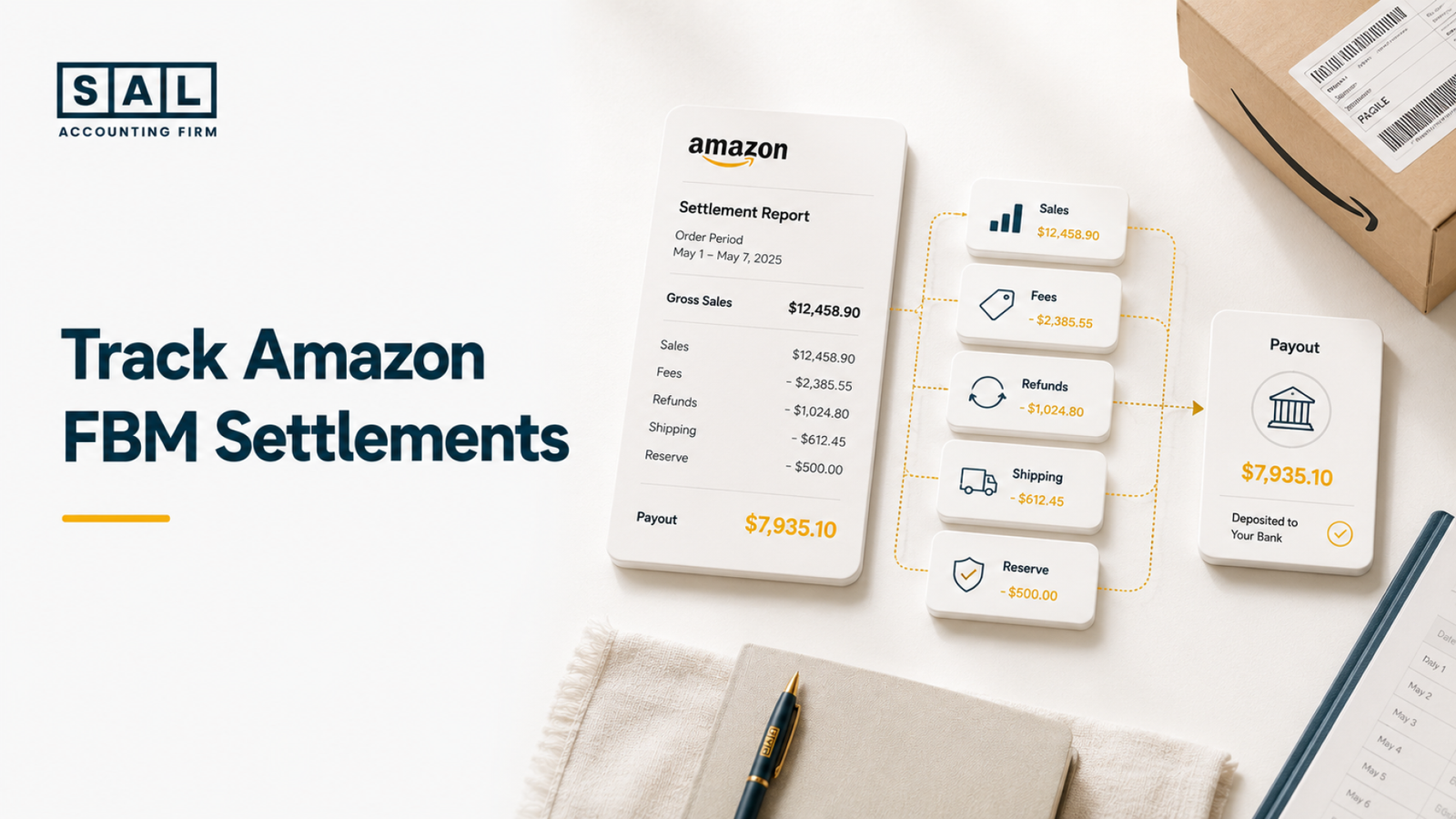
Amazon FBM settlements should be split into gross sales, shipping income, fees, refunds, claims, label costs, reserves, and adjustments before the payout is matched to your bank. The deposit alone is not revenue.
SAL Accounting works with ecommerce sellers whose Amazon payouts, bank deposits, and books don’t line up. Before your next month-end close, find the settlement entries that could be quietly distorting sales, shipping costs, and profit.
Start with the right files. SAL’s Tax Document Checklist for Ecommerce Stores lays out the Amazon reports, bank records, and account access to collect.
Quick Takeaways
- An Amazon payout is net cash, not gross sales.
- Each settlement may include sales, shipping income, refunds, fees, claims, label costs, adjustments, and reserves.
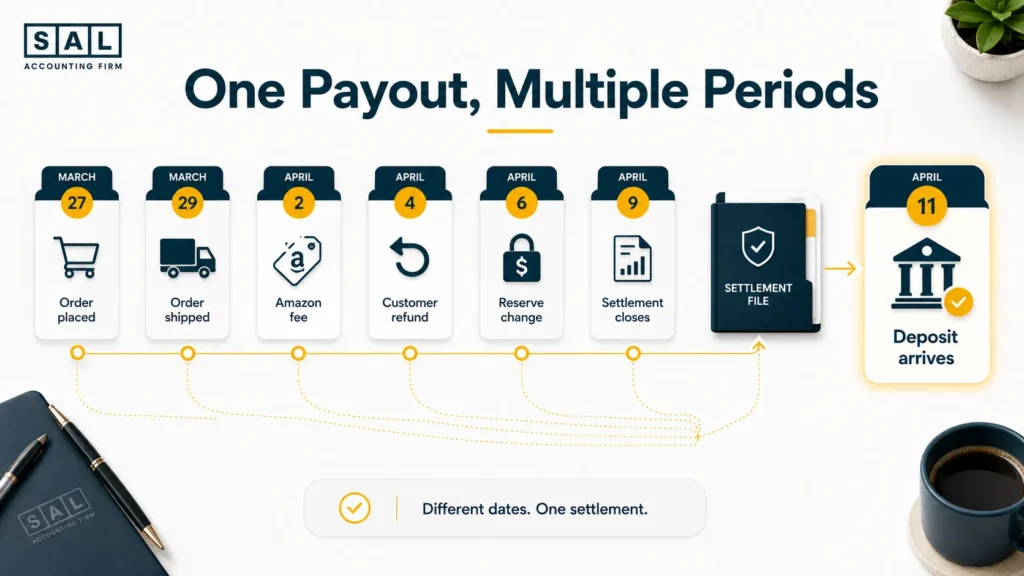
- The settlement date and bank deposit date may be different.
- FBM shipping costs can appear inside or outside Amazon.
- Every payout should pass through an Amazon clearing account before it reaches the bank.
- Anything left in the clearing account at month-end needs a clear explanation.
When Amazon, your bank, and your ledger keep showing different totals, SAL’s Amazon bookkeeping services for sellers rebuild the settlement trail before it reaches your financial reports.
Why Amazon FBM Settlements Are Easy to Misread
Amazon FBM settlements are easy to misread because one deposit can represent hundreds of separate transactions.
Customers may have paid for products and shipping. Amazon may then deduct referral fees, selling fees, label costs, refunds, A-to-z claims, chargebacks, and other adjustments before sending anything to your bank. The bank only shows the amount left over.
For example, imagine your settlement contains:
- $38,450 in product sales
- $1,340 in shipping income
- $2,760 in customer refunds
- $5,820 in Amazon fees
- $3,470 in shipping labels
- $440 in claims and adjustments
- $1,300 held or deferred by Amazon
Only $26,000 reaches the bank.
Recording that $26,000 deposit as sales would hide $13,790 of revenue, costs, refunds, and funds still held by Amazon. The cash entry may look tidy, but the reports would not reflect what happened.
Settlement timing adds another layer. A payout received in April may include March orders, April refunds, and fees posted on several different dates. The difference between cash and accrual accounting for ecommerce becomes important when a settlement crosses month-end.
The same gross-to-net problem appears across ecommerce payment reconciliation, but FBM sellers also need to track shipping expenses that Amazon never sees.
Pro tip: Never begin a settlement reconciliation from the bank deposit. Begin with Amazon’s gross activity, then work down to the amount deposited.
What an Amazon FBM Settlement Report Includes
An Amazon FBM settlement report explains how account activity turned into a payout. Amazon’s official Settlement Reports page describes payment reports as a detailed breakdown of transactions within a settlement period.
The Statement View summarizes balances, recent payments, sales, refunds, expenses, and reserves. The table below shows where the main settlement lines belong in your books.
| Settlement item | What it represents | Bookkeeping category | Main check |
| Product sales | Customer product charges | Sales revenue | Match order activity |
| Shipping income | Delivery charges paid by buyers | Shipping revenue | Do not offset shipping costs |
| Referral and selling fees | Amazon marketplace charges | Amazon fee expense | Keep separate from revenue |
| Refunds | Amounts returned to customers | Sales returns | Check product and shipping portions |
| A-to-z claims | Customer claim activity | Refund, claim, or receivable | Review the final decision |
| Chargebacks | Cardholder disputes | Chargeback or refund account | Keep separate from A-to-z claims |
| Buy Shipping labels | Shipping purchased through Amazon | FBM shipping expense | Check label refunds and adjustments |
| Other adjustments | Amazon credits or deductions | Account based on reason | Investigate unusual entries |
| Reserves or deferrals | Funds Amazon has not released | Amazon receivable or clearing | Do not treat as an expense |
| Final payout | Net cash sent to your bank | Clearing-to-bank transfer | Match the bank deposit |
A clear chart of accounts should categorize ecommerce transactions by what they represent, not by the amount that happened to reach the bank.
The settlement still will not include every cost of fulfilling an FBM order. Packaging, external postage, warehouse labour, shipping insurance, and third-party logistics charges may sit in separate systems.
- Also read: “Amazon FBA Bookkeeping: A Detailed Guide for Sellers”
How to Track Amazon FBM Settlements Step by Step
The process is easier when you follow the same order for every payout. Here is the process to follow:
1. Download the Settlement Report
Open the Payments section in Seller Central and find the relevant settlement under All Statements. Download the detailed report rather than relying only on the dashboard summary.
Amazon also provides date-range and transaction reporting options through its Payments Reports Repository. The right report depends on whether you are checking a single settlement, a full month, or individual transaction activity. Save each report with a consistent name, such as:
Amazon-CA-Settlement-2026-06-01-to-2026-06-14
Include:
- Marketplace
- Currency
- Settlement period
- Settlement ID
- Payout date
A repeatable ecommerce bookkeeping checklist reduces the chance that one report, marketplace, or bank account gets missed.
Pro tip: Create separate monthly folders for Amazon.ca, Amazon.com, and any other marketplace. Similar deposit descriptions make marketplace mix-ups surprisingly easy.
2. Match the Settlement Period to the Bank Deposit
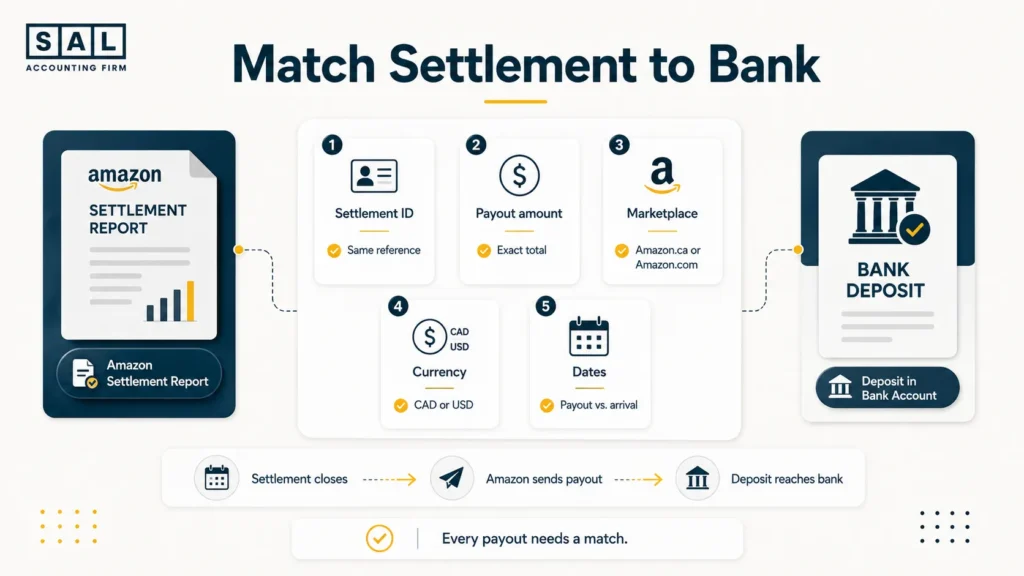
Find the final transfer amount and disbursement date in the settlement report. Then locate the matching deposit in your bank account.
Check:
- Final payout amount
- Settlement ID
- Marketplace
- Currency
- Amazon payout date
- Bank arrival date
The bank date may fall a few days after the settlement closes. That timing gap does not automatically mean the payment is missing.
A consistent set of ecommerce reconciliation best practices keeps the settlement, clearing account, and bank deposit tied together without forcing entries to match.
When the payout does not match, review:
- Deferred transactions
- Reserve movements
- Failed disbursements
- Currency conversion
- Bank charges
- Negative balances
- Payouts still in transit
Do not post the difference to “miscellaneous expense” just to finish the reconciliation. That only moves the problem somewhere less visible.
3. Separate Sales From Amazon Fees
Begin with gross product sales and shipping income. Then record each deduction in its own account.
The following example shows how a $34,870 Amazon deposit can come from much higher customer activity.
| Settlement activity | Amount | Payout effect | Bookkeeping account | Treatment |
| Product sales | $46,800 | +$46,800 | Amazon sales | Revenue |
| Shipping income | $1,620 | +$1,620 | Shipping income | Revenue |
| Customer refunds | $2,930 | -$2,930 | Sales returns | Contra-revenue |
| Referral and selling fees | $6,140 | -$6,140 | Amazon fees | Expense |
| Buy Shipping labels | $3,250 | -$3,250 | FBM shipping | Expense |
| Claims and adjustments | $380 | -$380 | Claims or adjustments | Review |
| Reserve increase | $850 | -$850 | Amazon receivable | Balance sheet |
| Final payout | $34,870 | $34,870 | Amazon clearing | Bank transfer |
The correct revenue figure is not $34,870.
Customers paid $48,420 for products and shipping. The remaining settlement lines explain how that activity became a $34,870 bank deposit.
The gross sales, refunds, fees, and shipping costs should appear separately in your ecommerce financial statements. Otherwise, revenue and operating costs become impossible to review properly.
4. Track Refunds, Claims, and Adjustments
Refunds should be recorded when the refund activity appears, even when the original order belongs to an earlier settlement.
A December order refunded in January should not disappear into January’s net deposit. The books should show the original sale and the later refund as separate events. Review these categories independently:
- Product refunds
- Shipping refunds
- Refunded Amazon fees
- A-to-z claims
- Chargebacks
- Reimbursements
- Carrier adjustments
- Amazon credits
- Other account adjustments
Amazon treats A-to-z Guarantee claims and chargebacks as distinct processes. One comes through Amazon’s customer-protection process, while the other begins with the cardholder’s financial institution.
Do not combine them automatically.
A claim may later be reversed or reimbursed. Posting it immediately as a permanent loss can create another correction later. Refund and claim timing is one of the common ecommerce profit calculation mistakes that makes monthly performance jump around.
Pro tip: Add a short note to unusual adjustments. A settlement line named “other” will not explain itself six months later.
5. Record FBM Shipping Costs Correctly
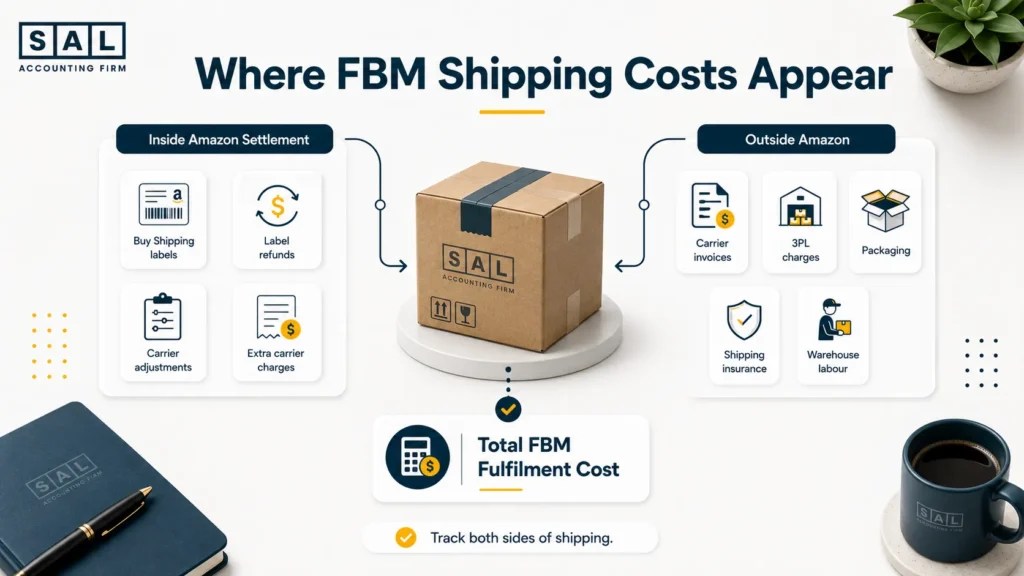
FBM shipping costs can come from two different places.
Shipping Purchased Through Amazon
Amazon Buy Shipping label charges may appear directly in the settlement. These charges reduce the payout and should be recorded as shipping expenses.
Transaction details may also include:
- Label refunds
- Carrier adjustments
- Additional carrier charges
- Corrections to an earlier label
Shipping Purchased Outside Amazon
Costs paid to Canada Post, UPS, FedEx, ShipStation, a 3PL, or another provider may never appear in the Amazon settlement.
Record them from:
- Carrier invoices
- Shipping software reports
- Credit card statements
- Bank transactions
- 3PL statements
The settlement should not be expected to contain every ecommerce business expense. Packaging, labour, insurance, oversized-item charges, address corrections, and residential surcharges can all sit outside Amazon.
Those hidden ecommerce expenses often explain why an FBM product looks profitable in Seller Central but leaves much less behind in the books.
Watch for duplicate shipping entries. A label deducted from the Amazon settlement should not also be recorded from the bank feed unless a separate provider charged the business.
6. Reconcile the Final Payout to the Bank Deposit
After every settlement component has been posted, the Amazon clearing account should explain the bank transfer.
The basic flow is:
**Opening Amazon balance
- Product sales
- Shipping income
- Other credits
− Refunds
− Amazon fees
− Shipping labels
− Claims and adjustments
− New reserves - Released reserves
= Payout or remaining Amazon balance**
The final payout should match the bank deposit exactly unless there is a documented currency or bank difference.
Anything left in the clearing account should connect to:
- Funds held or deferred by Amazon
- A payout still in transit
- An unresolved claim
- A negative account balance
- Activity posted after the settlement closed
- A marketplace currency balance
Amazon’s Deferred Transactions report identifies transactions that have not yet been released for payment and may show the reason and expected release timing.
Pro tip: A clearing account does not always need to finish at zero. It does need to finish with a balance you can explain.
7. Review What the Settlement Says About Profit
A reconciled settlement explains cash movement. It does not calculate complete profit by itself. Add costs that may sit outside Amazon:
- Product cost
- Import freight
- Customs and duties
- Packaging
- External postage
- Warehouse labour
- 3PL charges
- Advertising
- Software
- Returns processing
- Currency fees
Your real product margin also depends on accurate COGS calculations for ecommerce. A payout report cannot tell you what the inventory sold during that period originally cost.
For example, Amazon may release a $4,000 reserve in a quiet sales month. The payout rises, but sales did not suddenly improve by $4,000. Cash increased because Amazon released money earned earlier.
That distinction is often behind the question, “Why is my online store not making money?” Sales, payouts, cash, and profit are connected, but they are not interchangeable.
Case Study: How Aiden in The Beaches, Toronto Rebuilds a Missing $12,4401
The following case studies are illustrative composites based on common Amazon FBM bookkeeping problems.
Aiden runs an Amazon FBM home organization brand from The Beaches, Toronto. He buys most shipping labels through Amazon and records each bank deposit as sales. One month, Seller Central shows strong order activity, but only $31,560 reaches his bank.
The Problem
The books show $31,560 of revenue. Amazon fees, refunds, shipping labels, and funds held in reserve are missing. Aiden cannot explain why Seller Central reports $44,000 of product and shipping income.
What We Do
We rebuild the settlement using $42,750 in product sales, $1,250 in shipping income, $2,640 in refunds, $5,310 in Amazon fees, $3,420 in shipping labels, $470 in claims, and $600 in deferred funds.
Result
The $31,560 deposit matches exactly. Aiden’s books now show $44,000 of gross activity, the deductions that reduced cash, and the $600 Amazon still holds. His bank balance stays the same, but revenue, costs, and profit finally reflect the business.
Why Amazon Payouts Should Not Be Recorded as Sales
Amazon payouts should not be recorded as sales because they represent net cash after Amazon has already added and removed multiple transaction types.
Recording the deposit as revenue creates several problems.
Sales Look Lower Than They Really Were
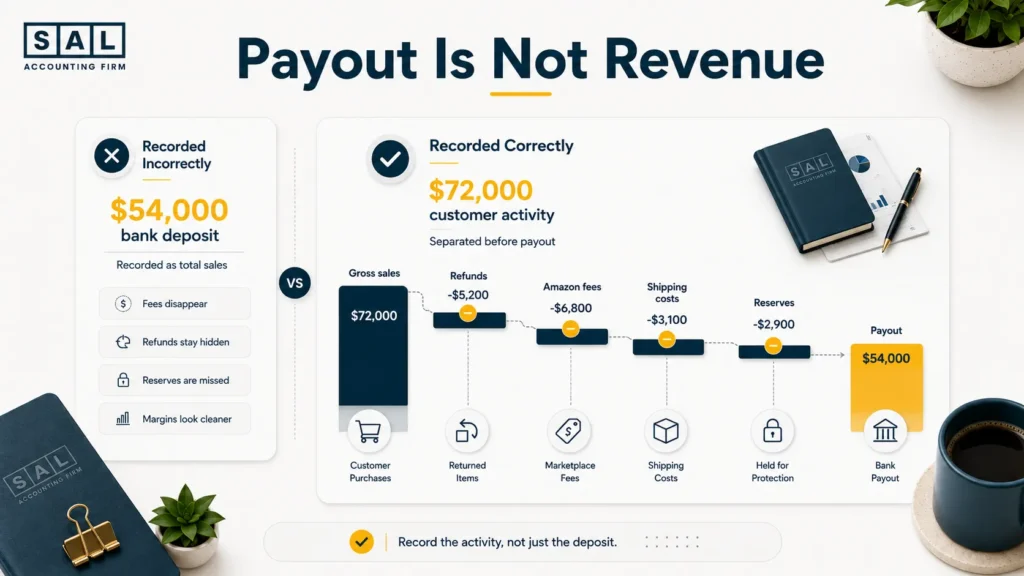
Suppose customers pay $72,000 for products and shipping, but Amazon deposits $54,000 after deductions.
Recording $54,000 as revenue understates sales by $18,000.
That can distort:
- Monthly growth
- Average order value
- Channel comparisons
- Revenue forecasts
- Tax reporting
- Product performance
Amazon Fees Disappear
Referral fees, selling fees, and other charges never appear as expenses because Amazon deducted them before paying you.
You lose the ability to measure:
- Amazon’s real cost
- Fee percentage by period
- Margin after marketplace fees
- Changes in platform expenses
- Amazon performance against other channels
Refunds and Claims Stay Hidden
A store with $70,000 of sales and $8,000 of refunds is not performing the same way as a store with $62,000 of sales and no refunds.
Both may produce the same net revenue, but only one has a return or customer-experience issue that needs attention.
Reserve Movements Distort the Month
Money held by Amazon has not necessarily been spent or lost. It may still belong to the business but remain unavailable for payout.
Treating a reserve as lower revenue or an expense mixes cash timing with business performance.
Financial Reports Become Hard to Trust
When the deposit replaces the settlement detail, your reports may show lower sales, missing expenses, cleaner-looking margins, and unexplained month-to-month changes.
These are common causes of ecommerce financial statements that do not match reality.
The problem is not limited to Amazon. Recording net deposits instead of the activity behind them is one of the most damaging ecommerce accounting mistakes because the bank can still reconcile while the income statement remains wrong.
Pro tip: A matching bank balance does not prove that revenue and expenses were recorded correctly.
Common Amazon FBM Settlement Tracking Mistakes
Most Amazon FBM settlement errors start with one simple assumption: that the bank deposit tells the full story. It doesn’t. These common mistakes can leave fees, refunds, shipping costs, and reserves buried inside the payout:
- Recording deposits as sales: The bank deposit is net cash, not total revenue. This hides fees, refunds, shipping costs, claims, and reserves.
- Missing Amazon fees: Referral fees and other deductions never appear as separate bank withdrawals, so they can disappear from the books.
- Ignoring refunds and claims: Refunds, A-to-z claims, and chargebacks stay buried in the payout, making returns and customer issues harder to track.
- Forcing differences to zero: Posting unexplained amounts to miscellaneous income or expense may balance the account, but it does not solve the problem.
- Tracking shipping incorrectly: External carrier costs may be missed, while Amazon label charges may be recorded twice.
- Mixing channels or leaving balances unexplained: Amazon, Shopify, Stripe, and other deposits should use separate clearing accounts, and every remaining Amazon balance should have a clear reason.
Also read: “Why Most Amazon Sellers Fail and How to Avoid It”
Case Study: How Daniel in Port Credit, Mississauga Separates Amazon From Shopify2
Daniel operates a kitchen accessories business from Port Credit, Mississauga. He sells through Amazon FBM and Shopify, purchases some labels through Amazon, and uses a separate UPS account for oversized packages. Every deposit currently goes into one ecommerce sales account.
The Problem
Amazon and Shopify revenue cannot be reconciled independently. Amazon label charges are hidden inside payouts, while external UPS invoices sit in a general postage account. Daniel cannot tell which channel produces the stronger fulfilment margin.
What We Do
We create separate Amazon and Shopify clearing accounts. Amazon sales, shipping income, refunds, fees, label costs, reserves, and payouts are posted from each settlement. UPS invoices are matched only to orders shipped through the external carrier account.
Result
Amazon settlements now match Amazon deposits, Shopify payouts remain separate, and shipping is no longer counted twice. Daniel can compare channel revenue, fees, fulfilment costs, and profit before deciding where to increase advertising.
Monthly Amazon FBM Settlement Tracking Checklist
Complete these checks before closing each month.
| ✓ | Monthly Task | Report or Source | What to Confirm | Warning Sign | Complete When |
| ☐ | Download settlements | Amazon All Statements | Every settlement period is included | Missing settlement | All files saved |
| ☐ | Match payouts | Bank statement | Amount, currency, and date match | Unmatched deposit | Transfer cleared |
| ☐ | Record gross activity | Settlement report | Sales and shipping income are separated | Deposit recorded as sales | Revenue posted correctly |
| ☐ | Post Amazon deductions | Transaction details | Fees, refunds, and labels are recorded | Empty expense accounts | Costs categorized |
| ☐ | Review claims | Transaction View | Claim and chargeback status is confirmed | Unexplained adjustment | Outcome documented |
| ☐ | Add outside shipping | Carrier and 3PL reports | Costs paid outside Amazon are included | Shipping expense looks too low | All invoices posted |
| ☐ | Confirm held funds | Reserve and deferred reports | Remaining Amazon balance is supported | Unexplained clearing balance | Held funds explained |
| ☐ | Save month-end records | Accounting folder | Reports and reconciliation are complete | Missing support | Month documented |
Canadian businesses are responsible for maintaining reliable records that support income, expenses, and tax filings. The CRA’s record-keeping rules also apply when records are held by a third-party platform or bookkeeper.
A complete month-end file should contain:
- Settlement reports
- Transaction details
- Deferred or reserve reports
- Bank statements
- External carrier invoices
- Shipping software reports
- Reconciliation workpapers
- Notes for unusual claims or adjustments
These records also make ecommerce tax-season preparation much less stressful. Amazon sales, fees, refunds, shipping, and tax reports should already agree before the year-end file reaches your accountant.
Canadian sellers should also keep settlement activity aligned with the records used for Amazon seller tax reporting. A year-end sales total built from deposits alone may not match the marketplace’s gross transaction history.
Pro tip: Review unmatched items before closing the month. A five-minute question today can become a five-hour cleanup after twelve more settlements are added.
When Amazon FBM Settlement Tracking Needs a Bookkeeper
A bookkeeper becomes useful when Amazon settlement work starts taking time away from decisions you should be making about inventory, pricing, and growth.
Common signs include:
- You record Amazon deposits as sales because the reports feel too detailed.
- Seller Central revenue does not match your accounting software.
- Fees, refunds, claims, and label charges are difficult to separate.
- Amazon.ca and Amazon.com activity sits in the same account.
- External FBM shipping costs are incomplete.
- The Amazon clearing balance is never fully explained.
- One settlement takes hours to rebuild.
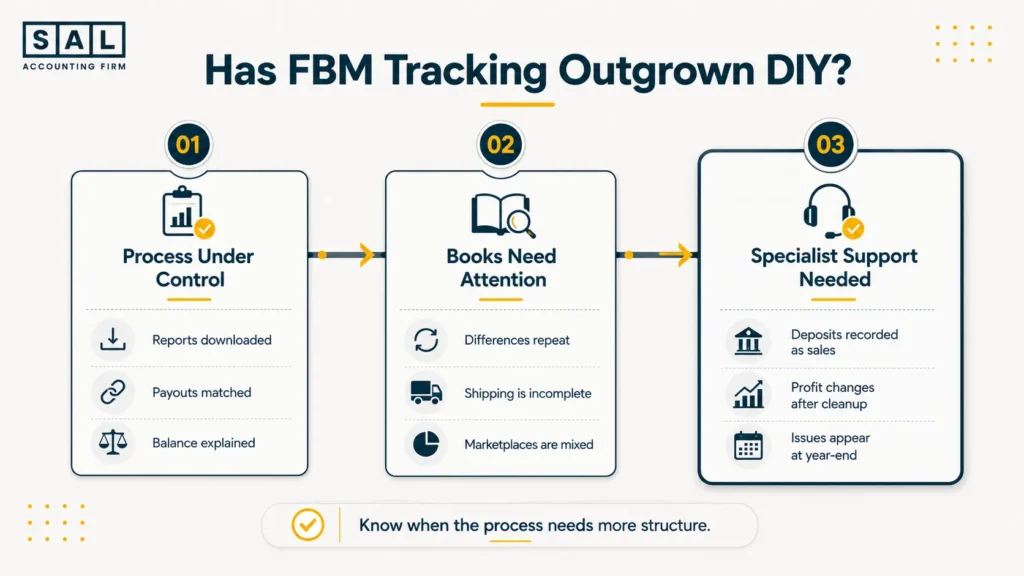
- Profit changes significantly after year-end cleanup.
- Problems are only found during tax season.
- You cannot compare Amazon with your other sales channels.
These issues often appear among the wider signs that an ecommerce brand needs a better bookkeeper. A bookkeeper handling Amazon settlements should be able to explain:
- What customers paid.
- What Amazon deducted.
- What Amazon still holds.
- What reached the bank.
- What remained after product and fulfilment costs.
The questions to ask an ecommerce accountant should include how they reconcile marketplace payouts, track clearing accounts, separate sales from fees, and deal with reserves.
Late books, unexplained balances, and repeated year-end corrections may also signal that it is time to switch ecommerce accountants, rather than continuing the same cleanup cycle each year.