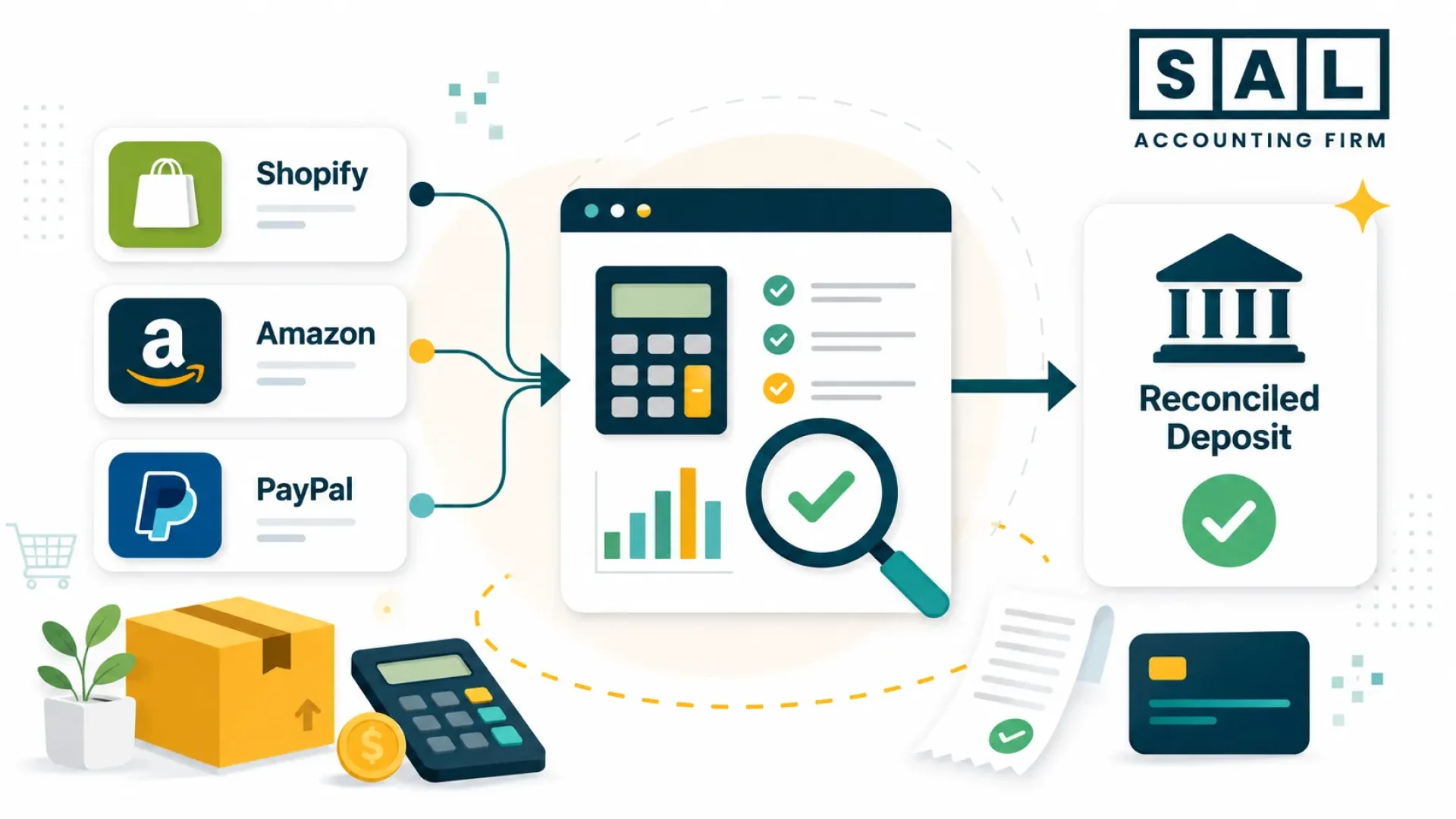
Wondering why your Shopify dashboard, Amazon settlements, and bank account all tell a slightly different story? You’re not alone.
For many multi-channel sellers, sales, payouts, refunds, and bank deposits don’t line up neatly. Left unchecked, those gaps can lead to misstated revenue, missed tax issues, and messy year-end numbers.
In simple terms, ecommerce reconciliation best practices give you a clear way to review each channel, catch payout gaps, and fix small issues before they turn into messy month-end numbers.
This guide builds on our e-commerce payment reconciliation fundamentals post and goes deeper. At SAL Accounting, these are the ecommerce reconciliation best practices we use with Canadian sellers on Shopify, Amazon, Etsy, and WooCommerce who also sell into the US.
Quick Takeaways
- E-commerce reconciliation checks if your sales, payouts, fees, taxes, and bank deposits all line up.
- Your bank deposit is not your revenue. Skip this step and your top line is wrong every month.
- Use clearing accounts for each payment processor. They make payouts easier to track.
- Reconcile weekly, close monthly, and true up sales tax and FX quarterly.
- Tools like A2X and Synder make sense once volume passes about 200 orders a month.
- For Canadian sellers, the GST/HST refund calculator and the US economic nexus threshold checker are good starting points before you tackle the tax side.
What Is E-commerce Reconciliation, and Why Is It Different?
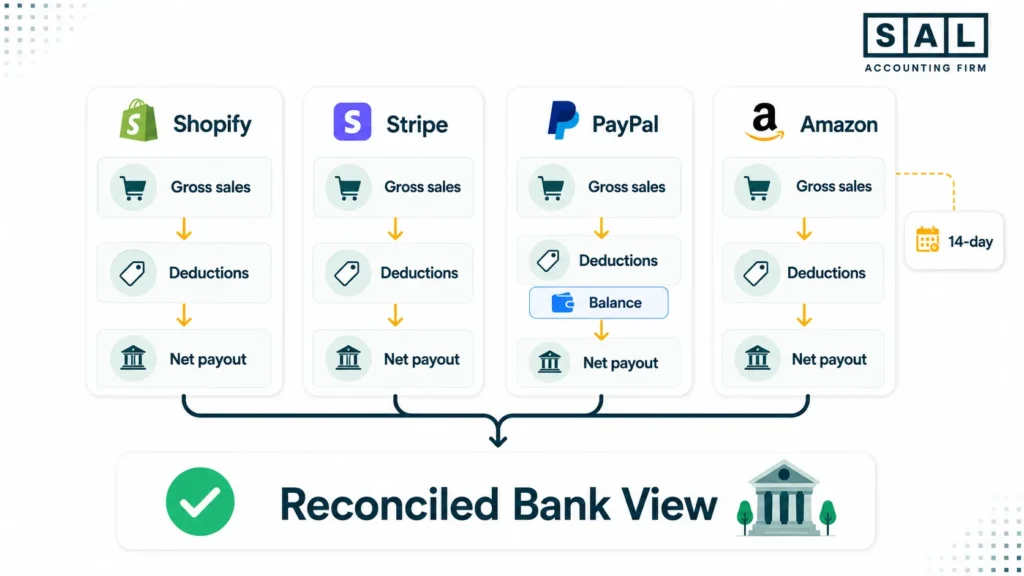
Ecommerce accounting reconciliation means matching your store’s gross sales to the net payouts your payment processors send to your bank, after fees, refunds, chargebacks, taxes, and timing differences. The goal is to make sure revenue, fees, tax liability, and cash all line up by channel and period.
In traditional retail, one sale often equals one deposit. In e-commerce, it is not that simple.
- Gross to net. A $100 Shopify sale arrives as roughly $97 after card fees, and less after platform fees, FX, and chargebacks.
- Timing. Shopify deposits on a rolling schedule. Amazon settles every 14 days. Stripe lets you choose. PayPal is on demand. None match the day of the sale.
- Multi-channel reality. One brand sells through Shopify, Amazon, Etsy, and wholesale, each with its own fees and reports.
- Tax complexity. GST/HST, US state-level tax, and marketplace facilitator rules create separate liability buckets.
- Cross-border friction. Selling Canada-to-US adds FX differences and nexus thresholds domestic sellers never see.
That gap is what the ecommerce reconciliation process closes, every period.
What Does a Clean Online Stores Reconciliation Process Look Like?
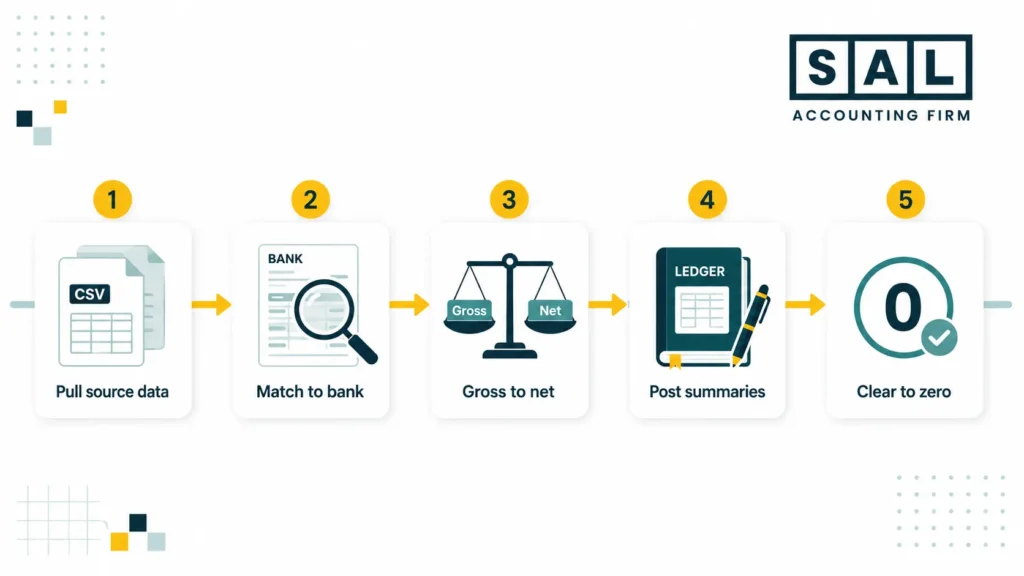
Here is the workflow we use with our e-commerce bookkeeping clients. It scales from one channel up to a dozen.
Step 1: Pull the Source Data
For each channel, export three reports for the period:
- Gross sales report
- Payout or settlement report
- Fees report
On Shopify, that usually means Finances Summary, Payouts, and Transactions. On Amazon, use the Settlement Report. On Stripe and PayPal, use Balance and Payout reports.
Step 2: Match Payouts to Bank Deposits
Pull your bank feed. Each processor payout should match a deposit by date and amount.
When they don’t, the cause is usually one of these:
- A split deposit
- A bank FX fee on a USD payout
- A held reserve
- A timing difference
- A refund or chargeback processed after the original sale
This is where a lot of sellers stop. But matching the bank is only the first layer.
Step 3: Reconcile Gross Sales to Processor Payouts
This is where most online stores’ reconciliation best practices break down. The deposit is net. Your books need to show gross, then deductions, then cash.
Gross sales − refunds − chargebacks − processing fees − platform fees − sales tax payable + shipping income + adjustments = net payout
If those don’t agree to the cent, you have a leak. Find it before you close.
Step 4: Post Summary Entries to the GL
Use a daily summary journal entry per channel for most sellers. Summary posting keeps the GL readable and easier to review.
Step 5: Reconcile Clearing Accounts to Zero
The bank should tie out against statements. Clearing accounts (Shopify Clearing, Stripe Clearing, Amazon Clearing) should hit zero by the end of each settlement cycle. Sales tax liability should match what you owe. Anything non-zero that should be zero is a timing item, an error, or both. Document each one.
Pro Tip: If you process more than 200 orders a month, reconcile weekly instead of monthly. Small problems stay small.
How Often Should You Reconcile Your E-commerce Store?
You don’t need to reconcile everything every day. You do need a rhythm.
| Schedule | What to Do | Why it Matters |
|---|---|---|
| Daily (5 min) | Glance at processor dashboards and the bank feed. Confirm yesterday’s payout. | Catches frozen funds, failed deposits, and fraud within 24 hours. |
| Weekly (30 min) | Match the week’s payouts to bank deposits. Flag unmatched items. | Stops timing differences from compounding. |
| Monthly (2–4 hrs) | Full gross-to-net by channel. Post summary entries. Clear clearing accounts. Reconcile sales tax. | The monthly close ecommerce process that gives you reliable financials. |
| Quarterly | True up sales tax filings to the GL. Review FX gains and losses. | Catches errors before they reach the tax return. |
How Do You Map a Chart of Accounts for Easier Reconciliation?
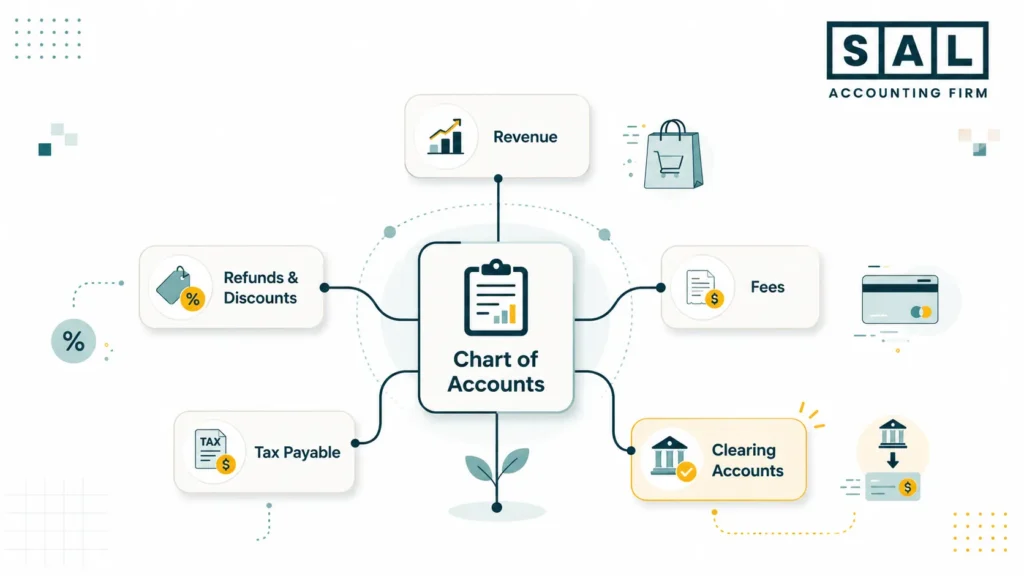
A chart of accounts built for a generic small business will be a headache every time you try to reconcile a Shopify payout. The fix is one-time and pays off forever.
Here is a baseline COA for a Shopify-plus-Amazon seller. Adjust account names to match your software.
| Source Field | COA Account | Account Type |
|---|---|---|
| Shopify gross sales | Sales — Shopify | Revenue |
| Amazon gross sales | Sales — Amazon | Revenue |
| Shipping charged to customer | Shipping Income | Revenue |
| Discounts applied | Sales Discounts | Contra-revenue |
| Refunds issued | Sales Returns | Contra-revenue |
| Chargebacks | Chargebacks | Contra-revenue or expense |
| Shopify Payments / Stripe fees | Merchant Processing Fees | Expense |
| Amazon referral and FBA fees | Amazon Fees | Expense |
| Shipping labels paid to carriers | Shipping Expense | Expense |
| GST/HST collected | GST/HST Payable | Liability |
| US state sales tax collected | US Sales Tax Payable | Liability |
| Pending payouts | Shopify Clearing / Amazon Clearing | Asset |
| FX on USD payouts | Realized/Unrealized FX Gain or Loss | Other income/expense |
Clearing accounts is one of the best changes you can make. They hold the money between the sale and the bank deposit, so payment processor reconciliation becomes much easier to track.
The COGS guide for e-commerce stores walks through inventory accounts in detail, and the e-commerce financial statements guide shows how these accounts roll up to your P&L.
How Do You Handle Payment Processor Reconciliation by Channel?
Payment processor reconciliation works a little differently for each channel, because each platform handles payouts, fees, and refunds in its own way.
Shopify Payments
Shopify groups orders into payouts on a rolling schedule, so reconcile by payout, not by order. Match each Shopify payout to the bank deposit, then check that the orders inside line up with gross sales minus refunds and fees.
Our Shopify accounting services cover the full setup, and the Shopify fee calculator can help you check whether a payout looks right before you reconcile.
Stripe and PayPal
Stripe works a lot like Shopify Payments, but you can usually choose a more predictable payout schedule. Reconcile it from the Balance report and match payouts to the bank.
PayPal needs extra care because money can move in and out of the balance outside normal sales activity. Treat PayPal like its own bank account, reconcile it monthly, and record fees as they happen.
Amazon Seller Central
Amazon settlements can span two calendar months, which makes month-end harder. This is where A2X reconciliation can help. A2X can split settlements by month and post cleaner summaries into QuickBooks or Xero.
At higher Amazon volume, this saves time and reduces errors. We cover this more in Shopify vs Amazon FBA. If your Amazon books feel like guesswork right now, our Amazon accounting team can take the reconciliation work off your plate.
How Do You Reconcile Refunds, Chargebacks, Taxes, and FX?
Some payout gaps are normal, but they still need to be explained clearly in your books.
Refunds and Chargebacks
Refunds reduce revenue and lower the payout you receive. Chargebacks do the same, usually with an extra fee. For refunds chargebacks reconciliation, record both when they happen, not when the original sale happened. Otherwise, your deposit drops and your books do not explain why.
This is one of the mistakes we cover in our e-commerce accounting mistakes guide.
Sales Tax
For sales tax reconciliation ecommerce, remember that sales tax is not revenue. It is money you collect, hold, and later remit, so it should sit in a liability account.
For Canadian sellers, GST/HST may apply once you pass CAD $30,000 under the CRA small supplier rules. For US sales, marketplaces may collect and remit sales tax in many states, but you still need to record it correctly.
Check our guide about sales tax nexus for e-commerce sellers for more information. Also If you’re unsure about state thresholds, run the US economic nexus threshold checker.
Shipping Income vs. Shipping Expense
Shipping has two sides: what the customer paid you and what you paid the carrier. Do not net them together. Tracking them separately helps you see whether shipping is cutting into your margins.
For cross-border sellers, the cross-border e-commerce shipping breakdown explains customs and duty costs in simpler terms.
Multi-Currency FX
If you sell in USD and bank in CAD, each payout has two numbers: the USD payout and the CAD amount that lands in your bank.
For multi-currency FX reconciliation, record the sale using a consistent exchange rate, record the deposit at the actual bank amount, and book the difference as FX gain or loss. We use the Bank of Canada daily exchange rates as a consistent source for Canadian clients.
Pro Tip: Review open USD balances at period end too. Otherwise, your CAD financial statements may not match what the account is really worth.
Which Tools Work Best for E-commerce Reconciliation?
Manual reconciliation works at low volume. It stops working around 200 orders a month and fails badly at multi-channel scale.
A simple stack often looks like this:
| What You Need | Tool |
|---|---|
| Accounting platform | QuickBooks Online or Xero |
| Settlement mapping (Shopify + Amazon) | A2X |
| Multi-processor sync (Stripe, PayPal, Shopify, Amazon) | Synder |
| Inventory + multi-channel sync | Webgility |
| Sales tax filing (US) | TaxJar or Avalara |
For a deeper comparison of the accounting platforms themselves, see our review of the best e-commerce accounting software.
Pro Tip: Pick one summary tool and stick with it. The biggest reconciliation messes we clarify come from clients who installed three different connectors over two years and now have orders posted three different ways.
What Are the Most Common Reconciliation Mistakes for Online Stores?
We see the same five mistakes again and again:
- Posting deposits as revenue. Deposits are net of fees, refunds, and taxes. Revenue is the full sale amount. If you book deposits as revenue, sales look too low.
- Skipping clearing accounts. Clearing accounts show what is pending, processed, or deposited. Without them, payouts are harder to track.
- Treating sales tax as income. Sales tax is not yours to keep. It belongs in a liability account, not revenue.
- Only doing bank reconciliation ecommerce checks. Matching the bank is not enough. You still need to check sales, fees, refunds, taxes, and clearing accounts.
- Letting timing issues pile up. One unmatched payout is easy to fix. A month of them becomes a cleanup project.
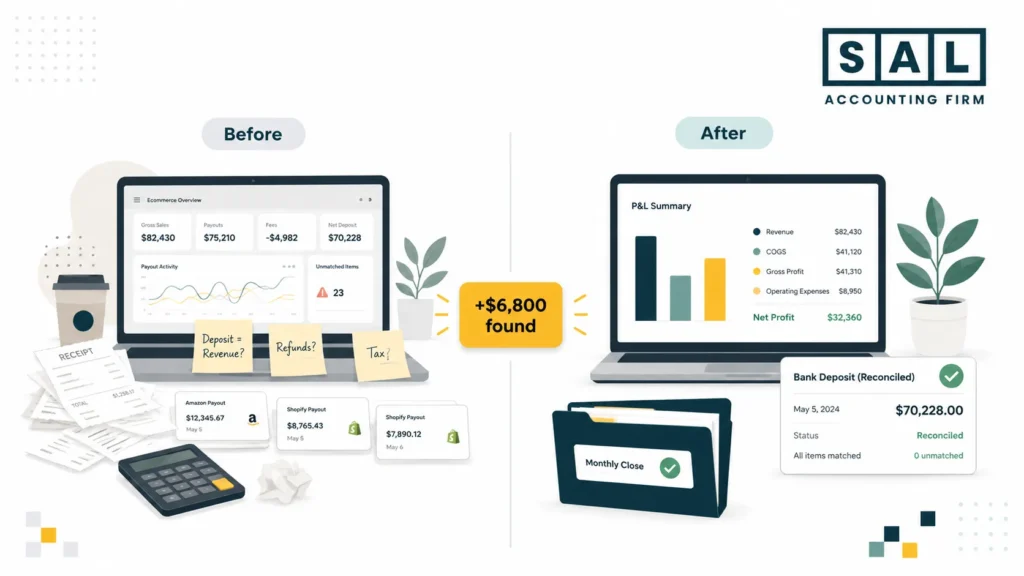
Case Study: Toronto Shopify Seller Finds $6,800 in Hidden Fees1
Priya runs a beauty brand from Toronto, selling on Shopify and Amazon with about 900 orders a month. Around 60% of her revenue comes from US customers.
Problem
Her general bookkeeper kept things organized, but they didn’t specialize in ecommerce. So the books didn’t clearly show what was happening with Shopify payouts, Amazon fees, refunds, and margins. Sales looked fine on paper, but cash still felt tight.
What Changed
Priya came to SAL Accounting because she needed someone who understood ecommerce numbers, not just basic bookkeeping. We helped her get a clearer view of what each channel was costing her and where her money was actually going.
Result
Within two months, she found $6,800 in fees that had been hard to see before. Her real gross margin was 4.5 points lower than the old reports showed, so she adjusted pricing on two SKUs and finally had numbers she could trust.
The Month-End E-commerce Reconciliation Checklist
Use this for every channel, every month:
- Match payouts to bank deposits
- Check gross sales against processor reports
- Record refunds, chargebacks, and processor fees
- Keep sales tax separate from revenue
- Clear payment processor clearing accounts, or note what is still in transit
- Record FX differences on cross-border payouts
- Track shipping income and shipping costs separately
- Check gross margin by channel
When these items are done, your monthly close ecommerce process becomes much easier. You can see what each channel earned, what got deducted, and whether the numbers actually make sense.
- Also Read: “How to Prepare Your E-commerce Business for Tax Season: Checklist, Deadlines, Deductions, and Tools”
How SAL Accounting Can Help
When your reconciliation is set up right, you’re not guessing anymore. You can see what each channel paid you, what got taken in fees, what products really cost, and whether margins are as strong as the dashboard suggests.
If your numbers feel hard to trust right now (too many channels, too many fees, too much cross-border complexity) that’s the gap we close. We specialize in Canadian e-commerce sellers running Shopify, Amazon, and multi-channel stores into the US.
Book a free tax strategy call with SAL Accounting and we’ll tell you where the leaks are and what to fix first.
- Hypothetical Scenario. Numbers are illustrative. ↩︎