
We help eCommerce founders like you master your financial statements every day. In this guide, we will walk you through your income statement, balance sheet, and cash flow statement in plain, easy-to-understand language. The shocking truth online store owners discover too late is that 82% of businesses fail because of cash flow problems, even when their profit and loss statement shows they are profitable.
This dangerous gap between reported profit and real cash sitting in your bank quietly destroys growing online stores. In this SAL Accounting guide, we will show you exactly how to spot it, fix it, and take full control of your numbers.
Quick Takeaways
- Every ecommerce business needs three main financial statements: Income Statement, Balance Sheet, and Cash Flow Statement.
- Your Income Statement shows profit or loss, but it doesn’t show your real cash position.
- The Balance Sheet gives a snapshot of what you own and owe on a specific date.
- The Cash Flow Statement reveals the actual money moving in and out of your business.
- Most ecommerce stores fail because of cash flow problems, even when they show a profit.
- Review all three statements together every month and ask: Am I profitable? Do I have enough cash? Is my inventory healthy?
- Clean, accurate financial statements give you the clarity and confidence to make better pricing, inventory, and growth decisions.
What Are the Three Main Financial Statements for an eCommerce Business?
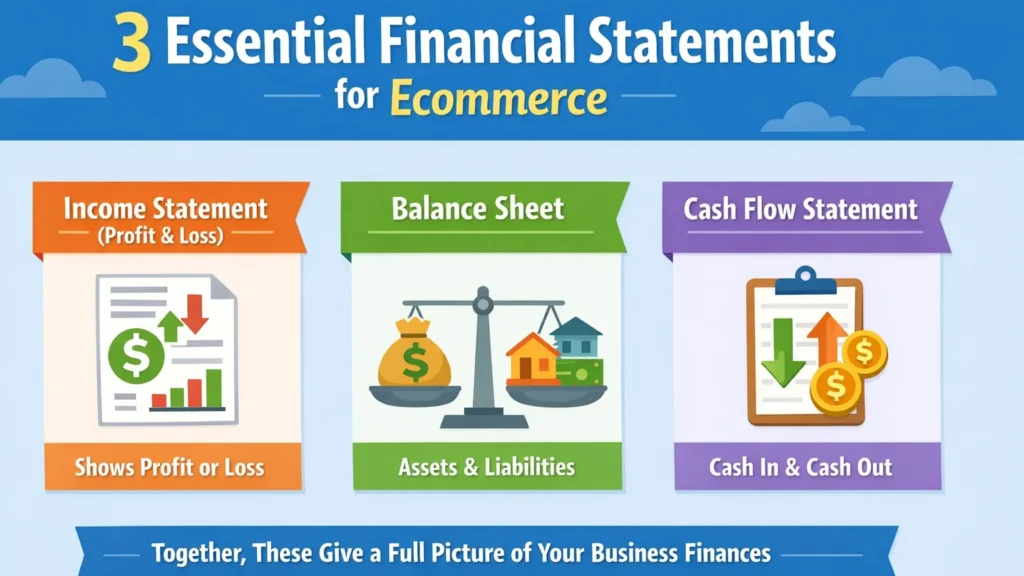
Every e-commerce business needs three core financial statements (CRA guide). Here’s what each one does:
- Income Statement (Profit & Loss): Shows if your store made a profit or loss during a period.
- Balance Sheet: Gives a snapshot of what your business owns and owes at a specific date.
- Cash Flow Statement: Tracks the actual cash coming in and going out of your business.
Together, these three reports give you the full picture of your store’s financial health. Many store owners use professional e-commerce bookkeeping services to stay accurate. We will explain each of these statements in simple detail in the following sections.
What Is an E-commerce Income Statement (P&L) and How to Read It?
We start with the income statement (proof of income statement) because most store owners check this one first. It shows you whether your online store made money or lost money in a certain period, usually one month or one year. Think of it as your business scorecard. It begins with all the money that came in from sales. Then it subtracts the costs. At the end, you see your clear net profit or loss. Here is how it works in simple steps:
- Revenue: This is the total money from all customer orders before any deductions. It includes sales from your Shopify store, Amazon, WooCommerce, or Etsy.
- Cost of Goods Sold (COGS): These are the direct costs of the products you actually sold. It covers what you paid your supplier plus shipping to bring the items into your warehouse or fulfillment center. See how to track and calculate COGS for e-commerce stores.
- Gross Profit: You get this by subtracting COGS from revenue. It tells you how much money remains after paying for the products themselves.
- Operating Expenses: These include everything else you spend to run the store: advertising, platform fees from Shopify or Stripe, payment processing fees, shipping to customers, refunds, marketing, salaries, and warehouse rent.
- Net Profit: This is the final number, gross profit minus all operating expenses. It shows the actual profit (or loss) for the period.
Quick Example: Last month, your store had $50,000 in total sales. Your COGS was $20,000. That gives you $30,000 in gross profit. Then you spent $18,000 on ads, fees, refunds, and shipping to customers. Your net profit for the month comes to $12,000. Have a look at the table below:
| Category | Amount ($) | % of Revenue | Notes | Action Tip |
| Revenue | 50,000 | 100% | Total sales from all channels | Track by product & channel |
| Cost of Goods Sold (COGS) | 20,000 | 40% | Product cost + inbound shipping | Review supplier costs monthly |
| Gross Profit | 30,000 | 60% | Revenue – COGS | Aim for 45%+ |
| Operating Expenses | 18,000 | 36% | Ads, fees, shipping, refunds | Cut low-ROI ad spend |
| Net Profit | 12,000 | 24% | Bottom line | Compare month-over-month |
Many founders see a nice profit number like this and feel good. But later they struggle to pay bills. That is exactly why we also need the balance sheet and cash flow statement.
Pro Tip: Look at your gross profit percentage every single month. Most healthy eCommerce stores aim for 40% or higher. If it starts dropping, you can raise prices, find cheaper suppliers, or cut some advertising spend.
- Read More: “E-commerce Accounting Guide for Small Businesses”
What Is an E-commerce Balance Sheet?
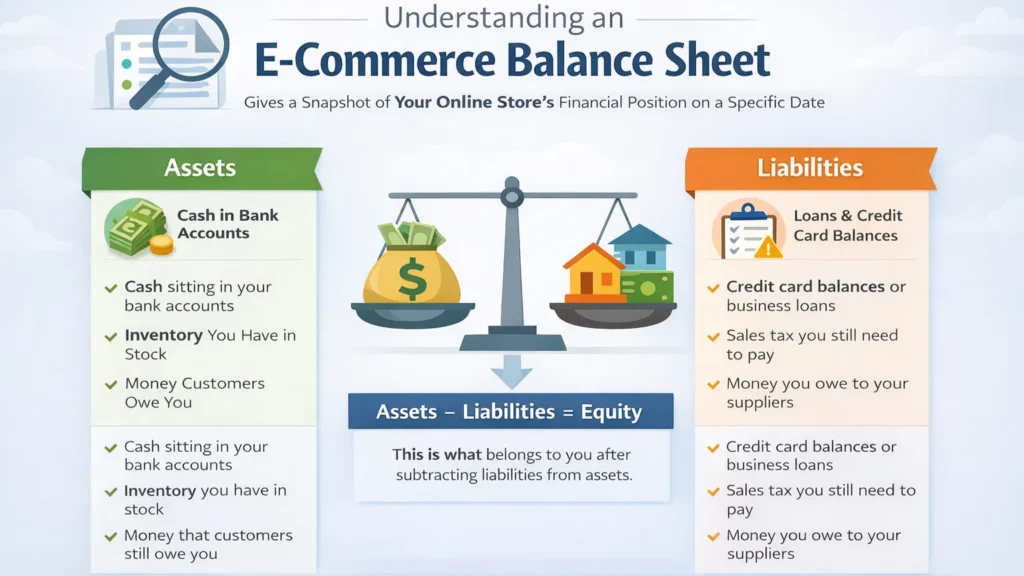
The e-commerce balance sheet report gives you a clear snapshot of your online store on one specific day, usually the last day of the month or year. It answers three simple questions:
- What does your business own right now?
- What does your business owe right now?
- How much is left for you (or your investors)?
Unlike the income statement, which covers a period of time, the balance sheet is like a quick photo of your financial position at that exact moment. Here’s how it breaks down in easy steps:
Assets
These are everything your business owns that has value.
- Cash sitting in your bank accounts
- Inventory you have in stock (in your warehouse or at Amazon FBA)
- Money that customers still owe you
For most eCommerce stores, inventory is the biggest asset. But remember, if that inventory doesn’t sell, it can tie up your money and create problems. Check out the Shopify inventory accounting guide; it may help you.
Liabilities
These are the things you owe to other people or companies.
- Credit card balances or business loans
- Sales tax you collected from customers but haven’t paid to the government yet
- Refunds or chargebacks that might still come in
- Money you owe to your suppliers
You should also know how to minimize tax liabilities for your small business.
Equity
This is what belongs to you after you subtract liabilities from assets. It grows when your business makes a profit and shrinks when you take losses.
Example: On the last day of December, your balance sheet shows:
- $45,000 in cash
- $80,000 worth of inventory
- $15,000 in sales tax, you still need to pay the government
Your total assets equal $125,000. Your total liabilities equal $35,000. So your equity comes to $90,000. This snapshot tells you your store looks solid right now. But if a big chunk of that inventory is old and not selling, that $80,000 number can be misleading. It might look good on paper, but hurt your cash later.
Pro Tip: Check your balance sheet every month and focus on two important things:
- Is your cash balance growing or shrinking?
- Is your inventory level healthy, or are you tying up too much money in products that aren’t moving?
Your balance sheet works hand-in-hand with the income statement. One shows if you made a profit. The other shows what you actually own and owe at that moment.
- Read More: “Best Business Bank Accounts for E-commerce Stores”
What Is an E-commerce Cash Flow Statement?
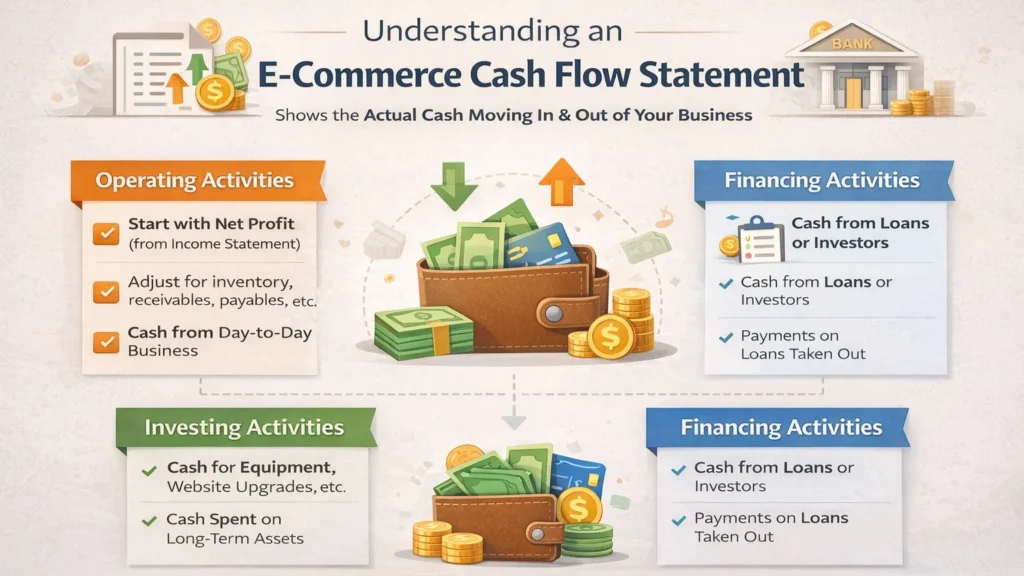
A cash flow statement shows you exactly how cash actually moved in and out of your business during a period. It tells the real story behind your bank balance.
Many store owners get surprised here. They see a nice profit on the income statement, but their bank account looks empty. The cash flow statement explains why. You can forecast the cash flow for your business. It breaks down into three main parts:
1. Operating Activities
This section shows the cash coming from your day-to-day business operations. It starts with your net profit from the income statement and then makes several adjustments. Here’s what it typically adjusts for:
- Adding back non-cash expenses (like depreciation)
- Changes in inventory levels
- Changes in accounts receivable (money customers owe you)
- Changes in accounts payable (money you owe suppliers)
This is the most important part for eCommerce stores because it shows the real cash your business generated from selling products.
2. Investing Activities
This part covers cash used for bigger, long-term purchases. It includes buying new equipment, upgrading your website, or making other investments in assets. Most small eCommerce stores don’t have much activity here.
3. Financing Activities
This shows cash from loans, investor money, or owner withdrawals. It includes new loans you took, repayments, or money you pulled out for yourself. Check the cash flow statement guide for Shopify stores to learn more.
Quick Example: You made $12,000 net profit last month (from your income statement). But during the same month, you spent $35,000 buying new inventory for the holiday season. Even though you were profitable on paper, your cash decreased by $18,000 because of that big inventory purchase.
Your cash flow statement clearly shows this gap. It explains why you feel “profitable but broke.”
Pro Tip: Watch your operating cash flow closely. Positive operating cash flow means your core business is generating real cash. If it stays negative for several months, you may need to slow down inventory purchases or improve collections.
How to Prepare E-commerce Financial Statements? (Monthly & Year-End)
We will walk you through a simple process that many successful ecommerce store owners use every month. Follow this routine and your numbers will become clear and trustworthy.
Your Monthly Close Routine
Do these steps every month. Try to finish everything by the 10th of next month:
- Reconcile your bank accounts and all payment processor payouts from Shopify, Stripe, PayPal, and Amazon. E-commerce payment reconciliation aligns your transactions.
- Match every sale, refund, fee, and chargeback from your platforms to your accounting system
- Update your inventory records and calculate the correct COGS for the month
- Record payment processor fees, advertising spend, and shipping costs properly
- Handle your sales tax liability and check any gift cards or deferred revenue
- Review your profit and loss statement for any strange numbers and fix them
- Close the month in QuickBooks or Xero
Your Year-End Close – Extra Steps
At the end of the year, you follow the same monthly process and then add these important tasks:
- Do a full physical inventory count or verify your final report from your warehouse or Amazon FBA
- Make sure your inventory valuation (FIFO or weighted average) is correct
- Record depreciation on any equipment or assets you own
- Review and document all owner withdrawals or contributions
- Gather all documents your accountant needs for tax filing
- Compare this year’s numbers with last year’s and note the big changes
- Finalize clean versions of your income statement, balance sheet, and cash flow statement
Pro Tip: Treat your monthly close like a fixed appointment with your business. When you stay consistent, your financial statements stop feeling like a chore and start helping you make smarter decisions every month. Shopify owners can now have their Shopify month-end close checklist.
Use this simple monthly close checklist to stay organized and keep your books accurate:
| Step | Task | Why It Matters | Time Required |
| 1 | Reconcile bank & payment processor payouts | Prevents missing transactions | 30–45 mins |
| 2 | Update inventory and calculate COGS | Ensures accurate profit | 20–30 mins |
| 3 | Record all fees, refunds & chargebacks | Keeps expenses correct | 15 mins |
| 4 | Handle sales tax liability | Avoids penalties | 10 mins |
| 5 | Review & categorize ad spend | Helps control marketing costs | 15 mins |
| 6 | Close the month in accounting software | Gives you clean reports | 10 mins |
Case Study: How Sarah in Liberty Village, Toronto, Fixed Her Cash Flow Problem1
Sarah runs a fashion accessories store on Shopify from her studio in Liberty Village, Toronto.
Problem:
Sarah’s income statement shows a healthy $18,000 profit in October. She feels great at first. But then she cannot pay her supplier invoice and has to delay her rent. When we review her statements, the problem becomes clear. Her income statement looks good, but her cash flow statement shows negative operating cash flow. She has overstocked inventory for the holidays, and many customers pay with gift cards. Her balance sheet also shows inventory worth $95,000.
What we do:
We help her create a simple plan. She slows down new inventory orders, runs a flash sale on slow-moving items, and tracks her cash flow every week.
The Result:
Within two months, her operating cash flow turns positive. She can now pay her suppliers on time and grow with confidence. Sarah now reviews all three statements every month. She says it is the best decision she has made for her business.
What Are the Best Tools for Ecommerce Financial Statements?
You don’t have to do all the work manually. The right tools can save you a lot of time and make your income statement, balance sheet, and cash flow statement much more accurate and easier to prepare.
Basic Tools (Good for Starting Out)
If your store is still small or just getting started, these simple tools are usually enough:
- QuickBooks Online or Xero: These are the main accounting programs. They help you create and manage all three financial statements.
- Shopify Reports: Great for checking your basic sales data quickly. Check out the way Shopify sales tax reporting works for you.
Tools for Growing Stores
Once your sales start growing, you will need smarter tools that do more of the heavy lifting:
- A2X or Finaloop: These connect your Shopify and Amazon sales directly to QuickBooks or Xero. They automatically bring in sales, refunds, fees, and payouts.
- TaxJar or Avalara: They handle sales tax calculations so your balance sheet stays up to date. They are among the best software for e-commerce accounting.
- Cin7 or Dear Systems: These keep your inventory numbers accurate, which helps your COGS and balance sheet.
Pro Tip: If your store is doing more than $500,000 per year, it’s time to move away from spreadsheets. Proper tools will save you time and prevent mistakes in your financial statements.
Here’s a quick comparison of the best tools for managing your ecommerce financial statements:
| Tool | Best For | Key Features | Pricing (starting) | Best For Stores Doing |
| QuickBooks Online | Overall accounting | Full financial statements & reports | $30/month | $100k – $1M+ revenue |
| Xero | Growing stores | Strong integrations & bank feeds | $13/month | $200k – $2M revenue |
| A2X | Shopify & Amazon reconciliation | Auto-sync of sales and payouts | $19/month | Multi-channel sellers |
| TaxJar | Sales tax management | Automatic tax calculation & filing | $19/month | Multi-state sellers |
| Cin7 | Inventory & COGS tracking | Real-time inventory management | $299/month | High-volume stores |
How to Use Your Ecommerce Financial Statements to Make Smarter Decisions
You now know what your statements are and how to prepare them. The real value comes when you use them to make better decisions for your store.
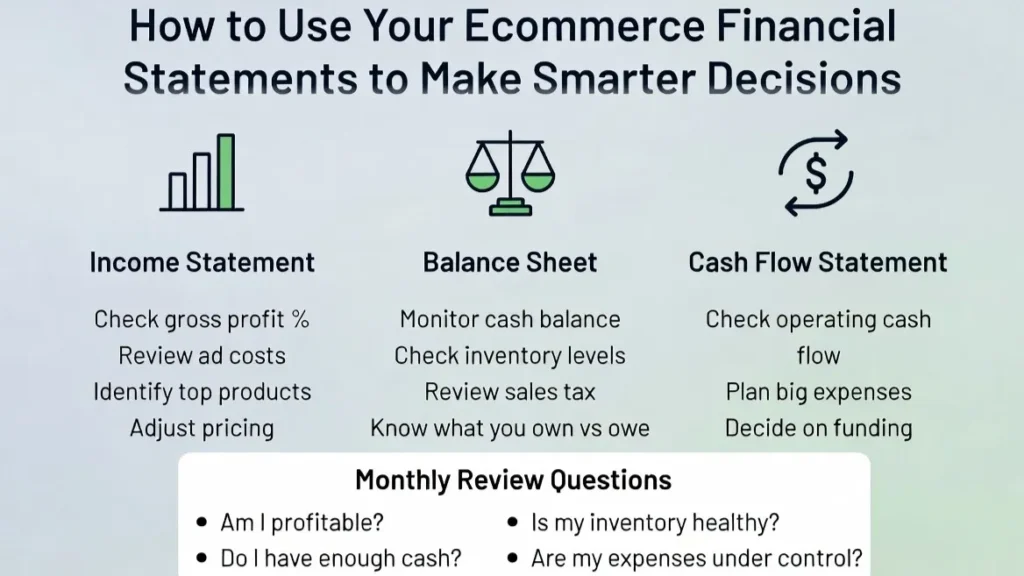
Decisions You Can Make with Your Income Statement
Your income statement shows what is profitable. Check your gross profit percentage. If it drops below 40%, raise your prices or find cheaper suppliers. Look at your ad costs. If they are too high, cut back or try new channels. See which products make a good profit and sell more of them. Avoid ecommerce accounting mistakes to gain more profit.
Decisions You Can Make with Your Balance Sheet
Your balance sheet shows the current health of your business. Watch your cash balance. If it keeps falling even when you are profitable, you have a cash flow problem. Check your inventory levels. Too much inventory ties up cash. Too little means you might miss sales. Always check your sales tax liability so you have money ready to pay it.
Decisions You Can Make with Your Cash Flow Statement
Your cash flow statement helps you the most when growing. See if your operating cash flow is positive. If it is negative for too long, slow down buying inventory. Use it to plan big expenses. It also helps you decide if you need funding from a bank or investor.
Pro Tip: Every month, look at all three statements together. Ask yourself: Am I profitable? Do I have enough cash? Is my inventory healthy? Then decide what to do next.
Our Shopify accounting and bookkeeping services, along with expert eCommerce accounting solutions at SAL Accounting, are what you need. Get in touch for a consultation.
Case Study: How Michael in Port Credit, Mississauga, Scaled Profitably2
Michael sells premium coffee and tea on Amazon and his WooCommerce site from his warehouse in Port Credit, Mississauga.
Problem:
Michael’s business is growing quickly, but he is always worried about cash. His income statement shows a strong 48% gross profit. But his balance sheet shows $140,000 stuck in slow-moving inventory. His cash flow statement reveals he is barely breaking even on actual cash, even though he is profitable on paper. He is over-ordering stock and tying up too much money.
What we do:
We analyze his numbers together and help him set clear targets. He improves inventory turnover and keeps at least 45 days of cash runway. Michael reduces his next purchase order by 30% and focuses more on his bestsellers.
The Result:
Six months later, his net profit increases by 35%, his cash balance becomes much healthier, and he hires his first full-time employee. Today, Michael says checking his full financial statements every month is what finally lets him scale without fear.
Ready to Take Full Control of Your Ecommerce Numbers?
You now understand your income statement, balance sheet, and cash flow statement, and how to use them to make smarter decisions. Closing the dangerous gap between reported profit and actual cash can transform your online store.
Don’t let poor financial visibility hold your business back. Our team at SAL Accounting helps Shopify, Amazon, and WooCommerce sellers keep their books clear and accurate. Book a consultation today and take full control of your numbers.