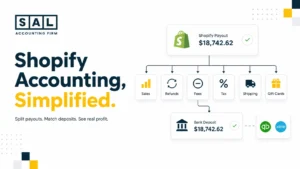
Shopify, Amazon, Stripe, and PayPal can all show different numbers. Your bank only shows what landed after fees, refunds, chargebacks, and sometimes tax. So when it’s time to file, it can feel like your numbers don’t match reality.
This guide from SAL Accounting is for eCommerce sellers who want a clearer way to prepare for tax season without getting buried in accounting language. That includes Shopify, Amazon, Etsy, WooCommerce, and Canadian sellers dealing with U.S. sales.
Quick Takeaways
- Your tax prep should start with clean books, not just receipts.
- Don’t use bank deposits as your sales number. Ecommerce payouts usually arrive after fees, refunds, and other deductions.
- Pull reports from Shopify, Amazon, Etsy, WooCommerce, PayPal, Stripe, and your accounting software before filing.
- Reconcile 1099-K forms, platform settlements, and bank deposits before sending numbers to your accountant.
- Review inventory, COGS, GST/HST, QST, U.S. sales tax, and deductions before you file.
- Cross-border sellers should check both income tax and sales tax responsibilities, especially if they sell into the U.S.
Not sure what to send your accountant? Start with SAL’s Tax Document Checklist for ECommerce Stores.
In Canada, retail ecommerce revenue reached $73.7 billion in 2024, up 9.0% from the year before. If your reports feel hard to trust before filing, working with our ecommerce accounting team can help you understand what’s wrong, what’s missing, and what needs to be cleaned up first.
What Does It Mean to Prepare Your E-commerce Business for Tax Season?
Preparing your e-commerce business for tax season starts with one simple goal: make sure your sales, payouts, fees, refunds, inventory, and taxes all tell the same story. That means you need to clean up the path from customer order to bank deposit. Start by checking:
- Platform sales reports from Shopify, Amazon, Etsy, or WooCommerce
- Payout reports from Stripe, PayPal, Shopify Payments, or Amazon
- Refunds, chargebacks, discounts, and payment fees
- Inventory and cost of goods sold
- Business expenses and deductions
- GST/HST, QST, or U.S. sales tax filings
Basically, tax prep is not just “send your accountant your Shopify login.” It’s proving what actually happened in your store.
Example: Let’s say Shopify shows $100,000 in gross sales for the year, but only $82,000 hit your bank account. That does not mean your revenue was $82,000.
It usually means some money was taken out before the payout reached your bank, like payment processing fees, refunds, discounts, sales tax collected, chargebacks, app fees, or payout timing differences.
This mismatch is one of the most common ecommerce accounting mistakes, and it’s usually fixable once the reports are matched properly.
Pro Tip: Don’t treat every bank deposit as sales. That’s one of the most common ecommerce bookkeeping issues, and it’s usually fixable once the payout reports are matched properly.

E-commerce Tax Checklist: Documents and Reports to Gather Before Filing
Before you file, create one year-end folder for the reports your accountant needs. Keep it simple. The goal is to show what you sold, what got refunded, what fees were taken, what tax was collected, and what expenses you paid. A simple year-end folder can include:
- Sales and payout reports
- Bank and credit card statements
- Inventory and COGS records
- Tax reports
- Payroll, contractor, receipt, and bill records
- Prior-year returns
Think of this as a tax-season version of a small business bookkeeping checklist, with ecommerce reports added in. Now, here’s what should go inside.
1. Sales Channel Reports
Start with the platforms where you sell, like Shopify, Amazon, Etsy, WooCommerce, eBay, or other marketplaces. These reports help explain what happened before money reached your bank. Pull reports that show:
- Gross sales, net sales, and discounts
- Refunds, returns, and chargebacks
- Shipping charges and marketplace fees
- Sales tax, GST/HST, QST, or marketplace tax collected
This matters because your bank might show one payout, but the platform report shows what was inside it.
For Shopify tax preparation, the Total sales by order report can show gross sales, net sales, taxes, returns, and shipping charges. Shopify says this report can help you or your accountant prepare sales tax returns (Shopify tax reports).
Shopify sales tax reporting can also create confusion because sales, tax collected, refunds, and payouts do not always show up in one clean number.
2. Payment Processor Reports
Next, pull reports from the tools that moved the money, such as Shopify Payments, Stripe, PayPal, Square, Amazon Pay, Klarna, or Afterpay. These reports help explain the gap between sales and deposits.
Example: Shopify may show $50,000 in sales, but Shopify Payments may show why only $44,000 reached your bank after fees, refunds, chargebacks, and payout timing. Before filing, save:
- Full-year payment activity reports
- Monthly payout summaries
- Fee, refund, and chargeback details
- Any 1099-K forms you received
This is the core of ecommerce payment reconciliation: connect platform sales, processor activity, and bank deposits without guessing.
For the 2025 tax year, the IRS says third-party settlement organizations generally return to the threshold of more than $20,000 and more than 200 transactions for Form 1099-K reporting. According to IRS Form 1099-K FAQs, Payment card transactions follow different rules.
3. Accounting and Bank Records
Once your platform and payment reports are ready, gather the records that show how everything was booked. This includes your profit and loss, balance sheet, general ledger, bank statements, credit card statements, loan statements, payroll reports, contractor records, and receipts for larger purchases.
Basically, platform reports show sales activity. Payment reports show payouts. Bank and accounting records show whether the books match reality.
Your ecommerce financial statements should make the cleanup clearer, not more confusing. They should show whether your sales, expenses, inventory, and tax accounts make sense before filing.

How to Reconcile 1099-K, Platform Settlements, and Bank Deposits
This is where tax season usually gets confusing. A Form 1099-K may show gross payments. Your platform settlement report may show sales, refunds, fees, and tax. Your bank account only shows what was paid out. Those three numbers are not supposed to match perfectly.
Step 1: Start with Gross Sales
Start with what the customer paid before deductions.
Example: a Shopify store shows:
- $250,000 in gross sales
- $18,000 in refunds
- $9,000 in payment fees
- $12,000 in sales tax collected
- $4,000 in chargebacks
If the bank only received around $207,000, that doesn’t automatically mean something is wrong. It means you need the bridge between gross sales and net deposits.
Step 2: Separate Refunds, Fees, and Taxes
Refunds are not the same as fees. Sales tax is not your revenue. Chargebacks need their own review. When these get lumped together, your profit can look better or worse than it really is.
Step 3: Match Payouts to Bank Deposits
Payout timing matters. A sale on December 30 may not hit your bank until January. That timing difference can make year-end reports look off.
For Shopify sellers, Shopify payment reconciliation is where payouts, fees, refunds, and deposits get matched back to the right orders.
Step 4: Save the Reconciliation
Once you’ve matched the numbers, save the file. Don’t rely on live dashboards only. Platforms can change report layouts, filters, and views later. A Form 1099-K for ecommerce sellers should be checked against platform reports and bank deposits before you rely on it for filing.
Case Study: How a Leslieville Shopify Seller Keeps Tax Season Under Control1
A Shopify seller in Leslieville, Toronto, runs a growing skincare brand with orders coming through Shopify, payments through Shopify Payments and PayPal, and a few wholesale invoices paid by e-transfer. Sales are growing, but tax season feels messy because Shopify shows one number, PayPal shows another, and the bank only shows deposits after fees, refunds, and tax. The owner needs a clear way to explain what actually happens between each sale and the final bank deposit.
The Problem
The seller uses bank deposits as the starting point for tax prep. That makes revenue look lower than it really is and hides important details like refunds, processing fees, chargebacks, and GST/HST collected.
What We Do
SAL Accounting helps organize Shopify sales reports, payout reports, PayPal activity, bank statements, and GST/HST records into one clean year-end file. Then we match gross sales to payouts, separate fees and refunds, and make sure tax collected is not treated like business income.
The Result
The seller sees the full path from sale to deposit. Instead of guessing why the numbers do not match, they have a clear explanation for revenue, refunds, fees, and tax. Tax season becomes less stressful because the records actually support the return.
Shopify and Amazon Tax Preparation: Reports to Pull Before Filing
Shopify and Amazon need different cleanup steps. They both show sales, but they don’t show them in the same way.
Shopify Tax Preparation Reports
For Shopify tax preparation, pull:
- Finances summary
- Total sales by order report
- Taxes finance report
- Payouts report
- Refunds report
- Gift card activity
- Shopify Payments 1099-K, if applicable
Shopify says U.S. Shopify Payments accounts may receive Form 1099-K if they meet federal or state thresholds, and only store owners can access that tax information in Shopify admin.
Example: if Shopify shows $40,000 in sales for December, but your bank deposits only show $35,500, look for Shopify Payments fees, refunds, chargebacks, sales tax collected, gift cards, and payouts that landed in January.
You may need help making Shopify numbers easier to read. Shopify accounting support at SAL Accounting can help you understand what came in, what got deducted, and what still needs to be recorded.
Your Shopify seller tax cleanup should connect sales, refunds, tax collected, fees, gift cards, and payouts before the numbers go to your return.
Amazon Tax Preparation Reports
For Amazon tax preparation, pull:
- Date Range Summary
- Settlement reports
- Transaction reports
- Tax Document Library
- Form 1099-K
- Marketplace Tax Collection reports
- FBA inventory reports
- FBA storage and fulfillment fee reports
Amazon says sellers can find Form 1099-K in Seller Central under Reports, Tax Document Library, then the relevant year.
Amazon can feel harder than Shopify because fees are split across more categories. You may see referral fees, FBA fees, storage fees, advertising, reimbursements, returns, and marketplace tax collection.
If your Amazon reports feel like a pile of unrelated downloads, Amazon seller bookkeeping support can help turn those reports into numbers you can actually use.
Amazon FBA bookkeeping needs extra care because storage fees, fulfillment fees, reimbursements, inventory, and settlements can all affect the final numbers.
Use this table to quickly match each ecommerce report to the number it helps explain and where it should go in your books.
| Report | Shows | Use it to check | Usually belongs in |
| Shopify payouts | Deposits after fees and refunds | Bank deposits | Clearing account |
| Shopify sales by order | Sales, refunds, tax, shipping | Gross sales vs net sales | Revenue and tax payable |
| Amazon settlement report | Sales, fees, returns, FBA costs | Amazon payout details | Revenue and marketplace fees |
| Amazon tax document library | 1099-K and tax forms | Year-end tax support | Tax folder |
| Stripe or PayPal report | Payments, fees, refunds, chargebacks | Processor payouts | Revenue, fees, and refunds |
| Inventory report | Stock on hand and COGS | Year-end inventory value | Inventory and COGS |
COGS and Inventory Year-End: How to Avoid Profit Mistakes
Inventory is one of the easiest places to get ecommerce profit wrong. COGS means the cost of goods sold. In plain English, it’s the cost of the products you actually sold, not everything you bought. Before filing, check:
- Inventory on hand at year-end
- Inventory held by Amazon FBA
- Inventory held by your 3PL
- Inventory in transit
- Damaged or obsolete stock
- Returned products that can’t be resold
- Product costs, freight, duties, and packaging costs
You’ll also need a consistent method for valuing inventory. Common methods include FIFO, where older inventory costs are treated as sold first, and weighted average, where costs are averaged across units.
Example: let’s say you bought $60,000 of inventory this year, but you only sold $42,000 worth of it. You usually can’t treat the full $60,000 as the cost of goods sold right away. The unsold products still sit in inventory.
That’s why COGS and inventory year-end cleanup matters. To calculate COGS for ecommerce stores, separate products sold from products still sitting in inventory.
Shopify inventory accounting should connect product counts, COGS, and year-end inventory value.
Pro Tip: Do your year-end inventory count as close to your year-end date as possible. Save reports from Shopify, Amazon FBA, and your 3PL in the same folder.

GST/HST Filing, QST, and U.S. Sales Tax Nexus Review
Income tax and sales tax are not the same thing. Income tax is based on profit. Sales tax, GST/HST, and QST are amounts you may collect from customers and send to the government. That difference matters.
Canadian GST/HST and QST Review
If you sell in Canada, review whether you need to register for GST/HST. The CRA small supplier rules generally look at whether your taxable supplies exceeded the threshold in a calendar quarter or over the previous four calendar quarters. For many businesses, the commonly referenced small supplier threshold is $30,000.
If you’re already registered, you still need to file based on your reporting period. CRA has separate filing rules and deadlines for GST/HST returns.
Keep in mind: collecting GST/HST does not mean that money is yours to spend. It should be tracked separately.
A GST/HST return in Canada should be backed by ecommerce reports that show taxable sales, tax collected, refunds, and any amounts already filed.
U.S. Sales Tax Nexus Review
If you sell into the U.S., check whether you have sales tax nexus. Nexus means a state has enough connection to your business to require registration, collection, or filing.
That connection can come from sales volume, inventory, employees, warehouses, FBA stock, or other activity.
This is where cross-border sellers often feel unsure. You may be a Canadian company, but your U.S. sales can still create state-level sales tax questions.
If you want a quick first check, SAL’s US Economic Nexus Threshold Checker can help you see whether your U.S. sales may need a closer review.
U.S. sales tax requirements for Canadian sellers can apply even when the business is based in Canada, especially when sales volume, FBA inventory, or state activity creates nexus.
Marketplace Facilitator Rules
Amazon, Etsy, and some other marketplaces may collect and remit sales tax on certain marketplace orders.
Amazon says Marketplace Tax Collection refers to marketplace facilitator laws where Amazon may be responsible for collecting and remitting sales or use taxes in certain jurisdictions. That helps, but it doesn’t mean you can ignore sales tax completely. You still need to check:
- Direct Shopify or WooCommerce sales
- Sales into states where you may have nexus
- Marketplace tax reports
- Whether marketplace-collected tax was recorded properly
- Whether you still have filing responsibilities
If you’re selling between Canada and the U.S., a cross-border tax accountant for ecommerce sellers can help you see which rules apply before tax season gets rushed.

Case Study: How a Port Credit Amazon Seller Handles Cross-Border Tax Prep2
An Amazon seller in Port Credit, Mississauga, sells home organization products across Canada and into the U.S. Most of the business runs through Amazon FBA, but the owner also uses Shopify for repeat customers. At year-end, the reports feel scattered across Amazon settlement reports, FBA fees, storage fees, marketplace tax collection, inventory records, Shopify sales, GST/HST details, and U.S. customer orders.
The Problem
The seller is not sure which tax amounts Amazon already collects, which Shopify sales need a closer sales tax review, and how Amazon FBA inventory affects COGS. The risk is double-counting tax, missing fees, or treating unsold inventory as an expense too early.
What We Do
SAL Accounting reviews Amazon settlement reports, Shopify sales reports, FBA inventory records, GST/HST details, and U.S. sales activity. We separate marketplace-collected tax from direct sales tax questions, clean up COGS, and check whether U.S. sales tax nexus needs attention.
The Result
The seller has a clearer year-end picture. They know what Amazon collects, what Shopify still needs support for, what inventory remains unsold, and what needs review before filing. That gives the owner more confidence before sending the final records to their accountant.
Ecommerce Deductions, Credits, and Year-End Tax Choices to Review
Ecommerce deductions can add up quickly, but they’re often scattered across Shopify, Amazon, apps, payment processors, credit cards, and bank accounts. Before filing, review costs like:
- Ads, influencers, and affiliate payments
- Platform, app, and payment processing fees
- Shipping, packaging, 3PL, warehouse, and FBA costs
- Software, insurance, bookkeeping, and accounting fees
- Equipment, office supplies, and home office costs where eligible
CRA lists common business expense categories like advertising, delivery, insurance, professional fees, supplies, utilities, and home office costs.
For bigger year-end items, ask your accountant about SR&ED Canada if you built custom tools, or Section 179 if your U.S. entity bought qualifying equipment or software.
Common ecommerce tax deductions usually come from everyday store costs like ads, platform fees, payment fees, shipping, software, and professional support. Clean ecommerce business expenses make those deductions easier to support.
The point is simple: don’t try to claim everything. Claim what actually belongs to the business and what you can support.
Online Store Tax Season Guide: Key U.S. and Canadian Deadlines
Deadlines depend on your structure, country, and filing type. So don’t treat this as a replacement for tax advice. Use this as a planning map, then keep a simple financial calendar with key deadlines so tax dates do not sneak up on you.
| Tax item | U.S. sellers | Canadian sellers | Prepare |
| Contractor slips | 1099-NEC, usually Jan 31 | T4A may apply | Contractor details and totals |
| Personal returns | Usually April 15 | 2025 return due April 30, 2026 | Income, slips, deductions |
| Self-employed returns | Depends on filing type | File by June 15, 2026, pay by April 30, 2026 | Business income and expenses |
| Corporations | Depends on entity and year-end | T2 due 6 months after year-end | Corporate books and tax records |
| Sales tax / GST/HST | State rules vary | Depends on reporting period | Tax reports and amounts collected |
IRS Publication 509 lists U.S. tax calendar dates, including business and employer deadlines.
For Canada, CRA lists April 30, 2026 as the filing and payment deadline for most 2025 personal tax returns, with a June 15, 2026 filing deadline for many self-employed taxpayers, while payment is still due April 30, 2026.
Canadian corporations generally file their T2 return within six months after the end of the tax year.
- Also Read: “CRA T2 Tax Form: Easy Guide for Canadian Businesses”
Tools, Templates, and Workflows That Make Tax Season Faster
You don’t need a complicated system. You need a repeatable one.
Start by pulling your sales reports, payout reports, bank and credit card statements, inventory records, and tax reports into one year-end folder. Then match your payouts to your bank deposits, update COGS, review GST/HST, QST, or sales tax, and confirm your main deductions before sending everything to your accountant.
Helpful tools can include:
- QuickBooks Online or Xero for bookkeeping
- A2X, Link My Books, or another ecommerce connector for platform data
- Inventory and receipt tools for backup records
- A shared folder for year-end reports
The best ecommerce accounting software is the one that helps you pull cleaner reports, match payouts, track inventory, and reduce manual cleanup.
For Shopify stores, automating Shopify accounting and bookkeeping can make tax season less dependent on last-minute spreadsheet work.
The tool matters less than the habit. If you review reports monthly instead of waiting until tax season, the cleanup is much easier.
- Read More: “Shopify Integration with QuickBooks: How to Sync, Automate & Reconcile Your Store’s Accounting”
Common Ecommerce Tax Season Mistakes That Can Create Problems
These are common. If you’ve done one of them, you’re not behind. It just means your setup needs cleanup. Watch for:
- Use Shopify, Amazon, or Etsy dashboard sales as taxable profit
- Record bank deposits as revenue without separating fees, refunds, chargebacks, or payout timing
- Double count tax already collected by marketplaces
- Miss GST/HST registration thresholds or skip a U.S. sales tax nexus review
- Treat all inventory purchases as COGS, even when some products are still unsold
- Mix personal and business expenses or miss contractor slips
- File before 1099-K forms, settlement reports, and year-end reports match
- Forget to save the reports used to support the return
Example: if Amazon collected and remitted sales tax on a marketplace order, you don’t want to record that same tax as something you still owe. But you also don’t want to ignore the report. You need it as support for what happened.
Most ecommerce accounting mistakes come back to the same issue: the reports do not show the full path from sale to deposit.
Pro Tip: Save the exact reports used for filing in a locked year-end folder. If a platform dashboard changes later, you still have the version your return was based on.
Conclusion: Ready for the Ecommerce Tax Season?
The best way to prepare your e-commerce business for tax season is to clean up the story behind your numbers. What did you sell? What did customers refund? What fees were taken? What tax was collected? What inventory was sold? What actually became profit? Once those pieces match, tax season feels less like a scramble and more like a review.
If you’re preparing your ecommerce business for tax season and your reports don’t match your bank deposits, book a consultation with SAL’s ecommerce accountants. We can help you see what needs to be cleaned up before you file.