
Should you outsource payroll for your ecommerce business? Usually, yes once pay runs consume too much time, your team spans locations, or you no longer trust every deduction and deadline. SAL Accounting works with ecommerce businesses where payroll grows alongside seasonal hiring, remote staff, commissions, and contractors.
Read to the end before your next hire: the quiet warning signs you ignore now are usually the ones that become hardest to fix as headcount grows.
Put payroll in context first: enter wages and other operating expenses into the Ecommerce EBITDA Calculator to see how staffing costs affect the business beyond sales.
Quick Takeaways
- Outsource payroll when the process takes too much owner or management time.
- Growing teams create more employee changes, pay types, deadlines, and records.
- Payroll software calculates numbers, but it does not take responsibility for the full process.
- Remote employees and international workers may require different payroll arrangements.
- Your provider should manage more than payments. Remittances, reports, records, and year-end forms also matter.
- You still need to approve payroll and provide accurate information after outsourcing.
Ready to put the process under one routine? SAL’s Ecommerce accounting services cover the work behind each pay run, from calculations and remittances to reporting.
Why Does Ecommerce Payroll Get More Complicated as You Grow?
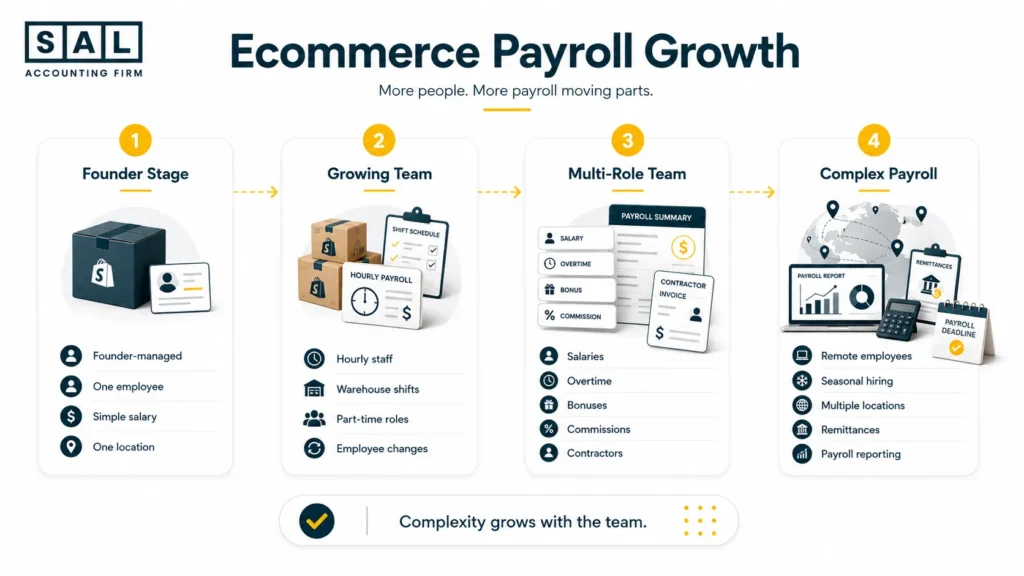
Ecommerce teams rarely grow in a neat order. You might begin with one customer service employee. Then you add warehouse staff, a remote marketer, seasonal packers, a sales manager with commission, and several contractors who support advertising or product photography. Each person may be paid differently:
- Hourly wages
- Fixed salary
- Overtime
- Commission
- Performance bonuses
- Vacation pay
- Contractor invoices
- Expense reimbursements
The CRA’s payroll requirements cover more than sending employees their net pay. Employers may need to collect employee information, calculate deductions, determine the province of employment, remit amounts, prepare slips, and retain payroll records.
Every employee creates more than one payment. They also create records, approvals, deadlines, deductions, and reporting work. The seven signs below show when that work may have outgrown a founder-managed system.
| Sign | What You Notice | Hidden Cost | Main Risk | Best Next Step |
| Payroll takes too long | Paydays consume hours | Lost management time | Rushed review | Track two full pay cycles |
| Mistakes feel more likely | You repeatedly recheck figures | Corrections and employee questions | Wrong or late pay | Add a second review |
| Your team is growing | More roles and pay types | Extra administration | Missed employee changes | Create one change process |
| Staff work elsewhere | Remote or international hiring | Setup research | Wrong payroll arrangement | Review location before hiring |
| Compliance feels unclear | Deadlines rely on memory | Follow-up and corrections | Late filings or remittances | Build a payroll calendar |
| Software is not enough | Spreadsheets surround the app | Duplicate manual work | Incomplete records | Review the workflow |
| Payroll distracts from growth | Higher-value work gets delayed | Slower decisions | Founder bottleneck | Compare DIY and outsourced cost |
7 Signs It’s Time to Outsource Payroll for Your Online Store
As your online store grows, payroll can become harder to manage. These seven signs show when outsourcing may save time, reduce mistakes, and give you a clearer process.
1. Payroll Takes Too Much of Your Time
Payroll rarely feels difficult when you have one salaried employee. The problem appears as the team changes. Consider an ecommerce brand with eight employees and a biweekly gross payroll of $18,750. The software calculation may take only a few minutes. But someone still needs to:
- Collect warehouse hours
- Check one sales commission
- Add two expense reimbursements
- Update vacation taken
- Confirm a new pay rate
- Review the payroll register
- Post the payroll journal
- Check the remittance balance
A “quick” pay run can easily occupy half a day.
Keep in mind that payroll is part of your wider ecommerce business expenses. The real cost includes wages, employer contributions, software, administrative time, and the work needed to correct errors.
Pro tip: Track every payroll-related task for two complete pay cycles. Include emails, corrections, approvals, reporting, and employee questions. Do not count only the time spent inside the software.
When payroll regularly follows you into the evening, it is no longer a small administrative task.
2. You’re Worried About Payroll Mistakes
Do you check payroll several times because you still do not trust it? That usually means the process needs stronger controls. Common problems include:
- Incorrect hours or pay rates
- Missed overtime
- Duplicate bonuses
- Wrong deductions
- Late employee payments
- Incorrect vacation balances
- Former employees left active
- Workers set up under the wrong classification
Employee versus contractor classification needs particular attention. The CRA looks at the working relationship as a whole, not only the wording used in an agreement. Employment status can affect CPP, EI, income tax withholding, and reporting responsibilities. (CRA employment status)
This does not mean you deliberately set someone up incorrectly. Ecommerce businesses often hire quickly, and a freelance relationship can gradually begin to look more like employment.
The point is simple: if you do not trust payroll after you run it, the system is not giving you enough support.
3. Your Team Is Growing
Your first employee and your fifteenth employee create very different payroll processes. A growing team may include:
- Full-time office employees
- Part-time customer support staff
- Hourly warehouse workers
- Seasonal fulfilment employees
- Remote employees
- Commission-based staff
- Independent contractors
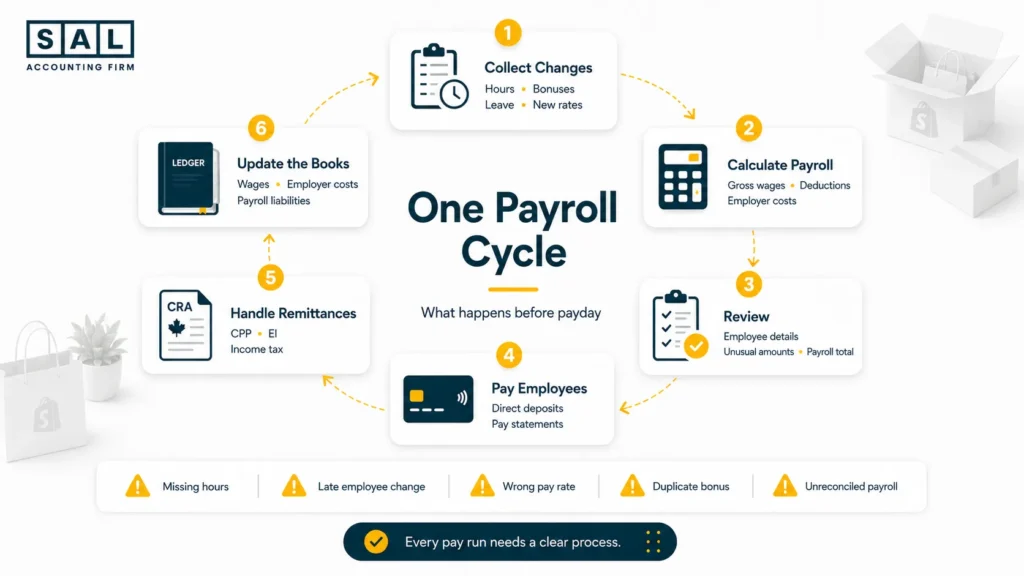
Every new hire also creates ongoing changes. Payroll needs to receive pay increases, bonuses, leave, bank details, benefit changes, vacation, departures, and expense reimbursements before the cutoff.
Remote work adds another consideration. For Canadian deductions, an employee’s province of employment is not always determined only by their home address. The CRA also considers where the employee reports for work and the employer establishment connected with the employment. (CRA province of employment)
Pro tip: Use one payroll-change form with a firm submission deadline. Text messages, emails, and verbal updates are easy to miss when several managers send changes in different ways.
Case Study: How Maya in King West Turns a Friday Payroll Scramble Into a Clear Process1
Maya runs a growing Shopify apparel brand from King West, Toronto. Her team expands from five employees to fourteen after the company brings fulfilment in-house. She now has salaried office staff, hourly warehouse employees, a remote customer service employee, and temporary workers during product launches. Maya still processes payroll herself, using email and a spreadsheet to collect employee changes.
The Problem
Payroll takes most of Friday afternoon. One bonus is missed because it arrives after the cutoff, and an employee’s pay increase is not entered until the following cycle. Payroll liabilities in the accounting system also stop matching the provider reports.
What We Do
We create one employee-change process, a clear submission deadline, and a pre-payroll approval report. Wages, employer costs, deductions, and remittances are also connected to the monthly bookkeeping process rather than posted as one unexplained bank payment.
Result
Maya reviews one organized summary before each payroll instead of searching through messages. Employee changes reach payroll on time, payroll accounts reconcile monthly, and she has a clearer view of the cash required before every pay date.
4. You’re Hiring Across Provinces or Borders
Selling to customers in another country does not automatically create foreign payroll. Hiring someone there might. Your team could eventually include:
- An employee in another Canadian province
- A Canadian employee who relocates
- A US-based employee
- An employee in another country
- An overseas contractor
- A worker hired through an employer of record
These arrangements are not interchangeable.
For example, paying a freelance designer in another country is different from hiring a full-time employee who works fixed hours under your company’s direction. The country where the person works, their relationship with the business, and the entity that hires them can all affect the setup. Review these questions before making an offer:
- Where will the person physically work?
- Are they an employee or a genuine independent contractor?
- Which business entity will hire them?
- Can your current payroll provider cover that jurisdiction?
- Is a local payroll provider or employer-of-record arrangement required?
Pro tip: Review the arrangement before the worker starts. Fixing several months of payments, deductions, and records later is usually more difficult than setting them up properly from day one.
5. Payroll Compliance Feels Overwhelming
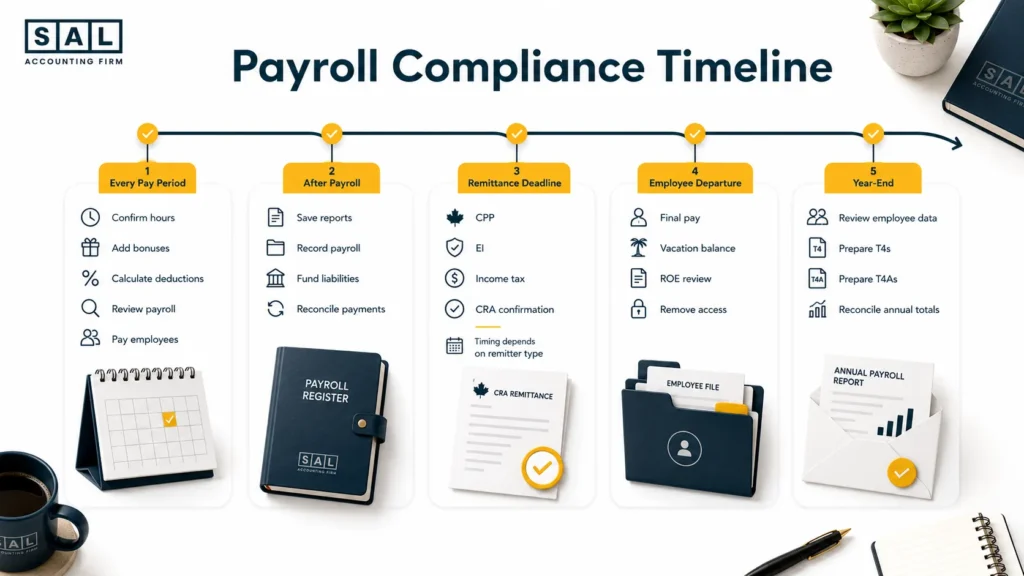
Payroll compliance is not one deadline. It may include:
- Opening and maintaining a payroll account
- Calculating CPP, EI, and income tax
- Employer CPP and EI contributions
- Source-deduction remittances
- Vacation and statutory holiday records
- Taxable benefits
- Records of employment
- T4 and T4A preparation
- Payroll record retention
- Corrections to prior pay periods
Your remitter type determines how often payroll deductions must be sent to the CRA. Late remittances may result in penalties and interest, so the deadline needs to be based on your actual remitter status rather than a generic calendar reminder. (CRA remittance due dates)
T4 information returns are generally due by the last day of February following the calendar year. An employee who experiences an interruption of earnings may also require a Record of Employment, depending on the situation. (CRA T4 information) (Service Canada ROE guidance)
A proper financial calendar for business deadlines should show:
- What must be completed
- Who is responsible
- When information is due internally
- When the official deadline falls
- What proves the task was completed
If every payroll date and filing deadline lives in your memory, too much depends on one person.
6. Your Payroll Software Isn’t Saving You Time
Payroll software can calculate deductions and prepare reports.
It cannot automatically make every decision around the calculation.
Someone still needs to:
- Set up each worker correctly
- Collect approved hours
- Enter commissions and bonuses
- Review taxable benefits
- Confirm employee changes
- Approve the payroll register
- Fund the pay run
- Handle corrections
- Reconcile payroll accounts
- Answer employee questions
Software performs the calculation. It does not own the process.
- Also read: “Best Payroll Apps for Shopify Stores”
The right platform still matters. Your payroll system should work with the accounting software used by your ecommerce business and produce reports that can be posted without rebuilding the entire pay run manually.
When payroll reaches the books, wages, employer costs, employee deductions, and remittances should remain separate. SAL’s ecommerce bookkeeping services in Toronto keep the accounting entries behind payroll tied to the rest of the monthly close.
Pro tip: Write down every manual step before replacing your payroll app. A different platform will not fix missing information, unclear approvals, or a weak review process.
7. You’d Rather Focus on Growing Your Business
There is always something more valuable an ecommerce founder could be doing. You could be:
- Reviewing product margins
- Negotiating supplier terms
- Planning inventory
- Improving customer retention
- Preparing a promotion
- Checking cash before a large purchase order
Instead, you are chasing a missing timesheet.
Payroll also needs to appear in your cash flow forecast. The business may be profitable on paper but still need enough available cash for wages, employer contributions, remittances, and contractor payments on specific dates.
At the end of the day, payroll should not be the thing keeping you from focusing on your customers.
That does not make payroll unimportant. It means the process is important enough to have a dependable system and a clearly responsible person.
What Should an Outsourced Payroll Service Handle?
A good payroll service should do more than process a direct deposit. The exact scope depends on the provider, so responsibilities need to be written clearly before the first pay run.
| Payroll Area | Provider Should Handle | You Still Provide | Expected Output | Question to Ask |
| Initial setup | Employee records and opening balances | Business and worker details | Reviewed payroll file | Who checks the setup? |
| Pay processing | Wages, deductions, bonuses, adjustments | Approved hours and changes | Payroll register | What is the cutoff? |
| Employee payments | Direct deposits and pay statements | Available payroll funding | Payment confirmation | What happens if payment fails? |
| Remittances | Calculation and submission if included | Approval and funds | CRA confirmation | Is submission included? |
| Employee changes | New hires, raises, leave, departures | Timely instructions | Updated employee record | How are changes submitted? |
| Reporting | Payroll and accounting summaries | Accounting access if needed | Monthly payroll reports | Will reports match the books? |
| Year-end work | T4s, T4As, amendments if included | Final employee information | Filed slips and summaries | Are amendments extra? |
| Departures | Final pay and ROE support | Departure details | Final payroll documents | Who issues the ROE? |
| Compliance support | Deadline tracking and payroll questions | Notice of business changes | Payroll calendar | Which locations are covered? |
Outsourcing does not remove your responsibilities as the employer. You still need to provide accurate information, approve payroll, make funding available, and keep records accessible.
Ontario employers remain responsible for required employment records even when another person, such as an accountant or payroll company, retains them. (Ontario record-keeping rules)
Pro tip: Ask for a responsibility matrix. It should clearly show what your team does, what the provider does, who approves each stage, and what happens when information arrives late.
How Do You Choose the Right Payroll Partner for Ecommerce?
The cheapest payroll quote is not always the best fit. You need a provider that understands how your team works, where employees are located, which systems you use, and what needs to reach the accounting records after payday.
Look for Ecommerce Experience
Ecommerce payroll has patterns that many standard businesses do not. Your team may expand quickly before the holiday season, include changing warehouse shifts, or receive bonuses connected to store performance.
Ask a realistic question:
“We have six regular employees, five seasonal warehouse workers, one employee in another province, and four contractors. What would your payroll process look like?”
The answer should cover employee setup, deadlines, approvals, remittances, reporting, and reconciliation. A vague promise to “streamline payroll” is not enough.
Check Their Payroll and Tax Knowledge
A provider should understand the routine payroll rules and recognize when a situation needs a closer review. Ask how they handle:
- Employee versus contractor questions
- Province-of-employment changes
- Bonuses and taxable benefits
- Remitter types
- Employee departures
- Records of employment
- T4 and T4A preparation
- Prior-period corrections
- CRA payroll notices
The CRA’s Employers’ Guide to Payroll Deductions and Remittances covers employer responsibilities for deductions, remittances, records, and reporting.
The provider should also know when a question needs employment-law or jurisdiction-specific advice rather than guessing.
Make Sure Payroll Reaches Your Books Properly
A completed pay run should produce clean accounting entries. Your books may need to separate:
- Gross wages
- Employer CPP and EI
- Vacation pay
- Benefits
- Employee deductions
- Payroll remittances
- Contractor costs
- Payroll liabilities
Your monthly ecommerce bookkeeping checklist should include payroll reconciliation. The payroll reports, bank payments, remittances, and general ledger should all agree.
The same numbers should then flow into your ecommerce financial statements so you can see labour costs, liabilities, cash movement, and operating profit clearly.
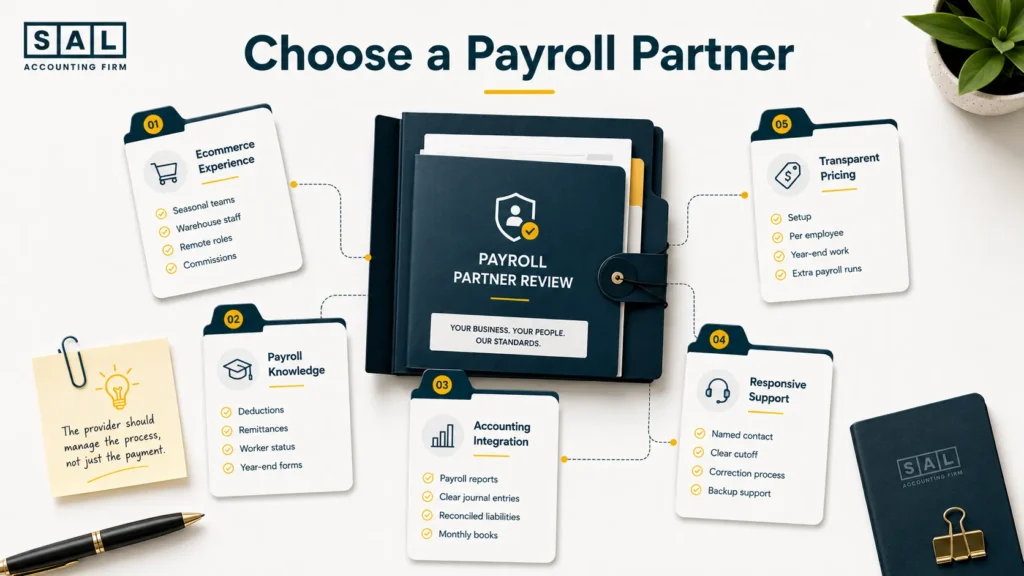
Test Their Support Before You Need It
Payroll questions are often time-sensitive. Before signing, ask:
- Who will be your regular contact?
- How quickly are questions answered?
- What happens when a change arrives after cutoff?
- Who handles urgent corrections?
- Is backup support available?
- How are employee records protected?
The questions you use when evaluating an ecommerce accountant also apply here: who does the work, who reviews it, and how clearly will problems be explained?
Check the Complete Price
Ask for a complete fee breakdown, including:
- Initial setup
- Monthly base fee
- Per-employee charge
- Per-pay-run fee
- Off-cycle payroll
- New hires and departures
- Records of employment
- Year-end slips
- Amended slips
- Additional jurisdictions
- Software
- Support
A low monthly fee can become expensive when routine changes are billed separately.
- Also read: “In-House vs. Outsourced Ecommerce Accounting”
Case Study: How Daniel in Port Credit Gets Payroll and Cash Planning on the Same Page2
Daniel runs a home-organization brand from Port Credit, Mississauga. His business sells through Amazon and its own online store. The team includes eight regular employees, additional warehouse staff during busy periods, one remote employee in Alberta, and several creative contractors. Payroll software is in place, but employee updates arrive through email, text, and separate spreadsheets.
The Problem
The software calculates payroll, but the process around it is unclear. Daniel does not always know when the full payroll withdrawal or remittance will leave the bank. Payroll reports also reach the bookkeeper late, which leaves wage and payroll liability accounts unreconciled.
What We Do
We organize every worker by role, location, payment method, and employment status for review. A biweekly calendar sets the deadlines for hours, commissions, reimbursements, approval, funding, and reporting. Payroll costs are also added to the business’s rolling cash forecast.
Result
Daniel receives one pre-payroll summary showing gross wages, employer costs, deductions, remittances, and total cash required. The books receive the reports on time, seasonal hiring is easier to plan, and payroll no longer creates an unexpected drop in available cash.
This is an illustrative composite based on common ecommerce payroll situations. The name and business details are examples.
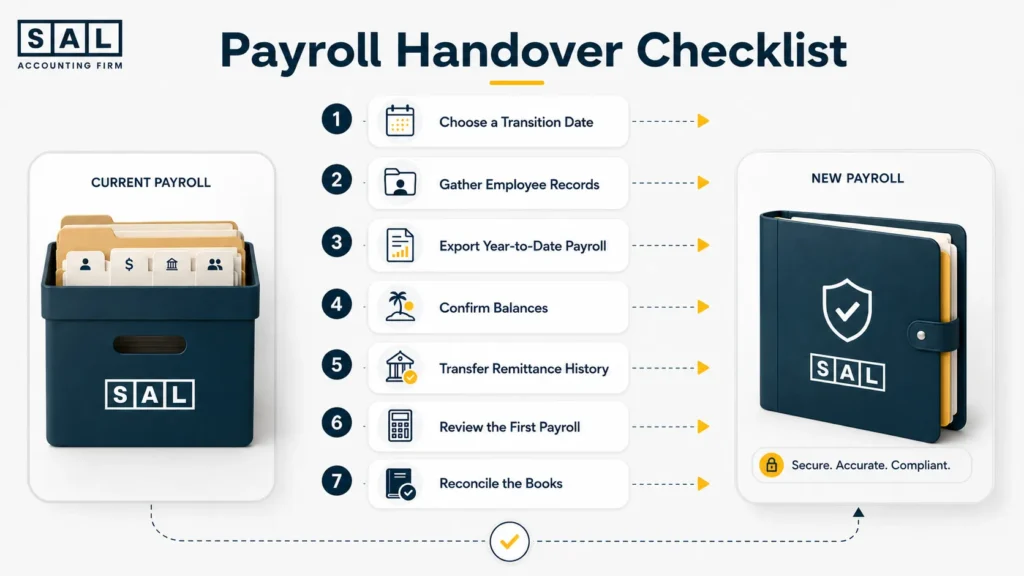
Is Outsourcing Payroll Worth It for an Online Store?
Payroll outsourcing is worth it when the time, uncertainty, and correction work involved in doing it yourself cost more than the service. A simple payroll with one stable employee may still be manageable internally. The decision changes when you add hourly work, bonuses, several locations, seasonal hiring, or frequent employee changes.
| Decision Factor | Managing Payroll Yourself | Outsourcing Payroll | Outsource When |
| Time | You collect and process everything | You submit changes and approve | Payroll interrupts core work |
| Knowledge | You research rules and corrections | A specialist operates the process | Deadlines or deductions feel uncertain |
| Team complexity | Works for a small stable team | Scales across roles and locations | Worker types change often |
| Control | Full hands-on control | Approval without every task | You want oversight, not administration |
| Cost | Software plus internal time | Provider and software fees | Internal time costs more |
| Continuity | May depend on one person | Documented provider process | Payroll stops when you are away |
| Reporting | You prepare accounting entries | Standard reports reach the books | Payroll accounts do not reconcile |
| Support | You solve problems yourself | Specialist support is available | Corrections take too long |
Ask yourself:
- Does payroll regularly delay work only I can do?
- Could someone else run the process if I were unavailable?
- Do I trust every worker’s current setup?
- Do payroll reports reconcile with the books each month?
- Can I clearly explain the next remittance deadline?
- Do I know the full cash required for the next payroll?
Several “no” answers are a good reason to compare providers.