Canadian e-commerce businesses usually deal with income tax, GST/HST, and sometimes PST, QST, import duties, or US sales tax. At SAL Accounting, we see how quickly this gets confusing once sales, refunds, platform fees, payouts, inventory, and customer locations mix together.
This guide keeps the focus on e-commerce taxes in Canada so you know what to charge, what to track, and what to fix before filing.
When store numbers start feeling messy, SAL’s e-commerce bookkeeping support gives you a clearer way to sort out sales, tax collected, fees, refunds, and payouts before tax season.
Quick Takeaways
- Canadian e-commerce businesses usually need to report business income, even when sales happen through online platforms.
- GST/HST registration often becomes important once taxable sales pass the small supplier threshold.
- PST and QST may apply separately depending on where customers are located.
- E-commerce platforms can help calculate tax, but they do not replace proper bookkeeping.
- Cross-border sales may create extra tax questions, especially if your store sells into the US.
- Good e-commerce tax records should track sales, refunds, fees, shipping, tax collected, payouts, and inventory costs.
Platform fees can shrink what your store keeps. The Shopify Fee Calculator gives you a quick way to see the gap.
What Taxes Do E-Commerce Businesses Pay in Canada?
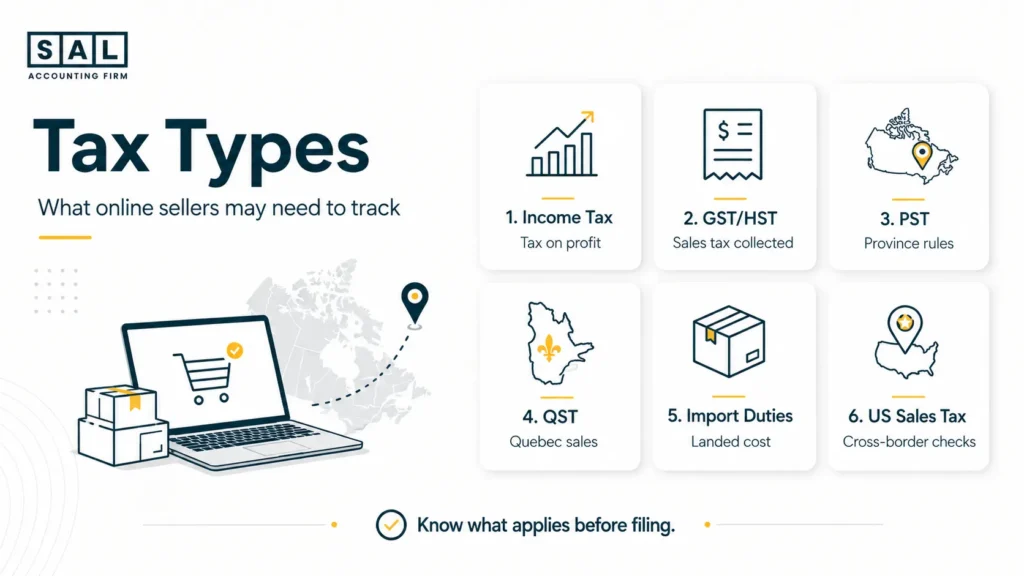
Most Canadian e-commerce businesses need to think about more than one type of tax. The main ones are:
- Income tax: Based on your business profit after eligible expenses.
- Sales tax: GST/HST, PST, or QST you may need to charge customers and send to the right tax authority.
- Cross-border tax: Rules that may come up when you import products, sell to US customers, store inventory outside Canada, or ship internationally.
The CRA explains e-commerce as business activity done through electronic channels, and its e-commerce guidance is a useful starting point for understanding why online sales still create normal tax responsibilities. Here is the simple version:
| Tax Type | Applies To | Common Trigger | What E-Commerce Sellers Should Check |
| Income tax | Business profit | You earn taxable business income | Sales, expenses, profit, and structure |
| GST/HST | Most taxable sales in Canada | Required or voluntary registration | Customer location, tax collected, filings |
| PST | Certain provinces | Sales into PST provinces | Provincial sales tax rules |
| QST | Quebec sales | Sales into Quebec | QST setup and Revenu Québec rules |
| Import duties | Goods entering Canada | Imported inventory | HS codes, product origin, landed cost |
| US sales tax | US customer sales | Nexus, inventory, or marketplace rules | Sales by state and platform reports |
The point is, there is no one-size-fits-all setup. A small online store selling only in Ontario has a different tax picture from an e-commerce business shipping across Canada and into the US.
Do E-Commerce Businesses in Canada Have to Pay Income Tax?
Yes. If your e-commerce business earns income in Canada, you generally need to report it. How you report it depends on your setup:
- Sole proprietor: Business income usually goes on your personal tax return.
- Corporation: The corporation usually files its own corporate tax return.
- Multi-channel seller: Sales still need to be tracked properly, even when they come from different platforms or payment processors.
This is why choosing the best business structure for online retail matters before the business gets too complicated. If you are incorporated, the Corporate Income Tax Calculator can also give you a rough starting point. The tricky part is knowing your real income.
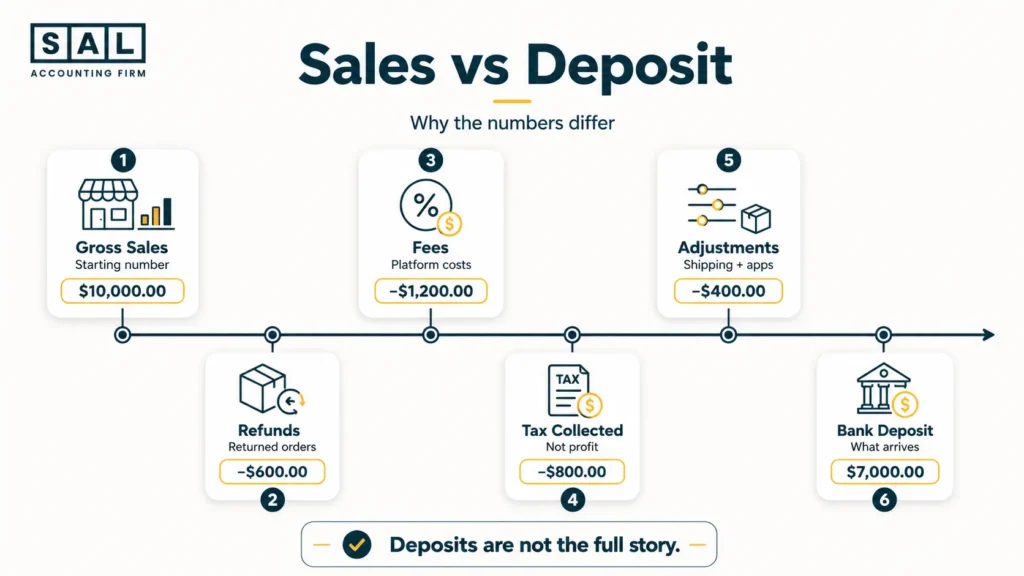
Example: Your store might show $80,000 in sales, but that does not mean $80,000 reached your bank. Refunds, fees, discounts, chargebacks, shipping costs, apps, and inventory may all reduce what you actually keep.
That is where many stores run into e-commerce profit calculation mistakes, especially when payouts are recorded as income without separating the deductions behind them.
Pro Tip: Check the payout report before using bank deposits as your sales number. Deposits show what arrived after deductions, not the full sales story.
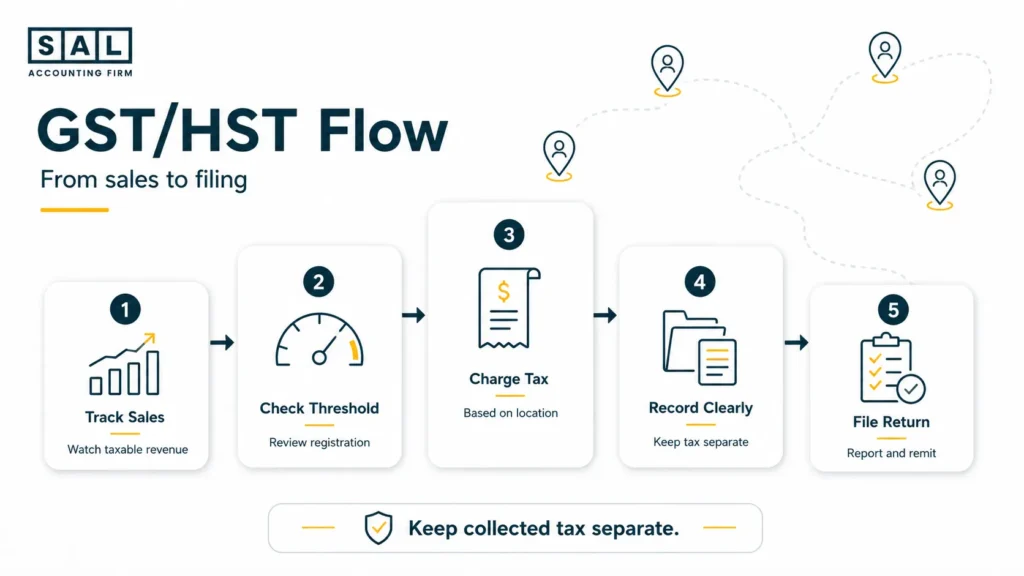
When Do E-Commerce Businesses Need to Register for GST/HST?
Many e-commerce businesses need to review GST/HST registration once taxable sales pass the small supplier threshold. The CRA explains this under its small supplier rules, and its GST/HST e-commerce guidance covers how online sellers should think about charging, collecting, and filing.
The tricky part is that e-commerce sales are not always local.
You may sell to customers in:
- Ontario
- Alberta
- Nova Scotia
- British Columbia
- Quebec
- the US
That means the tax rate may depend on where the customer is located, not only where your business is based. The CRA’s GST/HST rates guide and place-of-supply overview are useful references here.
Example: If you sell a $100 taxable product to a customer in Ontario and 13% HST applies, the customer pays $113. That extra $13 is not profit. It is sales tax collected, and it needs to be tracked properly.
This is also why GST/HST return filing in Canada depends on clean records, not just a form. Your sales, expenses, input tax credits, refunds, and collected tax all need to line up.
How Do GST, HST, PST, and QST Work for E-Commerce Sales?
GST, HST, PST, and QST are all sales taxes, but they are not handled the same way.
GST is the federal sales tax. HST applies in provinces where federal and provincial sales taxes are combined. PST is separate provincial sales tax in certain provinces. QST is Quebec’s sales tax. Here is the simple way to think about it:
- GST/HST is generally handled through the CRA.
- PST is generally handled by the province.
- QST is handled through Revenu Québec.
- Some sales may be zero-rated or treated differently depending on the product, customer, and location.
That matters because registering for one tax does not always mean you are covered for everything. A seller may be registered for GST/HST but still need to review whether PST or QST applies based on customer location. Revenu Québec explains QST responsibilities for certain suppliers and platforms under its QST collection rules.
Keep in mind, tax rates and rules can change. Before applying any rate to your store, confirm the latest details with the CRA, Revenu Québec, or the relevant provincial tax authority.
Pro Tip: Do not assume “Canada sales tax” means one setting. A customer in Quebec, Ontario, Alberta, and BC can create different tax questions.
How Do E-Commerce Platforms Affect Sales Tax?
E-commerce platforms can help with tax calculations, but they do not remove your responsibility to understand what is being collected, reported, and filed.
This is one of the most common misunderstandings we see with online sellers.
A platform may calculate tax based on your settings, customer location, product type, and registration details. But if the setup is wrong, the tax calculation may also be wrong. Shopify explains this in its Canadian tax settings, and Amazon explains marketplace collection through its Marketplace Tax Collection rules. Here is how this can look across common e-commerce platforms:
| E-Commerce Platform | What It Can Help With | What Can Still Go Wrong | What Sellers Should Check |
| Online store platform | Regional tax settings and reports | Wrong registrations or payout confusion | GST/HST, PST, QST, reports |
| Marketplace platform | Marketplace tax collection | Confusing fees, withheld tax, refunds | Settlement reports and remittance |
| Custom website | Tax plugins or manual settings | Outdated rates or wrong rules | Plugin settings and customer location |
| Multi-channel setup | Sales across several platforms | Duplicated or missing sales records | Sales by channel and payout source |
Example: a Shopify store may need Shopify sales tax reporting to make sense of what was collected, while a marketplace seller may need Amazon seller tax reporting to understand what the platform collected or withheld.
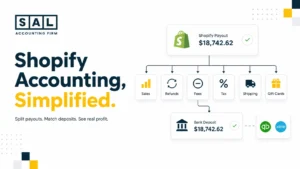
Platform tools can calculate tax, but they do not automatically explain your books. Your store may show $12,000 in sales while only $10,650 reaches the bank because of fees, refunds, discounts, shipping, or tax collected. That is where e-commerce reconciliation best practices matter. For Shopify-heavy stores, Shopify accounting keeps sales, taxes, fees, and payouts easier to separate.
- Also read: “Shopify Payment Reconciliation Guide”
Do Canadian E-Commerce Businesses Need to Track US Sales Tax?
Sometimes, yes. Canadian e-commerce businesses should review US sales tax once US orders become regular, especially when sales spread across different states, inventory is stored in the US, or marketplace fulfillment is involved.
The main thing to remember: one US sale does not automatically mean you have every US tax obligation. But growing US sales should be tracked before they become messy. Start with these checks:
- Where are your US customers located?
- Are sales growing in the same state?
- Is inventory stored in the US?
- Is a marketplace collecting tax for you?
- Are you close to any economic nexus thresholds?
The US Economic Nexus Threshold Checker gives you a quick way to see which states may need a closer look. For outside references, the Sales Tax Institute’s economic nexus state chart is useful because US sales tax is state-based, not one national system.This is where the sales tax nexus for sellers becomes relevant once US orders are more than occasional.
Pro Tip: Do not start with a US entity. Start with the actual problem. Sales tax, fees, banking, and expansion structure are different questions, and each one needs a different review.
- Also read: “US Sales Tax Requirements for Canadian Sellers”
What Records Should E-Commerce Businesses Keep for Taxes?
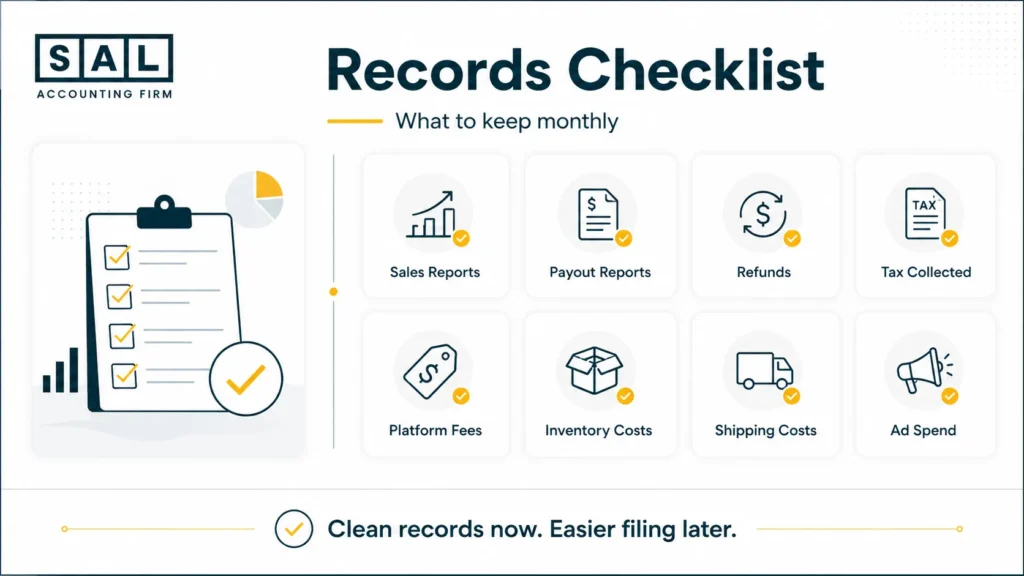
Your tax return is only as clear as the records behind it. For e-commerce businesses, the biggest issue is that platform sales usually do not match bank deposits. That is normal. What matters is whether you can explain the difference.
The CRA’s record keeping guidance explains that businesses need records to support income, expenses, GST/HST, and other tax filings. For e-commerce sellers, those records often live across platforms, payment processors, ad accounts, shipping apps, supplier invoices, and bank accounts. Here is what to keep organized:
| Record Type | Examples | Why It Matters | Review Frequency |
| Sales reports | Store and marketplace reports | Shows gross sales | Monthly |
| Payout reports | Stripe, PayPal, platform payouts | Explains bank deposits | Monthly |
| Refunds and returns | Returns, chargebacks, cancellations | Keeps revenue accurate | Monthly |
| Tax collected | GST/HST, PST, QST, marketplace tax | Supports filings | Monthly/quarterly |
| Platform fees | Selling fees, app fees, payment fees | Explains deductions | Monthly |
| Inventory costs | Products, freight, duties | Supports COGS | Monthly |
| Marketing costs | Meta, Google, TikTok ads | Tracks major spend | Monthly |
| Shipping costs | Courier invoices, labels | Supports fulfillment costs | Monthly |
If you are not sure what to gather first, the Tax Document Checklist for eCommerce Stores gives you a practical starting point for collecting the reports and documents your accountant will usually need. At the end of the day, clean records help answer three simple questions:
- What did customers actually buy?
- What tax was collected?
- What money did the business actually keep after fees, refunds, shipping, inventory, and ads?
This is also why e-commerce financial statements matter once your store grows. You need more than sales numbers. You need a clear view of profit, cash flow, inventory, and tax.
What Tax Deductions Can E-Commerce Businesses Claim?
E-commerce businesses often have more deductible expenses than they realize. The key is making sure the expense is business-related and properly documented. Common e-commerce deductions may include:
- inventory purchases
- shipping and fulfillment costs
- packaging, labels, boxes, and mailers
- platform fees
- payment processing fees
- website hosting and apps
- advertising and marketing costs
- product photography
- professional services
- home office expenses, if eligible
- software subscriptions
- business bank and payment fees
This is where e-commerce tax deductions and e-commerce business expenses are worth separating. A deduction is not just something you spent money on. It needs to be connected to the business and supported by records.
Inventory also needs extra care. If you buy products in bulk, ship them from overseas, pay duties, and store them before sale, the tax picture is not the same as paying a simple monthly software bill. For stores with physical products, calculating COGS for e-commerce stores can make profit much clearer.
If you want to step back from day-to-day sales and see operating performance more clearly, the Ecommerce EBITDA Calculator can help you look at revenue, COGS, expenses, and profit in one place.
- Read more: “E-Commerce Tax Loopholes”
What About Import Duties and Cross-Border E-Commerce Shipping?
Importing products into Canada can affect your real product cost. The item price is only one part of the picture. You may also need to track:
- duties
- customs charges
- brokerage fees
- freight costs
- product classification
- landed cost
The CBSA’s commercial importing guide explains the main import steps, including classifying goods, determining duties and taxes, and getting commercial goods released.
Example: A product that costs $20 from your supplier may not really cost $20 by the time it reaches you. For example:
- Product cost: $20
- Freight: $4
- Duty: $2
- Brokerage: $1
- Real landed cost: $27
That matters because landed cost affects pricing, inventory, tax records, and profit. This comes up often in cross-border e-commerce shipping because shipping costs, duties, and delivery terms can quietly change the margin on each order.
Case Study: How Maya in Liberty Village, Toronto Got Her E-Commerce Tax Records Clear1
Maya runs a skincare e-commerce business from a small studio near Liberty Village in Toronto. Her store starts with local Ontario orders, but within a year she is shipping across Canada and getting more US customers. Sales are growing, but her numbers are becoming harder to trust. Her platform shows strong revenue, her bank deposits look lower than expected, and she is not sure whether her tax setup matches where her customers are actually located.
The Problem
Maya is recording payouts as income instead of separating full sales, refunds, discounts, payment fees, and tax collected. That makes her revenue look smaller, her fees harder to see, and her GST/HST numbers harder to review. She also does not have a clean monthly view of sales by province.
What We Do
We clean up the e-commerce sales flow, separate gross sales from refunds and fees, review the GST/HST setup, and build a monthly reporting system that shows sales by province, tax collected, payment fees, shipping costs, and net payouts. We also show Maya which reports matter, so she is not trying to understand tax from bank deposits alone.
Result
Maya can finally see why platform sales do not match her bank deposits. Her tax records are easier to review, her GST/HST numbers make more sense, and she has a clearer view of profit after product costs, shipping, ads, and platform fees. Instead of waiting until tax season to untangle everything, she has a cleaner monthly system.
How Can E-Commerce Businesses Reduce Tax Stress Before Filing?
You do not need a perfect system on day one. But you do need a system that helps you see what is going on.
A simple monthly routine can make a big difference:
- Download your sales and payout reports.
- Review payouts against bank deposits.
- Track refunds, discounts, and chargebacks.
- Separate tax collected from actual revenue.
- Save supplier invoices and shipping costs.
- Review sales by province.
- Check whether US sales are growing.
- Keep personal and business spending separate.
- Review tax settings before peak seasons.
- Speak to an e-commerce accountant before year-end if the numbers are getting messy.
This is the same reason preparing your e-commerce business for tax season should start before April. Tax prep is much easier when the books already show what happened each month. For stores with frequent transactions, e-commerce accounting software can help, as long as the setup matches the way the store actually sells.
Case Study: How Daniel in Port Credit, Mississauga Fixed Cross-Border E-Commerce Tax Confusion2
Daniel sells home organization products from Port Credit in Mississauga. He starts with Canadian sales, then expands into US orders through a marketplace and his own online store. Sales look promising, but the tax side becomes confusing quickly. Some taxes are being collected by platforms, fees are being deducted before payout, inventory costs are rising, and Daniel is not sure what he still needs to track himself.
The Problem
Daniel assumes platform reports are enough on their own. But his books do not clearly separate product sales, marketplace fees, collected tax, refunds, inventory costs, advertising, and cross-border activity. Because his US sales are growing, he also needs a better way to review where sales activity might create additional tax questions.
What We Do
We organize his e-commerce reports, separate sales from fees and tax activity, review his Canadian GST/HST picture, and flag the US sales tax questions that need closer review. We also build a reporting process that shows Canadian sales, US sales, platform fees, inventory costs, and payout activity in a way he can actually understand.
Result
Daniel stops treating deposits as the full story. He can see what was collected, what fees were deducted, where his sales are coming from, and which cross-border items need attention. His tax process feels calmer, and he has better numbers for decisions about inventory, pricing, and US growth.
When Should an E-Commerce Business Get Tax Help?
You may be able to handle the basics yourself when sales are small and simple. But once your store grows, tax and bookkeeping issues can pile up quickly.
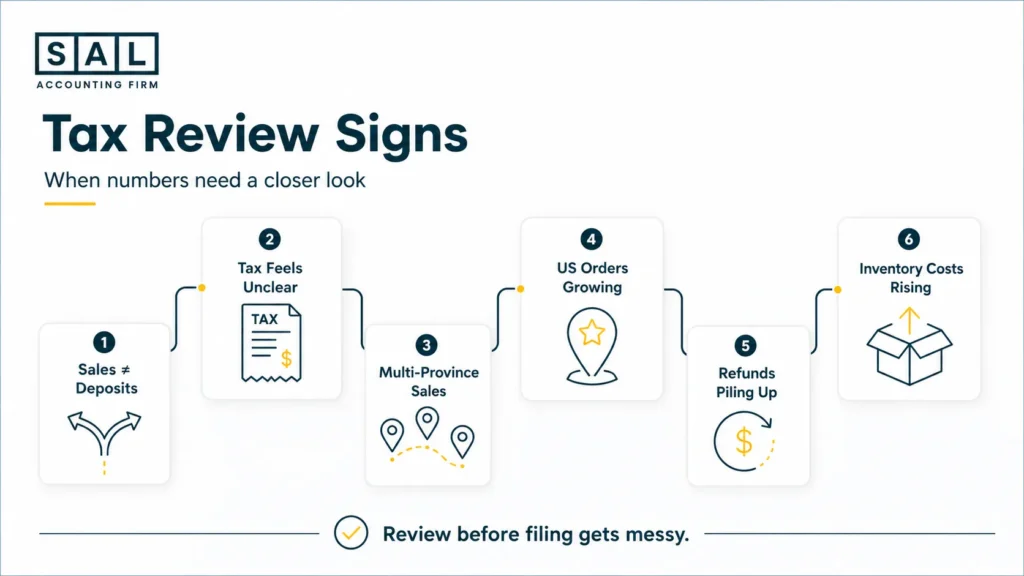
It may be time to get help if:
- your platform sales do not match your bank deposits
- you are near or past the GST/HST registration threshold
- you sell into multiple provinces
- you sell through more than one platform
- you have refunds, discounts, chargebacks, and payment fees every month
- you sell to US customers
- you import inventory
- you are not sure what tax your platform collected
- you do not know your real profit after fees, shipping, ads, and inventory
For many store owners, this is also the point where choosing the right support matters. A general bookkeeper may record bank deposits correctly, but e-commerce books need to explain what happened before the deposit arrived. That is why choosing the right e-commerce bookkeeper is different from choosing someone who only handles basic small business books.
If your accountant is not asking about platform reports, payout timing, refunds, inventory, tax collected, and COGS, that can be one of the e-commerce accountant red flags to pay attention to.
Are You Tracking the Right E-Commerce Taxes in Canada?
E-commerce taxes in Canada can feel confusing because online stores do not sell in one neat box. You may have customers in different provinces, platform fees taken before payout, refunds, shipping costs, US sales, and tax settings that need regular review.The good news is that this becomes much easier once your records are set up properly. When your sales, fees, refunds, taxes, and payouts are tracked clearly, you can file with more confidence and make better decisions from numbers that actually make sense.
If you are unsure what needs to be fixed first,contact SAL Accounting and get a clearer sense of what your store needs before the next filing period.