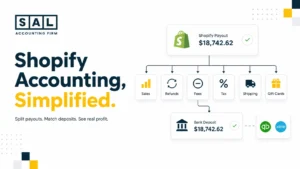
Poor bookkeeping can make an ecommerce store look profitable while cash disappears and tax balances quietly build. The numbers may look complete, but that doesn’t mean they reflect what’s happening behind each order and payout.
At SAL Accounting, we look beyond bank deposits to sales, fees, refunds, inventory, payouts, and taxes. Keep reading before your next financial decision—the report you trust could already be pushing you toward the wrong move.
Test the profit behind your sales: Enter your current numbers into SAL’s Ecommerce EBITDA Calculator.
Quick Takeaways
- Poor bookkeeping can make profit look higher or lower than it really is.
- A matching bank balance does not prove that sales, fees, refunds, and GST/HST were recorded correctly.
- Missing bills, uncategorized transactions, and mixed personal spending can distort both cash flow and tax.
- Monthly reconciliations make it easier to catch problems before they affect pricing, inventory, or filings.
- The earlier the books are cleaned up, the easier it is to rebuild reliable reports.
What Counts as Poor Bookkeeping in an Ecommerce Business?
Poor bookkeeping means your financial records are incomplete, incorrectly categorized, unsupported, delayed, or not properly reconciled. Your accounting software may still generate a polished profit and loss statement. That doesn’t guarantee the figures are reliable.
For example, every Shopify payout may appear in your bank feed. The bank balance matches, so the month looks finished. But the books could still be missing:
- Gross sales
- Discounts
- Refunds
- Payment-processing fees
- Chargebacks
- GST/HST collected
- Currency adjustments
The bank balance may be correct while revenue, profit, and tax are not.
The CRA expects businesses to maintain organized records and supporting documents that explain their transactions, income, expenses, and tax position. Here’s how common bookkeeping gaps affect the wider business.
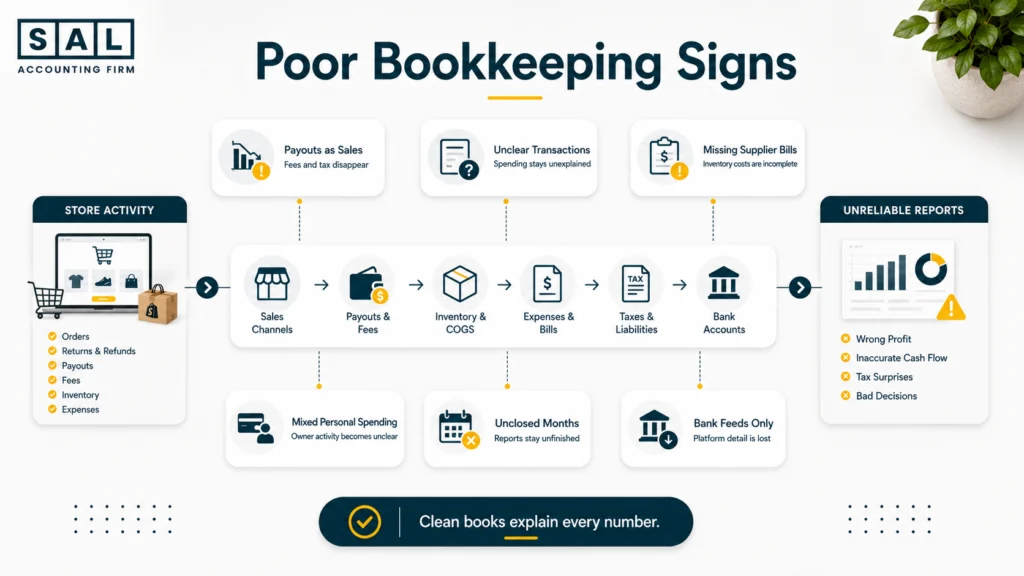
| Bookkeeping problem | What appears in the books | What gets hidden | Main risk |
|---|---|---|---|
| Payouts booked as sales | Deposits equal revenue | Fees, refunds and tax | Distorted profit |
| Transactions left unresolved | Costs sit uncategorized | Actual spending | Incomplete reports |
| Supplier bills are missing | Only cash payments appear | Inventory and tax details | Incorrect COGS |
| Personal spending is mixed in | All payments look business-related | Owner activity | Unclear cash flow |
| Books aren’t closed monthly | Reports appear complete | Missing adjustments | Weak decisions |
A timing difference isn’t automatically poor bookkeeping. Processor holds, payout delays, returns, and currency conversions can create legitimate gaps. The warning sign is when nobody can trace and explain the difference.
Many of these issues begin with ordinary shortcuts. The most common DIY ecommerce bookkeeping risks become more serious as sales volume, inventory, and tax obligations grow.
How Poor Bookkeeping Distorts Your Profit
Profit depends on sales and expenses being complete, correctly categorized, and recorded in the right period.
When those pieces are unreliable, your report may still show a final profit number. The problem is that you can’t safely use it to make decisions about:
- Product pricing
- Advertising budgets
- Inventory orders
- Hiring
- Discounts
- Owner withdrawals
SAL’s ecommerce bookkeeping services focus on reconciling platforms, processors, inventory, banks, and tax accounts rather than treating each deposit as a complete sale.
1. Booking Deposits as Sales
An ecommerce payout isn’t the same as revenue.
Imagine an Ontario Shopify store with this weekly activity:
- Product sales before HST: $14,800
- HST collected: $1,924
- Product refunds before HST: $900
- HST reversed on refunds: $117
- Processing fees: $510
- Final payout: $15,197
If the full $15,197 deposit is recorded as sales, the bookkeeping hides the separate revenue, refund, tax, and fee amounts.
The correct records should show:
- Net product revenue: $13,900
- Net HST collected: $1,807
- Processing fees: $510
- Cash received: $15,197
The bank balance is identical in both versions. The reported profit and HST balance are not.
Shopify also states that its payout reconciliation report reflects transactions, fees, and payouts—not accounting revenue.
See what each payout is costing you: Compare transaction and plan costs with the Shopify Fee Calculator.
The Shopify order financial lifecycle shows how sales, tax, refunds, fees, and settlements should connect before the payout reaches the bank.
2. Leaving Transactions Uncategorized
An uncategorized transaction should be temporary. Sometimes a charge remains in the bank-feed review screen and never enters the books. In other cases, it gets posted to a vague account such as:
- Uncategorized Expense
- Suspense
- Miscellaneous
- Ask My Accountant
The amount may reduce profit, but the report still doesn’t explain where the money went. For example:
- Meta advertising sits in Miscellaneous
- Inventory deposits are recorded as office supplies
- Bank transfers are treated as revenue
- Software paid personally is missing
- Loan repayments are recorded entirely as expenses
A consistent process for categorizing ecommerce transactions keeps these errors from spreading into margins, tax balances, and cash-flow reports.
Pro tip: Review uncategorized transactions by value, not only by count. One incorrectly classified inventory payment may matter more than dozens of small software charges.
3. Ignoring Refunds and Adjustments
Refunds, chargebacks, reserves, returns, and reimbursements don’t all receive the same accounting treatment.
A refund normally reduces sales and may reverse GST/HST. A chargeback may reverse revenue and create an additional processor fee. A returned item may need to go back into inventory if it can still be sold.
A processor reserve is different. The cash may still belong to the business even though it hasn’t reached the bank.
When these items are ignored, sales and profit may appear too high. When they are grouped into one general expense account, the total may look closer, but you lose visibility into:
- Return rates
- Chargeback costs
- Damaged inventory
- Processor holds
- Marketplace reimbursements
Those aren’t just bookkeeping details. They can point to pricing, product, or fulfilment problems.
Also read: “Hidden Ecommerce Expenses That Reduce Profit Margins”
Case Study: How Maya in Roncesvalles Finds the Gap Between Profit and Cash1
Maya runs a Shopify apparel store from Roncesvalles in Toronto. Her books show a 21% net profit margin, but the bank balance keeps falling. She assumes inventory is using the cash, although her reports can’t show how much is actually tied up in stock.
The Problem
Shopify payouts are recorded as sales. Processing fees, refunds, chargebacks, and HST aren’t separated. Several advertising costs paid using Maya’s personal card are also missing.
What We Do
We rebuild six months of platform and processor activity, reconcile each payout, record owner-paid expenses, and separate inventory purchases from the cost of items sold.
The Result
Maya’s corrected margin is 14%. It’s lower, but it’s useful. She can now reserve enough for HST, adjust her inventory orders, and stop promoting a high-sales bundle that produces very little profit.
How Poor Bookkeeping Disrupts Cash Flow
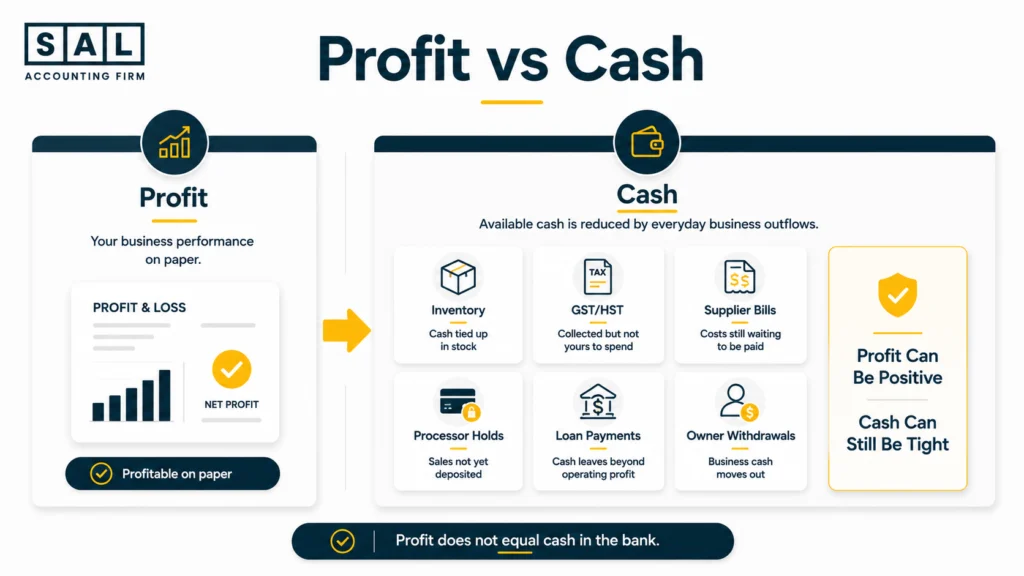
Profit and cash flow answer different questions. Profit shows whether revenue exceeded expenses. Cash flow shows when money entered and left the business. A profitable ecommerce store may still feel short on cash because money is:
- Tied up in inventory
- Held by a payment processor
- Reserved for GST/HST
- Used to repay financing
- Committed to supplier bills
- Withdrawn by the owner
Poor bookkeeping doesn’t create every cash-flow problem. It makes the cause much harder to identify.
1. Mixing Business and Personal Expenses
Mixing personal and business transactions affects expenses, cash, and owner balances at the same time.
A business expense paid personally. The cost may never enter the company books, making profit look too high.
A personal purchase paid by the company. Cash leaves the business, but the purchase may be incorrectly deducted as an operating expense.
A transfer between business and personal accounts. The transfer may be an owner contribution, withdrawal, reimbursement, or shareholder transaction—not sales or a normal expense.
Separate accounts reduce this confusion. Comparing business bank accounts for ecommerce sellers is a useful starting point when personal and company spending still overlap.
Pro tip: Add a short note whenever you pay a business cost personally. Record the supplier, purpose, amount, and whether the business should reimburse you.
2. Not Closing the Books Monthly
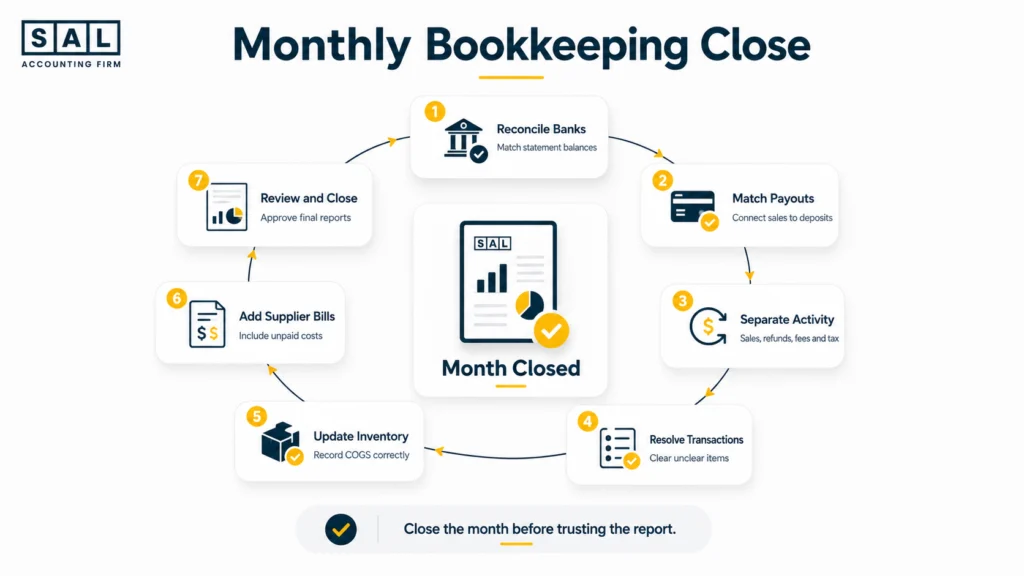
Entering transactions isn’t the same as completing the month. A proper monthly close should include:
- Reconciling banks and credit cards
- Matching platform sales to payouts
- Separating fees, refunds, and tax
- Reviewing unresolved transactions
- Updating inventory and COGS
- Recording unpaid supplier bills
- Reviewing loans, taxes, and owner balances
Without this process, a February report may be generated while February supplier bills, inventory adjustments, and final payouts are still missing. The report says February at the top, but it isn’t a complete February report.
The Shopify month-end close checklist covers the recurring checks needed before treating a month as finished.
3. Relying Only on Bank Feeds
A bank feed confirms that cash moved. It doesn’t explain what happened before the money reached the bank. One payout may contain:
- Several days of sales
- GST/HST collected
- Refunds
- Processing fees
- Chargebacks
- Currency adjustments
- Processor reserves
- Payout corrections
It may also exclude activity handled through PayPal or another payment method. The bank feed should be the final checkpoint, not the only source used to record revenue. Proper ecommerce payment reconciliation connects sales activity, processor statements, and bank deposits without losing the detail behind them.
For stores with more complex settlements, SAL’s Shopify accounting services provide a recurring process for separating and reconciling that activity.
How Poor Bookkeeping Creates Tax Problems
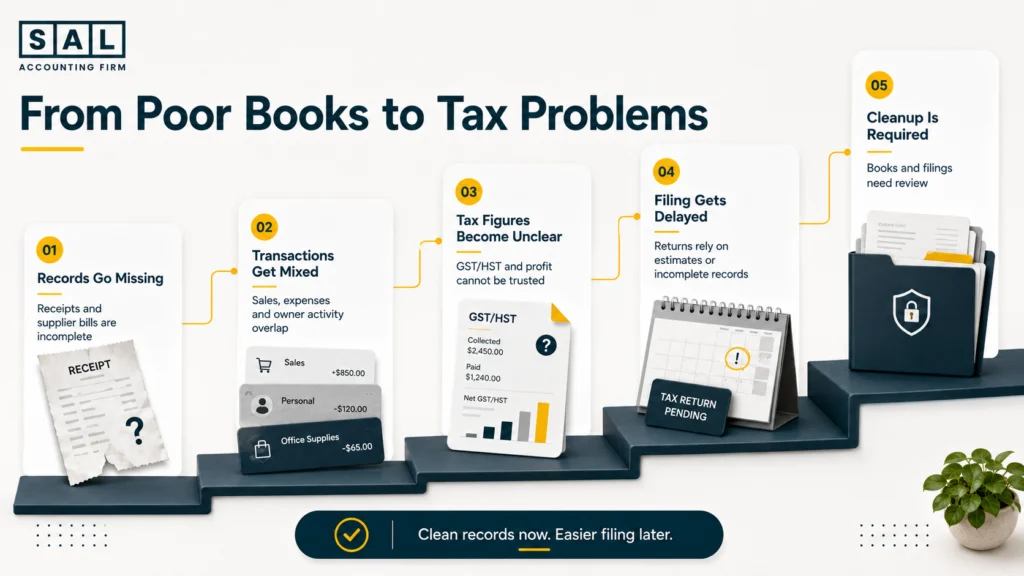
Poor bookkeeping can result in both overpaid and underpaid tax. You may overpay when valid expenses or input tax credits are missing. You may underpay when revenue or GST/HST collected hasn’t been recorded correctly. Both problems can exist in the same accounting file.
1. Missing Receipts and Supplier Bills
A bank statement proves that money moved. It may not establish:
- What was purchased
- Why it was purchased
- Whether it was for the business
- How much GST/HST was charged
- Whether it related to inventory
- Whether part of the purchase was personal
The CRA requires businesses to retain sales invoices, purchase invoices, and other supporting records for GST/HST returns and input tax credit claims.
Missing supplier bills may cause:
- Inventory to be understated
- COGS to be incorrect
- Accounts payable to be incomplete
- Freight and duties to be missed
- Input tax credits to be overlooked
This is especially important for product-based businesses. The way inventory landed costs are recorded affects inventory value, gross margin, and the cost assigned to each product.
Prepare the file before deadlines arrive: Work through the Tax Document Checklist for Ecommerce Stores.
2. Personal and Business Expenses Mixed Together
At tax time, your accountant needs to separate:
- Deductible business expenses
- Personal purchases
- Owner withdrawals
- Shareholder transactions
- Business costs paid personally
- GST/HST eligible for recovery
One accidental personal purchase usually isn’t the main concern. These mistakes happen.
The problem is a repeated pattern without receipts, descriptions, or consistent treatment.
The list of common ecommerce business expenses may reveal categories you’ve missed, but each deduction still needs a clear business purpose and supporting record.
3. Late Filings and Unsupported Tax Figures
Messy books don’t automatically create a penalty. However, they can delay filing or leave a business unable to confirm how much it owes.
The CRA may charge a late-filing penalty when a GST/HST return is overdue and has an amount owing.
Waiting until the filing deadline to investigate old differences also makes the cleanup harder. Platform reports may be spread across multiple periods, documents may be missing, and unusual transactions are harder to remember.
A structured approach to preparing an ecommerce business for tax season reduces the amount of last-minute reconstruction.
Case Study: How Omar in Port Credit Rebuilds a Tax-Ready Year2
Omar operates an Amazon and Shopify home-goods brand from Port Credit in Mississauga. His books are nine months behind, supplier invoices are spread across several inboxes, and GST/HST filings were prepared using marketplace deposits.
The Problem
The accounting file doesn’t agree with Amazon, Shopify, the bank, or the returns already filed. Tax collected is mixed with revenue, and several inventory payments have no supporting supplier bills.
What We Do
We rebuild sales and payouts by channel, collect missing invoices, record owner-paid expenses, and reconcile GST/HST accounts to each return and payment.
The Result
Omar’s year-end work proceeds using reconciled figures instead of estimates. Missing expenses and input tax credits are identified, and any periods that may require adjustment are clearly documented.
Amazon settlements contain their own mix of sales, fees, refunds, reserves, and reimbursements. Dedicated bookkeeping for Amazon sellers keeps that activity from being reduced to one bank deposit.
Signs Your Books Are Already Behind
Your books are functionally behind when they can’t support current decisions or upcoming filings. Look for these warning signs.
| Warning sign | Likely cause | Main risk | First check |
|---|---|---|---|
| Revenue closely matches deposits | Payouts booked as sales | Fees and tax hidden | Trace one payout |
| Profit rises while cash falls | Inventory or liabilities missing | Overspending | Review balance sheet |
| Refunds appear unusually low | Refunds aren’t separated | Margin overstated | Compare platform reports |
| COGS barely changes | Inventory entries are stale | Product profit distorted | Review stock movement |
| GST/HST differs from returns | Tax entries are incomplete | Unexpected balance | Reconcile filings |
| Uncategorized costs keep growing | Transactions aren’t resolved | Weak expense reporting | Review largest amounts |
Other signs include:
- Old processor balances that never clear
- Supplier bills that appear only when paid
- Owner transfers recorded as sales or expenses
- Inventory that doesn’t match warehouse records
- Reports that change significantly at year-end
- Numbers you don’t trust enough to use
Also read: “Signs Your Ecommerce Brand Needs a Better Bookkeeper”
A Real Example, Walked Through
Assume an Ontario Shopify store has the following activity during one month:
- Product sales before HST: $48,000
- HST collected: $6,240
- Refunds before HST: $3,000
- HST reversed on refunds: $390
- Processing fees: $1,500
- Net payout: $49,350
Here’s how one payout can create two very different reports.
| Line item | Actual activity | Bank-feed-only books | Correct treatment |
|---|---|---|---|
| Gross sales | $48,000 | Not separated | Sales revenue |
| HST collected | $6,240 | Included in revenue | Tax payable |
| Refunds | ($3,000) | Not separated | Reduce revenue |
| HST reversed | ($390) | Not separated | Reduce tax payable |
| Processing fees | ($1,500) | Missing | Operating expense |
| Bank payout | $49,350 | Recorded as sales | Match through clearing |
Now assume the store also has:
- COGS of $19,000
- Other expenses of $12,000
Bank-feed-only profit
$49,350 − $19,000 − $12,000 = $18,350
Correct profit
$45,000 − $1,500 − $19,000 − $12,000 = $12,500
Profit is overstated by $5,850.
That $5,850 also represents the net HST collected before any eligible input tax credits.
The bank balance still matches perfectly.
That’s why a reconciled bank account doesn’t automatically mean sales, profit, and tax are correct.
The Shopify payment reconciliation process shows how a clearing account connects sales activity to the final bank deposit.
How to Get Your Books Back on Track
Messy books don’t always need to be rebuilt from the beginning. Start with a focused cleanup.
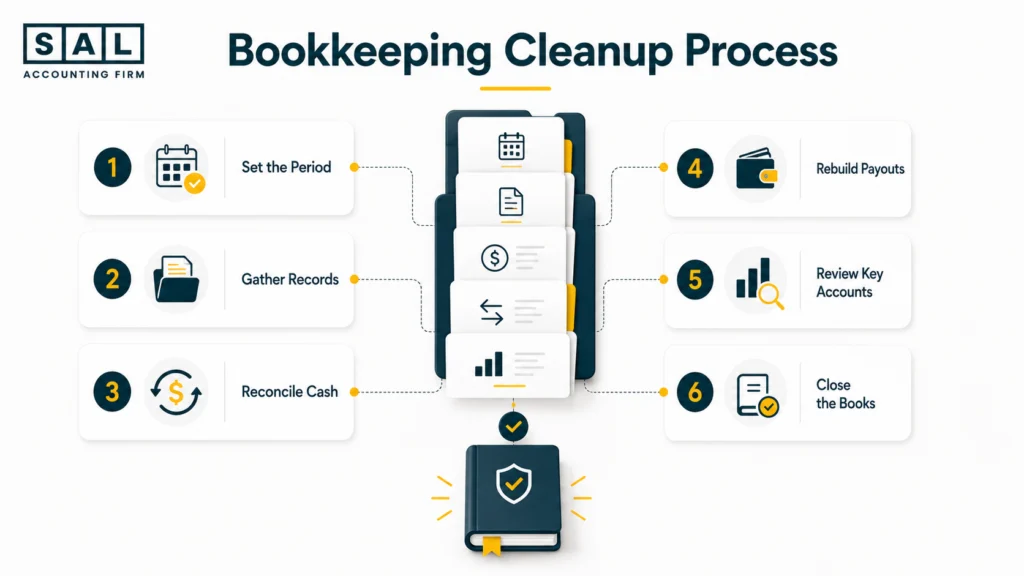
1. Choose the Cleanup Period
Set a clear start and end date. For example, rebuild January through June, approve the June closing balances, and begin a proper monthly process in July.
2. Gather the Source Records
Collect:
- Bank and credit card statements
- Shopify or Amazon reports
- Payment-processor statements
- Supplier bills and receipts
- Inventory records
- Loan statements
- Filed tax returns
- Owner transaction details
The CRA generally requires business records and supporting documents to be kept for six years from the end of the last tax year they relate to, although some records may need to be kept longer.
3. Reconcile Cash Accounts
Match each bank and credit card balance to the official statement. This identifies missing, duplicated, or incorrectly dated transactions. It confirms cash movement, but it doesn’t prove the categories are correct.
4. Rebuild the Sales-to-Bank Trail
For each platform and processor, separate:
- Gross sales
- Discounts
- Refunds
- GST/HST
- Fees
- Chargebacks
- Reserves
- Adjustments
- Net payouts
Each payout should be traceable from the original sales activity to the processor and then to the bank.
5. Review Inventory and Tax Accounts
Update inventory and COGS, then reconcile GST/HST, loans, payables, and owner balances.
Don’t use a general journal entry simply to make an unexplained balance disappear. That makes the report look cleaner without fixing the original problem.
6. Close the Corrected Period
Once the balances have been reviewed:
- Approve the closing figures
- Lock completed periods
- Document recurring entries
- Set monthly deadlines
- Begin a consistent close process
When another accountant will maintain the file, a structured ecommerce accounting records transfer prevents reports, opening balances, and platform access from getting lost.
Still Not Sure Whether Your Books Are Telling the Truth?
Start with one month, one payout, or one report that doesn’t make sense. Can your books clearly connect platform sales, refunds, processing fees, GST/HST, inventory, bank deposits, and reported profit? Some businesses need a short catch-up. Others need a historical cleanup or a more dependable monthly process.
Bring us the figures you can’t explain and book a consultation. We’ll identify what needs attention without making the process more complicated than it needs to be.