Shopify fees can take a bigger bite out of profit than the advertised processing rate suggests. On a $50 Canadian online order, Shopify Payments alone currently works out to about 3.4% on Basic, 3.2% on Grow, and 3.0% on Advanced before your plan, apps, or other payment costs are included.
At SAL Accounting, the useful number is your store’s total effective Shopify fee percentage. Read on to see where Shopify is really taking a bite out of your margin—and what you can do about it.
Use SAL’s Shopify Fee Calculator to estimate what your current order value and payment setup are costing you.
Quick Takeaways
- Shopify Payments processing is usually the biggest Shopify-related cost that increases with every sale.
- The fixed 30¢ charge makes payment fees more expensive as a percentage of revenue on lower-value orders.
- Your Shopify subscription becomes less significant as a percentage of revenue as the store grows.
- Using an outside payment provider can add another 0.2%–2% Shopify transaction fee, depending on your plan.
- App subscriptions and usage charges can quietly push your total Shopify cost higher.
- The number worth tracking is total Shopify-related costs as a percentage of Shopify sales, not just the advertised card rate.
What Shopify Fees Actually Reduce Your Profit Margin?
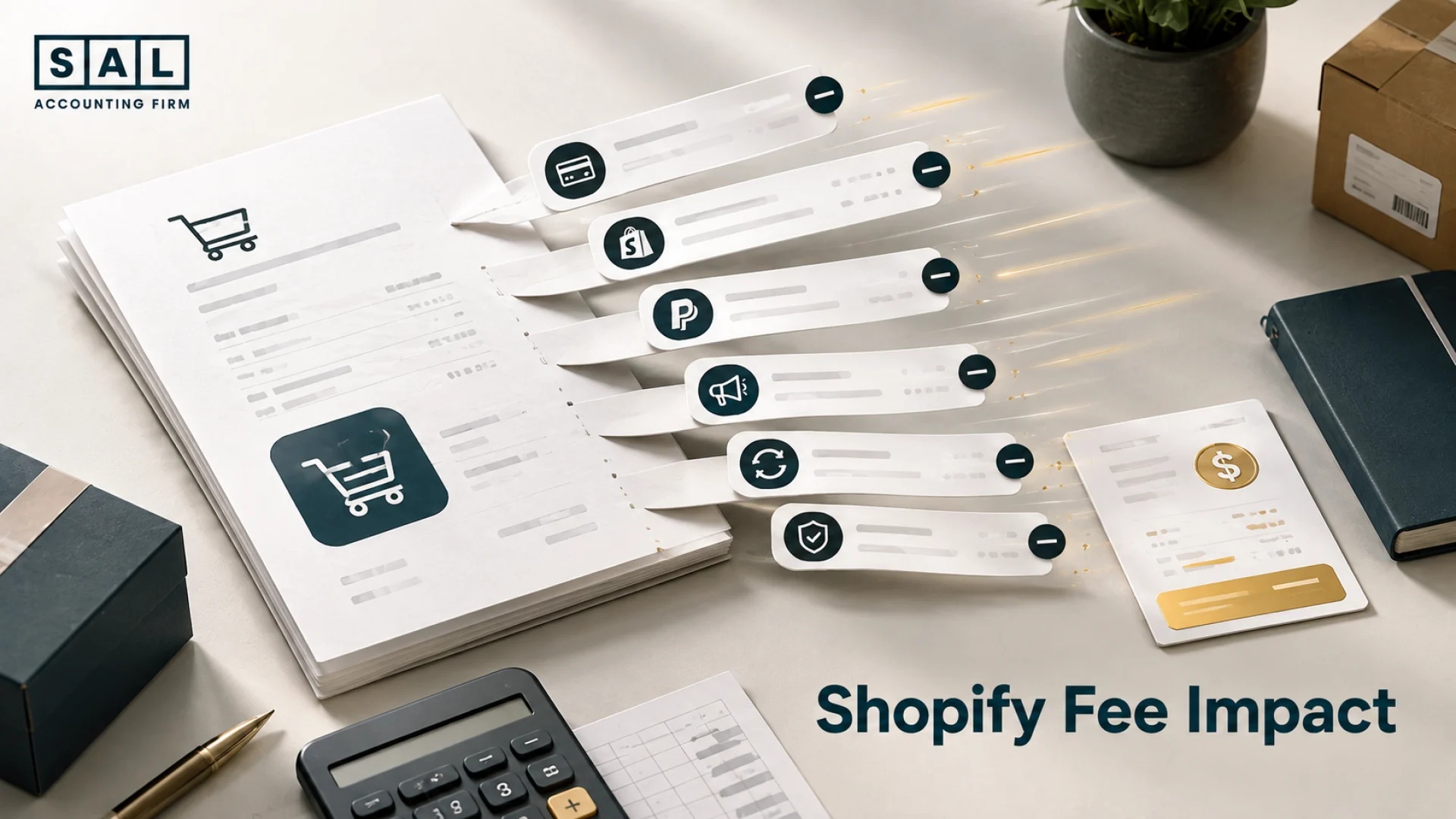
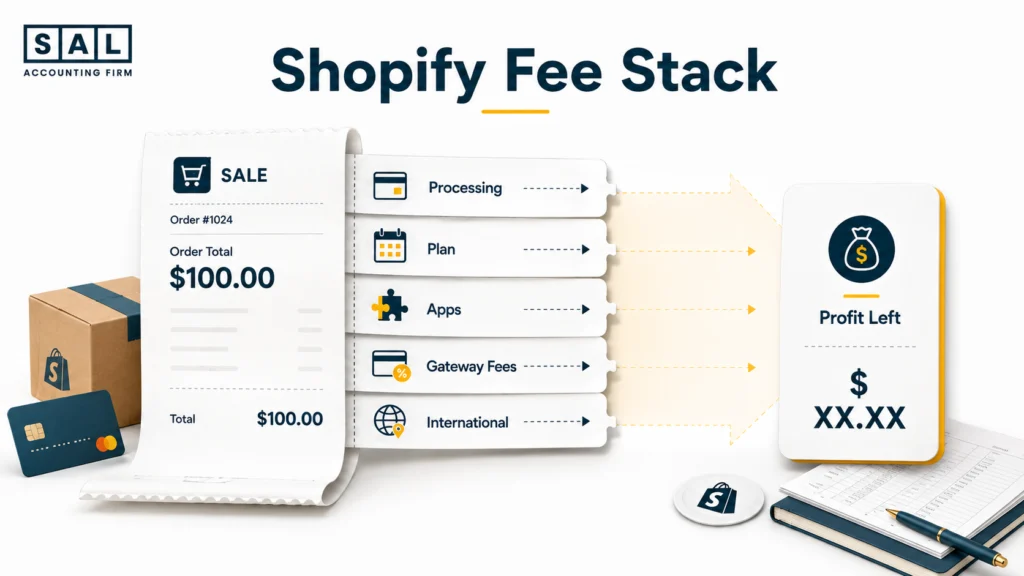
When someone says Shopify costs 2.8%, they are usually talking about one part of the picture: payment processing. Your real Shopify-related cost can include payment processing, the monthly plan, apps, third-party transaction fees, and international or currency-related charges.
| Shopify Cost | How It Is Charged | Changes With Sales? | Margin Impact |
|---|---|---|---|
| Payment processing | % + fixed amount | Yes | Usually significant |
| Third-party transaction fee | Additional % when applicable | Yes | Can be significant |
| Shopify plan | Monthly subscription | No | More noticeable at low revenue |
| Apps | Fixed or usage-based | Sometimes | Can accumulate quietly |
| International/currency costs | Depends on order/payment | Yes | Important for cross-border stores |
Shopify Payments Processing Fees
For Canadian merchants, Shopify currently lists standard online card rates of 2.8% + 30¢ CAD on Basic, 2.6% + 30¢ on Grow, and 2.4% + 30¢ on Advanced. International and Amex online card rates are currently higher at 3.5% + 30¢, 3.4% + 30¢, and 3.3% + 30¢ respectively.
That fixed 30¢ matters more than it looks. Take a $50 Canadian domestic-card order on Basic:
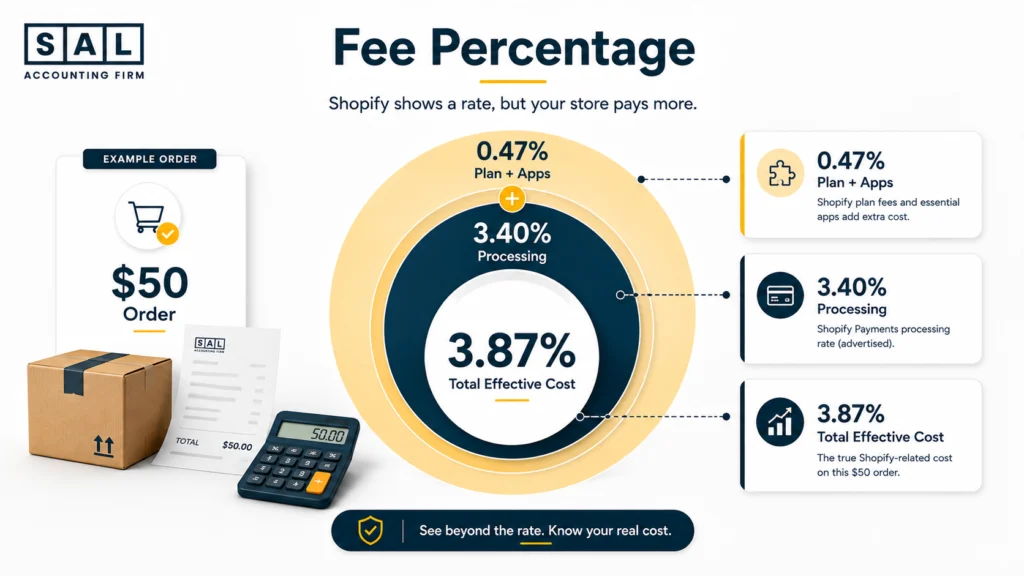
2.8% × $50 = $1.40
Fixed processing fee = $0.30
Total = $1.70
The effective processing cost is therefore 3.4% of the order, even though the percentage rate says 2.8%.
This is one of the reasons Shopify profit calculation mistakes often start with small charges being left outside the margin calculation. Your product can look profitable while payment and platform costs are quietly taking another few points from every order.
Third-Party Transaction Fees
Shopify Payments and third-party transaction fees are not the same thing. When qualifying transactions are processed through Shopify Payments, Shopify says you are not charged the additional third-party transaction fee. If you use another payment provider, Shopify’s current Canadian pricing lists additional transaction fees of:
- Basic: 2%
- Grow: 1%
- Advanced: 0.6%
- Plus: 0.2%
Those charges are separate from whatever the outside payment processor charges you.
So if another gateway advertises a lower processing rate, do not compare that rate with Shopify Payments in isolation. Compare the combined cost after Shopify’s additional transaction fee.
Shopify Plan Cost
Your plan fee behaves differently because it is relatively fixed rather than increasing with every order. Shopify currently lists Canadian annual-billing prices of $37 per month for Basic, $99 for Grow, and $389 for Advanced. On monthly billing, the current prices are $49, $132, and $517 respectively. Consider the $37 Basic annual-billing cost:
- At $1,000 monthly sales = 3.7% of revenue
- At $10,000 monthly sales = 0.37%
- At $50,000 monthly sales = 0.074%
Nothing happened to the subscription price. The business simply became large enough that the fixed cost represented a much smaller share of sales.
- Also read: “Shopify Pricing in Canada”
Shopify App Costs
App costs tend to creep up because they rarely arrive as one big decision. You might add a $19 review app, then a $39 subscription tool, a $49 upsell app, a $29 bundling app, and a $79 reporting tool.
Suddenly, five fairly modest subscriptions cost $215 every month.
Shopify says bills can contain recurring charges such as plan and app subscriptions, pay-per-use charges such as transaction fees, and one-time charges such as theme purchases. Shopify also notes that while most app charges appear on the Shopify bill, some third-party apps bill merchants directly outside Shopify. Those external charges will not appear on the normal Shopify invoice.
That makes a regular app audit important.
If your app stack costs $300 per month and the store sells $10,000, apps alone are costing 3% of sales. At $100,000 of sales, the same $300 is only 0.3%.
This is why hidden Shopify costs are more useful to review together than one subscription at a time.
International Payments and Currency Costs
International growth can change the picture again. Canadian Shopify stores currently face higher listed online card rates for international cards than standard domestic cards, so a store with a large U.S. or international customer base may have a different effective payment rate from a Canada-only store.
Currency also matters. Shopify says Canadian Advanced and Plus stores can receive payouts in multiple currencies, and Multi-Currency Payout fees can apply when additional payout accounts or non-domestic currencies are involved. Shopify also changed how currency-conversion and Multi-Currency Payout fees are calculated on April 6, 2026: the fee is now calculated directly on the gross order amount.
For Canadian brands selling across the border, it is worth separating domestic and international payment costs rather than applying one blended percentage to everything.
How Much Do Shopify Fees Actually Take From Each Sale?
Instead of asking, “What does Shopify charge?” ask:
What percentage of my Shopify sales is going toward Shopify-related costs?
A simple management formula is:
Total Shopify-related costs ÷ Net Shopify sales × 100
Depending on what you want the number to tell you, Shopify-related costs may include:
- Payment-processing fees
- Third-party transaction fees
- Shopify subscription
- Apps
- Relevant currency or international payment costs
This is your effective Shopify fee percentage.
It is not an official Shopify rate. It is a management number that shows what your actual store setup is costing you.
A Worked Example on a $50 Order
Suppose a Canadian Shopify store has:
- Basic on annual billing
- 1,000 orders per month
- $50 average order value
- Standard domestic card payments through Shopify Payments
- $200 per month of apps
Monthly sales are:
1,000 × $50 = $50,000
| Cost | Calculation | Monthly Cost | % of Sales |
|---|---|---|---|
| Shopify Payments | 2.8% + 30¢ × 1,000 | $1,700 | 3.40% |
| Basic plan | Annual billing | $37 | 0.07% |
| Apps | Monthly app stack | $200 | 0.40% |
| Total | — | $1,937 | 3.87% |
The store’s simplified effective Shopify-related cost is therefore about 3.9% of revenue.
That does not mean Shopify Payments charges 3.9%. Payment processing is only one part of the number. The extra 0.5 percentage points in this example come from the plan and app stack.
And we still have not deducted product cost, fulfilment, shipping subsidies, returns, or advertising. Those costs are why payment fees need to feed into a proper ecommerce contribution margin calculation rather than sitting in a miscellaneous expense bucket nobody reviews.
Why Low-AOV Stores Feel Shopify Fees More
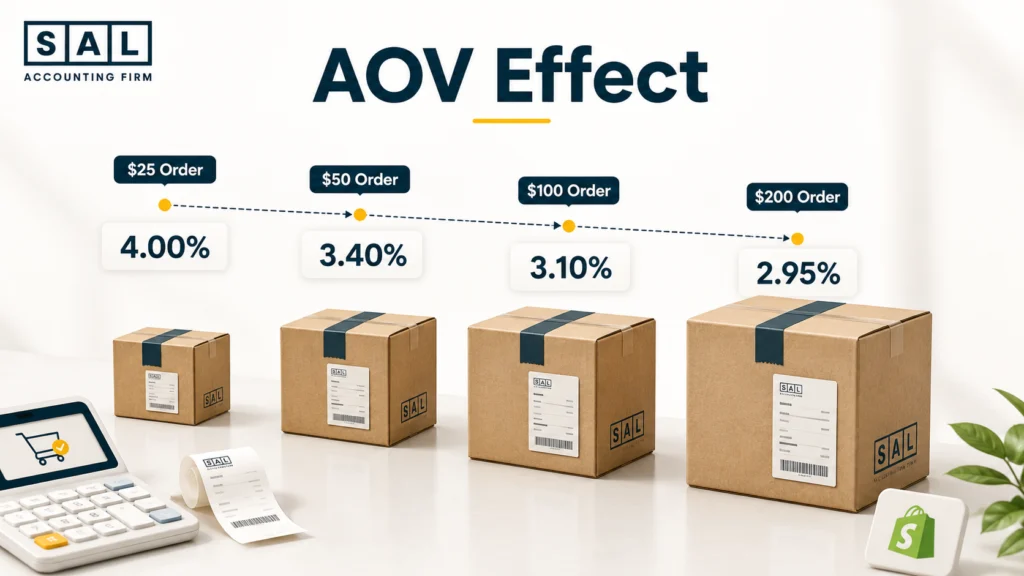
The percentage part of a processing rate scales with the order. The fixed 30¢ does not. Using the current Basic domestic rate:
| Order Value | Processing Cost | Effective Processing Rate |
|---|---|---|
| $25 | $1.00 | 4.00% |
| $50 | $1.70 | 3.40% |
| $100 | $3.10 | 3.10% |
| $200 | $5.90 | 2.95% |
A $25 order loses a full 4% to payment processing in this example, while a $200 order loses 2.95%.
That matters for businesses built around inexpensive products. Two stores can use the same Shopify plan and still experience meaningfully different payment economics because one has a $30 AOV and the other has a $150 AOV.
This is also why raising AOV can improve ecommerce product profitability without Shopify changing its rates at all.
Case Study: How Sophie in Roncesvalles Finds Her Real Shopify Fee Percentage1
Sophie runs an online accessories brand from Roncesvalles in Toronto. Her average order is $36, and she processes about 1,400 orders in a typical month.
The Problem
Sophie thinks Shopify costs roughly 2.8% because she is on Basic and uses Shopify Payments. Her calculation leaves out the 30¢ fixed component, her subscription, and roughly $320 of apps each month.
What We Do
We separate her Shopify-related charges and compare the total against monthly Shopify sales. At $50,400 of hypothetical monthly revenue, standard domestic payment processing is about $1,831. Adding a $37 Basic subscription and $320 of apps takes the total to roughly $2,188.
The Result
Sophie’s effective Shopify-related cost is about 4.3% of sales, rather than 2.8%. She now has a more useful number for reviewing pricing, AOV, contribution margin, and product profitability.
The difference between 2.8% and 4.3% may look small until it repeats across thousands of orders. That is exactly why negative ecommerce contribution margin can become much more damaging as volume grows.
- Read more: “Why Your Online Store Isn’t Making Money”
Which Shopify Plan Makes the Most Financial Sense?
A higher Shopify plan costs more each month, but processing rates and third-party transaction fees generally fall as you move up the main plans. Here is Shopify’s current Canadian pricing structure.
| Plan | Monthly Billing | Annual-Billing Equivalent | Standard Online Card Rate | Third-Party Fee |
|---|---|---|---|---|
| Basic | $49 | $37/mo | 2.8% + 30¢ | 2% |
| Grow | $132 | $99/mo | 2.6% + 30¢ | 1% |
| Advanced | $517 | $389/mo | 2.4% + 30¢ | 0.6% |
| Plus | From $3,400 | — | Most competitive rates | 0.2% |
The middle plan is currently called Grow, rather than the older “Shopify” plan name.
When Does a Higher Shopify Plan Save Money?
A lower processing rate does not automatically mean you should upgrade. You need to compare the extra subscription cost with the amount you would save on transactions.
Take Basic vs. Grow using annual billing. Basic costs $37 per month. Grow costs $99. The difference is $62.
The current standard online card percentage falls from 2.8% to 2.6%, a difference of 0.2 percentage points.
$62 ÷ 0.002 = $31,000
So, looking only at that 0.2% processing difference, about $31,000 of eligible monthly card volume produces roughly $62 of savings. Now compare Grow and Advanced. Advanced costs $290 more per month on annual billing:
$389 − $99 = $290
Again, the standard online rate falls by 0.2 percentage points:
$290 ÷ 0.002 = $145,000
The simplified processing-only break-even is therefore around $145,000 of eligible monthly card volume. These are not universal upgrade thresholds. Your card mix, international orders, outside payment methods, and the additional features you need can all change the answer.
The point is that plan selection should be calculated using your own store numbers.
- Also read: “Best Accounting Software for Shopify Sellers”
Where Shopify Fees Quietly Become More Expensive
Not every margin leak is visible on the pricing page. Some of the bigger problems appear when several smaller charges interact.
An Outside Payment Gateway Looks Cheaper
Suppose an outside processor offers a Basic-plan store:
2.3% + 25¢
That looks better than Shopify Payments at 2.8% + 30¢. On an $80 order, the outside processor would cost:
2.3% × $80 + $0.25 = $2.09
The current Basic Shopify Payments cost on the same simplified domestic order would be:
2.8% × $80 + $0.30 = $2.54
So the outside processor appears to save 45¢. But Basic currently carries a 2% Shopify third-party transaction fee when that fee applies. Another 2% of $80 is $1.60, which takes the combined payment cost to:
$2.09 + $1.60 = $3.69
That is roughly 4.6% of the $80 order. The payment processor had the lower advertised rate. The combined setup had the higher cost.
Your App Stack Keeps Growing
Apps often become expensive through accumulation rather than one bad purchase. A store adds a review app, a subscription app, a reporting app, an upsell app, and an inventory tool, then rarely comes back to ask whether they all still earn their monthly cost. Review:
- Apps nobody uses anymore
- Multiple apps solving the same problem
- Usage-based charges that grew with order volume
- Features Shopify now provides natively
- Apps billed outside Shopify that never appear on your Shopify bill
Because some apps charge merchants directly, reviewing only the Shopify invoice can miss part of the software stack.
A better question than “Is this $29 app expensive?” is: “What are all of our ecommerce software costs as a percentage of sales?”
That gives you a cleaner way to review ecommerce business expenses as the company grows.
International Sales Can Change the Effective Rate
A Canadian store selling mostly domestic orders and another selling heavily into the U.S. may be on the same Shopify plan but face different effective costs.
Part of that comes from Shopify’s higher published international-card rates. Part can come from currency conversion or payout setup. Shopify’s Canada documentation also distinguishes between customer payment currency and payout currency, so the currency a customer uses is not necessarily the currency that reaches your bank.
That is why international orders should be reviewed separately once they become a meaningful share of sales.
Refunds Can Leave Costs Behind
A refund reverses revenue, but it does not necessarily put every original fee back in your pocket.
Shopify states that when a refund is issued, credit-card fees and currency-conversion fees are not returned. Shopify also states that applicable third-party transaction fees are not refunded when an order is refunded.
That is especially relevant for categories with high return rates. If you process the payment, incur fees, then refund the sale, the economics are not the same as if the order had never happened.
Returns therefore belong in the wider conversation around hidden ecommerce expenses that reduce profit margins.

Case Study: How Liam in Port Credit Finds Two Layers of Payment Fees2
Liam runs a home-products store from Port Credit in Mississauga. He moves to an outside payment provider because its advertised processing rate looks lower than Shopify Payments.
The Problem
Liam compares the payment processors directly but leaves Shopify’s additional third-party transaction fee out of the calculation.
What We Do
We compare the full cost on the same hypothetical $80 order. His outside provider charges $2.09. Shopify’s additional 2% Basic transaction fee adds roughly another $1.60.
The Result
His combined payment cost becomes about $3.69 per order, compared with roughly $2.54 using the current standard Basic Shopify Payments rate. Across 900 similar orders, that difference is more than $1,000 in one month.
Understanding the complete Shopify order financial lifecycle makes those deductions easier to spot than simply looking at the amount deposited in the bank.
How Can You Reduce Shopify Fees Without Hurting Growth?
The goal is not to eliminate every Shopify cost. A $100 app that produces $1,000 of additional contribution is not a problem. A $100 app nobody uses is. Start with the costs where you can actually make a decision:
- Compare the full cost of Shopify Payments with any outside payment provider.
- Audit recurring and usage-based apps regularly.
- Calculate the break-even point before changing Shopify plans.
- Track AOV because fixed payment charges affect smaller orders more heavily.
- Review domestic and international payment costs separately.
- Include retained payment costs when reviewing returns.
- Track your effective Shopify fee percentage every month.
Pro tip: Do not upgrade your Shopify plan just because the payment-processing percentage is lower. Calculate what the lower rate would actually save at your real sales volume first.
Shopify fees should also be reviewed alongside SKU profitability and the rest of the costs attached to each sale. Saving $50 on software does very little if your core order economics are losing thousands through fulfilment, advertising, or poorly priced products.
How Should Shopify Fees Appear in Your Books?
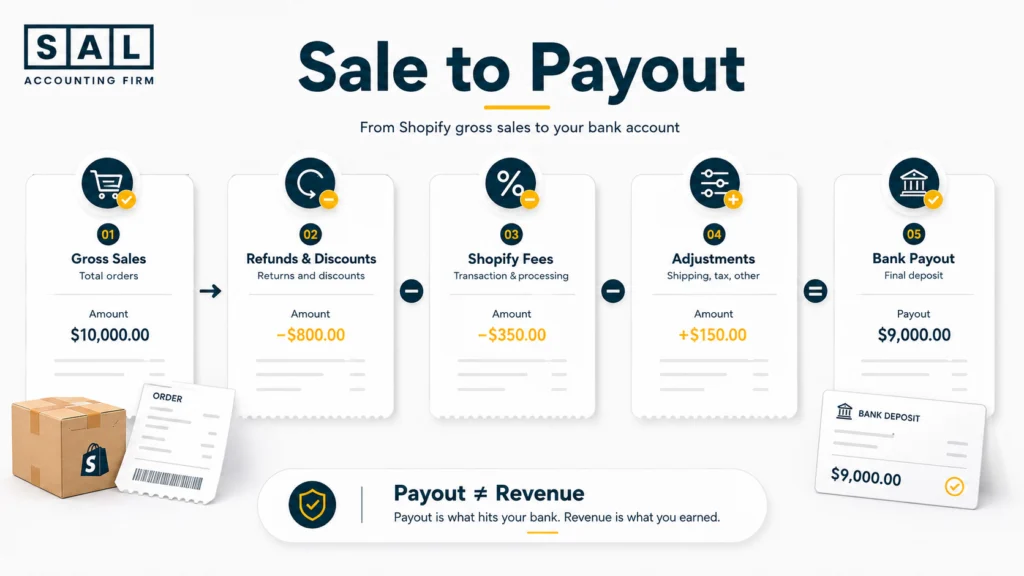
The fee calculation becomes much harder to trust if your bookkeeping starts with the net deposit. Suppose customers generate $100,000 of gross sales. After refunds, payment fees, and other adjustments, Shopify sends $94,000 to the bank. If the bookkeeping simply records:
Revenue = $94,000
you have lost visibility into the $6,000 difference. A better accounting trail preserves the movement:
Gross Sales → Refunds & Discounts → Fees → Other Adjustments → Payout
Shopify provides a payout reconciliation report that breaks Shopify Payments balance activity into components such as fees and payouts.
Your accounting should then reconcile that activity with what eventually arrives in the bank.
SAL’s Shopify payment reconciliation guide goes deeper into why the payout and the revenue number are not the same thing.
Keep Shopify Fees Visible
Shopify and payment costs should not disappear into a vague miscellaneous bucket if you want useful management reporting. Keeping them visible allows you to move from gross sales through product cost and then see exactly how payment, fulfilment, advertising, and other variable costs affect what is left.
A useful internal view might look like:
- Gross sales
- Refunds and discounts
- Net sales
- COGS
- Gross margin
- Shopify/payment fees
- Fulfilment
- Advertising
- Contribution margin
This is where consistent Shopify transaction categorization becomes important. If the same fee lands in different accounts every month, comparing margins becomes unnecessarily difficult.
Reconcile the Payout Instead of Treating It as Revenue
A Shopify payout is the end of a transaction flow, not the original sale.
The payout may reflect sales, refunds, payment fees, adjustments, and timing differences. Shopify itself points merchants to its payout reconciliation reporting for reviewing balance activity, fees, and payouts.
That means the bookkeeping process needs to reconcile Shopify activity with the bank rather than using the deposit as a shortcut for revenue.
The same principle sits behind ecommerce reconciliation best practices: the books should explain how you moved from customer sales to the cash actually received.
For brands where payouts, fees, refunds, inventory, and COGS have become difficult to keep aligned, SAL’s Shopify accounting services are built around those ecommerce-specific transaction flows.
- Also read: “Shopify Accounting Best Practices”