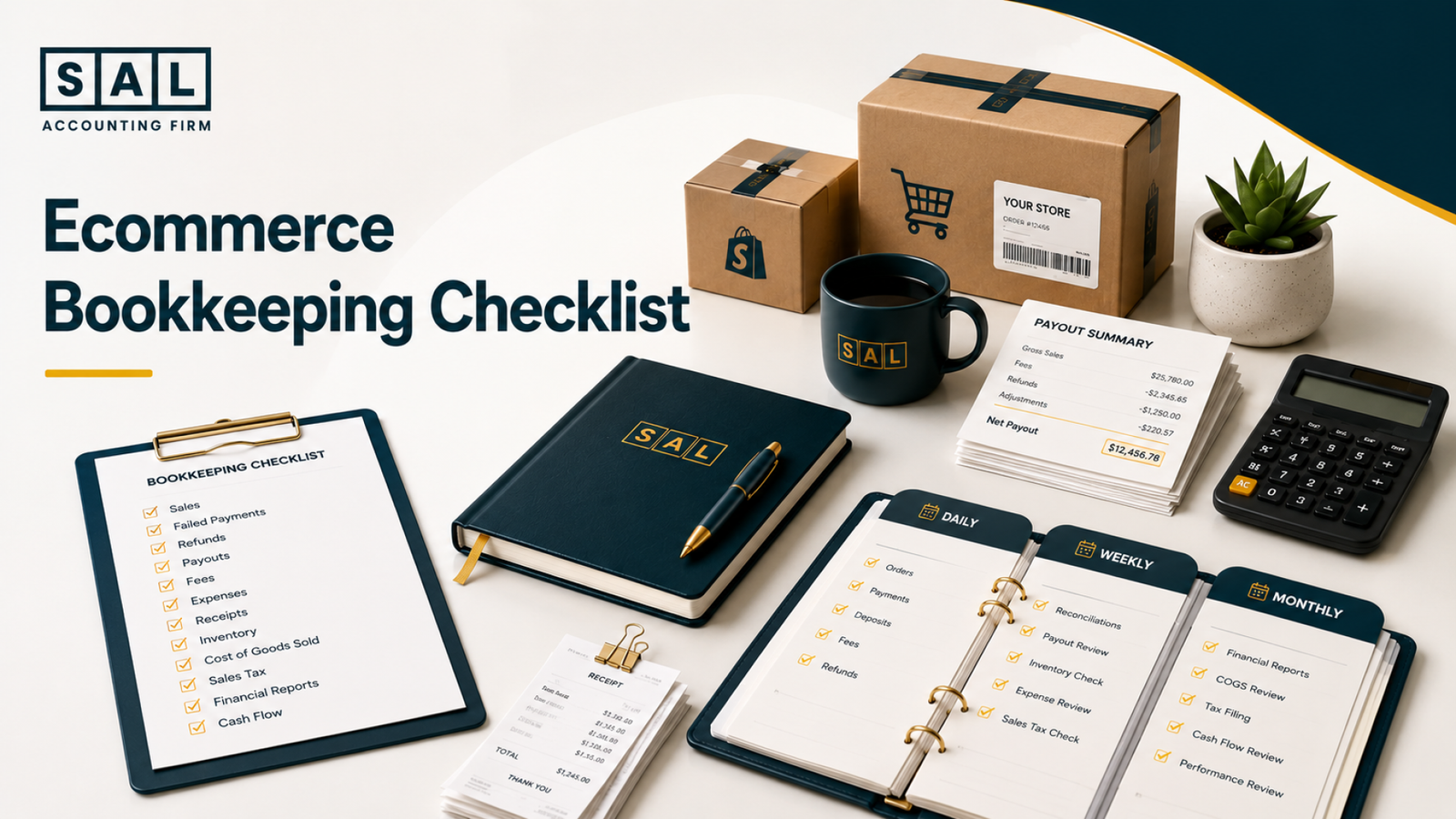
An ecommerce bookkeeping checklist gives every sale, payout, refund, fee, inventory movement, and tax balance a regular time to be checked. That full sales-to-cash trail is how SAL Accounting approaches ecommerce bookkeeping, because a healthy bank balance doesn’t automatically mean clean books.
Keep reading and save this checklist: the tasks most often skipped are usually the ones quietly distorting profit, cash, and tax before store owners notice.
Run one recent order through the Shopify Fee Calculator before reviewing your next payout. The amount Shopify keeps may be larger than it looks.
Quick Takeaways
- Check sales activity, failed payments, and refunds every day.
- Review payouts, expenses, receipts, and uncategorized transactions weekly.
- Reconcile banks, processors, sales, fees, inventory, COGS, and tax monthly.
- Record gross sales separately from the net cash deposited into your bank.
- Track margin by product and channel once your store begins to grow.
- Consider outsourcing when your books arrive late or no longer explain what happened.
For a monthly process built around online-store data, SAL’s ecommerce bookkeeping in Toronto covers the full trail from platform sales to financial reports.
Why Every Ecommerce Business Needs a Bookkeeping Checklist
Ecommerce bookkeeping is different because one order can create activity across several systems.
The storefront records the sale. A payment processor collects the money. A marketplace deducts fees. A fulfilment provider ships the product. Inventory changes. Tax becomes payable. Then a net payout reaches the bank several days later. Your accounting system needs to bring those pieces back together.
The CRA’s business-record guidance also expects business income and expenses to be supported by organized records. A bank-feed description alone may not show what was sold, which fees were deducted, or whether tax was included.
Why Ecommerce Bookkeeping Is Different
Consider a store that records the following activity during one payout period:
- Product and shipping revenue: $42,800
- GST/HST collected: $5,564
- Customer refunds: $2,300
- Platform and payment fees: $1,420
- Net cash deposited: $44,644
Recording the $44,644 deposit as sales would mix tax into revenue while hiding the refunds and fees. The bank balance may still reconcile, but the profit and sales reports would not explain what actually happened.
A complete ecommerce payment reconciliation process starts with the source reports and works toward the deposit, not the other way around.
What Happens When Bookkeeping Falls Behind
Late bookkeeping usually creates several smaller problems at once:
- Payouts stop matching the accounting software.
- Refunds disappear inside net deposits.
- Marketplace and processing fees go unrecorded.
- Tax collected gets mixed with revenue.
- Inventory purchases are treated like normal expenses.
- Cost of goods sold falls behind.
- Reports arrive too late to guide decisions.
- Tax preparation turns into a cleanup project.
These problems are common. They usually come from the way ecommerce platforms move and report money, not from the owner deliberately doing something wrong.
How This Checklist Keeps Your Numbers Accurate
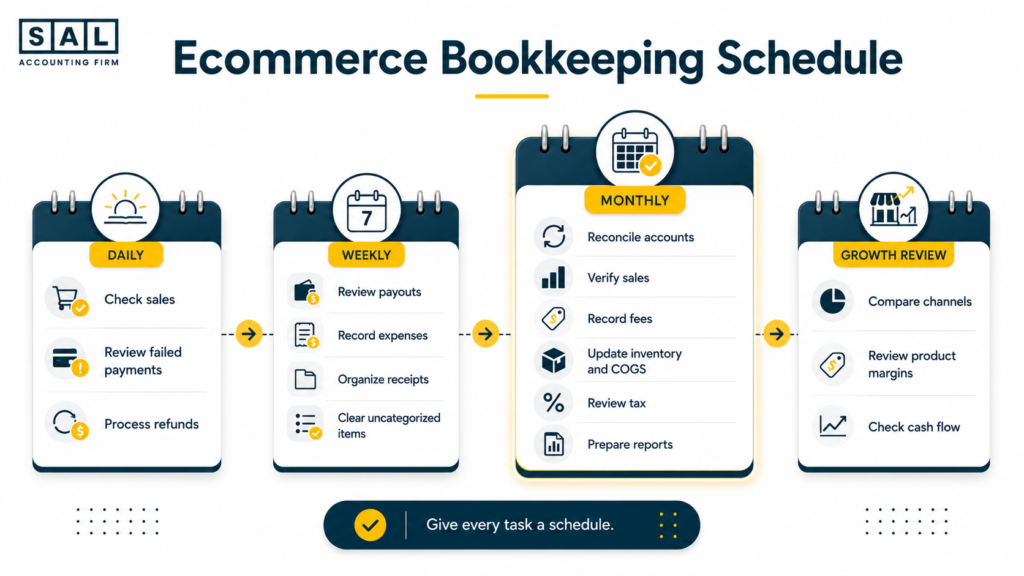
The checklist separates bookkeeping by urgency.
Daily checks catch customer and payment issues. Weekly checks keep transactions and documents under control. Monthly work proves that the platforms, processors, inventory records, bank, and books agree.
Here is the full schedule at a glance.
| Frequency | What to Check | Main Records | Warning Sign | Finished When |
| Daily | Sales, failed payments, refunds | Store and gateway dashboards | Unexplained order change | Exceptions are reviewed |
| Weekly | Payouts, expenses, receipts | Settlement reports and bank feeds | Deposit cannot be explained | Activity is categorized |
| Monthly | Accounts, sales, fees, inventory, tax | Statements and platform reports | Reports show different totals | Balances reconcile |
| Growth review | Channels, products, margins, cash | Management reports | Sales grow but cash stays tight | Decisions use reliable data |
The checklist works when every difference has an explanation. A forced adjustment that makes the numbers match without finding the cause is not a completed reconciliation.
Daily Ecommerce Bookkeeping Checklist for Online Stores
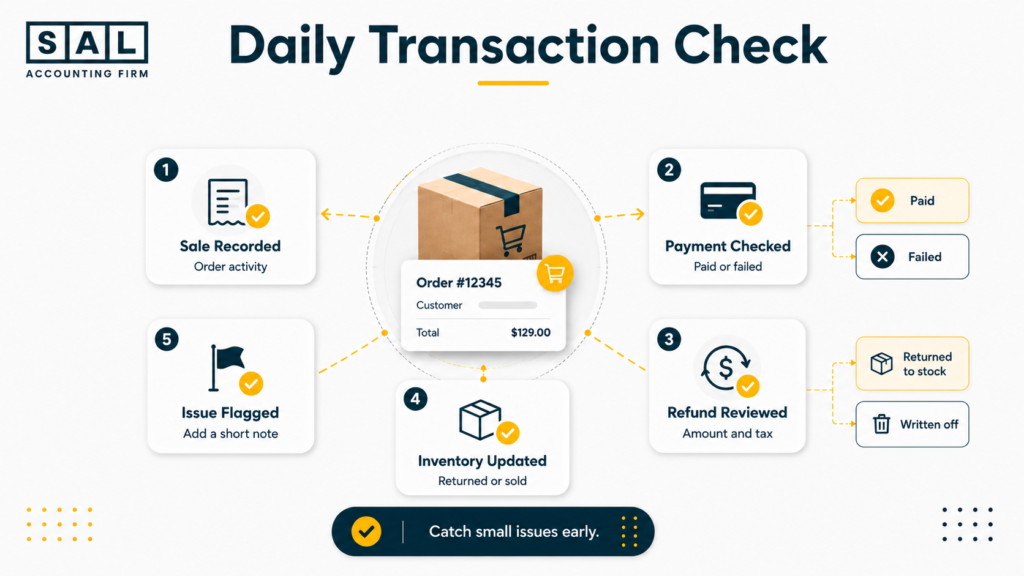
Daily bookkeeping should stay short. You are checking for exceptions that could affect a customer, an order, or the money you expect to receive.
Check Sales Activity
Review:
- Order count
- Gross sales
- Discounts
- Shipping charged
- Tax collected
- Cancellations
- Payment methods
Compare the day with your usual order pattern. A sudden drop could come from a checkout issue. A sudden increase could come from a promotion, duplicate orders, or unusual traffic.
You do not need to investigate every small change. Flag anything large enough that you may forget the reason by month-end.
Pro tip: Add a short note beside unusual sales days. “Email promotion launched” is much easier to understand now than three weeks later.
Review Failed Payments
A failed payment can affect the order, reserved inventory, and customer experience. Confirm:
- Whether the customer was charged
- Whether the order was created
- Whether payment was authorized or captured
- Whether inventory was reserved
- Whether the customer received a failure notice
Do not count an order as completed revenue simply because it appears in the store dashboard. Confirm that the payment reached the correct status.
Process Refunds
Record refunds separately from new sales.
For Shopify Payments, Shopify’s refund documentation explains that refunds are generally deducted from the next available payout. That means a refund processed today may reduce a deposit connected with later orders. Keep track of:
- The original order
- The refunded amount
- Tax reversed
- Returned inventory
- Non-refundable fees
- The payout affected
Consistent ecommerce transaction categorization keeps refunds visible instead of burying them inside lower deposits.
Weekly Ecommerce Bookkeeping Checklist
Weekly bookkeeping stops routine activity from turning into a month-end pile. Choose one set day each week. Review the previous week’s payouts, expenses, receipts, and unresolved transactions while the details are still easy to remember.
Review Marketplace and Payment Payouts
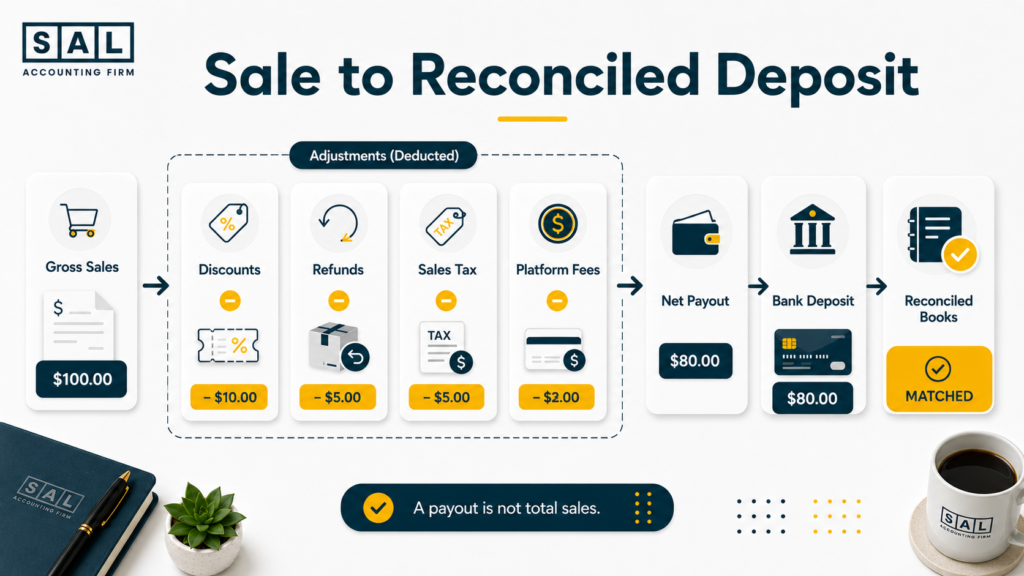
A payout is the final cash transfer. It is not automatically your sales total. Break each payout into:
- Gross sales
- Discounts
- Refunds
- Marketplace fees
- Payment-processing fees
- Chargebacks
- Reserves
- Tax
- Currency adjustments
- Net cash deposited
Shopify’s payout reconciliation report specifically states that the report reflects Shopify Payments balance activity and is not a revenue statement for accounting purposes.
Match the payout batch to the bank deposit. Do not try to match one customer order to one deposit when several orders were grouped together.
Pro tip: Create a separate clearing account for each major gateway. Shopify Payments, PayPal, Stripe, and Amazon should not all sit in one unexplained balance.
Shopify payouts still refusing to line up? SAL’s Shopify accounting and bookkeeping focuses on the sales, fee, refund, tax, and payout entries behind each deposit.
- Read more: “Shopify Payment Reconciliation Guide”
Record Business Expenses
Review bank and credit card activity and assign each transaction to the right account. Common ecommerce expenses include:
- Advertising
- Marketplace subscriptions
- Payment fees
- Shipping
- Fulfilment
- Packaging
- Software
- Contractors
- Professional fees
- Warehousing
- Customs and duties
- Currency-conversion fees
A complete ecommerce business expense list makes it easier to keep similar costs in the same category from month to month.
Be careful with inventory purchases. Products bought for resale are not always treated like ordinary operating expenses. Unsold units may remain in inventory until they are sold or written off.
Organize Receipts
Save invoices, receipts, supplier statements, shipping documents, and proof of payment in one system. The CRA’s expense-record guidance states that expense claims need supporting vouchers and receipts. Use a consistent file name such as:
2026-07-08 – Vendor – $468.20 – Packaging
That one habit makes documents much easier to search later.
Clear Uncategorized Transactions
Uncategorized transactions should be temporary. For each item, ask:
- Who was paid?
- What was purchased?
- Was it business or personal?
- Does it relate to inventory?
- Was sales tax charged?
- Is it a transfer?
- Was it already recorded elsewhere?
Do not guess just to clear the list. Add a question or request the missing receipt.
Hidden ecommerce expenses often stay invisible because small charges are left uncategorized, grouped into broad accounts, or deducted before a payout reaches the bank.
Case Study: How a King West Shopify Store Fixes Its Payout Records1
A growing apparel brand in King West, Toronto, sells through Shopify and receives money through Shopify Payments, PayPal, and a buy-now-pay-later provider. The owner reviews the bank balance each week but records every deposit as sales. As order volume rises, Shopify, the accounting software, and the bank begin showing different totals.
The Problem
Refunds, fees, tax, and payout timing are mixed into the deposits. The owner can see that sales are growing but cannot explain why reported revenue and cash keep moving differently.
What We Do
We separate gross sales, discounts, refunds, tax, payment fees, and net cash. Each provider receives its own clearing account, and the settlement reports are matched to the related bank deposits.
Result
Every deposit can be traced back to its platform activity. The owner can review sales, fees, tax, and cash separately instead of treating one payout as the full financial story.
Monthly Ecommerce Bookkeeping Checklist
The monthly close is where you prove that the bookkeeping is complete. Bank reconciliation is one part of the process. Ecommerce businesses also need to reconcile payment processors, marketplaces, sales reports, inventory, fees, tax accounts, and financial statements.
Reconcile Your Accounts
Reconcile every account that receives, holds, or spends business money:
- Bank accounts
- Credit cards
- Shopify Payments
- PayPal
- Stripe
- Amazon settlements
- Foreign-currency accounts
- Loans
- Lines of credit
- Clearing accounts
The ending balance in your books should match the statement for the same date.
Ecommerce reconciliation best practices also require you to investigate old clearing balances, duplicated entries, missing transfers, and timing differences before closing the month.
Compare Sales Reports With Your Books
Pull a sales report from every active channel and compare it with recorded revenue. Check:
- Gross product sales
- Shipping income
- Discounts
- Returns
- Refunds
- Gift cards
- Tax
- Marketplace-collected amounts
- Currency conversions
Use the same dates and time zone. A platform using Eastern Time may not match a processor using UTC when transactions fall near midnight or month-end.
Record Marketplace and Payment Fees
Marketplace fees often disappear when bookkeeping starts with the bank feed.
Example: Suppose a marketplace collects $68,500 from customers, deducts $4,900 in fees and $2,600 in refunds, then deposits $61,000.
Recording only $61,000 as revenue removes both the original sales and the costs deducted before deposit. The cash is correct, but revenue and expenses are both understated.
Record the settlement components separately before matching the final deposit.
Update Inventory and Cost of Goods Sold
Inventory is the cost of products the business still owns. Cost of goods sold, or COGS, is the cost attached to products that were sold. A simplified calculation is:
Opening inventory + purchases and applicable landed costs − closing inventory = cost of goods sold
For example:
- Opening inventory: $84,000
- Purchases and landed costs: $37,000
- Closing inventory: $96,000
- Cost of goods sold: $25,000
The CRA’s inventory and COGS guidance confirms that inventory is used when calculating cost of goods sold and net income.
Review damaged products, samples, giveaways, lost stock, returns, bundles, and inventory held by fulfilment partners. Each one can change the value.
- Also read: “How to Calculate COGS for Ecommerce Stores”
Review Sales Tax
Compare tax reports from each sales channel with the tax balances in your accounting software. Review:
- GST/HST collected
- Provincial sales tax
- QST
- U.S. sales tax, where applicable
- Marketplace-collected tax
- Input tax credits
- Payments or remittances
- Remaining tax payable
The CRA’s GST/HST information for businesses covers registration, collection, returns, remittances, and rebates.
Basically, tax collected from customers should not sit inside ordinary sales revenue. It needs its own account so you can see what the business earned and what may be owed.
The full GST/HST compliance process for ecommerce stores also needs to account for customer location, registrations, marketplace activity, and input tax credits.
Prepare Monthly Financial Reports
Prepare at least:
- A profit and loss statement
- A balance sheet
- A cash flow statement
Monthly ecommerce financial statements should answer practical questions:
- Did gross margin improve?
- Did advertising rise faster than sales?
- Are refunds increasing?
- How much cash is tied up in inventory?
- Are tax liabilities fully recorded?
- Which expenses changed significantly?
- Does profit make sense compared with store activity?
The reports are only useful after the accounts behind them have been reconciled.
Prepare Your Books for Your Accountant
A clean accountant package should include:
- Bank and credit card statements
- Platform sales reports
- Payout and settlement reports
- Inventory records
- Loan statements
- Tax reports
- Payroll summaries
- Receipts for unusual purchases
- Notes for large or one-time transactions
- Reconciled financial statements
Most Canadian business records generally need to be retained for the required period under the CRA’s record-retention rules. Keep the source documents behind summarized accounting entries, not just the final financial reports.
Read more: “How to Prepare Your Ecommerce Business for Tax Season”
This table keeps the monthly close focused on the records that need to agree.
| Monthly Task | Compare | Confirm | Common Gap | Final Output |
| Reconcile accounts | Books vs statements | Ending balances match | Missing or duplicate entries | Reconciled accounts |
| Verify sales | Platform vs ledger | Revenue is complete | Dates, refunds, discounts | Confirmed sales |
| Record fees | Settlements vs expenses | Every deduction is posted | Net deposits hide fees | Complete fee totals |
| Update inventory | Stock vs accounting | Units and value agree | Damaged or missing stock | Closing inventory |
| Record COGS | Units sold vs product cost | Cost follows sales | Purchases treated as expense | Reliable gross profit |
| Review tax | Platform vs tax ledger | Collected and owed agree | Tax recorded as revenue | Tax liability |
| Prepare reports | Final ledger | Month is complete | Open clearing balances | Monthly statements |
Pro tip: Set a monthly close deadline, such as the tenth business day. Without a deadline, “monthly” bookkeeping often becomes quarterly cleanup.
Ecommerce Bookkeeping Checklist for Growing Stores
A growing store needs more than correctly categorized transactions.
Once you sell through several channels, carry more inventory, or spend heavily on advertising, your books should show where profit and cash are coming from.
Track Sales by Channel
Separate activity for Shopify, Amazon, Etsy, wholesale, retail, and other channels. Track at least:
- Gross sales
- Discounts
- Refunds
- Marketplace fees
- Payment fees
- Advertising
- Fulfilment costs
- Channel contribution
The channel with the highest revenue may not produce the strongest return.
For Amazon-heavy businesses, bookkeeping for Amazon sellers in Toronto is structured around settlement reports, marketplace fees, FBA inventory, refunds, and channel reporting.
Review Product Margins
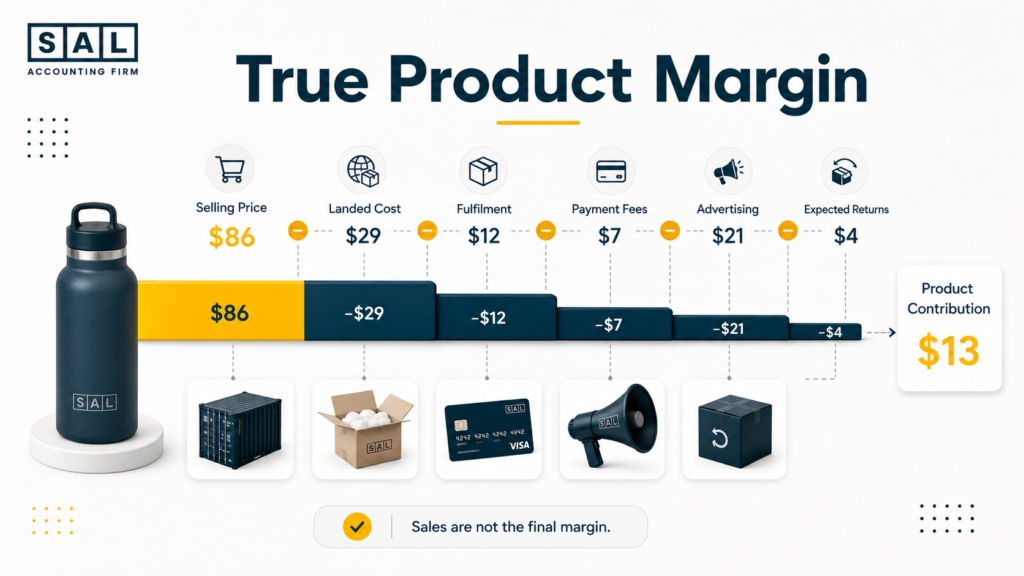
Product margin should include more than the supplier’s unit price. A useful calculation is:
Selling price − landed product cost − fulfilment − payment fees − advertising allocation − expected return cost = estimated product contribution
Example: Suppose a product sells for $86:
- Landed product cost: $29
- Fulfilment and packaging: $12
- Payment and marketplace fees: $7
- Advertising allocation: $21
- Expected return cost: $4
That leaves approximately $13 before general overhead.
An ecommerce contribution margin calculation makes it easier to compare products after the costs that move with each sale.
Pro tip: Review margin in dollars as well as percentages. A high-margin product that rarely sells may contribute less than a lower-margin product with steady volume.
Check Inventory Accuracy
Compare physical stock with:
- Shopify inventory
- Amazon inventory
- 3PL reports
- Warehouse records
- Purchase orders
- Accounting balances
Investigate:
- Damaged items
- Lost shipments
- Samples
- Giveaways
- Returns
- Bundles
- Receiving errors
- Stock in transit
Inventory mistakes affect both the balance sheet and cost of goods sold. That means the same stock problem can distort assets and profit at the same time.
Monitor Cash Flow
Profit and cash are not the same. A profitable store can still face a cash shortage when money is tied up in inventory, advertising, tax, reserves, or unpaid wholesale invoices. A practical cash flow forecast should include:
- Expected payouts
- Supplier deposits
- Inventory payment dates
- Advertising
- Payroll
- Tax payments
- Loan payments
- Software
- Warehousing
- Fulfilment costs
Use numbers from reconciled books rather than sales targets alone.
Case Study: How a Port Credit Store Gets a Clearer Product-Margin View2
An outdoor-products seller based in Port Credit, Mississauga, sells through Amazon and its own online store. Revenue continues to grow, but cash remains tight. Supplier invoices, advertising, marketplace fees, and shipping costs sit in different accounts, so the owner cannot tell which products are actually producing enough margin.
The Problem
Inventory purchases are treated as immediate expenses, COGS changes sharply between months, and Amazon activity is combined with direct-store sales. Popular products look successful, but their full costs are not visible.
What We Do
We separate activity by channel, organize marketplace and advertising fees, update landed product costs, and connect units sold with COGS. Upcoming supplier payments are also added to a rolling cash forecast.
Result
The owner can compare Amazon and direct-store performance, identify products with weak contributions, and plan inventory payments using a more realistic view of cash.
Is It Time to Outsource Your Ecommerce Bookkeeping?
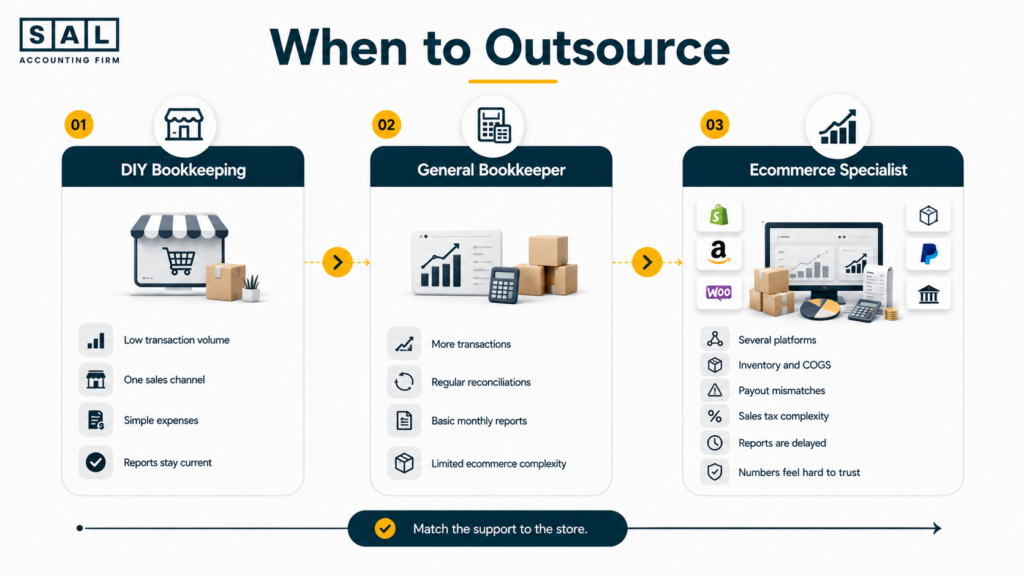
You do not need to outsource just because bookkeeping is time-consuming. The stronger reason is that the current process no longer produces timely, complete, and understandable reports.
Signs You Have Outgrown DIY Bookkeeping
Common signs include:
- Your books are more than one or two months behind.
- Payouts are still being recorded as sales.
- Bank balances reconcile, but processor balances do not.
- Inventory and COGS are based on estimates.
- You sell through several platforms or currencies.
- Tax accounts have unexplained balances.
- Monthly reports arrive too late to use.
- Your accountant spends year-end rebuilding the books.
- You avoid reviewing profit because the report feels unreliable.
- Bookkeeping takes time away from operations and growth.
These signs your ecommerce brand needs a better bookkeeper usually appear gradually. You may notice only one at first, then discover that the same setup affects several reports.
What an Ecommerce Bookkeeper Takes Off Your Plate
An ecommerce bookkeeper may manage:
- Platform and payment integrations
- Sales and settlement entries
- Bank and processor reconciliation
- Fee and refund tracking
- Expense categorization
- Receipt management
- Inventory and COGS entries
- Tax bookkeeping
- Month-end adjustments
- Financial reports
- Accountant-ready records
A completed checklist should also explain unresolved differences. A box marked “done” is not enough when a clearing account still contains an old balance.
How Specialist Bookkeeping Supports Better Decisions
A specialist follows the full ecommerce transaction:
Order → payment → refund or fee activity → payout → bank → inventory → COGS → financial reports
That creates better answers to practical questions:
- Which products create enough contribution?
- Which channel costs the most to operate?
- Why is cash falling while sales grow?
- How much tax is waiting to be paid?
- Can the store afford its next inventory order?
- Which costs rose this month?
At the end of the day, outsourcing should give you more than fewer bookkeeping tasks. It should give you reports that arrive on time and explain what is happening.
Final Thoughts: Make Every Ecommerce Number Traceable
A useful ecommerce bookkeeping checklist does not ask you to work on every financial task every day.
It gives each task a place.
Check customer and payment activity daily. Organize payouts, expenses, and documents weekly. Reconcile the full picture monthly. Then use the finished reports to understand margin, inventory, cash, and tax.
Your store’s numbers should not feel like separate stories told by the platform, the bank, and the accounting software. When those records no longer line up, book a consultation and bring the reports or deposits that are causing the confusion.