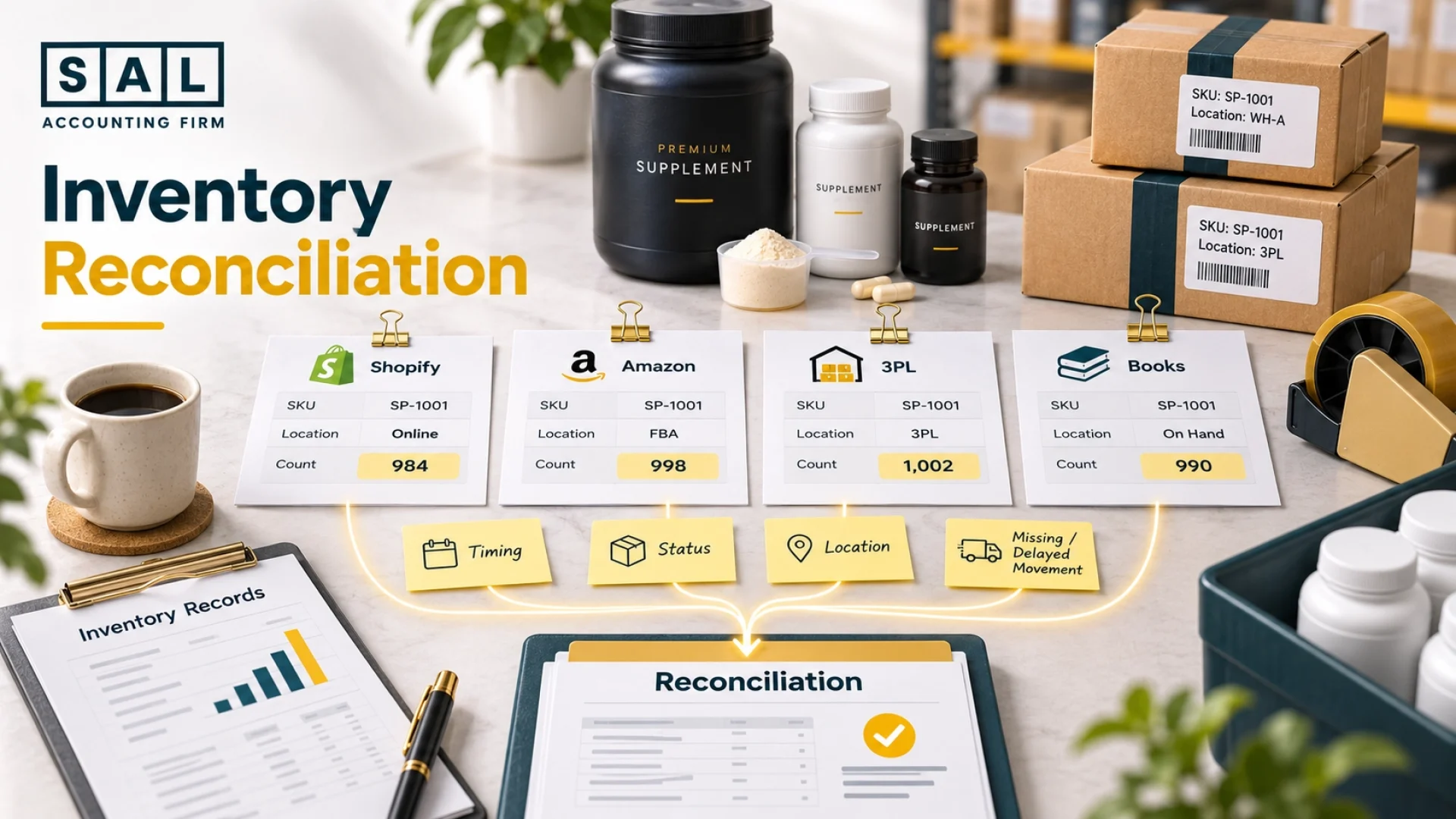
Shopify shows one inventory count, Amazon shows another, and your 3PL shows a third. That usually isn’t missing inventory. It’s movements recorded at different times, in different statuses, or not at all. The fix is to track every movement by SKU and location, then trace each gap to its cause.
SAL Accounting works through this every month for supplement brands. By the end, those three inventory counts will tell the same story.
Inventory errors flow straight into COGS and profit, so see what your numbers look like with the Ecommerce EBITDA Calculator.
Quick Takeaways
- Inventory counts differ across Shopify, Amazon, 3PLs, and your books because each tracks different locations, statuses, and dates.
- Reconcile each SKU at each location before adding up a company total.
- Every movement counts: receipts, sales, transfers, returns, samples, damage, and expiry.
- Check timing differences before treating a gap as missing inventory.
- Fix a gap where it started, and document every adjustment with evidence.
- Reconcile quantities first, then check their value.
Want inventory counts you can trust at every month-end? Our bookkeeping services for ecommerce brands reconcile Shopify, Amazon, your 3PLs, and your books every month, so your inventory counts hold up at every close.
Why Do Shopify, Amazon, 3PLs, and Your Books Show Different Supplement Inventory?
Each system tracks different locations, statuses, and dates, so their counts rarely match on their own. For a supplement brand, the gaps usually come from five places:
- Different locations: Your own warehouse, a 3PL, and an Amazon fulfillment centre each report only the inventory they hold.
- Different timing: Systems record the same movement on different days.
- Different statuses: One report counts reserved or damaged units, while another shows only inventory available for sale.
- Missing movements: Samples, returns, damage, and transfers get recorded in one system but not another.
- Different product codes: The same bottle can have one SKU in Shopify and another code at the warehouse.
A gap caused by timing or status isn’t a real shortage. A real error is a movement that’s missing, recorded twice, or entered incorrectly. Keeping each channel’s activity separate in your books makes these differences much easier to spot, which is the foundation of multichannel accounting for supplement brands.
What Should a Supplement Ecommerce Brand Map Before Reconciling Inventory?
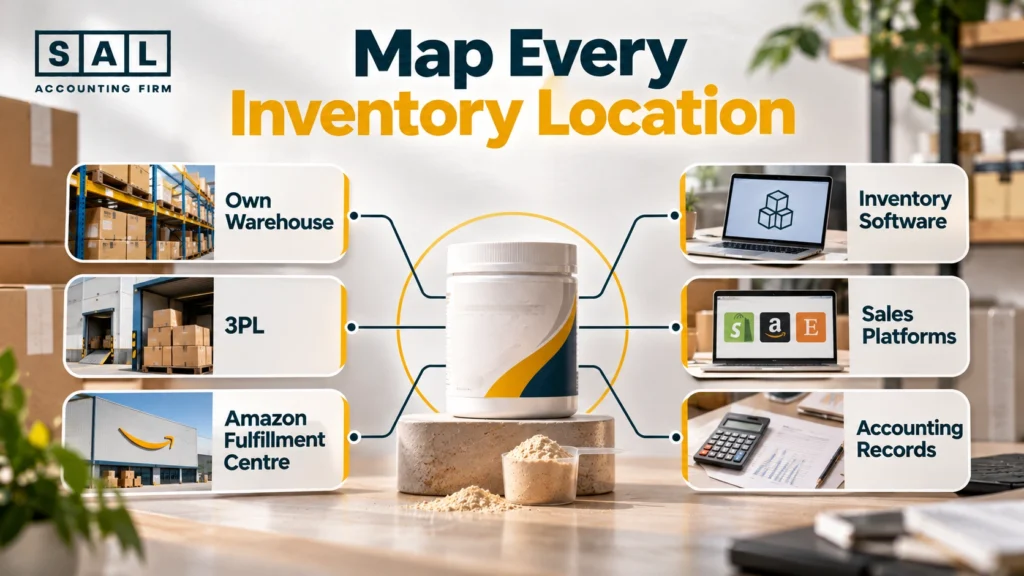
Map every place that holds or reports your inventory, so nothing gets counted twice or missed. Your inventory map should list:
- Your own warehouse: location, SKUs, and inventory status
- Each 3PL: what it stores, receives, ships, and its reporting cutoff time
- Marketplace fulfillment centres: inventory held by Amazon or other marketplaces
- Inventory software: which locations feed into it, and where its numbers come from
- Sales platforms: Shopify, Amazon, and other channels that record orders and reserved units
- Accounting records: the quantities and values in your books, and the period they cover
Then check what each report actually counts. A 3PL report showing 300 bottles available may leave out units that are reserved, awaiting inspection, or in transit. And if your inventory software pulls its numbers straight from the 3PL, adding both figures counts the same bottles twice. How each system feeds the others is worth reviewing when you choose inventory software for supplement brands.
Should a Supplement Brand Reconcile Inventory by SKU and Location?
Yes, reconcile each SKU at each location first, because a correct company total can hide a short warehouse.
Take one product: a 120-capsule vitamin D3 bottle. Some bottles sit at your Toronto 3PL, some at an Amazon fulfillment centre, and some are moving between the two. A company-wide total can look right even when one location is short and another is over.
Organize your records in this order:
SKU → Location → Inventory status → Movement history
Track bottles in transit separately until they arrive, so they’re never counted twice or missed.
When systems use different codes for the same bottle, a master SKU list links them. Labelling cases with a GS1-128 barcode, which can carry the product and lot number, helps every location scan and record the same item the same way.
How Do You Build an Inventory Movement Bridge for Each Supplement SKU?
Start with opening inventory at one location, add and subtract every movement, and you get the quantity that should be there.
Opening Inventory + Units Received − Units Sold − Other Removals + Valid Returns ± Transfers ± Supported Adjustments = Expected Ending Inventory
Here’s the vitamin D3 bottle at your main warehouse for one month:
| Movement | Units Added or Removed | Expected Units Remaining |
| Opening inventory | 5,000 | |
| Production received | +2,000 | 7,000 |
| Customer orders fulfilled | −1,400 | 5,600 |
| Samples distributed | −50 | 5,550 |
| Damaged units removed | −20 | 5,530 |
| Transfer to another location | −500 | 5,030 |
| Expected ending inventory | 5,030 |
The warehouse should hold 5,030 bottles. The 500 transferred bottles still belong to you, now at another location. Once they arrive, total company inventory is 5,530.
Receipts deserve a close look too. A co-packer may report 2,000 bottles produced while your warehouse receives 1,950, which is why it helps to reconcile each co-packer production run as it lands.
Which Inventory Reports Should a Supplement Brand Compare With Its Expected Inventory?
Compare your expected ending inventory with every report covering the same SKU, location, and period.
Depending on your setup, that can include 3PL reports, marketplace inventory reports, inventory software, sales platform reports, your accounting records, and physical counts. Before you compare any two, check:
| Check | What to Ask |
| Product | Do both reports mean the same bottle, even under different codes? |
| Location | Are both showing the same warehouse or fulfillment centre? |
| Cutoff | Do both show inventory up to the same date and time? |
| Status | Are you comparing the same kind of inventory, such as saleable units only? |
| Ownership | Does all the inventory belong to your business? |
| Duplicates | Could one report be pulling its numbers from the other? |
Say your bridge shows 5,030 bottles at the main warehouse, but the 3PL’s report shows 5,010. Don’t assume 20 bottles are missing. The 3PL’s report may only show available inventory, while 20 bottles sit in a damaged or quarantine status. If the 3PL’s total on-hand quantity is 5,030 (5,010 available plus 20 in quarantine), the gap is a status difference, not a shortage.
Amazon-held inventory needs its own records in your books, and the steps for that are laid out in Amazon FBA accounting best practices.
How Do Timing Differences Create Supplement Inventory Variances?
Two systems can record the same movement on different dates, creating a gap that fixes itself. This often happens when:
- Orders ship at month-end: Shopify marks an order fulfilled on March 31, but the 3PL records the shipment on April 1
- Supplier shipments are in transit: the supplier marks the order shipped, but the warehouse hasn’t received it yet
- Returns haven’t arrived: a refund is issued, but the product is still on its way back
- Transfers are in transit: one location records the units as sent, but the other hasn’t confirmed delivery
- Marketplace reports update late: inventory arrives at a fulfillment centre, but the report shows it later
Using that first example, at the March 31 cutoff, Shopify and the 3PL show different counts for the same shipment. No inventory is missing. Record both the date the inventory actually moved and the date each system recorded it. Then check the next report to confirm the gap closes.
How Should a Supplement Brand Reconcile Transfers Between 3PLs and Amazon?
Match what one location sent with what the other received, and keep anything still in transit separate. A transfer changes where your inventory sits. It doesn’t reduce what you own. For each transfer, record:
- Sending and receiving locations, SKU, and quantity shipped
- Ship date, receipt date, and quantity received
- Any shortages, damaged units, or rejected units
Say your Toronto 3PL sends 500 bottles to an Amazon fulfillment centre, but Amazon confirms only 480. Reduce the 3PL by 500 and add 480 to Amazon. Keep the other 20 as in transit or unresolved until you know what happened.
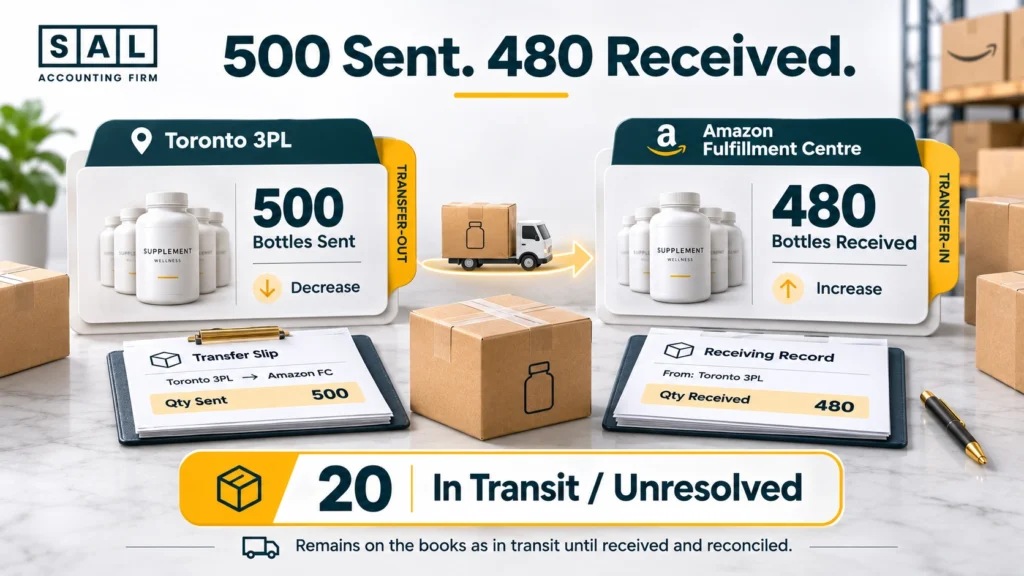
Those 20 bottles could be delayed, damaged, or genuinely lost. Shopify’s process for receiving an inventory transfer lets you accept part of a transfer and mark items as rejected, which keeps those differences visible. Never record a transfer as a sale or a new purchase.
Case Study: How Andrew’s Supplement Brand in Heartland, Mississauga Tracks a Short Transfer1
Andrew sells vitamins and electrolytes online from a warehouse unit near Heartland Town Centre in Mississauga. He sends 500 bottles from his 3PL to Amazon to restock before a busy month.
The problem: Amazon confirms 480 bottles received. Andrew’s inventory software simply drops the 3PL by 500 and adds 480 to Amazon, so 20 bottles vanish from his records. Nobody flags it, and the gap shows up later as an unexplained loss.
What we do: We set up an in-transit line for transfers that haven’t fully arrived. The 20 bottles stay on it while we follow up. Two weeks later, Amazon records 15 more as received. The last 5 are confirmed lost, and we record a documented adjustment with the shipment and receiving records as evidence.
The result: Andrew’s books show what actually happened: 495 bottles at Amazon and 5 written off with a clear reason. He now reviews the in-transit line at every month-end.
How Do Samples, Giveaways, Damage, and Expiry Create Missing Supplement Inventory?
They remove bottles physically, and if a system never records the removal, it keeps counting inventory you don’t have. For a supplement brand, these include:
- Promotional use: samples, influencer kits, and free products in promotional orders
- Internal use: bottles used for testing or demonstrations
- Inventory removed from sale: damaged, expired, or destroyed products
Say your warehouse sends out 50 sample bottles. The 3PL records the removal, but your inventory software doesn’t. Your records now show 50 bottles that aren’t there.
Record each removal under its real reason, not as a sale, and keep the paperwork. Expired inventory also needs its own accounting treatment, which is covered in accounting for expired supplement inventory.
How Should a Supplement Brand Include Returns in Inventory Reconciliation?
Add a return when the product physically arrives and passes inspection, not when the customer gets a refund.
A returned supplement can be in one of four stages:
| Stage | What It Means | Add to Saleable Inventory? |
|---|---|---|
| In transit | The customer shipped it, but it hasn’t arrived | No |
| Awaiting inspection | It’s at the warehouse, but its condition isn’t confirmed | No |
| Back in inventory | It’s inspected and approved for resale | Yes |
| Damaged or opened | It can’t be resold | No |
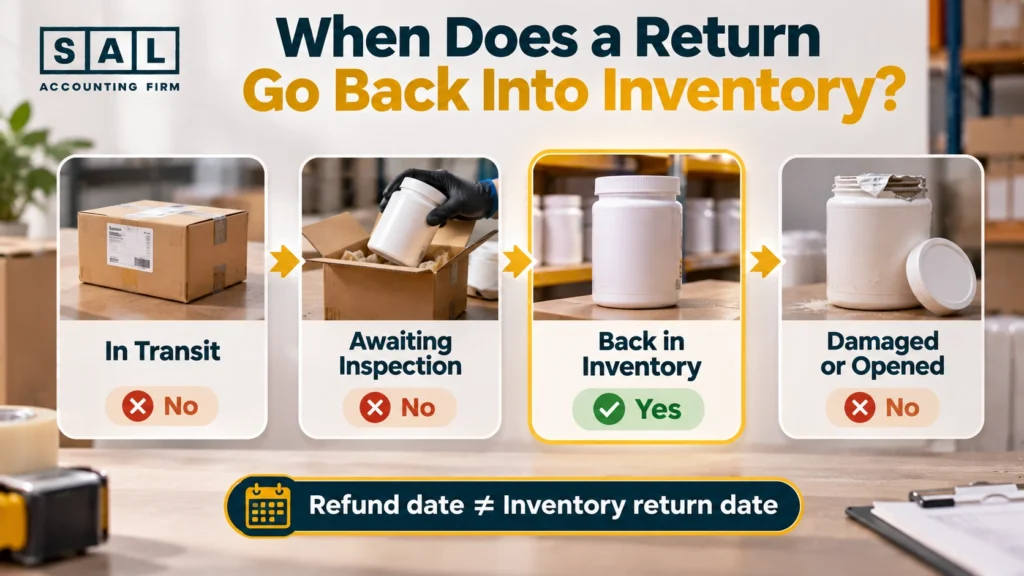
Say a customer is refunded for a vitamin bottle on April 5. The bottle reaches the 3PL on April 10 with a broken seal, so it goes to a review area. The refund date doesn’t put a saleable bottle back on your shelf. Keep the refund, return authorization, receipt, and inspection result linked so you can trace what happened. A clear refund policy makes those records easier to keep.
How Can Supplement Bundles and Multi-Packs Throw Off Inventory Counts?
A bundle sale removes several bottles from the warehouse, but your system may deduct only one bundle unit.
Say your store sells a Wellness Bundle with one vitamin D3 bottle, one greens tub, and one magnesium bottle. One order removes three products from the shelf. If your system only deducts one unit under the bundle SKU, every component count drifts away from reality. To prevent this, set up a component map for each bundle:
- Which individual SKUs make up the bundle
- How many of each are included
- How many to deduct for each bundle sold
Multi-packs work the same way. A three-pack sells as one product, but three bottles leave the warehouse.
Case Study: How Michelle’s Supplement Brand in Yorkville, Toronto Finds a Bundle Gap2
Michelle runs an online wellness brand from a small office in Yorkville, Toronto. Her Wellness Bundle becomes her best seller, with 600 sold in one month.
The problem: Her store deducts 600 units from the bundle SKU but nothing from the three bottles inside it. Her inventory software shows 600 more of each component than her 3PL actually holds. She almost reorders too late, because her records say she has plenty.
What we do: We match the 3PL’s outbound records to her bundle sales and confirm the gap equals 600 of each component. We set up the bundle’s component mapping, then record a documented correction for each SKU, using the order and shipping records as evidence.
The result: Michelle’s component counts now match the shelf. Every new bundle sale deducts the right bottles, and she reorders based on real inventory.
What Are the Most Common Causes of Supplement Inventory Variances?
Most gaps fall into seven types, and knowing the type tells you which record to check first.
| Cause | What It Looks Like | First Record to Check |
|---|---|---|
| Timing difference | The same movement lands in different periods | Transaction dates and cutoffs |
| Missing movement | A sale, sample, return, or transfer is missing from one system | The original transaction and warehouse report |
| Duplicate movement | A receipt or adjustment is recorded twice | Transaction IDs and receiving records |
| Transfer problem | One location records the move, the other doesn’t | Shipment and receiving records |
| SKU mapping issue | The same bottle appears under different codes | Master SKU list |
| Bundle issue | A bundle sale doesn’t deduct its components | Bundle component setup |
| Status difference | Saleable, reserved, or damaged units get compared as one | Status and location reports |
The table points you to a likely cause. The real cause still needs to be confirmed against the records.
How Do You Tell a Timing Issue From a Real Supplement Inventory Error?
A timing issue shows the same movement in different periods, while a real error is a movement that’s missing, doubled, or wrong. Trace the gap in this order:
- Confirm both reports mean the same SKU
- Confirm the location, including anything in transit
- Compare the reporting cutoffs with the actual movement dates
- Match receipts to purchase and production records
- Check sales for shipments, cancellations, and date differences
- Match each transfer’s sent and received quantities
- Check samples, giveaways, damage, expiry, and internal use
- Confirm returns have arrived and been inspected
- Look for missing or duplicate transaction references
- Request a physical count if the records still don’t explain it
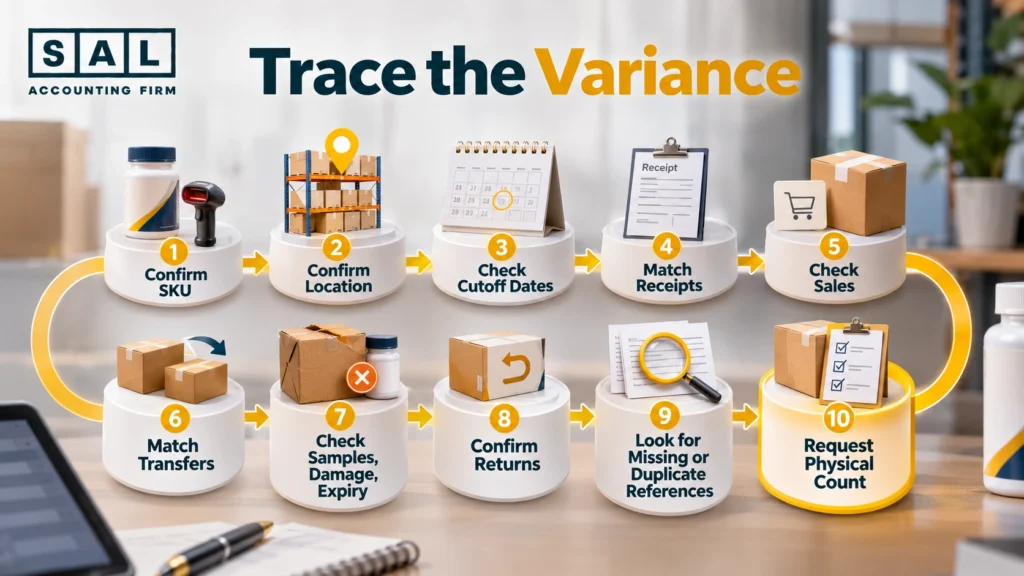
Work through the steps in order. Most gaps are explained by the first few, before you ever need a count.
What Should a Supplement Brand Do Once It Finds an Inventory Difference?
Fix the gap where it started, and keep evidence for every change. What you do depends on the cause:
- Timing difference: note what happened and when the other system should catch up, then confirm it does
- Operational error: fix it in the system where it happened, such as a missed receipt or a wrong SKU
- Accounting error: correct the balance in your books using reliable reports, and record who approved it
- Unexplained shortage: don’t change numbers just to make reports match; investigate, and count if needed
For every significant adjustment, record enough detail that someone else could follow it:
| Field | Example |
|---|---|
| Adjustment | −150 units |
| Product | Vitamin D3, 120 capsules |
| Location | Toronto 3PL |
| Reason | Expired inventory removed from sale |
| Date | September 10 |
| Evidence | 3PL disposal report |
A note like “inventory adjustment: −150 units” isn’t enough on its own. CRA expects you to keep adequate records that support your books, even when a 3PL or bookkeeper holds them. How quantities, status, and cost connect in your accounts is the wider job of supplement inventory accounting.
When Is a Supplement Brand’s Inventory Reconciliation Complete?
It’s complete when you can explain your ending inventory from your opening inventory and every valid movement in between. Before you close it out, confirm that:
- Opening quantities match last period’s closing records
- Receipts reflect units actually received
- Sales and other removals are in the right period
- Transfers appear at both locations, with in-transit units clearly marked
- Samples, damage, and expiry are recorded
- Returns reflect when they arrived and their condition
- Bundles deduct the right component SKUs
- Every material difference is explained and documented
Once the quantities are confirmed, check their value separately. Knowing how many bottles you have doesn’t confirm what they’re worth in your books, and IAS 2 sets out how inventory value is measured. A finished quantity reconciliation also makes your month-end close for supplement brands faster, with fewer unexplained numbers left at the end.
Final Thought: Can You Explain Every Supplement Bottle in Your Books?
Different inventory counts across Shopify, Amazon, and your 3PL aren’t a crisis on their own. Most gaps come from timing, status, or a movement one system missed. Reconcile each SKU at each location, trace every gap to its cause, and fix it at the source with evidence. Then check the value separately.
Once your inventory counts hold up, our free roadmap for smarter inventory decisions helps you plan purchasing and growth with confidence.