
Before you expand into the U.S., you need more than U.S. shipping turned on. You need your accounting, sales tax tracking, customs, payments, and marketplace reports set up clearly. The US opportunity is real. But it can get messy fast when platform payouts don’t match the bank, state tax feels unclear, duties surprise you, and you’re not sure if U.S. sales are actually profitable.
This SAL Accounting post gives you the setup checklist most sellers wish they had before their first big wave of U.S. orders.
Don’t let U.S. orders outrun your records. Start with the ecommerce tax document checklist
Quick Takeaways
- U.S. expansion is not just turning on U.S. shipping.
- Canadian and U.S. sales should be separated from day one.
- U.S. sales tax needs state-level tracking, not one general “U.S. sales” number.
- Customs details like HS codes, country of origin, and import costs can affect profit.
- Payment processors, USD payouts, and FX fees should be reviewed before launch.
- Marketplace settings need to match how you actually sell.
- A monthly review process helps catch tax, margin, and recordkeeping issues early.
If your Canadian numbers already feel hard to explain, U.S. sales will make the gaps show faster. Before extra layers pile up, put bookkeeping for ecommerce stores in place.
Why U.S. Expansion Setup Matters Before You Start Online Selling
U.S. sales can look simple at first: turn on shipping, get orders, watch money land. Then the numbers start splitting apart. Your platform shows one amount, your bank shows another, and tax, refunds, duties, shipping, and FX change what you actually keep.
U.S. expansion adds a few layers you need to track clearly:
- Tax and marketplace rules: state-level sales tax, marketplace tax handling, and separate platform reports.
- Money movement: USD payments, FX fees, processor fees, and payouts that do not match sales.
- Shipping and customs: product classification, customs paperwork, duties, brokerage costs, returns, and cross-border shipping losses.
That is usually where ecommerce payment reconciliation is more than a bookkeeping task. The real question is not only, “Did the money arrive?” It is, “What happened between the sale and the deposit?”
The point is not to make U.S. expansion feel scary. It is to make sure your setup is ready before sales grow faster than your systems can explain.
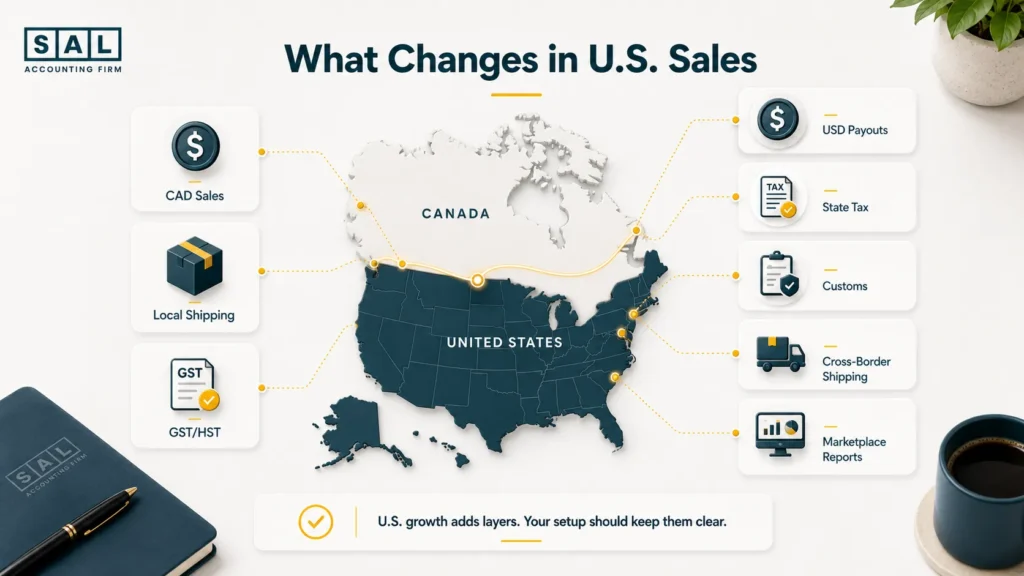
U.S. Expansion Setup Checklist for Canadian Ecommerce Sellers
Use this as your starting point. You do not need to master every detail at once, but each area should be reviewed before U.S. sales become a major part of your business.
| Setup Area | What to Prepare | Why It Matters | Best Time to Set It Up |
| Accounting | Sales, tax, fees, refunds, shipping, FX | Keeps numbers clean | Before U.S. sales begin |
| Sales tax | Sales by state and platform | Helps monitor nexus | From first U.S. order |
| Customs | Documents, HS codes, origin, duties | Avoids delays and surprise costs | Before shipping |
| Payments | USD payouts, processors, FX fees | Shows true profit | Before launch |
| Entity and banking | U.S. entity and USD account review | Avoids messy structure later | Before scaling |
| Marketplace settings | Platform tax, shipping, reporting rules | Reduces reporting confusion | Before going live |
| Records | Platform, tax, payment, shipping reports | Makes review easier | Monthly |
| Review process | Sales, tax, fees, margins, returns | Catches issues early | Every month |
If reports are messy during the year, tax season becomes a cleanup project instead of a review. The habits behind preparing your ecommerce business for tax season start here: clean sales reports, saved platform data, separated fees, and records that explain what actually happened.
What You Need to Import Into the U.S. as a Canadian Online Store?
If you ship products into the U.S., import setup matters. The Trade Commissioner Service explains importer details in its U.S. ecommerce shipping guide, but you do not need to memorize every customs rule. Start with the basics:
- Proper documentation: commercial invoice, product description, declared value, shipment details, country of origin, and consignee information.
- Customs bond: CBP explains that a customs bond helps guarantee duties, taxes, and import fees are paid.
- EIN or importer number: Some sellers may need an EIN or CBP importer number. CBP covers importer identity through Form 5106, while the IRS explains EIN instructions for foreign applicants.
- U.S. customs broker: CBP says a broker is not always required, but a customs broker can handle customs business for importers.
Pro tip: The goal is not more paperwork. It is making sure products clear customs and the costs show up clearly in your numbers.
For many sellers, cross-border ecommerce shipping becomes part of the accounting conversation too because delivery, customs, returns, and landed cost all affect whether U.S. sales are worth scaling.
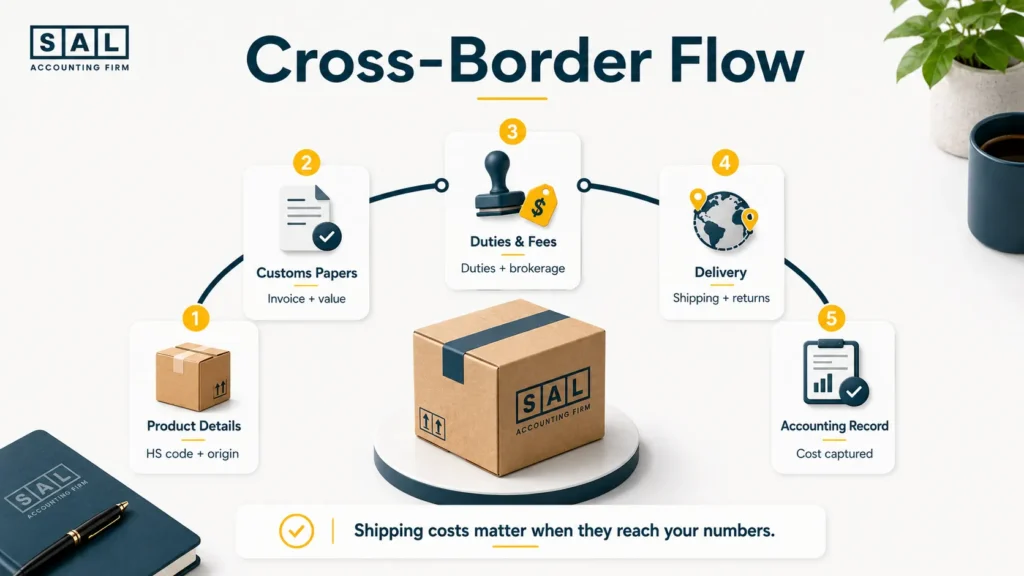
What Should Canadian Ecommerce Sellers Set Up Before Selling Into the U.S.?
Before U.S. sales start growing, your setup should make the numbers easier to read, not harder. These are the main areas to review before orders, tax rules, shipping costs, and platform reports start spreading across different systems:
1. Set Up Your Ecommerce Accounting Before U.S. Sales Begin
Your accounting should show what happened before the payout reached the bank. If you only record deposits as income, fees, refunds, sales tax, duties, and currency conversion can all get blurred together.
| When This Starts Happening | Set This Up | Track Separately | So You Don’t End Up With |
| Payouts don’t match sales | Payout tracking | Sales, fees, refunds, tax, FX | Deposits treated as revenue |
| U.S. orders grow | Market-level revenue | Canada vs U.S. sales | Growth hiding weak margins |
| Shipping gets expensive | Cost categories | Shipping, duties, returns | Profit looking too high |
| Tax appears in reports | Tax separation | Collected tax vs income | Tax mistaken for profit |
| More tools connect | Account matching | Platforms, banks, cards | Reports that don’t agree |
For Shopify-heavy stores, payout confusion often shows up first in Shopify payment reconciliation, where fees, refunds, tax, chargebacks, and payout timing can make one sale look like several different numbers.
Case Study: How Leila in Leslieville, Toronto Cleaned Up Her U.S. Shopify Sales Before Scaling1
Leila runs a small home goods Shopify store from Leslieville in Toronto. Her Canadian sales are easy enough to follow at first. Then a few U.S. creators share her products, and orders from New York, California, and Florida start coming in. The sales look exciting. The numbers do not.
The Problem
Canadian and U.S. sales are mixed together. U.S. sales by state are not being tracked. Shopify fees sit in one general category, and cross-border shipping costs are not separated from local fulfillment. Revenue is growing, but Leila cannot tell whether the U.S. market is actually profitable.
What We Do
SAL separates Canadian and U.S. revenue, cleans up payout tracking, and creates clearer categories for fees, refunds, shipping, tax, and currency conversion. This gives Leila a clearer view of what the store actually keeps after U.S. orders move through Shopify, payment processors, and cross-border costs.
The Result
Leila sees which U.S. products are worth scaling, which bundles need better shipping rates, and which states need to be watched before sales tax becomes a surprise.
Turn Shopify payouts into numbers you can trust with bookkeeping for Shopify.
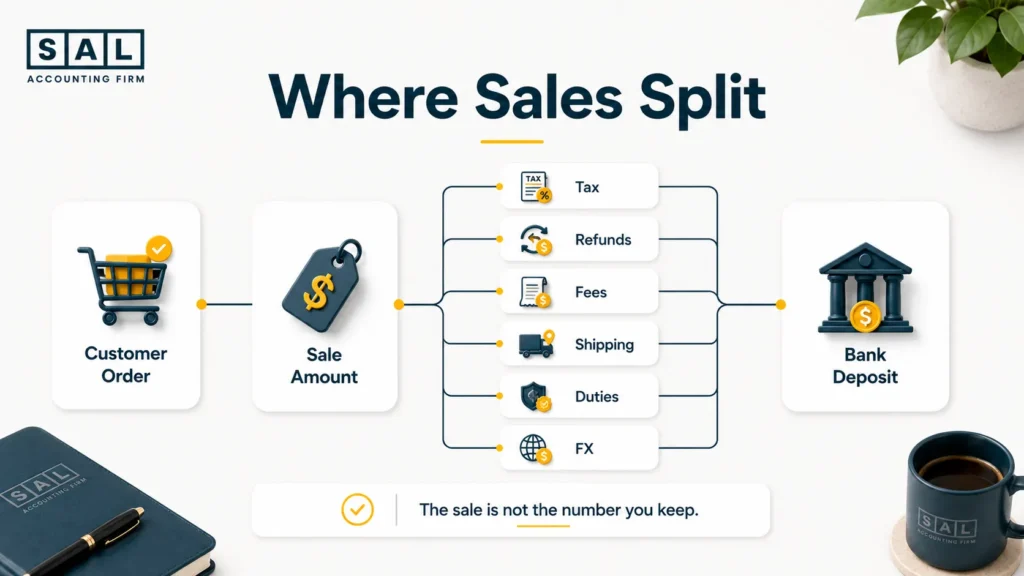
2. Understand U.S. Sales Tax Before You Reach Nexus
U.S. sales tax is state-based, so one general “U.S. sales” number is not enough. You need to know where customers are buying from, which platform handled the sale, and whether sales are getting close to a state threshold. Keep this simple at the start:
- Track sales and order count by state.
- Separate direct website sales from marketplace sales.
- Keep marketplace-collected tax separate from tax collected through your own store.
- Watch refunds and cancelled orders because they can change your totals.
- Review thresholds before registration becomes urgent.
For Canadian sellers, U.S. sales tax requirements are usually less about one national rule and more about state-by-state tracking, marketplace sales, direct website sales, and clean monthly reports.
- Also read: “U.S. Sales Tax Requirements for Canadian Sellers”
3. Set Up U.S. Sales Tax Tracking Before You Reach Nexus
Do not wait until you cross a threshold to start organizing your sales tax data. By then, you may need to rebuild months of state-level sales. A useful setup should answer three questions every month:
- Where are U.S. orders coming from?
- Which sales were handled by a marketplace?
- What tax was collected, refunded, or adjusted?
That is enough to make your sales tax picture much easier to review. It also helps stop collected tax from getting mixed into revenue.
If you cross a threshold, filing sales tax for a U.S. ecommerce business becomes the next layer: registration, filing dates, and making sure collected tax does not get treated like profit.
4. Decide Whether You Need a U.S. Entity, Bank Account, or Payment Setup
You do not automatically need a U.S. LLC just because you want American customers. The better question is whether a U.S. structure, bank account, or payment setup actually makes the business easier to run. Use this quick filter before adding more structure:
- Inventory: Will products sit in the U.S. or ship from Canada?
- Marketplace setup: Does Amazon, a payment provider, or a fulfillment partner need specific information?
- USD movement: Would a USD or U.S. bank account make payouts easier to track?
- Admin load: Would a U.S. entity solve a real problem or create extra filings?
- Decision clarity: Will the setup make the business easier to understand?
If you are considering a U.S. structure, the question of whether a Canadian corporation can own a U.S. LLC is usually more useful than a generic “Should I open an LLC?” answer.
- Read more: “Can a Canadian Corporation Own a U.S. LLC?”
5. Prepare Product, Shipping, Customs, and Fulfillment Details
A product can look profitable in Canada, then look very different once you add U.S. shipping, duties, brokerage, returns, and currency conversion.
Before selling into the U.S., look beyond supplier cost. You need to know the real cost of getting the product to the customer. Focus on four areas:
- Product details: HS code, product description, country of origin, and declared value.
- Import costs: Duties, brokerage, freight, customs invoices, and carrier charges.
- Fulfillment setup: Warehousing, 3PL fees, packaging, shipping zones, and returns.
- Landed cost: What is left after product cost, shipping, customs, fees, and returns.
This is where COGS for ecommerce stores needs to go beyond product cost. Freight, duties, brokerage, and fulfillment costs all shape the margin you actually keep.
- Read more: “How to Ship Products Between Canada and the U.S.”
Case Study: How Daniel in Port Credit, Mississauga Prepared His Amazon Store for U.S. Orders2
Daniel sells fitness accessories from Port Credit in Mississauga. He has steady Amazon.ca sales and wants to expand into Amazon.com. At first, it feels like the same business on a bigger platform.
Then the U.S. side brings different reports, USD payouts, marketplace fees, fulfillment costs, returns, and customs documents.
The Problem
Daniel is treating Amazon.com like an extension of Amazon.ca. U.S. revenue, Amazon.com fees, returns, customs costs, and currency conversion are not separated, so pricing decisions are based on incomplete numbers.
What We Do
SAL separates Amazon.ca and Amazon.com activity, builds categories for U.S. marketplace fees, customs costs, USD payments, shipping, and returns, and shows Daniel which reports to save each month.
The Result
Daniel can see which U.S. products are worth pushing, which ones need pricing changes, and where Amazon.com costs are cutting into margin.
For stores using FBA, Amazon FBA bookkeeping is useful because storage fees, reimbursements, advertising costs, returns, and settlement timing can all affect what the seller actually keeps.
6. Separate Canadian and U.S. Ecommerce Sales From Day One
If you only do one thing before expanding, separate Canadian and U.S. activity from the start. Total sales might go up, but that does not mean the U.S. side is profitable.
| What Gets Mixed | Canada Side | U.S. Side | Why Separate It |
| Sales | Canadian orders | U.S. orders by state | Shows real growth |
| Tax | GST/HST/QST | State sales tax | Keeps tax out of revenue |
| Payouts | CAD deposits | USD deposits, FX | Shows payment drag |
| Shipping | Domestic fulfillment | Cross-border costs | Protects margin |
| Returns | Local returns | U.S. return costs | Spots market issues |
| Profit | Canada margin | U.S. margin after fees | Shows what to scale |
The bank deposit is only the ending. Ecommerce reconciliation shows the story behind it: what sold, what got deducted, and what you actually kept.
7. Set Up Shopify, Amazon, and Marketplace Settings for U.S. Buyers
Your platform settings should match how you actually plan to sell. Do not assume the default settings are enough. Before launch, review the settings that affect checkout, reporting, and profit:
- U.S. shipping zones and rates
- U.S. tax settings
- currency settings
- product availability by country
- Amazon.ca versus Amazon.com reports
- return rules and fulfillment setup
- customer duty and tax messaging
- payment processor setup
For sellers balancing Shopify and Amazon, Shopify vs Amazon FBA is not just a platform decision. It also affects fees, payout timing, fulfillment costs, sales tax reports, and how cleanly the numbers can be reviewed later.
8. Keep the Right Ecommerce Records From the Start
Recordkeeping sounds boring until you need to explain what happened. Once U.S. sales grow, scattered reports can turn into a cleanup problem fast. Keep records that show the full path of the order:
- Sale: platform reports, marketplace reports, sales by country, state, and channel.
- Money: payout reports, processor reports, bank statements, and FX details.
- Shipping: commercial invoices, customs invoices, duties, brokerage, and carrier charges.
- Tax: sales tax reports, GST/HST reports, refunds, and adjustments.
- Costs: inventory, ads, apps, fulfillment, packaging, and returns.
Shipping, apps, advertising, fulfillment, payment fees, and customs costs all sit inside your wider ecommerce business expenses. If those categories are too broad, it becomes harder to see what U.S. growth is really costing.
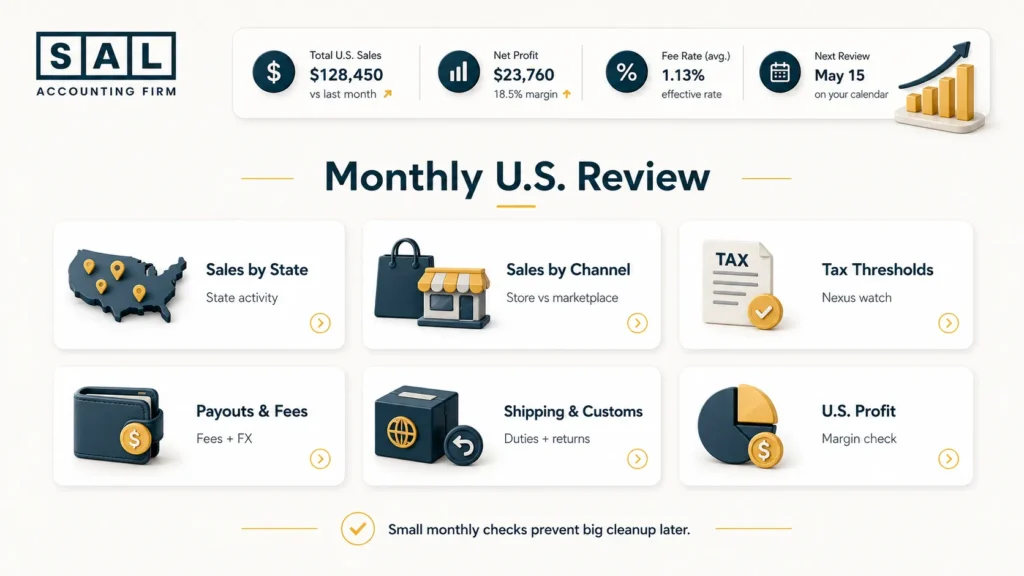
9. Build a Monthly Review Process for U.S. Ecommerce Sales
U.S. expansion should not be reviewed once a year. A short monthly review helps you catch issues while they are still small. Each month, check:
- Sales by state: Are any states getting close to a nexus threshold?
- Sales by channel: Which platforms are actually growing?
- Payouts and fees: Do platform sales match what reached the bank?
- Shipping and customs: Are duties, brokerage, freight, and returns hurting margin?
- Tax settings: Was tax collected, marketplace-handled, refunded, or adjusted?
You are not waiting for a surprise. You are checking the right things consistently.
Final Thoughts: Is Your U.S. Setup Ready for Real Sales?
You do not need to know every U.S. tax, customs, and marketplace rule before selling your first product into the U.S. But you do need a setup that can grow with you.
That means clean accounting, state-level sales tracking, customs clarity, proper payment setup, separated Canadian and U.S. reports, and a monthly review process. At the end of the day, U.S. expansion should help you make better decisions, not leave you guessing where the money went.
If your numbers are already getting harder to trust, contact SAL Accounting and get a clearer sense of what needs to be fixed, tracked, or set up next.