Amazon FBA bookkeeping can feel confusing because your payout only shows the final deposit, not everything that happened before the money reached your bank. Amazon collects the sale, takes out fees, handles fulfillment, processes returns, charges storage, and then sends what is left.That is where many sellers lose track of their real profit. The numbers can get blurry once fees, refunds, ads, inventory costs, and taxes are mixed together.
At SAL Accounting, we see this often. In this guide, you’ll learn what to track, which Amazon reports matter, and how to keep cleaner books for tax time.
If tax season is already on your mind, SAL’s tax document checklist for ecommerce stores can also help you see what records to gather first.
Quick Takeaways
- Amazon FBA bookkeeping means tracking your full Amazon activity, not just the payout in your bank.
- Your books should separate gross sales, Amazon fees, refunds, ads, inventory, and COGS.
- The key reports are Payments, date range transactions, inventory, fulfillment, advertising, and tax reports.
- The biggest mistake is recording Amazon payouts as revenue. That hides the real sales, fees, refunds, and ad costs.
- Reconcile Amazon payouts every month so Seller Central, your bank, and your accounting software match.
- Clean books help you understand real profit, price products better, avoid year-end cleanup, and prepare better tax records.
Why Is Amazon FBA Bookkeeping So Important for Sellers?
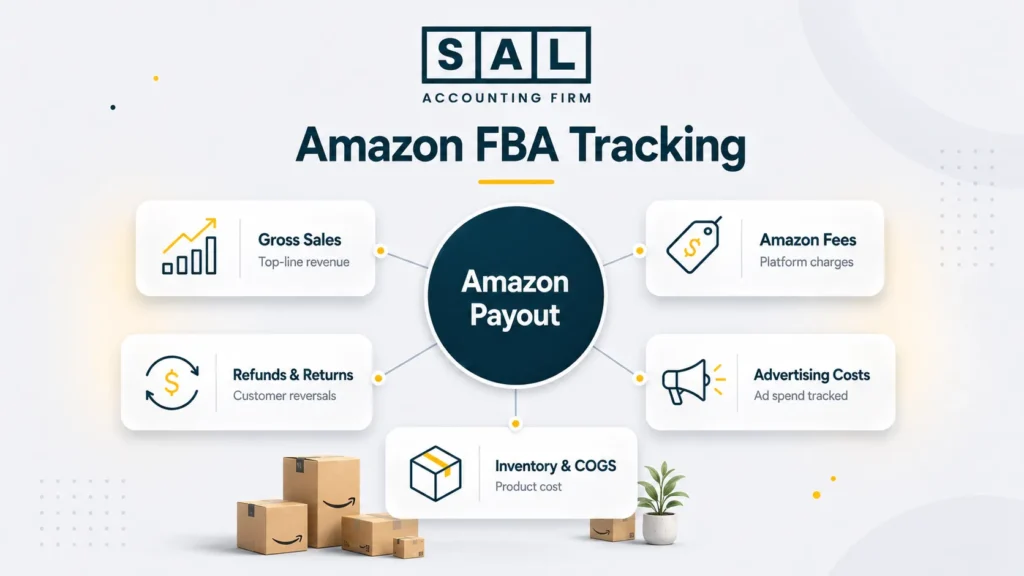
Amazon FBA sellers do not just need to know how much they sold. They need to know what happened between the customer order and the final payout. That means separating:
- gross sales
- refunds
- referral fees
- FBA fulfillment fees
- storage fees
- advertising costs
- product costs
- inventory changes
- tax activity
Amazon fees are not fixed in one simple bucket. Referral fees can vary by product category, and FBA fulfillment fees can change based on Amazon’s current fee structure. For example, Amazon’s 2026 FBA update includes a 3.5% fuel and logistics-related surcharge on FBA fulfillment fees in the U.S. and Canada starting April 17, 2026 (Amazon 2026 FBA fulfillment fee changes).
So if your books only show “Amazon deposit,” you are missing the real story. If your numbers are already getting harder to trust, SAL can help with Amazon seller bookkeeping so your reports show what actually happened before the money reached your bank.
This also connects to ecommerce payment reconciliation, because the issue is not just the sale. It is the gap between platform activity and the bank deposit.
Is an Amazon Payout the Same as Revenue?
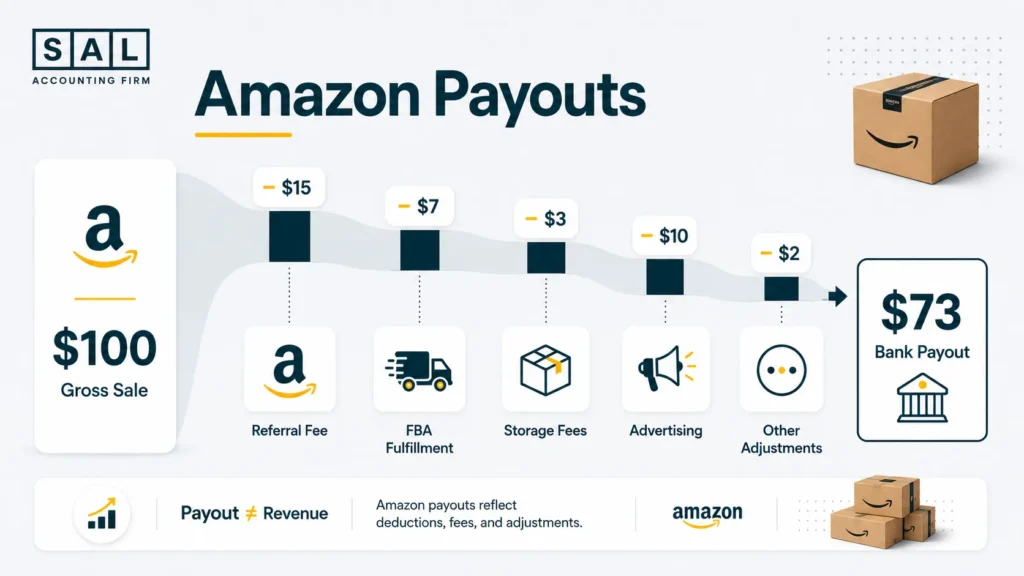
No. An Amazon payout is not the same as revenue. The payout is the net amount Amazon sends to your bank after deductions. Revenue is the original sales amount before Amazon fees, refunds, ads, and other adjustments are separated.
Example: Let’s say you sell a product for $100. Amazon sends $73 to your bank. If you record only the $73 as sales, your books are missing:
- the original $100 sale
- Amazon referral fees
- FBA fulfillment costs
- storage charges
- advertising costs
- refunds or returns
- tax activity
- reimbursements or adjustments
Basically, the payout is where the bookkeeping starts. It is not the whole answer. This is one of the most common ecommerce accounting mistakes because the bank feed looks clean, but the actual platform activity is hidden inside Seller Central.
What Should Amazon FBA Sellers Track in Their Books?
Amazon FBA sellers need to track more than income and expenses. You need a clear place for each part of your Amazon activity. Here’s a simple tracking table:
| Bookkeeping Area | What It Means | Where to Find It | Why It Matters | Check When |
| Gross sales | Sales before deductions | Payments reports | Shows real revenue | Monthly |
| Amazon fees | Referral, FBA, storage | Payments reports | Shows platform cost | Monthly |
| Refunds | Returns and adjustments | Returns/payments reports | Stops overstated sales | Weekly/monthly |
| Advertising | Sponsored ad spend | Amazon Ads reports | Shows cost to sell | Weekly/monthly |
| Inventory | Units bought and stored | FBA inventory reports | Supports COGS | Monthly |
| COGS | Cost of sold products | Supplier + inventory records | Shows margin | Monthly |
| Taxes | GST/HST, sales tax, forms | Tax reports/accounting records | Supports filings | Quarterly/year-end |
The point is simple: Amazon gives you a lot of data, but your books need to organize it in a way you can actually use. For Canadian sellers, this can also connect to Amazon seller taxes because sales, inventory, and tax records need to tell the same story.
Which Amazon Seller Central Reports Do You Need for Bookkeeping?
Seller Central has a lot of reports. You do not need to obsess over every one. But you do need the reports that explain your sales, fees, payouts, inventory, refunds, and tax activity.
For bookkeeping, the Payments and date range reports are usually the starting point. They help you see the sales, fees, refunds, taxes, transfers, and adjustments behind each payout instead of guessing from the bank deposit alone (Amazon Payments Reports Repository). Here’s what to focus on:
| Amazon Report | What It Shows | Use It For | Main Risk If Ignored | Check When |
| Payments report | Sales, fees, transfers | Reconcile payouts | Deposits get misread | Monthly |
| Date range report | Detailed activity | Split transactions | Fees get lumped together | Monthly |
| Inventory report | Stock status | Track inventory | COGS gets messy | Monthly |
| Fulfillment reports | Shipments/returns | Confirm FBA activity | Inventory events missed | Monthly |
| Ads reports | Campaign spend | Record ad costs | Profit looks too high | Weekly/monthly |
| Tax reports | Tax activity | Support filings | Tax records unclear | Quarterly/year-end |
Inventory reports also matter because they show what is sitting in Amazon’s warehouses, what may need restocking, and what may be aging or unfulfillable. Storage fees are tied to the space your products use in Amazon fulfillment centers, so slow-moving stock can quietly affect profit (monthly inventory storage fees).
- Also read: “How to Calculate COGS for Ecommerce Stores”
How Do Amazon FBA Fees Affect Your Profit?
Amazon FBA fees directly affect your margin. A product can look profitable before Amazon costs and look very different after referral fees, fulfillment fees, storage, returns, and ads. The main fees to watch are:
Referral Fees
Amazon charges referral fees based on product category. Because rates vary, don’t use one rough percentage for every product. Check them by category so your margins stay accurate.
FBA Fulfillment Fees
These are the costs Amazon charges to pick, pack, and ship your products. They can change based on size, weight, and category, so bulky or heavy items may cost more than expected.
Monthly Storage Fees
Storage fees matter when products sit too long in Amazon warehouses. Slow inventory can tie up cash and create monthly costs, so it should be reviewed regularly.
Advertising Costs
Amazon ads can help drive sales, but they need to be measured against profit. A product with strong sales and high ad spend may not be as healthy as it looks.
Returns and Refunds
Returns reduce sales and can affect inventory. If they are not recorded properly, your profit may look too high and your stock numbers may be off.
This is why ecommerce business expenses should not be treated as one big bucket. Fees, ads, storage, and refunds all tell you something different.
How Should You Record Amazon Sales, Fees, and Refunds?
The cleanest method is to start with gross sales, then record the deductions separately. Here’s what that can look like in practice:
| Item | Amount | Bookkeeping Category | What It Tells You | Why It Matters |
| Product sale | $100 | Sales revenue | Original sale | Shows top-line sales |
| Referral fee | -$15 | Amazon fees | Platform cost | Shows Amazon’s cut |
| FBA fee | -$7 | Fulfillment cost | Delivery cost | Shows order handling |
| Ad cost | -$10 | Marketing | Cost to get sale | Shows ad pressure |
| Product cost | -$30 | COGS | Cost of item | Shows margin |
| Estimated profit | $38 | Profit before overhead | What remains | Guides pricing |
Now imagine recording only the payout. You would miss almost every useful detail. You would not know whether profit is being reduced by ads, Amazon fees, product cost, returns, or pricing.
This is also why clean ecommerce financial statements matter. They help you see what is actually driving profit, not just what landed in the bank.

Case Study: How Ayesha in Liberty Village, Toronto Cleans Up Her Amazon Payouts1
Ayesha runs a small home goods brand from Liberty Village in Toronto. Her Amazon sales are growing, but her books feel confusing every month. Amazon deposits money into her business account, and she records the deposit as sales. It feels simple, but it means she cannot see the original sales, fees, refunds, ads, or FBA charges behind each payout.
The Problem
Her revenue is understated because she records Amazon payouts instead of gross sales. Her Amazon fees and advertising costs are also buried inside the payout. So when she looks at profit, she cannot tell whether the issue is pricing, product cost, ads, or returns.
What We Do
We separate gross sales from Amazon deductions. Then we map referral fees, FBA fulfillment fees, storage fees, refunds, reimbursements, and ad costs into clear categories. Each Amazon payout is matched to the Payments report so the bank deposit makes sense.
The Result
Ayesha can now see why each payout is lower than sales. Her reports show what Amazon is taking, which products need a margin review, and what needs to be fixed before tax time.
How Do You Track Amazon FBA Inventory and COGS?
Inventory is one of the biggest reasons Amazon bookkeeping gets messy. You may buy 1,000 units from a supplier, send them to Amazon, and sell them over several months. That full supplier invoice does not automatically mean all 1,000 units became COGS right away. For bookkeeping, you need to know:
- what you bought
- what each unit cost
- what sold
- what was returned
- what is still in stock
- what was damaged, lost, or reimbursed
COGS means the cost of goods sold. For Amazon sellers, that usually starts with product cost. Depending on your setup, it may also include freight, duties, prep, packaging, and other costs needed to get inventory ready for sale.
This is where Shopify inventory accounting has a similar idea, even though the platforms are different. The product cost still needs to match the units that were actually sold.
Here’s a simple inventory view.
| Inventory Item | Example | Bookkeeping Treatment | Why It Matters | Review When |
| Product purchase | 500 units at $8 | Inventory asset | Not sold yet | When purchased |
| Units sold | 120 units | Move to COGS | Matches cost to sales | Monthly |
| Returns | 15 units | Adjust sales/inventory | Prevents wrong profit | Monthly |
| Damaged units | 8 units | Review adjustment | Keeps stock accurate | Monthly |
| Storage fees | Monthly FBA charge | Expense | Shows slow-stock cost | Monthly |
If inventory feels hard to track, that is usually a sign the bookkeeping process needs a cleaner monthly rhythm.
Should Amazon FBA Sellers Use Cash or Accrual Accounting?
Cash and accrual accounting answer different questions. Cash shows when money moves. Accrual gives a clearer view of profit by matching sales, fees, inventory, and COGS to the right period. Here’s how both methods work, and why Amazon sellers with inventory often need more than a simple payout view.
Cash Accounting
Cash accounting records income when money is received and expenses when money is paid. It can be simpler for very small sellers. But it can also make profit look strange when you buy inventory in bulk or wait for Amazon payouts.
Accrual Accounting
Accrual accounting records income and expenses when they happen. For Amazon sellers with inventory, this usually gives a clearer view because sales, COGS, fees, and refunds are matched more closely. Here’s the practical comparison.
| Method | How It Works | Best For | Main Issue | FBA Impact |
| Cash | Records cash movement | Very small sellers | Timing distorts profit | Payouts may confuse results |
| Accrual | Records activity | Growing sellers | Needs cleaner tracking | Better sales/COGS matching |
| Hybrid view | Simple tax + management view | Sellers wanting clarity | Needs guidance | Helps explain profit |
| Accountant-led setup | Chosen for tax/business needs | Cross-border sellers | More setup | Cleaner reporting |
Keep in mind: the right method can depend on your country, business size, inventory, and tax setup.
How Do You Set Up Bookkeeping for an Amazon FBA Business?
You do not need a complicated system. You need a consistent one. The goal is to separate Amazon sales, fees, refunds, inventory, and payouts in a way you can check every month. Here’s the basic setup most sellers need before the books start making sense.
1. Use a Separate Business Bank Account
Keep Amazon deposits, supplier payments, software costs, shipping costs, and business expenses separate from personal spending. This makes tax prep much cleaner.
If you are still choosing accounts, business bank accounts for ecommerce can affect how easy it is to separate business activity from personal money.
2. Build Clear Bookkeeping Categories
Your books should separate the main Amazon activity. Use categories like:
- Amazon sales revenue
- referral fees
- FBA fulfillment fees
- storage fees
- advertising costs
- refunds and returns
- reimbursements
- inventory
- COGS
- software subscriptions
- shipping and freight
- professional fees
Basically, avoid putting everything under “Amazon expense.” That hides the problem.
3. Connect the Right Tools Carefully
QuickBooks, Xero, A2X, and other tools can help, but setup matters. A bad sync can create more cleanup work than manual bookkeeping.
This is why ecommerce accounting software should be chosen based on how your store actually works, not just what looks popular.
4. Reconcile Monthly
Each Amazon payout should match the Seller Central reports. If Amazon sends $4,200 to your bank, your books should explain how that payout was built.
5. Review Margins by Product
Store-wide profit is helpful. Product-level profit is better. One product may sell well but lose margin because of ads, returns, storage fees, or high fulfillment costs.
What Is the Best Monthly Bookkeeping Workflow for Amazon Sellers?
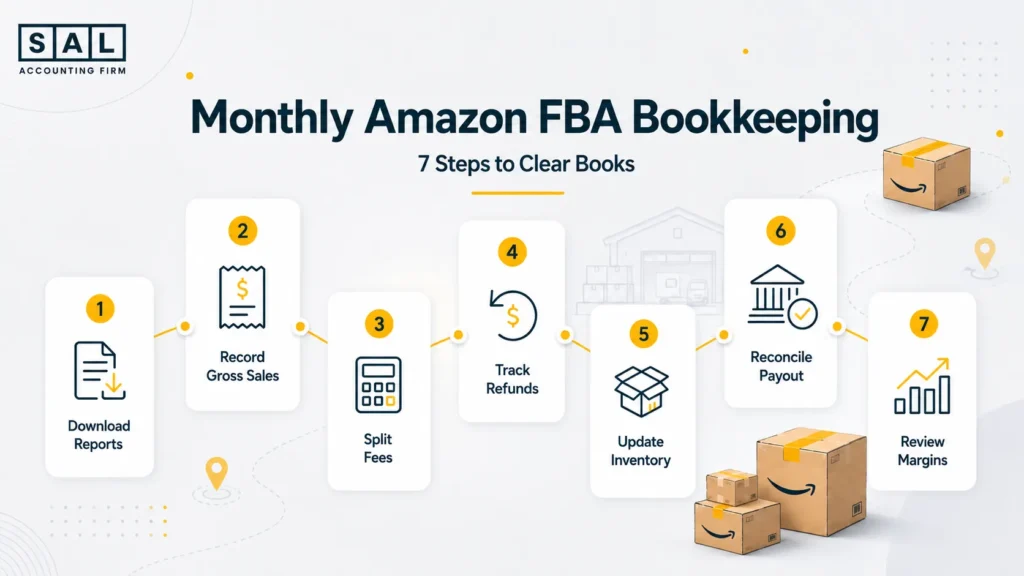
A monthly workflow keeps your books from turning into a year-end cleanup project. Here’s a simple process.
| Step | Monthly Task | Report or Tool | What to Check | Mistake It Prevents |
| 1 | Download reports | Payments, inventory, ads | Complete data | Missing activity |
| 2 | Record gross sales | Date range report | Sales before deductions | Payout-as-sales error |
| 3 | Categorize fees | Payments report | Referral, FBA, storage | Vague expense bucket |
| 4 | Record refunds | Returns/payments | Refunds and adjustments | Overstated profit |
| 5 | Update inventory | FBA inventory | Units sold/returned | Wrong COGS |
| 6 | Reconcile payout | Bank + reports | Deposit matches activity | Unexplained gaps |
| 7 | Review margins | Accounting reports | Profit by SKU | Scaling weak products |
The goal is not to check every number every day. The goal is to avoid surprises. This also connects to a small business bookkeeping checklist, especially if you are building a repeatable monthly process.
Case Study: How Daniel near Port Credit, Mississauga Finds the Real Profit in His Amazon Store2
Daniel sells fitness accessories through Amazon FBA and runs the business from the Port Credit area in Mississauga. His sales reports look strong, but cash always feels tighter than expected. He spends heavily on Amazon ads, restocks inventory often, and tracks sales in a spreadsheet, but he does not separate COGS, ad spend, returns, and FBA fees by product.
The Problem
Daniel cannot tell which products are actually profitable. His best-selling SKU has high ad spend and frequent returns, while a slower product has a stronger margin. Because everything is blended together, the business looks better than it really is.
What We Do
We organize his books by gross sales, Amazon fees, refunds, ads, inventory, and COGS. Then we review product-level numbers so he can compare profit after product cost, FBA fees, and advertising.
The Result
Daniel can now see which products deserve more ad spend and which ones need pricing, sourcing, or inventory changes. His bookkeeping becomes something he can use to make decisions, not just something he updates for tax season.
What Are the Best Bookkeeping Tools for Amazon FBA Sellers?
The best tool depends on your sales volume, number of SKUs, reporting needs, and comfort level. A spreadsheet can work when things are small. But as orders, fees, refunds, and inventory grow, manual tracking gets harder.
| Tool | Best For | Helps With | Watch Out For | Good Fit |
| Spreadsheet | New sellers | Basic tracking | Easy to break | Low volume |
| QuickBooks Online | Growing stores | Accounting reports | Needs clean setup | Standard books |
| Xero | Cloud accounting | Reporting/integrations | Needs mapping | Small/mid stores |
| A2X | Amazon payout mapping | Splitting payouts | Extra cost | FBA sellers |
| Seller Central | Source data | Amazon activity | Not accounting software | Every seller |
Automation can save time, but it does not replace understanding. If the mapping is wrong, your reports will still be wrong.
This can matter when comparing in-house vs outsourced ecommerce accounting, because the real question is not just who enters the data. It is whether the numbers are being organized in a way the owner can trust.
What Are the Most Common Amazon FBA Bookkeeping Mistakes?
Amazon sellers usually do not make bookkeeping mistakes because they are careless. They make them because Amazon data is not easy to read at first. One payout can include sales, fees, refunds, ads, tax activity, and adjustments, so it is easy for things to get mixed together. Here are the mistakes that usually cause the biggest problems.
Recording Payouts as Sales
This is the big one. If you record the Amazon deposit as revenue, both sales and expenses are wrong. Your books should show gross sales first, then separate the fees, refunds, ads, and other deductions.
Ignoring Fees
Referral fees, fulfillment fees, storage fees, return fees, and other charges should be separated. One “Amazon fees” line is better than nothing, but detailed categories are more useful because they show where your margin is actually going.
Forgetting Refunds and Returns
Returns reduce sales and may affect inventory. If you miss them, your profit may look too high, and your stock numbers may not match what is actually available to sell.
Not Tracking Advertising Separately
Ads can hide weak margins. A product may sell well, but if ad spend is too high, the profit may be much lower than expected. Track ad costs separately so you can see whether sales are actually worth it.
Treating Inventory Purchases as Immediate Expenses
Buying inventory is not the same as selling inventory. If you expense everything right away, your profit can look wrong from month to month. You need to match product cost to the units that were actually sold.
Waiting Until Year-End
Amazon books are much easier to clean monthly than twelve months later. By year-end, missing refunds, fee changes, inventory issues, and payout mismatches are harder to trace. This is why choosing the right ecommerce bookkeeper matters once the store gets more complicated.
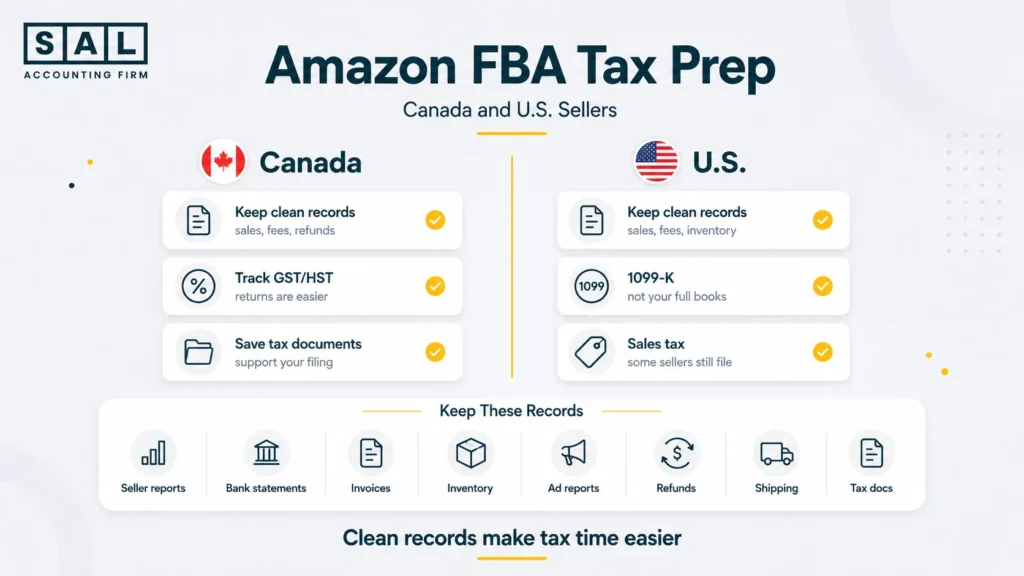
How Should Amazon FBA Sellers Prepare for Tax Time in Canada and the U.S.?
Tax prep is much easier when your records already explain what happened during the year.
For Canadian sellers, that means keeping clear records to support income, expenses, and filings. For U.S. sellers, the same idea applies: your records should support what you report on your tax return (CRA recordkeeping rules). For Amazon sellers, keep:
- Seller Central reports
- bank statements
- supplier invoices
- inventory records
- advertising reports
- refund and return records
- software receipts
- shipping and freight documents
- tax documents
- accountant adjustments
For U.S. sellers, Form 1099-K may also be part of the tax picture. But it should not be treated as your full bookkeeping record. Your own books still need to explain sales, fees, refunds, inventory, and deductions clearly (IRS Form 1099-K guidance).
If you sell from Canada into the U.S., this often connects to U.S. sales tax requirements for Canadian sellers. Amazon may collect and remit certain marketplace taxes, but that does not automatically mean every filing or registration question disappears.
For Canadian sellers, GST/HST can also matter. GST/HST return filing in Canada becomes easier when sales, fees, refunds, and tax records are clean before filing season starts.
What Should Clean Amazon FBA Books Help You Understand?
Clean Amazon FBA books should do more than help you file taxes. They should help you make better decisions. When your sales, fees, refunds, ads, inventory, and COGS are separated properly, you can see what is actually happening inside the business. Not just what Amazon paid you. Here are the questions your books should help answer.
Which Products Are Actually Profitable?
A product can sell well and still have weak profit. Your books should show profit after product cost, Amazon fees, ad spend, refunds, storage, and other costs. That way, you are not growing a product just because it has strong sales.
How Much Is Amazon Really Taking?
Amazon costs can add up quickly. You should be able to see referral fees, fulfillment fees, storage fees, return-related costs, and other charges clearly. If those costs are buried together, it becomes harder to know whether your pricing still makes sense.
Are Ads Helping or Hurting Profit?
More sales do not always mean more profit. If a product needs heavy ad spend to sell, the margin may be thinner than it looks. Clean books help you compare ad costs against product-level profit, not just total revenue.
Are Returns Starting to Affect Your Numbers?
Returns can quietly pull down profit. They reduce sales, affect inventory, and may create extra costs. If you review returns by product, you can spot patterns earlier instead of finding out at year-end that one SKU caused most of the problem.
Is Too Much Cash Sitting in Inventory?
Inventory can make a business look busy while cash feels tight. If you keep restocking before older inventory sells, your money may be tied up in products sitting at Amazon. This is where cash flow forecasting for small business can help you plan restocks more clearly.
Is the Business Becoming More Valuable?
Clean books matter if you want to borrow, attract investors, or eventually sell. They help show whether the business has steady profit, clear margins, clean records, and fewer messy adjustments. If you want a rough view beyond basic profit, SAL’s ecommerce EBITDA calculator can help you think through earnings before certain costs and adjustments.
Clean records also make it easier to avoid missing legitimate costs. This connects to ecommerce tax deductions because better records usually mean fewer expenses get lost or forgotten.
How Does Amazon FBA Bookkeeping Change for Canadian Sellers Selling in the U.S.?
Canadian Amazon sellers often have extra layers to think about. These may include:
- Canadian income tax
- GST/HST
- U.S. marketplace tax collection
- U.S. sales tax nexus
- currency conversion
- U.S. bank accounts
- cross-border shipping
- inventory stored outside Canada
- entity structure questions
This is where bookkeeping and tax planning start to overlap.
Example: FBA inventory stored in the U.S. can create questions that are different from a simple Canada-only store. Selling into the U.S. can also make international selling on Amazon FBA more complex than just changing your marketplace settings.
If you are deciding whether Amazon is the right channel, Shopify vs Amazon FBA can also matter because the platforms handle fees, payouts, fulfillment, and reporting differently.
Cross-border selling can also affect shipping and landed costs. That is where cross-border ecommerce shipping connects back to bookkeeping, because freight, duties, and landed costs can affect inventory and COGS.
If the Canada-U.S. side is starting to feel unclear, SAL’s cross-border tax support can help you understand what needs to be tracked, filed, or reviewed before the numbers get harder to clean up.
When Should Amazon Sellers Get Bookkeeping Help?
You can manage basic bookkeeping yourself when your Amazon store is small. But it may be time to get help if:
- your payouts do not match your books
- you are recording deposits as sales
- you cannot explain your profit
- inventory is hard to track
- returns are not being reviewed
- ad spend is growing
- you sell in both Canada and the U.S.
- tax season feels stressful every year
- you are preparing to grow or sell the business
For many sellers, the right time is not when everything is broken. It is when the numbers stop feeling easy to trust.
If your Amazon sales are growing alongside other channels, ecommerce bookkeeping can help you see the full picture across platforms, fees, payouts, inventory, and tax records.
Amazon FBA Bookkeeping Checklist for Sellers
Use this as a simple monthly review.
| Task | Main Report | Who Handles It | Why It Matters | Frequency |
| Record gross sales | Payments/date range | Bookkeeper | Keeps revenue accurate | Monthly |
| Split Amazon fees | Payments report | Bookkeeper | Shows true costs | Monthly |
| Record refunds | Returns/payments | Bookkeeper | Avoids overstated sales | Monthly |
| Update inventory | FBA inventory | Seller/bookkeeper | Supports COGS | Monthly |
| Reconcile payouts | Bank + Amazon | Bookkeeper | Confirms deposits | Monthly |
| Record ad spend | Ads reports | Seller/bookkeeper | Shows marketing cost | Monthly |
| Save tax records | Tax document library | Seller | Supports filing | Quarterly |
| Review product margin | Accounting reports | Owner/accountant | Guides decisions | Monthly/quarterly |
This does not have to be fancy. It just has to be consistent.
Ready to Make Your Amazon FBA Books Easier to Trust?
Amazon FBA bookkeeping gets easier once sales, fees, refunds, ads, inventory, and COGS are separated properly. Then your reports stop feeling like a pile of Amazon deposits and start showing what the business actually keeps. You can see which products are worth growing, what fees are costing you, and what needs fixing before tax time.If your Amazon books feel unclear, reach out to SAL Accounting and get a clearer sense of what needs to be cleaned up next.