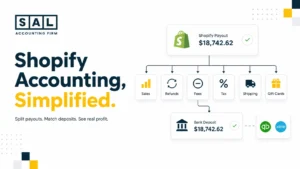
Hidden ecommerce expenses make sales look strong while profit feels weak. Canadian retail ecommerce revenue reached $73.7 billion in 2024 and grew 9.0%. The real question is not just what your store sold. It is what the business kept after fees, shipping, returns, inventory, software, tax, and payout timing.
Before you assume your store is profitable, read to the end. That is exactly the gap SAL Accounting pays attention to.
Measure what is left after the noise with SAL’s Ecommerce EBITDA Calculator.
Quick Takeaways:
- Hidden ecommerce expenses are easy to miss because they rarely sit in one clean report.
- They can show up across your store platform, payment processor, bank account, shipping provider, warehouse invoices, ad accounts, inventory records, and credit card statements.
- Your sales report may look healthy while fees, refunds, shipping gaps, software, discounts, and inventory issues quietly reduce profit.
- Basically, your store may not have a sales problem.
- It may have a margin visibility problem.
- The goal is to see what each order actually leaves behind after the real cost of selling online.
Turn the full order story into clean books with SAL’s ecommerce bookkeeping services.
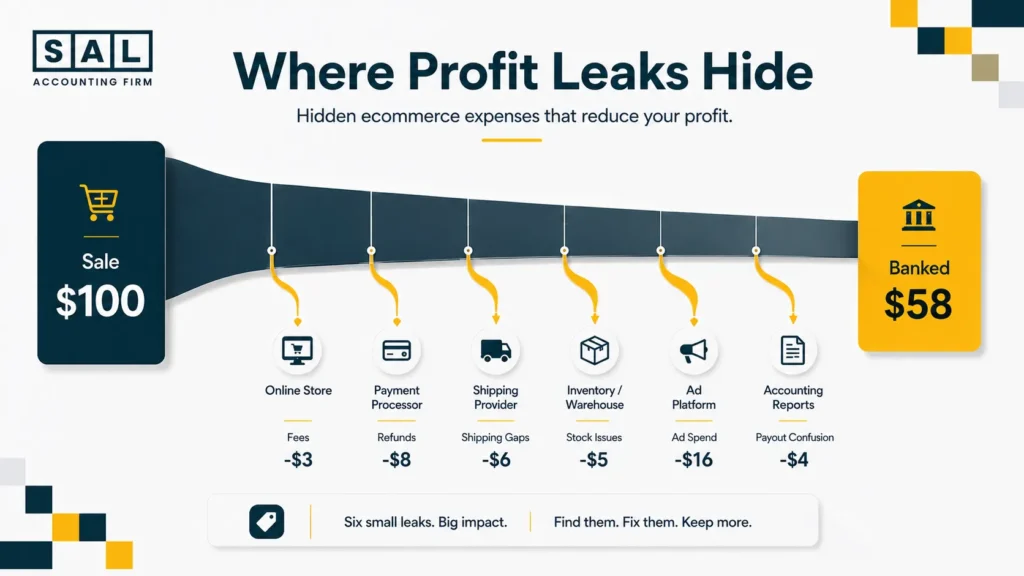
Hidden Ecommerce Expenses Sellers Usually Miss
Hidden ecommerce expenses are usually normal costs. The problem is not that these costs exist. The problem is when they are scattered, grouped together, or hidden inside payouts.
- Also read: “E-commerce Profit Calculation Mistakes To Avoid”
1. Payment Processing Fees
Every online payment has a cost. Card payments, digital wallets, installment payments, and payment gateways can all reduce what you actually keep from each order.
A $3 fee on one order may not feel like much. Across hundreds or thousands of orders, it becomes real money. Watch for:
- processor fees
- chargeback fees
- refund processing costs
- international card fees
- payout deductions
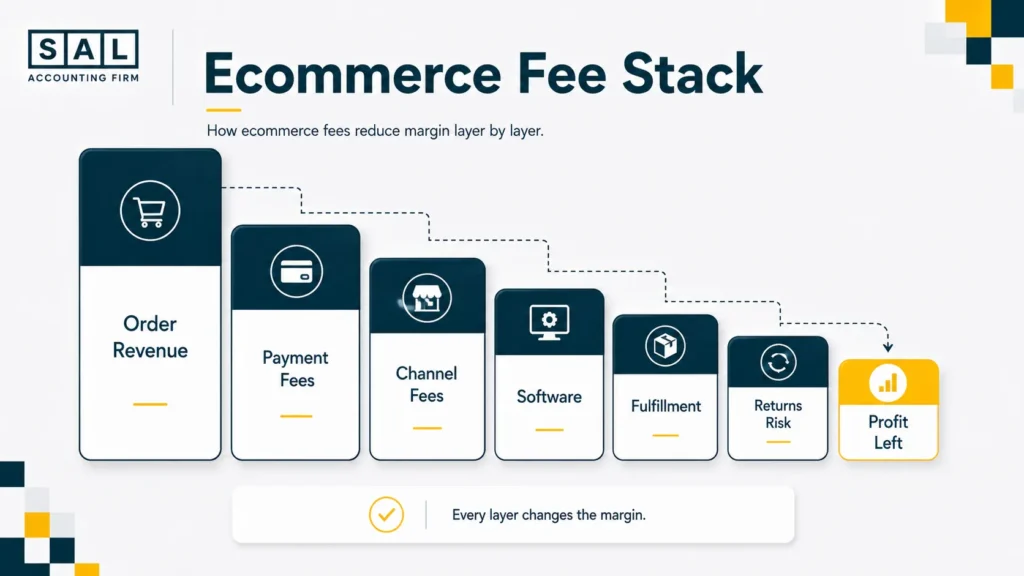
This is where ecommerce contribution margin matters more than sales volume because it shows what is left after the costs tied to each order.
Pro tip: Review payment fees as a percentage of gross sales, not only as a monthly dollar amount. The percentage tells you whether the cost is growing faster than revenue.
2. Platform and Channel Fees
Your ecommerce platform, marketplace, wholesale portal, or sales channel may charge fees to help you sell online. These can include monthly fees, selling fees, listing fees, transaction fees, fulfillment support fees, or add-on charges.
The tricky part?
They do not always appear beside the sale. So the order looks profitable until the channel costs are added back in. That is also why ecommerce business expenses need categories that match how the store actually operates.
Shopify-heavy store? Test your fee pressure with SAL’s Shopify Fee Calculator.
3. Shipping Surcharges
Shipping is one of the easiest ecommerce costs to underestimate. Your customer may pay a flat shipping rate, but your actual carrier cost can change because of:
- fuel surcharges
- dimensional weight
- remote delivery fees
- residential delivery fees
- address correction fees
- peak season costs
Canada Post says fuel surcharges apply to parcel services and are adjusted weekly as fuel prices change. So even when your product price stays the same, your shipping cost may still move. That small shipping gap can quietly eat into every order.
For sellers shipping across borders, cross-border ecommerce shipping can also change the cost picture through duties, carrier charges, customs handling, and delivery zones.
4. Returns and Refunds
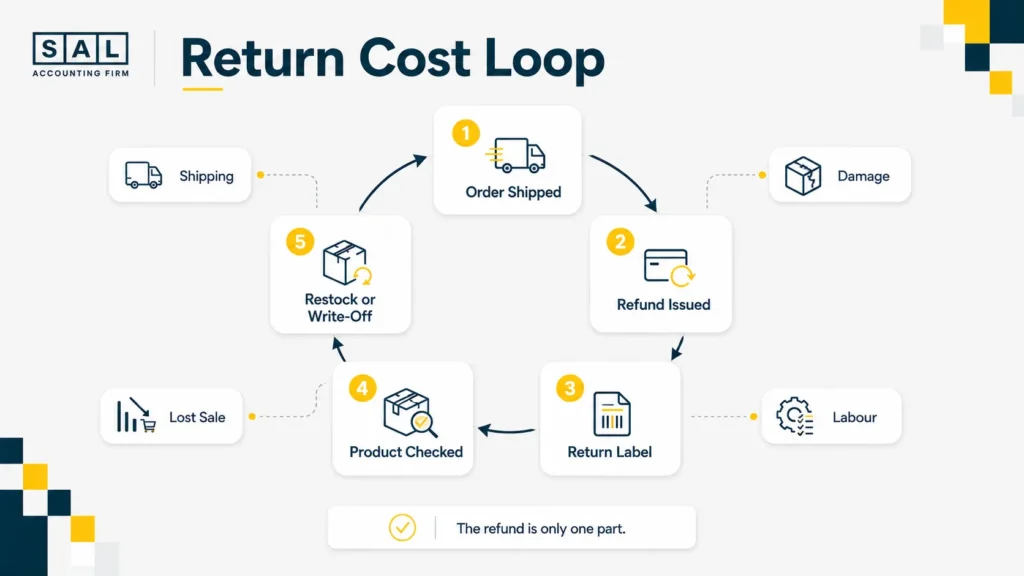
Returns do not just reverse revenue. They create extra cost. You may refund the order, pay for the return label, lose the original shipping cost, inspect the product, restock it, or write it off if it comes back damaged. The full return cost usually includes:
- refund amount
- return shipping
- damaged stock
- restocking or warehouse labour
- replacement order cost
- support time
A return-heavy product can look popular and still hurt profit.
5. Discounts and Promotions
Discounts can help sales. But they also reduce margin.
A 20% discount does not just lower the price. It lowers the amount left to cover product cost, payment fees, shipping, packaging, returns, ads, software, and overhead.
Not every discount is bad. But every discount should have a reason. A good question to ask is:
Are we using discounts to grow profit, or just to create more low-margin orders?
6. Product Cost Changes
Product cost is not fixed forever. Supplier prices change. Freight changes. Duties change. Packaging changes. Currency changes. If your books still use old product costs, your margin report may be wrong.
Basically, your reports may say a product is profitable even after the cost has changed.
That is why margin reports can go off track when COGS is outdated, landed costs are incomplete, or product costs sit outside the order report. Ecommerce sellers need COGS tied to real landed costs, not just supplier invoices.
7. Duties, Import Costs, and Landed Cost Gaps
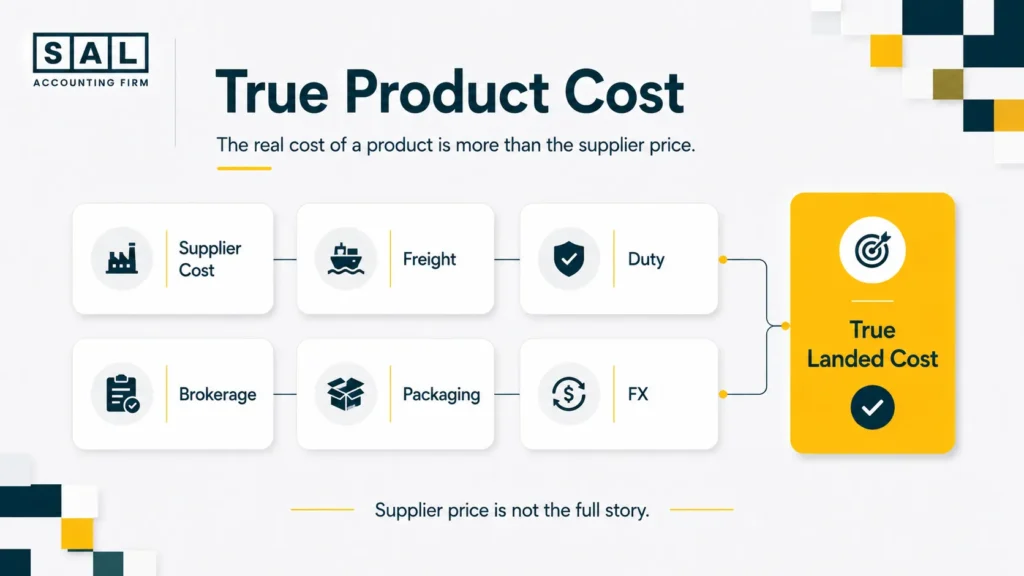
For many ecommerce sellers, product cost is not just the supplier invoice.
It can also include freight, duty, customs fees, brokerage, insurance, packaging, and currency conversion. CBSA says duties and taxes on imported commercial goods are assessed and paid through the CARM system.
That matters because landed cost affects margin. If you only record the supplier price, the product may look more profitable than it really is.
Pro tip: Treat landed cost as part of the product story, not a random expense sitting somewhere else in the books.
8. Inventory Shrinkage and Write-Offs
Inventory issues can hurt profit quietly.
This includes damaged stock, missing units, expired products, obsolete products, warehouse errors, and products that sit too long.
You may not feel the cost immediately.
But eventually, it shows up as weaker cash flow, lower margins, or inventory adjustments.
Pro tip: Review inventory by “sellable stock,” not just total stock. A warehouse count does not always tell you what can still be sold at full value.
9. Software and Subscription Costs
Ecommerce stores collect tools over time.
One tool for reviews.
One for email.
One for shipping.
One for inventory.
One for analytics.
One for upsells.
Individually, they may feel small. Together, they become a fixed monthly cost. Review these tools regularly and ask:
- Are we still using this?
- Does it save time or improve profit?
- Is there a duplicate tool?
- Did the pricing tier increase?
- Who owns this subscription?
Small recurring costs are easy to ignore until they become a real margin leak.
10. Ad Spend That Looks Good but Profits Badly
Ads can bring in revenue and still hurt profit. This happens when you only look at ROAS. ROAS shows revenue compared to ad spend. It does not show profit after product cost, fees, shipping, returns, discounts, and fulfillment. So a campaign can look successful and still bring in low-margin orders. The better question is:
How much profit is left after the full cost of the order?
CRA lists advertising expenses among operating expense categories. For margin decisions, ad spend also needs to be reviewed against product-level profit.
11. Tax Collected and GST/HST Timing
Sales tax collected is not profit. This is one of the easiest things to mix up when ecommerce reports, deposits, and tax settings are not reviewed together.
If you collect GST/HST, that money needs to be separated from revenue. CRA says registrants may recover GST/HST paid on eligible business purchases and expenses through input tax credits. That means tax can affect cash flow in two directions:
- tax collected from customers
- GST/HST paid on business purchases
For Canadian sellers, GST/HST compliance for ecommerce stores should stay separate from revenue and margin tracking.
Estimate recoverable tax with SAL’s GST/HST Refund Calculator for eCommerce Stores.
12. Currency and Cross-Border Costs
If you sell across borders, currency can affect your real profit. You may sell in one currency, pay suppliers in another, and receive deposits after conversion. Bank of Canada publishes daily exchange rates, which is useful context when cross-border sales and supplier payments are part of the margin picture.
Small currency differences may not feel important on one order. But across larger sales volume, they can change the margin picture. When sales, supplier payments, tax, and reporting cross borders, global ecommerce accounting becomes part of the margin conversation.
Case Study: How a Queen West Ecommerce Brand Found Its Missing Margin1
A growing lifestyle ecommerce brand near Queen West in Toronto has steady online sales, strong repeat customers, and healthy-looking order volume. The founder feels the business should have more cash left at the end of each month. But the bank balance does not match the sales reports. Shipping costs are higher than expected, discounts are used often, and several small software tools are charging every month without a clear owner.
The Problem
The business is judging performance from revenue instead of real margin. Payment fees, shipping gaps, discounts, packaging, software, and returns are spread across different systems. The founder can see sales, but not the full cost behind each sale.
What We Do
SAL Accounting would organize the numbers by revenue, fees, COGS, shipping, returns, software, and operating costs. We would also reconcile ecommerce payouts to the bank and create a clearer monthly margin view, so the owner can see which products and campaigns are actually worth scaling.
The Result
The founder gets a cleaner picture of profit. Instead of guessing, they can review margin by product group, cut unused tools, adjust shipping rules, and stop relying on sales volume as the main sign of business health.
- Read more: “How To Categorize Ecommerce Transactions Correctly”
Where Hidden Expenses Hide in Your Online Store Reports
A lot of ecommerce owners do not miss costs because they are careless. They miss them because ecommerce reports are split across too many places. This table shows where the most common margin gaps usually begin.
| Report or System | What It Usually Shows | What It May Hide | What to Do |
| Store platform | Orders, sales, refunds | Full cost per order | Match sales to payouts |
| Payment processor | Deposits and fees | Product-level profit | Separate fees from revenue |
| Bank feed | Money received | Gross sales and deductions | Do not treat deposits as sales |
| Credit card | Tools and subscriptions | Which costs belong to ecommerce | Categorize monthly |
| Shipping account | Labels and surcharges | Profit by order | Compare charged vs actual |
| Warehouse or 3PL invoice | Storage and handling | Cost by SKU | Review fulfillment costs |
| Inventory records | Stock count | Damaged or obsolete items | Adjust monthly |
| Ad accounts | Spend and revenue | Profit after all costs | Compare to margin |
At the end of the day, your bank account is not enough. It tells you what arrived. It does not explain what happened before the money arrived.
When sales, payouts, fees, refunds, tax, and bank deposits do not line up, ecommerce reconciliation best practices become part of the margin review, not just a bookkeeping task.
How Poor Ecommerce Bookkeeping Turns Small Costs Into Margin Problems
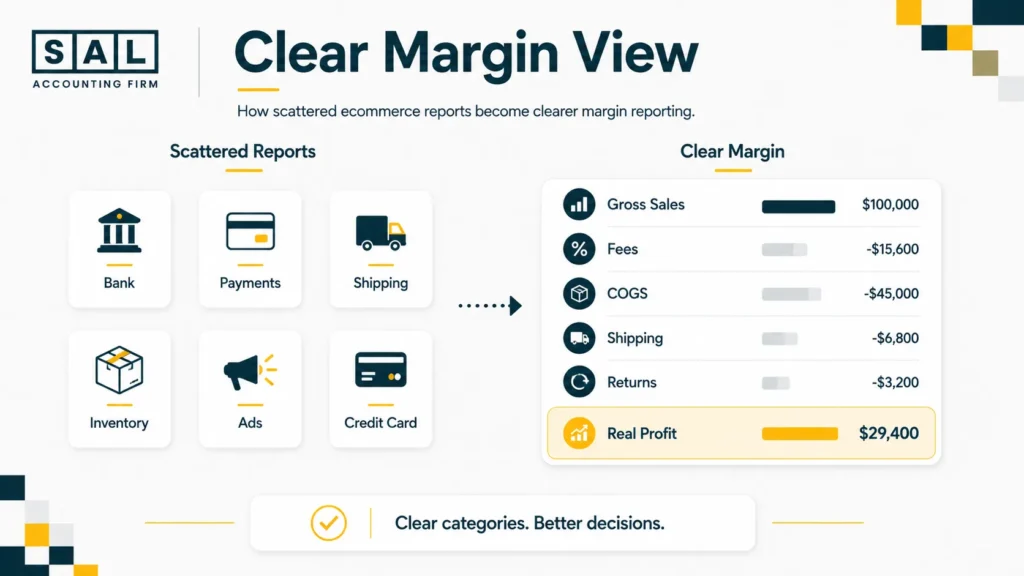
Bad ecommerce bookkeeping does not always look messy. Sometimes, it looks clean because everything is grouped too simply. That is the problem. If payouts are recorded as income, you lose visibility on the details that matter most:
- gross sales
- refunds
- discounts
- payment fees
- platform fees
- shipping costs
- product costs
- tax collected
- inventory adjustments
Basically, if the books only show deposits, they do not show the ecommerce story. And when your books do not show the story, your decisions become harder.
You may raise ad spend on low-margin products.
You may keep selling items that barely make money.
You may ignore shipping gaps.
You may think cash flow is the issue when margin is the real problem.
This is one of the most common things we see. This is also where cash vs accrual accounting for ecommerce can change the way sales, payouts, inventory, and timing show up in the books.
Case Study: How a Port Credit Ecommerce Seller Fixed Profit Leaks2
An ecommerce home goods seller in Port Credit, Mississauga sells through its website, social channels, and a marketplace. Sales are growing, but profit changes every month with no clear reason. Some products look strong until shipping, storage, returns, and packaging are included. Others have good order volume but weak margins after discounts and ad spend.
The Problem
The seller has no clean way to compare product profit across channels. Revenue, fees, shipping, fulfillment, inventory adjustments, and software costs sit in different reports. This makes it hard to know which products are helping the business and which ones are quietly draining cash.
What We Do
SAL Accounting would separate income and costs by channel, organize expense categories, review fulfillment and shipping costs, and build a monthly margin report. The goal is not just cleaner books. The goal is better decisions.
The Result
The owner can compare product performance more clearly, spot low-margin items, reduce slow-moving inventory, review discount strategy, and avoid scaling products that only look profitable before the full costs are included.
How to Catch Hidden Costs Before They Hurt Cash Flow
You do not need to review everything every day. But you do need a monthly rhythm.
Start with the costs that affect profit fastest. This monthly review keeps the focus on the numbers that change margin.
| Monthly Review Area | What to Compare | Red Flag | Why It Matters |
| Payouts | Store reports vs bank | Deposits do not match sales | Fees or refunds may be missing |
| Gross margin | Sales vs COGS | Margin changes suddenly | Product cost may be outdated |
| Shipping | Customer charge vs actual cost | You pay more than customer pays | Order profit drops |
| Returns | Refunds by product | Same product keeps coming back | Margin or quality issue |
| Software | Monthly tools | Unused tools still active | Fixed cost creep |
| Ads | Spend vs profit | ROAS looks good, cash feels tight | Revenue may not be profitable |
| Inventory | Stock vs sales | Old stock builds up | Cash gets trapped |
Pro tip: Pick one day each month to compare payouts, refunds, fees, shipping, and inventory before looking at profit. The order matters. Profit is easier to trust once the pieces underneath it are clean.
Tax season also gets easier when the records are already organized. Preparing an ecommerce business for tax season starts long before the filing deadline, especially when payouts, COGS, and sales tax need cleanup.
What Hidden Ecommerce Expenses Should You Track First?
Start with the expenses closest to the order. These usually explain margin problems fastest:
- product cost
- payment fees
- platform or channel fees
- shipping and fulfillment
- returns and refunds
- discounts
- ad spend
- software and tools
- inventory write-offs
- currency costs
Do not start with a giant system that tries to track everything perfectly. Start with the costs that explain your margin.
For example, if a product sells for $80, the real question is not only, “How many did we sell?” The better question is: What is left after product cost, fees, shipping, returns, discounts, and ads?
That is the number you need before making pricing, inventory, or marketing decisions. Once those costs are clear, ecommerce pricing strategies become easier to judge because you are pricing from margin, not guesswork.
Estimate tax on profit before year-end with Corporate Income Tax Calculator.