
Not sure if your Amazon numbers actually make sense? You’re not the only one.
A lot of FBA sellers look at Seller Central, their bank account, and their accounting software and feel like they’re looking at three different versions of the same business. Amazon says you made sales. Your bank shows a smaller number. Your profit report says something else entirely.
The problem is that Amazon bundles sales, fees, refunds, reimbursements, and adjustments together and deposits what’s left every two weeks. If you only record what hits your bank, your books won’t show what really happened.
At SAL Accounting, this guide walks through the Amazon FBA accounting best practices that help you keep clean books, understand real profit, and avoid tax-season surprises. Also if your US sales are growing, the US economic nexus threshold checker gives you a quick starting point on where your obligations stand.
Quick Takeaways
- Your Amazon payout is not your sales number.
- Start with the settlement report, not the bank deposit.
- Separate sales, refunds, Amazon fees, reimbursements, reserves, taxes, and product costs.
- Track Amazon FBA COGS using real landed costs where needed.
- Reconcile payouts weekly if you sell regularly.
- Use tools like A2X, QuickBooks, or Xero, but still review the numbers.
- Check tax items before tax season, not during it.
If you need the beginner version first, the Amazon FBA bookkeeping guide covers the foundations. This article goes deeper into the practical system you should use every month.
Why Don’t Your Amazon Numbers Often Match Reality?
Here’s what’s actually happening when that deposit hits your bank account.
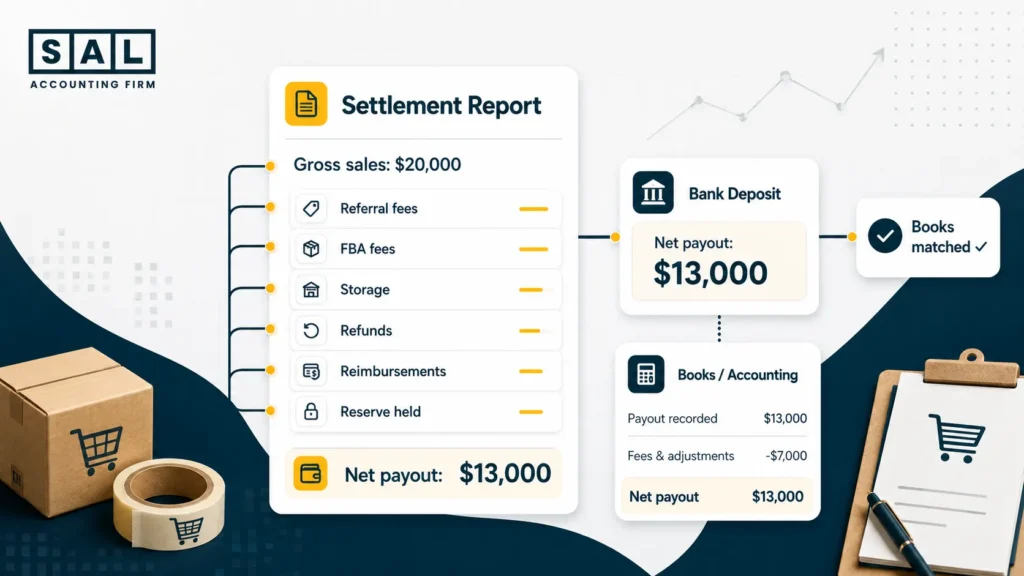
Say you sold $20,000 worth of products in a settlement period. After referral fees, FBA fees, storage, refunds, and advertising, your deposit comes out to around $13,000.
If that $13,000 gets recorded as revenue, you’ve understated your actual sales by $7,000 and lost all visibility into what Amazon is charging you.
When your revenue is understated and your fees are invisible, you can’t trust your margins or make confident decisions about pricing and inventory. This is the same core issue that comes up in ecommerce payment reconciliation more broadly. The problem isn’t just the sale, it’s what happened between the platform and the bank. The fix starts with understanding what’s inside that deposit, not just the total.
If your Amazon numbers are already getting harder to trust, SAL can help with bookkeeping for Amazon sellers so your reports reflect what actually happened.
How to Make Sure Amazon Payouts Match Your Bank and Books?
The settlement report is your starting point. Find it in Seller Central under Reports > Payments > All Statements. It breaks down gross sales, every fee type, refunds, reimbursements, and the net amount Amazon transferred to you.
The settlement report explains the payout. The bank deposit only confirms what arrived.
The Reconciliation Process
Here’s how Amazon settlement report reconciliation works step by step:
- Download the settlement report. Go to Reports > Payments > All Statements in Seller Central and grab it as soon as the period closes.
- Break it into its parts. Gross sales go to revenue. Referral fees, FBA fees, storage, and advertising each get their own expense line. Refunds reduce revenue. Reimbursements sit in a separate income account.
- Match the net to your bank deposit. The settlement total should equal what hit your account, usually within one to three business days.
- Check what Amazon is holding. Holding roughly two weeks of revenue is normal. What’s not normal is that the balance grows month after month without explanation.
Most sellers reconcile monthly. By then, small issues have already piled up. Weekly is much easier to manage.
You can also use A2X for this. It pulls your settlement data directly from Seller Central and posts categorized entries into QuickBooks or Xero automatically. It won’t catch everything, but it reduces the manual work.
- Also read: “Amazon FBA Bookkeeping Guide”
What Are You Actually Making After All Fees and Costs?
Sales are not the same as profit. To see what you’re really making, your books need to clearly separate three things: what customers paid, what Amazon took, and what your products actually cost you.
Where Amazon Fees Belong
Amazon fees (referral fees, fulfillment fees, storage fees) are not part of your product cost. This is one of the most common mistakes we see. They’re selling expenses and they belong somewhere else in your books.
If they get mixed in with what you paid for the product, your margins look worse than they are and you can’t get a clear read on how Amazon is actually performing.
This is also where comparing Shopify vs Amazon FBA becomes useful. Each platform has a different fee structure, payout timing, and reporting setup, so the cost picture looks different depending on where you sell.
What to Include in Your Product Cost
Your product cost is everything it took to get the item to Amazon’s warehouse, ready to sell:
- What you paid your supplier per unit
- Shipping to Amazon’s fulfillment centers
- Customs and import duties
- Prep and labeling costs
So if your supplier charges you $12, but after shipping, duties, and prep the real cost is $16, your books should show $16, not $12. If they don’t, your profit looks better than it really is. That’s a problem. For a deeper breakdown of how to structure this, the COGS guide for ecommerce stores walks through the math in detail.
For Canadian sellers shipping into the US, this is especially easy to miss. Exchange rates, brokerage fees, and duties all add up, and they should all be part of how you calculate what a product actually costs you. That connects directly to the cross-border ecommerce shipping costs that often get left out of landed cost calculations.
How to Value Your Inventory
Most FBA sellers use FIFO (first in, first out), which means the cost of your oldest inventory is recorded first as units sell. Weighted average is also fine if your product costs change often. Either works.
Note: You don’t need to turn this into a finance lecture. The key is picking one and sticking with it. If your method keeps changing, your profit numbers will keep changing too. This connects to how ecommerce financial statements should reflect consistent inventory valuation across periods, not just what’s convenient at year end.
Why the Timing of Income Matters
Amazon deposits money every two weeks, but that doesn’t mean all those sales happened in the same period. Some months will show more deposits than others even when sales are perfectly steady.
Recording income when you actually earned it, not when it lands in your bank, gives you a profit number you can trust month to month. This is the accrual principle, and it’s covered in more detail in the context of double-entry bookkeeping for small businesses.

What to Do With Returns and Money Amazon Owes You?
Returns and reimbursements are where things get messy fast.
A customer returns a product. Amazon refunds them. The item might go back into stock, become unsellable, or trigger a reimbursement. If your books don’t track this, your revenue, inventory, and profit numbers will all be off.
Returns
When a customer returns a product, what you do in your books depends on what happens to the item:
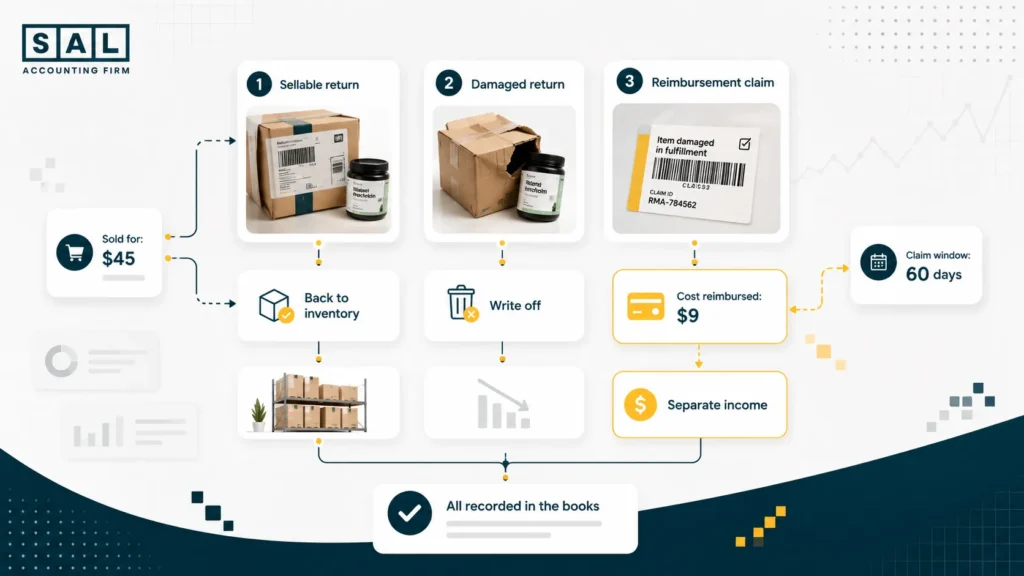
- Item comes back sellable: reverse the sale and put the unit back in inventory at its original cost.
- Item comes back damaged or unsellable: reverse the sale and write off the cost. The unit is gone.
Where sellers go wrong is ignoring the return completely, or just reducing revenue without touching inventory. Both cause numbers to get unclear over time. The same issue comes up regularly in ecommerce accounting mistakes, returns that aren’t fully reconciled tend to be one of the bigger sources of profit distortion.
What to Do With Reimbursements
Reimbursements are money Amazon pays you when they lose or damage your inventory, or make errors on fees or refunds. They go into a separate income line, not into your sales revenue. Mixing them in makes your revenue look higher than it is.
Two things changed in 2025 that a lot of sellers haven’t caught up with yet:
- Amazon now reimburses based on what the product cost you, not what you sold it for. If you sold something for $45 and it cost you $9, you get back $9. For private label sellers, that’s a big drop from what it used to be.
- You now have 60 days to file a claim, not 18 months. Miss that window and you get nothing.
Check your reimbursement report weekly: Seller Central > Reports > Fulfillment > Reimbursements. Months are no longer fast enough.
- Also read: “Amazon Seller Taxes Guide”
The Tax Rules You Need to Know When Selling Into the US
This is probably the most misunderstood part of FBA accounting. A lot of sellers hear “Amazon collects sales tax” and assume they’re done. Not always.
What Amazon Takes Care Of
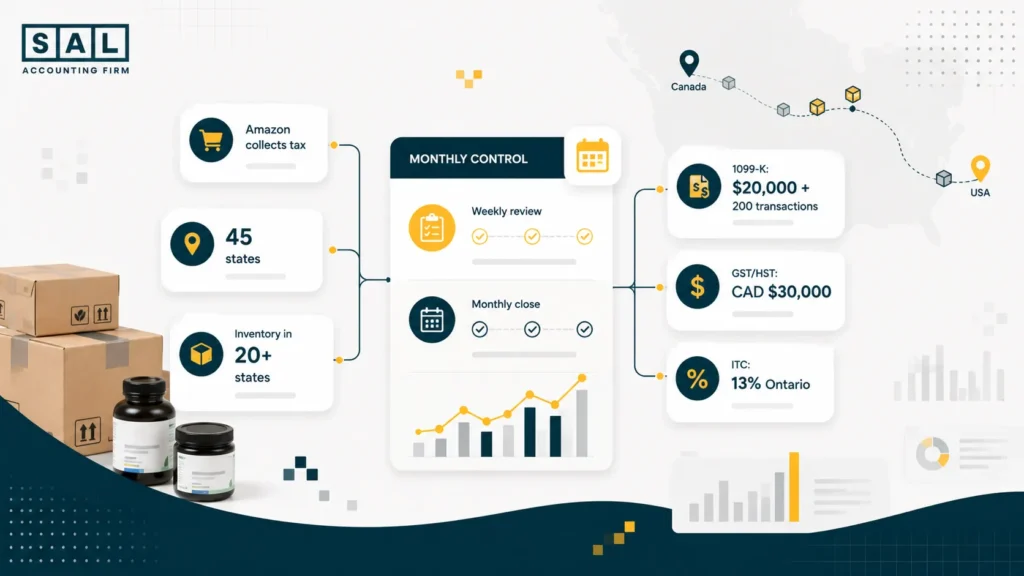
Amazon collects and remits sales tax in 45 US states, plus Washington DC and Puerto Rico, through marketplace facilitator laws. You don’t need to set rates or file returns in those states for your Amazon sales.
What It Doesn’t Cover
Storing inventory creates tax obligations. Amazon spreads your stock across its network automatically, which means you likely have inventory sitting in 20 or more states at any time.
In many of those states, that’s enough to require a sales tax permit, even though Amazon is already collecting the tax. Some states also want a filed return even when you owe nothing. Amazon collecting tax and you being compliant are two different things. The full picture of the sales tax nexus for ecommerce sellers explains where physical and economic presence create registration obligations.
Your 1099-K won’t match your books, and that’s okay. For the 2026 tax year, Amazon sends one if you exceed $20,000 in gross sales and 200 transactions. The number is gross, before fees, refunds, or anything else. The IRS explains the current 1099-K reporting thresholds. Work from gross sales down, not from your deposits up. There’s more detail on this in the 1099-K guide for ecommerce sellers.
For Canadian Sellers
A few things that come up often with our Canadian clients:
- GST/HST registration: It kicks in once your Canadian sales pass CAD $30,000. The CRA explains the threshold under its small supplier rules.
- FBA inventory in Canada: (Amazon has warehouses in BC, Ontario, and Alberta) It means you’re considered to be running a business in Canada. The GST/HST registration rules for ecommerce sellers are worth understanding before you scale.
- Input tax credits: once registered, you can claim back the tax Amazon charges on fees. In Ontario that’s 13%. On any real volume of fees, that’s meaningful money. The GST/HST refund calculator can help you estimate what you may be able to recover.
- Digital Services Tax: since October 2025, Amazon Canada adds a 3% DST on FBA fees. The Canada DST overview covers how this applies to sellers on Amazon.ca.
If you’re a Canadian seller on Amazon.com, your US obligations still apply on top of all of this. This is where cross-border tax support makes a real difference. The obligations on both sides compound quickly once you’re running inventory in multiple countries.
- Also read: “US Sales Tax Requirements for Canadian Sellers”
How to Keep Your Amazon Books Accurate Every Month?
You don’t need a huge system. You just need a repeatable one. The sellers with the cleanest books aren’t doing more. They’re doing the same things consistently.
Weekly
- Download and review new settlement reports
- Reconcile each settlement to your bank deposit
- Check the reimbursement report and file any open claims within the 60-day window
- Flag unusual fee spikes or adjustments before they get buried
Monthly
- Confirm all settlements are reconciled to the bank
- Check that gross sales, fees, refunds, and reimbursements are in the right accounts
- Update product costs and include all landed costs
- Reconcile your inventory balance to Seller Central
- Record any returns from the period
- Check what Amazon is holding; it should be roughly two weeks of revenue, nothing more
- Compare margins month over month and if something shifted, find out why
Catch small issues before they turn into a year-end cleanup project. Once you’re six months behind, every settlement becomes harder to untangle. The ecommerce tax season preparation guide covers what that cleanup looks like and how to avoid it.
The Tool Stack
A simple Amazon accounting stack often looks like this:
| What You Need | Tool |
| Accounting platform | QuickBooks Online or Xero |
| Settlement mapping | A2X |
| Sales tax filing | TaxJar or Avalara |
| Inventory tracking | Depends on volume: an inventory app, your accounting system, or a spreadsheet |
The tools handle the data. For tax planning, cross-border structure, and anything that needs real judgment, that’s where a specialist ecommerce accountant comes in.
At the end of the day, clean Amazon FBA bookkeeping isn’t just about staying compliant. It’s about knowing what’s actually happening in your business.
Also read: “Best Financial Software for Amazon FBA Businesses”
How SAL Accounting Can Help
When your Amazon books are set up properly, you’re not guessing anymore.
You can see what Amazon actually paid you, what got taken out in fees, what your products really cost, and whether your profit is as strong as it looks in Seller Central. That means cleaner decisions around pricing, inventory, tax planning, and growth.
If your numbers feel hard to trust right now, SAL can help with Amazon seller bookkeeping so you can see what your store is actually making after fees, returns, landed costs, and cross-border tax.
Ready to get a clearer picture of what’s actually happening inside your Amazon numbers? Contact SAL Accounting and get a clearer sense of what needs to be fixed, tracked, or set up next.