

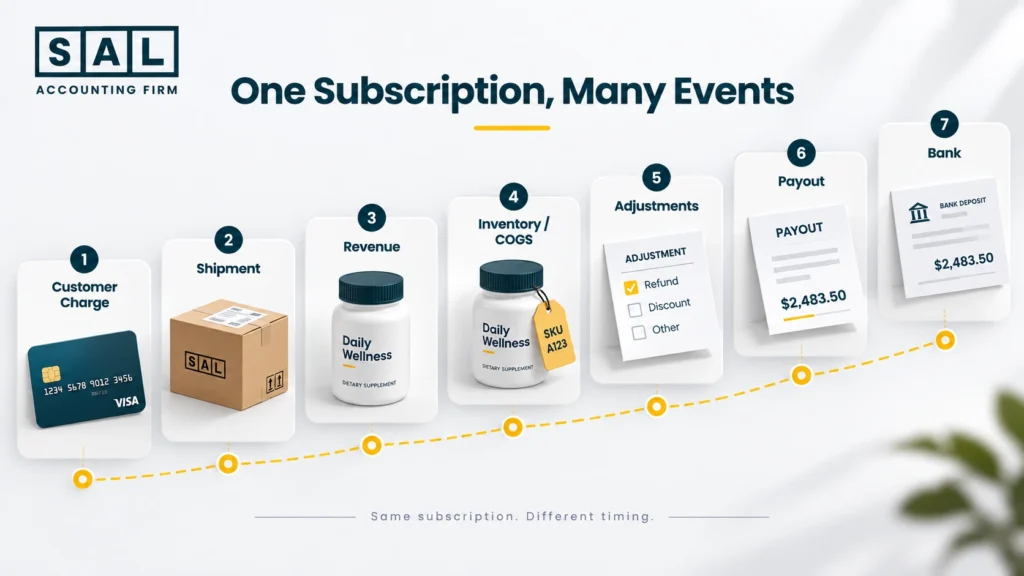
Subscription accounting for an online supplement brand should follow what actually happened, not just when cash moved. That’s the same full-transaction view SAL Accounting uses for ecommerce brands: charge, shipment, revenue, inventory, COGS, adjustments, payout, then bank.
When one step lands on the wrong date, an otherwise tidy month can tell the wrong story. Keep reading, small timing errors repeated across hundreds of renewals can quietly distort revenue, stock, and profit for months.
Before comparing subscription sales with the cash that lands in your bank, see what fees are taking out with the Shopify Fee Calculator.
Quick Takeaways
- A customer charge is not automatically the same thing as revenue.
- Prepaid subscriptions can create a gap between cash received and revenue earned.
- Inventory and COGS should follow the products actually fulfilled.
- A failed billing attempt is not a completed sale.
- A skipped or paused subscription may create no accounting activity for that cycle.
- Discounts, refunds, chargebacks, and fees should stay identifiable.
- A payout is not automatically your subscription revenue.
- You should be able to trace every subscription from order to bank deposit.
The basic flow looks like this:
Customer Charge → Shipment → Revenue → Inventory/COGS → Adjustments → Payout → Bank
That flow is what keeps recurring subscription accounting from turning into a pile of numbers that almost match.
What Makes Subscription Accounting Different for an Online Supplement Business?
A subscription can create several financial events from what looks like one customer order. Let’s say someone subscribes to a tub of protein powder every month.
They might be charged on September 1. The order ships on September 3. The payment gets grouped into a payout on September 5. The cash reaches the bank on September 7.
Those dates are connected. They are not the same accounting event.
Subscriptions make this even more obvious when customers pay upfront. Shopify’s prepaid subscription orders, for example, are paid in advance but can have several scheduled fulfillments over time. Shopify also reserves inventory for each prepaid cycle when that fulfillment date arrives rather than reserving the entire subscription at the original order date.
And unlike a digital subscription, supplements involve physical products leaving inventory. That’s why online supplement business accounting needs to track more than recurring charges. Here’s what one subscription can create:
| Event | What Happened | Main Accounting Impact | Timing Driver | Common Mistake |
|---|---|---|---|---|
| Customer charge | Payment succeeds | Cash/processor balance | Billing date | Treating charge as automatic revenue |
| Fulfillment | Product goes to customer | Inventory activity | Shipment/delivery | Ignoring fulfillment timing |
| Revenue | Sale is earned | Revenue | Accounting treatment | Following cash only |
| Inventory | Units leave stock | Inventory balance | Product movement | Reducing stock too early or late |
| COGS | Product cost becomes expense | COGS | Related fulfillment | Following payment date |
| Payout | Transactions are grouped | Clearing balance | Processor cycle | Calling payout revenue |
| Bank deposit | Cash arrives | Bank balance | Settlement date | Using deposit as the whole sale |
A normal Shopify order’s financial lifecycle already has several steps between checkout and bank deposit. A subscription adds recurring billing, skips, retries, cancellations, and future fulfillment on top.
When recurring orders outgrow basic bank-feed bookkeeping, SAL’s Ecommerce Accounting keeps sales, inventory, fees, adjustments, and payouts separated in the books.
When Should Subscription Revenue Be Recorded?
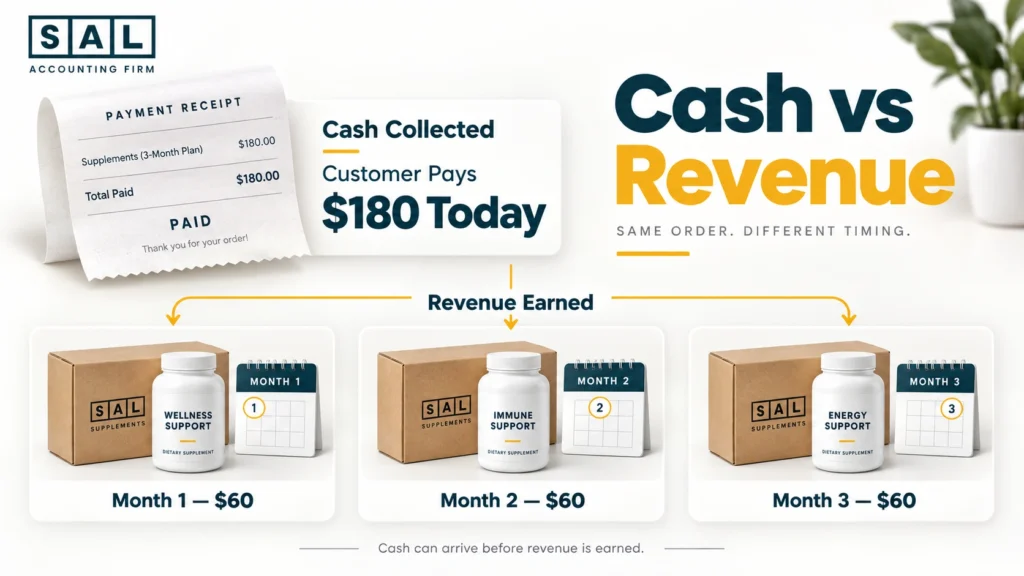
The key distinction is simple: Cash collected does not automatically mean revenue earned. For a normal monthly subscription, payment and fulfillment may happen within a few days of each other. With prepaid subscriptions, the gap is much easier to see.
Say a customer pays today for three months of supplements. You have the cash, but you still owe them future products. So, when looking at revenue timing, think about:
- When the customer paid: Cash may arrive before the order is fulfilled.
- What the customer purchased: One current shipment is different from three future shipments paid upfront.
- When the product was fulfilled: Shipment or delivery will often be an important part of the analysis for physical products.
- What accounting framework applies: The exact revenue-recognition treatment depends on the business and the transaction terms.
For Canadian private enterprises applying ASPE, CPABC’s revenue recognition guidance includes factors such as delivery and whether the amount can be measured reliably. Under IFRS 15, revenue generally follows when the relevant performance obligation is satisfied.
Basically, don’t use the payment date by itself to decide that revenue has been earned.
Pro tip: For prepaid subscriptions, keep cash received and revenue earned as two separate numbers in your head. Once you do that, the rest of the accounting becomes much easier to follow.
How Should Prepaid Supplement Subscriptions Be Accounted For?
This is where the timing difference becomes much easier to see. Let’s say a customer pays $180 upfront for three monthly supplement shipments. The cash comes in today. But the business still owes the customer three deliveries. So this:
$180 received = $180 immediately earned
doesn’t necessarily reflect what actually happened. Depending on the accounting framework and transaction terms, the amount connected to future fulfillment may need to remain as deferred or unearned revenue until the related obligation has been satisfied.
A good chart of accounts for a supplement ecommerce brand should give these different balances somewhere sensible to go rather than dropping everything into one sales account.
Monthly vs. Prepaid Supplement Subscriptions
The biggest difference is what happens between payment and fulfillment.
| Area | Monthly Subscription | Prepaid Subscription | Main Question | Common Miss |
|---|---|---|---|---|
| Payment | Around each cycle | Several cycles upfront | What did the customer pay for? | Treating cash as earned |
| Fulfillment | Usually one shipment | Multiple future shipments | What has shipped? | Ignoring future deliveries |
| Revenue | Often close to fulfillment | May span several periods | What has been earned? | Recording all revenue now |
| Inventory | Leaves each cycle | Leaves over time | How many units moved? | Reducing all stock upfront |
| COGS | Follows fulfilled product | Follows each fulfillment | Which cost belongs now? | Expensing all product cost |
A Simple $180 Example
Say the three deliveries are effectively worth $60 each. The customer pays $180 upfront. The business then fulfills:
- Month 1: one $60 shipment
- Month 2: one $60 shipment
- Month 3: one $60 shipment
Cash arrived once. The accounting activity happens over several periods. The same logic applies to inventory. Receiving $180 does not mean three months of supplement inventory left the warehouse on day one.
Pro tip: Keep a simple prepaid-subscription schedule showing the amount collected, fulfillments completed, amount recognized, and balance still connected to future orders. It makes month-end review much easier.
Case Study: How a Liberty Village Supplement Brand Fixes Prepaid Subscription Timing1
A growing online supplement brand in Liberty Village, Toronto sells a three-month prepaid vitamin subscription. Customers pay $180 upfront and receive one shipment each month.
New prepaid sign-ups are growing, but revenue jumps sharply whenever a new subscription campaign runs.
The Problem
The full prepaid amount is being recorded as revenue when customers pay, even though most of the products still have not been fulfilled. Cash is right, but the timing of revenue, inventory, and COGS no longer tells the same story.
What We Do
We separate the upfront customer payment from the later fulfillment activity. Each subscription can then be followed through the future shipments, related revenue treatment, inventory movement, and COGS.
The Result
The monthly books follow what the business actually delivered instead of showing one large spike simply because several customers prepaid at once. The owner can clearly explain the difference between cash already collected and future subscription activity still outstanding.
How Should Inventory and COGS Be Recorded for Subscription Orders?
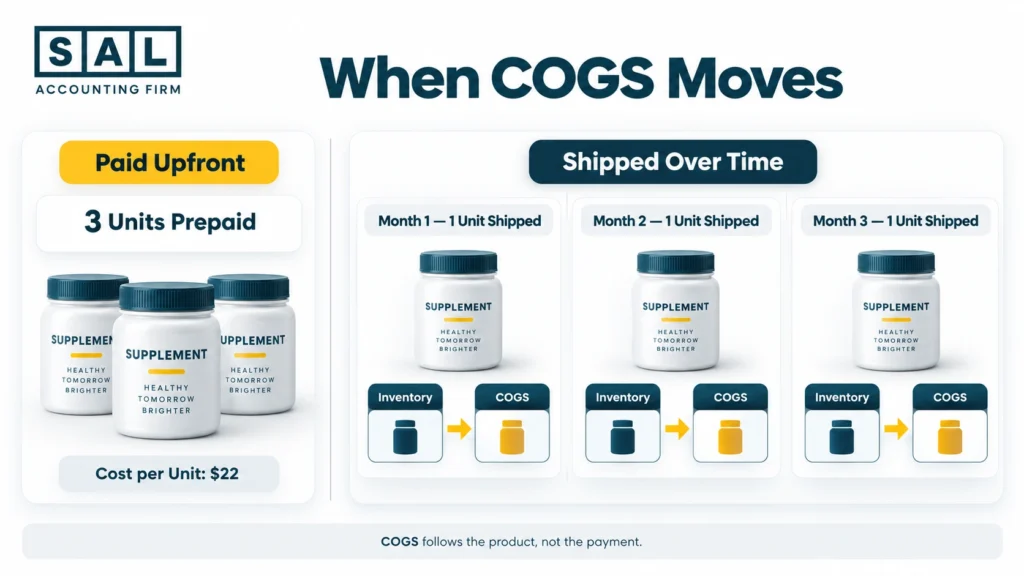
A supplement subscription has something a software subscription doesn’t: physical inventory. Every time a bottle, tub, pouch, or box is fulfilled, the product leaves the business. The accounting trail should reflect that:
Inventory → Product Fulfilled → COGS
Imagine one tub of protein powder costs the business $22. A customer prepays for three tubs.
The cash for all three may arrive today. But if only the first tub has been fulfilled, you do not automatically want all three units flowing through current-period COGS simply because the customer paid upfront. That would separate product cost from the activity it belongs to.
It can also make inventory wrong. For brands managing stock between a warehouse, 3PL, and ecommerce platform, the right inventory software for a supplement ecommerce business should make the movement easier to trace.
Shopify sellers also need their Shopify inventory accounting to agree with what actually went out through subscription fulfillments.
Pro tip: Reconcile units and dollars separately. First confirm how many units left inventory. Then confirm the cost attached to those units. Trying to fix both at once makes differences harder to find.
- Read more: “How to Calculate COGS for Ecommerce Stores”
How Should Subscription Discounts Be Recorded?
Subscribe-and-save discounts are normal for supplement brands. You may have:
- a recurring percentage discount;
- a fixed-dollar discount;
- a first-subscription offer;
- a promotional code; or
- a different discount based on subscription frequency.
Shopify’s subscription setup supports different subscription frequencies and discount types, so those discounts can become a regular part of recurring order activity rather than a one-off promotion. Shopify Subscriptions documents those options. From an accounting perspective, you still want to know what happened.
A simple view is:
Gross Sales − Discounts = Net Sales
Let’s say a supplement normally sells for $50. The subscriber receives 10% off.
Regular price: $50
Subscription discount: $5
Net sale: $45
Now imagine $43 eventually reaches your payout after processing costs. That does not make the sale $43. The $5 discount and the processor cost are two different things.
This is why categorizing Shopify transactions correctly matters. Sales, discounts, fees, refunds, taxes, and payouts should not collapse into one net number.
How Should Refunds, Cancellations, Chargebacks, and Failed Payments Be Recorded?
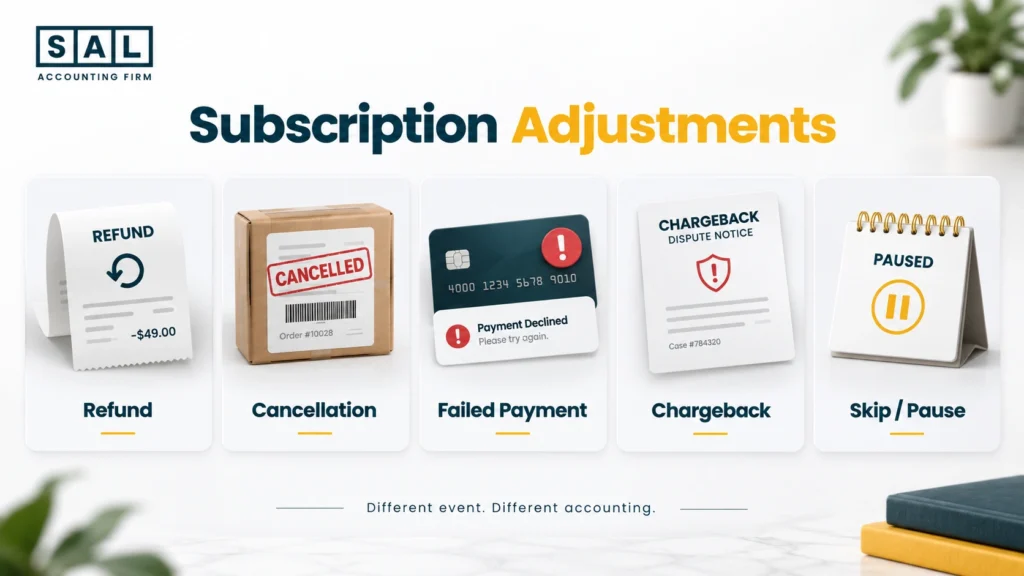
These events are related. They are not interchangeable. Here’s the quick difference:
| Event | Revenue Impact | Inventory/COGS | Cash/Payout | Main Check |
|---|---|---|---|---|
| Full refund | May reverse/reduce sale | Depends on product status | Reduces cash/payout | Was it fulfilled or returned? |
| Partial refund | Reduces part of sale | May not change inventory | Reduces cash/payout | What was refunded? |
| Cancellation | Stops future activity | Usually no future shipment | Usually no future charge | Was payment already taken? |
| Failed payment | No completed transaction | Usually no shipment | No collection | Did a retry succeed later? |
| Chargeback | Adjusts prior transaction | Usually tied to earlier order | May reduce payout + fee | Which order caused it? |
| Skip/pause | Often no cycle activity | No shipment if skipped | Usually no charge | Did anything actually happen? |
Refunds
A refund relates to a transaction that already exists. It could be:
- a full refund;
- a partial refund;
- a refund before fulfillment; or
- a refund after the product has shipped.
What happens in the books depends partly on what also happened to the product. Was it never shipped? Was it returned to sellable inventory? Was it damaged? Was the customer allowed to keep it? Those details matter.
Cancellations
A cancellation is different. A customer might cancel future deliveries without reversing an order that has already been properly charged and fulfilled:
Refund = adjustment to an existing transaction
Cancellation = stopping future subscription activity
Chargebacks
A chargeback happens after a sale has already been recorded, so it should stay connected to that original order.
When the dispute is processed, the payment processor may reverse the transaction and charge an additional fee. Record those adjustments separately rather than letting them disappear inside a later payout difference.
Failed or Retried Payments
A billing attempt is not a completed sale just because the system tried to collect it.
Shopify lets merchants configure payment retry attempts and choose what happens after repeated failures, including skipping, pausing, or cancelling a subscription. Shopify’s billing attempt settings explain how those retries work.
So imagine a payment fails Monday and succeeds Wednesday.
Monday is an attempted charge.
Wednesday is the successful transaction.
Your books should not pretend both created sales.
Pro tip: Use successful charges, not billing attempts, as the starting point when reconciling recurring payments.
Case Study: How a Port Credit Supplement Seller Separates Subscription Adjustments2
An online supplement company in Port Credit, Mississauga has a growing recurring customer base. Every month, customers skip deliveries, change cards, request refunds, and occasionally file chargebacks. Sales still look reasonable, but the monthly adjustment number keeps moving around.
The Problem
Refunds, failed charges, skips, and chargebacks are being pushed into one generic negative-sales category. The books reach a net number, but nobody can explain what actually created it.
What We Do
We separate successful charges from failed attempts, match refunds back to existing transactions, keep skipped cycles out of current sales activity, and identify chargebacks and processor adjustments individually.
The Result
The owner can now explain why subscription activity changed from one month to the next instead of seeing one unexplained negative number. Refunds, payment failures, skipped orders, and chargebacks each tell their own story.
What Happens When a Customer Skips or Pauses a Subscription?
Being a subscriber is not the same thing as creating financial activity every month. That distinction sounds small, but it matters.
With Shopify Subscriptions, a customer can skip an upcoming order or pause a subscription. A paused subscription stops future charges and upcoming orders until it is resumed. Shopify’s subscription management guidance explains how skips and pauses work for customers. So imagine Sarah normally receives a supplement box every month. She skips September. There is:
- no successful charge;
- no shipment;
- no inventory leaving; and
- no other adjustment.
In that case, there may also be no September revenue or COGS for that cycle. Sarah may still be an active subscriber overall. But September did not necessarily create accounting activity. The point is:
Subscription status ≠ financial activity.
Why Don’t Subscription Sales Match the Bank Deposit?
Because the bank sees the end of the process. Your subscription platform sees much more of the beginning. A simple payout might look like:
Subscription Sales
− Refunds
− Processing Fees
− Chargebacks
± Other Adjustments
= Payout
Then:
Payout → Bank Deposit
Shopify’s payout activity can include transactions, fees, refunds, chargebacks, adjustments, and payouts. That’s why a lower bank deposit does not automatically mean the original sales number was wrong. Shopify Payments payout activity gives merchants those underlying details.
Let’s use a simple example. Your subscription platform shows $23,500 in relevant sales activity. After refunds, payment costs, chargebacks, and other adjustments, $20,000 reaches your bank. Recording:
Revenue = $20,000
throws away the detail between those two numbers. The payout is the result of the transactions.
It is not automatically the revenue figure.
A proper Shopify payment reconciliation should work backwards from the payout to the underlying sales, refunds, fees, and adjustments rather than simply categorizing the deposit as income.
That distinction becomes even more important for subscription stores because transactions from different billing cycles can end up inside different payouts.
Running a large recurring program through Shopify? Our Shopify Accounting keeps gross sales, refunds, fees, inventory, and payouts from disappearing into one deposit number.

What Are the Most Common Subscription Accounting Mistakes?
Most subscription accounting problems are not one huge mistake. They’re small timing or classification problems repeated every renewal. Common examples include:
- recognizing prepaid subscriptions entirely as immediate revenue without considering future fulfillment;
- recording failed billing attempts as sales;
- ignoring when products actually ship;
- recording COGS based only on customer payment timing;
- treating cancellations and refunds as the same event;
- hiding subscription discounts inside net deposits;
- recording processor payouts as revenue;
- forgetting chargebacks or payout adjustments;
- leaving skipped cycles in accounting activity;
- disconnecting inventory movement from subscription fulfillment; and
- changing the accounting treatment from month to month.
These are variations of the same ecommerce accounting mistakes that appear when platforms, processors, inventory, and the bank are treated as though they are one system.
And that’s the part worth watching. One timing difference across ten orders may barely move the numbers.
Repeat it across 2,000 renewals and several months, and the financial statements can become much harder to explain.
That is how otherwise tidy books end up producing inaccurate ecommerce financial statements without one dramatic error ever appearing.
How Can You Tell if Your Subscription Accounting Is in Sync?
Try explaining one month from beginning to end. You should be able to move through:
Subscription Orders
→ Successful Charges
→ Shipments
→ Revenue
→ Inventory / COGS
→ Refunds & Adjustments
→ Payouts
→ Bank
Now ask a few simple questions:
- Why were 4,800 subscription orders scheduled but only 4,520 successfully charged?
- Why were 4,450 fulfilled?
- Why did revenue differ from successful payments?
- Why did the payout differ again?
- And why did the bank receive a different number?
You don’t need those numbers to match. You need to be able to explain the difference.
That same logic should carry into the financial reports for your online supplement business. Your P&L, balance sheet, inventory records, and cash should tell different parts of the same story.
Good ecommerce reconciliation practices make those differences visible before they roll into the next month.
Pro tip: Review old clearing balances by age. A payout that has been outstanding for three days may just be timing. A subscription clearing balance sitting unexplained for six months needs a closer look.
Ready to Keep Subscription Accounting Reliable as You Grow
Good subscription accounting doesn’t mean forcing your subscription app, Shopify, inventory system, accounting software, processor, and bank to show the same number.
They do different jobs. What matters is being able to explain how one number became the next.
Customer Charge → Fulfillment → Revenue → Inventory/COGS → Adjustments → Payout → Bank
Once that trail makes sense, skipped orders, prepaid plans, failed payments, refunds, and payout differences stop feeling like random accounting problems. They become normal events you can actually trace.
Want the bigger financial picture as your store grows? Get the Financial Growth Blueprint and see what should become clearer as a Canadian ecommerce brand scales.