
A Magento website usually costs $25,000 to $300,000+ to build in 2026. The final price depends on how complex your store is and whether you choose the free version or the paid edition. We put together this clear breakdown of Magento ecommerce services and pricing to help you budget your project properly.
Many brands like yours overspend by 30-50% in the first year. They underestimate the full Magento TCO, especially Adobe Commerce licensing, complex integrations, and ongoing maintenance. We at SAL Accounting will walk you through the real 2026 numbers and smart ways to avoid overspending.
Check out our ecommerce bookkeeping services to get clear help with budgeting and managing your ongoing expenses.
Quick Takeaways
- A Magento website usually costs $25,000 to $300,000+ to build in 2026.
- Magento Open Source is free, but Adobe Commerce costs $22,000 to $125,000+ per year.
- Custom development is the biggest expense, it can range from $15,000 to $150,000+.
- Year 1 total cost (TCO) ranges from $50,000 to $500,000+. After that, expect 20–40% of Year 1 cost yearly.
- You can save a lot by starting with Open Source, using ready-made themes, and building in phases.
- Magento costs more than Shopify, but it gives you more power, customization, and B2B features for bigger stores.
What Are Magento eCommerce Services?
Magento ecommerce services cover everything you need to build and run your online store. These services include custom development, design, integrations, data migration, testing, and ongoing support. Here’s what you usually get:
- Custom development to build the store you want
- Simple and nice design that matches your brand
- Connections to your other tools like ERP, CRM, and payment systems
- Moving your products, customers, and orders to the new store
- Testing to make sure everything works well
- Maintenance and support after the store goes live
The services you pick directly affect your e-commerce business starting costs. A simple store needs less work and costs less. A complex store needs more work and costs more. We will show you the price for each part later in this post.
Magento Pricing Explained: Open Source vs Adobe Commerce
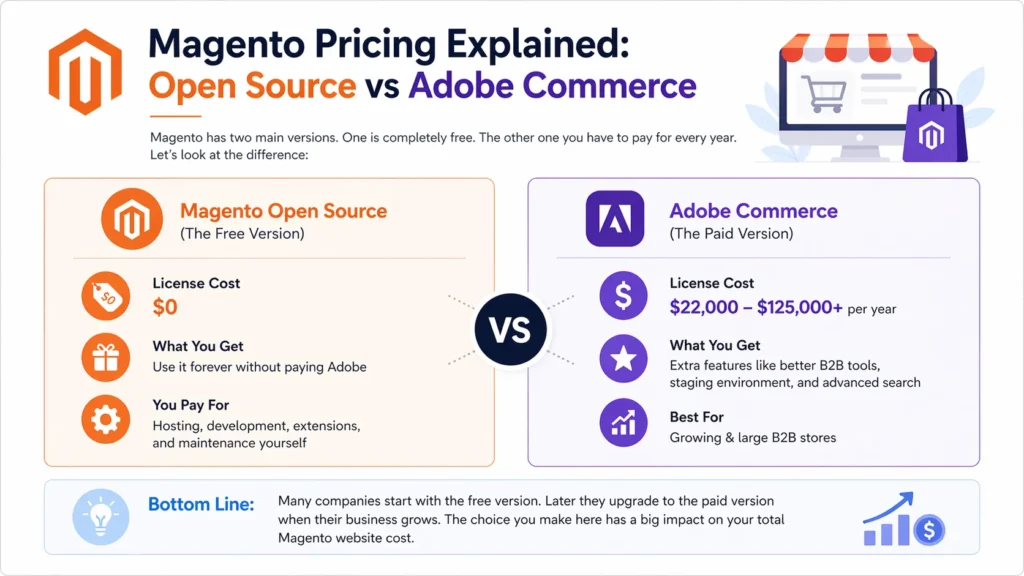
Magento has two main versions. One is completely free. The other one you have to pay for every year. Let’s look at the difference:
Magento Open Source (the free version)
This is the completely free version of Magento (start using Magento). You can download and use it without paying any license fee to Adobe. Many small and medium businesses like this version because it has zero license cost. However, you are responsible for all other expenses for your ecommerce store like hosting, design, and maintenance.
- License cost: $0
- You can use it forever without paying Adobe
- You pay for hosting, development, extensions, and maintenance yourself
Adobe Commerce (the paid version, also called Magento Commerce)
This is the paid version of Magento. You have to pay a license fee every single year. The price depends on how much your store sells. It starts lower for smaller businesses and gets higher as your sales grow. Consider the sales taxes for your ecommerce business in addition to these costs. This version gives you many advanced features that make running a bigger store much easier.
- You pay a yearly license fee
- Price usually starts from about $22,000 per year and can go up to $125,000+ depending on your sales
- It includes extra features like better B2B tools, staging environment, and advanced search
Here is a simple comparison:
| Aspect | Magento Open Source (Free) | Adobe Commerce (Paid) |
| License Cost | $0 | $22,000 – $125,000+ per year |
| Best For | Startups, small stores | Growing & large B2B stores |
| Upfront Cost | Low (only development & hosting) | Higher (yearly license + development) |
| Advanced Features | Basic only | Many built-in (B2B, staging, advanced search) |
| Who Manages It | You or your agency | You + official Adobe support |
| Best When | You want to save on license fees | You need powerful tools and scalability |
Many companies start with the free version. Later they upgrade to the paid version when their business grows. The choice you make here has a big impact on your total Magento website cost.
- Read More: “Best eCommerce Accounting Software in 2026”
How Much Does It Cost to Build a Magento Store in 2026?
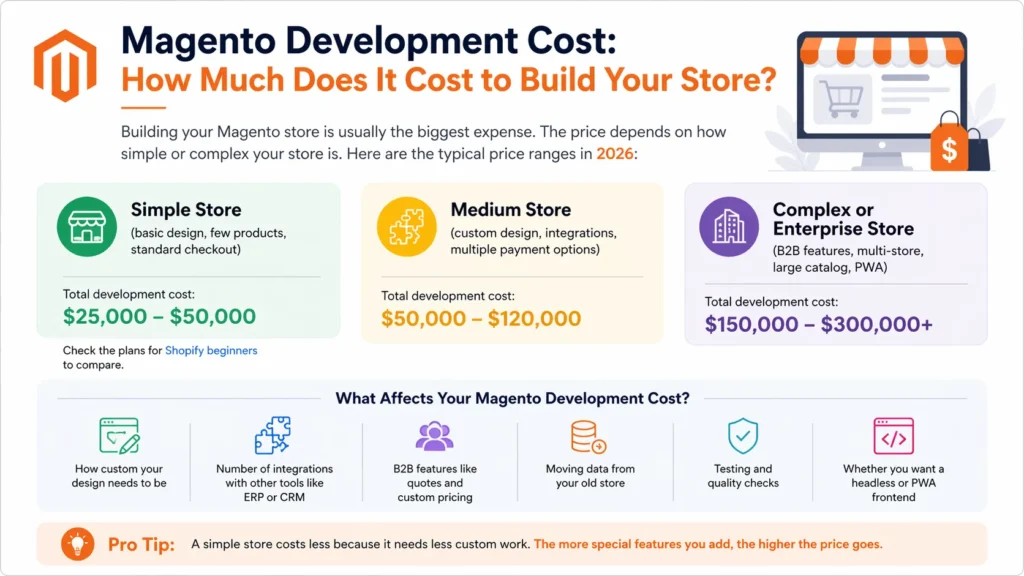
Building your Magento store is usually the biggest expense. The price depends on how simple or complex your store is. Here are the typical price ranges in 2026:
- Simple store: (basic design, few products, standard checkout) Total development cost: $25,000 – $50,000. Check the plans for Shopify beginners to compare.
- Medium store: (custom design, integrations, multiple payment options) Total development cost: $50,000 – $120,000
- Complex or Enterprise store: (B2B features, multi-store, large catalog, PWA) Total development cost: $150,000 – $300,000+
What Affects Your Magento Development Cost?
Several things decide how much you will pay:
- How custom your design needs to be
- Number of integrations with other tools like ERP or CRM
- B2B features like quotes and custom pricing
- Moving data from your old store
- Testing and quality checks
- Whether you want a headless or PWA frontend (like Alokai)
Pro Tip: A simple store costs less because it needs less custom work. The more special features you add, the higher the price goes.
Where Does Your Money Go? Magento Website Cost Breakdown
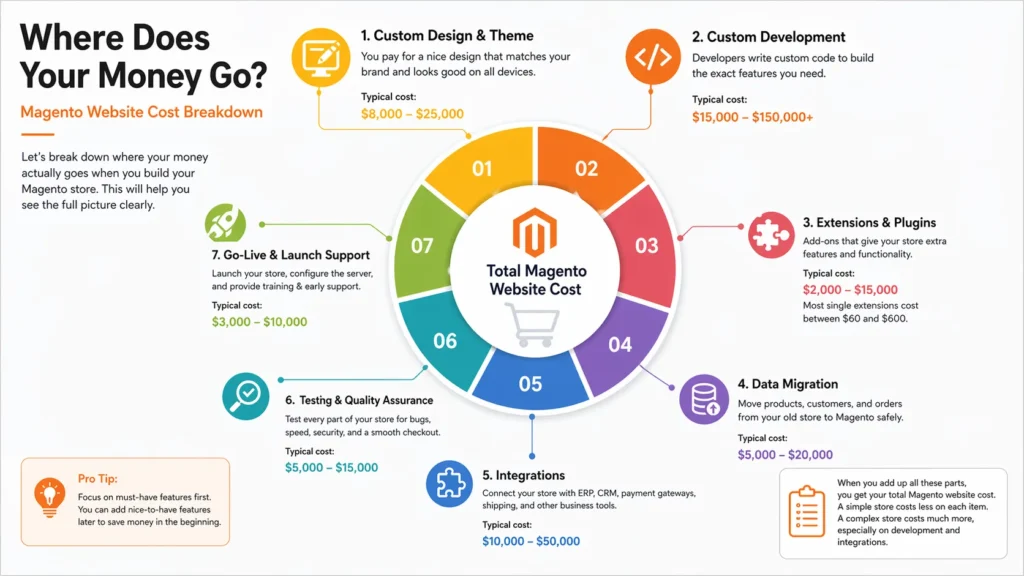
Let’s break down where your money actually goes when you build your Magento store. This will help you see the full picture clearly.
1. Custom Design & Theme
You pay for a nice design that matches your brand. A good design makes your store look professional and easy for your customers to use. It includes the layout, colors, fonts, buttons, product pages, and how it looks on mobile phones. If you want a unique design, it takes more time and costs more. A simple ready-made theme costs less. Have a look at the Shopify pricing options and plans too.
Typical cost: $8,000 – $25,000
2. Custom Development
This is usually the biggest part of your Magento website cost. Developers write special code to make the exact features you want. The more custom features you ask for, the more you pay. Here is what affects this cost:
- Special product filters and search options
- Custom checkout process
- Special user accounts or login systems
- Any feature that is not available in standard Magento
Typical cost: $15,000 – $150,000+
3. Extensions & Plugins
Extensions are ready-made add-ons that give your store extra functions. You don’t need to build everything yourself. For example, you may need extensions for better search, product reviews, discounts, or SEO. Some are free, but good ones usually cost money. Most stores need 10 to 20 extensions.
Typical cost: $2,000 – $15,000
Most single extensions cost between $60 and $600.
4. Data Migration
You move all your products, customers, and old orders from your old store to the new Magento store. You must do this carefully so nothing gets lost or broken. If you have thousands of products, this job takes more time and costs more.
Typical cost: $5,000 – $20,000
5. Integrations
You connect your Magento store with your other business tools so everything works together. Each connection needs work and testing. Here is what usually gets connected:
- ERP system for inventory and orders
- CRM system for customer information
- Payment gateways like PayPal or Stripe
- Shipping software and marketing tools
The more tools you connect, the more you pay. Choose the best e-commerce integrations to save money.
Typical cost: $10,000 – $50,000
6. Testing & Quality Assurance
Experts test every part of your store before you launch. They check for bugs, test the speed on phones and computers, make sure the checkout works properly, and look for security problems. Good testing stops expensive fixes after launch.
Typical cost: $5,000 – $15,000
7. Go-Live & Launch Support
This is the final step. The team helps you put your store live on the internet. They fix the server settings, move the files, and make sure everything works. They also train your team and help you during the first few days after launch.
Typical cost: $3,000 – $10,000
When you add up all these parts, you get your total Magento website cost. A simple store costs less on each item. A complex store costs much more, especially on development and integrations.
Pro Tip: Focus on must-have features first. You can add nice-to-have features later to save money in the beginning.
This table shows all the costs in one place. It makes it easy for you to see and compare the prices.
| Cost Item | Simple Store | Medium Store | Complex Store |
| Custom Design & Theme | $8,000 – $12,000 | $12,000 – $18,000 | $18,000 – $25,000 |
| Custom Development | $15,000 – $25,000 | $40,000 – $70,000 | $100,000 – $150,000+ |
| Extensions & Plugins | $1,000 – $3,000 | $3,000 – $8,000 | $8,000 – $15,000 |
| Data Migration | $3,000 – $6,000 | $6,000 – $12,000 | $12,000 – $20,000 |
| Integrations | $5,000 – $10,000 | $15,000 – $30,000 | $30,000 – $50,000 |
| Testing & QA | $3,000 – $6,000 | $6,000 – $10,000 | $10,000 – $15,000 |
| Go-Live & Launch Support | $2,000 – $5,000 | $5,000 – $8,000 | $8,000 – $10,000 |
| Total Estimated Cost | $25,000 – $50,000 | $50,000 – $120,000 | $150,000 – $300,000+ |
Case Study: How a Toronto Fashion Brand Built Their Magento Store Under Budget1
Sarah owns a growing fashion store in Toronto’s Distillery District. She wants a nice online store with custom filters and easy checkout. When she gets quotes from agencies, the prices are very high, between $180,000 and $250,000.
The Problem
The quotes are much higher than Sarah’s budget. She is worried she will have to remove important features or delay her launch.
What We Do
We help Sarah split the project into smaller parts. She starts with the free Magento Open Source version and uses a good ready-made theme. We only build the most important features first and choose affordable extensions.
The Result
Sarah launches her Magento store for just $68,000, almost 60% less than the highest quote. Her store looks great and is ready to grow. She will add more features later.
What Is the Total Cost of Ownership (TCO) for a Magento Store?
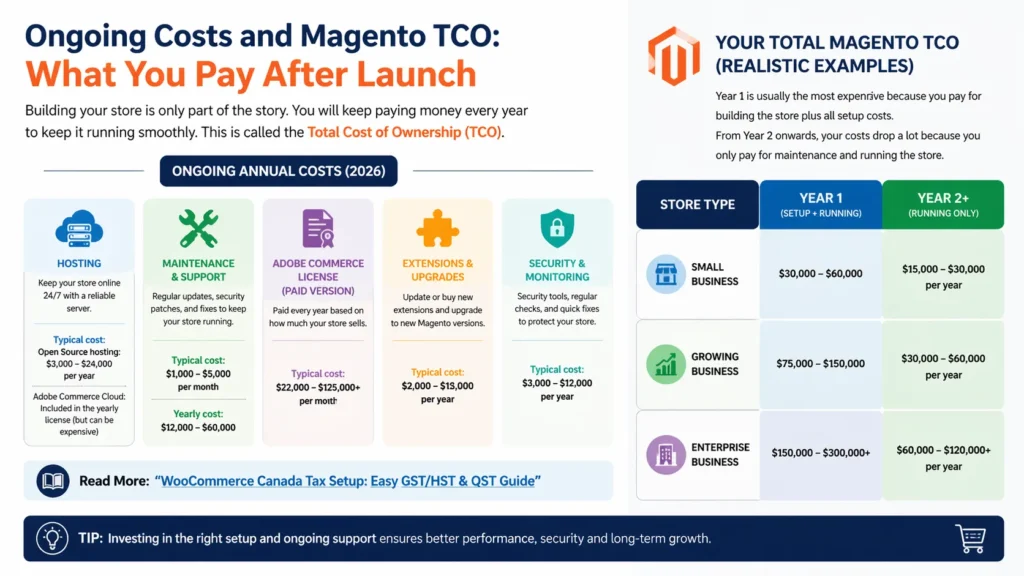
Building your store is only part of the story. You will keep paying money every year to keep it running smoothly. This is called the Total Cost of Ownership or TCO. Here’s what you need to know about ongoing costs in 2026:
1. Hosting
You need a good server to keep your store online 24/7. If you use the free Magento Open Source, you pay for hosting yourself. If you use Adobe Commerce Cloud, the hosting is included in the license fee.
Typical cost:
- Open Source hosting: $3,000 – $24,000 per year
- Adobe Commerce Cloud: Included in the yearly license (but it can be expensive)
2. Maintenance & Support
Your store needs regular updates, security patches, and fixes. Most businesses hire an agency or developer for this. You may need to outsource the bookkeeping tasks for your online store as you develop.
Typical monthly cost: $1,000 – $5,000
Yearly cost: $12,000 – $60,000
3. Adobe Commerce License (If You Choose the Paid Version)
You pay this fee every year if you use Adobe Commerce. The amount depends on how much your store sells.
Typical cost: $22,000 – $125,000+ per year
4. Extensions & Upgrades
You may need to update or buy new extensions every year. New Magento versions also come out, and you might need to upgrade.
Typical yearly cost: $2,000 – $10,000
5. Security & Monitoring
You must keep your store safe from hackers. This includes security tools, regular checks, and quick fixes if something goes wrong.
Typical yearly cost: $3,000 – $12,000
6. Your Total Magento TCO (Realistic Examples)
Let’s look at realistic total costs for different types of stores. These numbers include development, licensing, hosting, and all other expenses.
- Year 1 is usually the most expensive because you pay for building the store plus all setup costs.
- From Year 2 onwards, your costs drop a lot because you only pay for maintenance and running the store.
| Store Type | Year 1 Total Cost | Ongoing Yearly Cost (Year 2+) |
| Simple Open Source store | $50,000 – $100,000 | $10,000 – $25,000 |
| Medium store | $120,000 – $250,000 | $25,000 – $60,000 |
| Complex Adobe Commerce store | $250,000 – $500,000+ | $60,000 – $150,000+ |
Pro Tip: Many brands forget about these ongoing costs and get shocked later. Plan for them from the beginning so you don’t overspend.
Case Study: How a Mississauga Electronics Store Controls Their Monthly Costs2
Michael owns an electronics store in Mississauga’s Square One area. After launching his Magento store, he sees his monthly bills going up fast.
The Problem
Michael is paying almost $4,800 every month for hosting, updates, and support. This is much more than he expected.
What We Do
We check his setup and switch him to a better hosting plan. We create a simple monthly maintenance package, clean up his extensions, and help him get a better long-term contract.
The Result
Michael lowers his monthly cost from $4,800 to $2,150 — a saving of more than 55%. Now his costs are predictable and he has more money to grow his business.
How to Save Money on Your Magento Project (Cost-Saving Tips)
You don’t have to spend the maximum amount. Avoid common ecommerce accounting mistakes to cut the costs. Here are practical ways to save money on your Magento website:
- Start with Magento Open Source Use the free version first instead of paying for Adobe Commerce. You can upgrade later when your business grows. This saves you a lot of money in the beginning.
- Use Ready-Made Themes and Extensions Don’t build everything from scratch. Start with good ready-made themes and extensions. This cuts down custom development costs significantly.
- Build in Phases Launch with only the most important features first. Add extra features later. This spreads your cost over time and makes the project more affordable.
- Compare Agency Quotes Get quotes from 3–4 different agencies. Agencies in Eastern Europe or India often charge lower rates but still deliver good work.
- Sign a Long-Term Maintenance Contract Agree on a 12 or 24-month support contract with your agency. You will usually get a much better hourly rate this way.
You can also check these smart ways to reduce ecommerce costs for more ideas.
Pro Tip: Make a clear list of “must-have” and “nice-to-have” features before you start. Focus only on must-haves in the first version. This is one of the easiest ways to control your Magento website cost.
Magento vs Shopify vs WooCommerce: Which One Should You Choose?
You might be wondering if Magento is the best choice for your business. Let’s compare it with Shopify and WooCommerce in simple terms. You can also compare Shopify and WooCommerce with each other. Magento is more powerful but also more expensive. Shopify is easier and cheaper to start. WooCommerce is free but needs more technical work. Here is a quick and honest comparison:
| Aspect | Magento | Shopify | WooCommerce |
| Best For | Medium to large stores, B2B | Beginners and small stores | Small to medium stores |
| Upfront Cost | High ($25,000 – $300,000+) | Low ($29 – $299 per month) | Low (free + hosting) |
| Monthly / Yearly Cost | High (especially Adobe Commerce) | Predictable monthly fee | Low to medium |
| Customization | Very high | Medium | High (but needs coding) |
| B2B Features | Excellent | Basic | Needs extra plugins |
| Scalability | Excellent for large catalogs | Good | Good for small-medium |
| Technical Skill Needed | High | Very low | Medium |
| Best When | You need advanced features | You want something easy and fast | You want free and flexible |
When you should choose Magento:
Magento is a great choice when you need power and flexibility. Choose Magento if:
- You sell a large number of products
- You need strong B2B features (quotes, custom pricing, company accounts)
- You want full control and high customization
- You plan to grow into a very big store
When you should choose Shopify or WooCommerce instead:
Shopify and WooCommerce are better options when you want something simpler and faster. Choose them if:
- You are just starting and want to launch quickly
- You have a small budget
- You don’t want to deal with technical complexity
Simple Advice: If your store is simple and small, go with Shopify. If you need advanced features and plan to grow big, Magento is worth the higher cost. Our Shopify tax accounting expert can review your needs and give you clear, honest advice.
Final Thoughts: How to Plan Your Magento Budget
A Magento website usually costs $25,000 to $300,000+ to build in 2026. Your first-year total can reach $50,000 to $500,000+. After that, you pay 20% to 40% of the first-year cost every year. Choose Magento if you need advanced features and want to grow big. Otherwise, Shopify might be easier and cheaper for you. Plan your must-have features carefully. Always budget for ongoing costs too.
We at SAL Accounting help businesses like yours create realistic Magento budgets. Reach out if you want a custom cost breakdown or our free budgeting worksheet.