

Your books can look organized and still give you the wrong numbers. DIY or generic bookkeeping often follows the bank feed, while Shopify, Amazon, inventory, fees, refunds, and tax sit outside that view.
That gap is exactly where SAL Accounting focuses its work with Canadian ecommerce brands. Read this before your next pricing, inventory, or tax decision, because one clean-looking report can hide a costly mistake.
Start with the right records using SAL’s Tax Document Checklist for Ecommerce Stores before reviewing your books.
Quick Takeaways
- Shopify and Amazon payouts are not the same as revenue.
- Fees deducted before a payout may never appear in the bank feed.
- Supplier payments should not automatically become COGS.
- Poorly configured integrations can duplicate or omit sales.
- Reliable reports must connect back to platform and inventory records.
When the same gaps return every month, SAL’s ecommerce accounting services rebuild the full sales-to-bank trail instead of treating each deposit as income.
How Can DIY or Generic Bookkeeping Distort Ecommerce Numbers?
DIY or generic bookkeeping can distort your numbers when it records bank deposits without rebuilding the sales, refunds, fees, taxes, inventory, and adjustments behind them.
That can make revenue, COGS, gross margin, sales-tax balances, and profit look higher or lower than they really are.
Basically, a reconciled bank account does not automatically mean you have reliable ecommerce books.
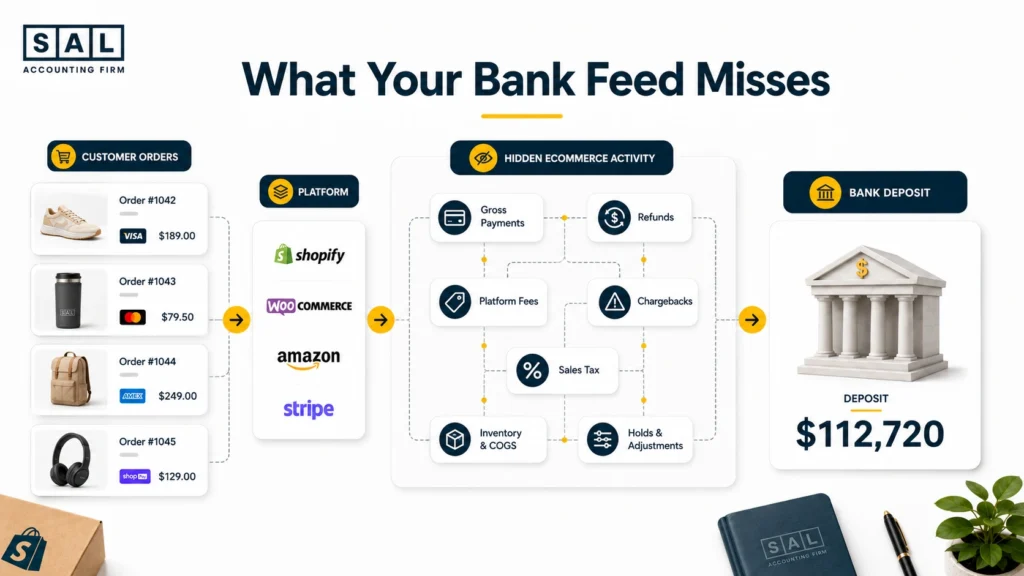
Why Can Ecommerce Books Look Complete but Still Be Wrong?
A reconciled bank account only confirms that the cash balance matches the bank. It does not confirm that every sale, fee, refund, tax amount, or inventory movement has been recorded correctly. One Shopify order’s financial lifecycle can affect:
- Revenue
- Sales tax
- Processing fees
- Refunds
- Inventory
- COGS
- Clearing accounts
- Cash
Categorized vs Reconciled Transactions
| Transaction Stage | What It Confirms | What It Misses | Example |
|---|---|---|---|
| Categorized | The transaction has an account | Whether the amount is complete | Deposit posted as sales |
| Bank reconciled | Cash matches the bank | Fees, refunds, holds, and timing | $112,720 deposit matches |
| Fully reconciled | Platform activity explains the deposit | Nothing material remains unexplained | Gross sales minus deductions equals payout |
Proper ecommerce reconciliation traces the full path from the customer payment to the final bank deposit.
Tidy books show where the cash went. Reliable books explain how it got there.
Case Study: How Priya in Leslieville Finds Missing Shopify Costs1
Priya runs a growing skincare brand from Leslieville in Toronto. Her bookkeeper updates QuickBooks each month and reconciles the bank account. Shopify shows strong sales, and the profit and loss statement looks healthy. But Priya cannot understand why cash feels tight, especially during months when orders are increasing.
The Problem
Shopify payouts are recorded as revenue. Processing fees, refunds, chargebacks, and payout adjustments are missing because they never appear as separate bank-feed transactions. Revenue is understated, expenses are incomplete, and the reported margin cannot be trusted.
What We Do
We rebuild the Shopify activity from the platform reports. Gross sales, refunds, fees, taxes, holds, and adjustments are recorded separately. Each payout moves through a Shopify clearing account before it is matched to the bank.
Result
Priya can explain the difference between Shopify sales and the cash received. Her margin is lower than the previous reports suggested, but it now reflects what the store is actually earning. She can make pricing, advertising, and inventory decisions without guessing.
For stores dealing with the same payout gap, Shopify accounting services should begin with the platform reports, not the final deposit.
7 Ways DIY or Generic Bookkeeping Distorts Your Ecommerce Numbers
Your books can look complete while hiding missing fees, refunds, inventory costs, and tax. Here are seven ways DIY or generic bookkeeping can distort your ecommerce numbers.
1. Net Payouts Are Recorded as Revenue
Suppose your Shopify store processes $128,400 in customer payments during the month.
After refunds, processing fees, chargebacks, adjustments, and temporary holds, Shopify transfers $112,720 to your bank. Here is what gets lost when the payout becomes the sales entry:
| Payout Activity | Platform Amount | Visible in Bank Feed | Generic Entry | Resulting Distortion |
|---|---|---|---|---|
| Customer payments | $128,400 | No | $0 | Revenue is hidden |
| Refunds | ($6,700) | No | $0 | Returns disappear |
| Processing fees | ($4,980) | No | $0 | Expenses are understated |
| Chargebacks and adjustments | ($1,400) | No | $0 | Disputes go unexplained |
| Reserves and holds | ($2,600) | No | $0 | Timing difference is missed |
| Net payout | $112,720 | Yes | $112,720 revenue | Bank matches, books do not |
The $112,720 is the correct cash deposit. It is not the correct sales entry.
Shopify’s official payout reconciliation report separates balance activity, fees, refunds, disputes, holds, adjustments, and payouts. Shopify also states that the report reflects funds received, not revenue for accounting purposes.
Pro Tip: Pick one recent payout and ask your bookkeeper to trace it from platform sales to the bank. Every material difference should have a clear explanation.
- Also read: “Shopify Payment Reconciliation Guide”
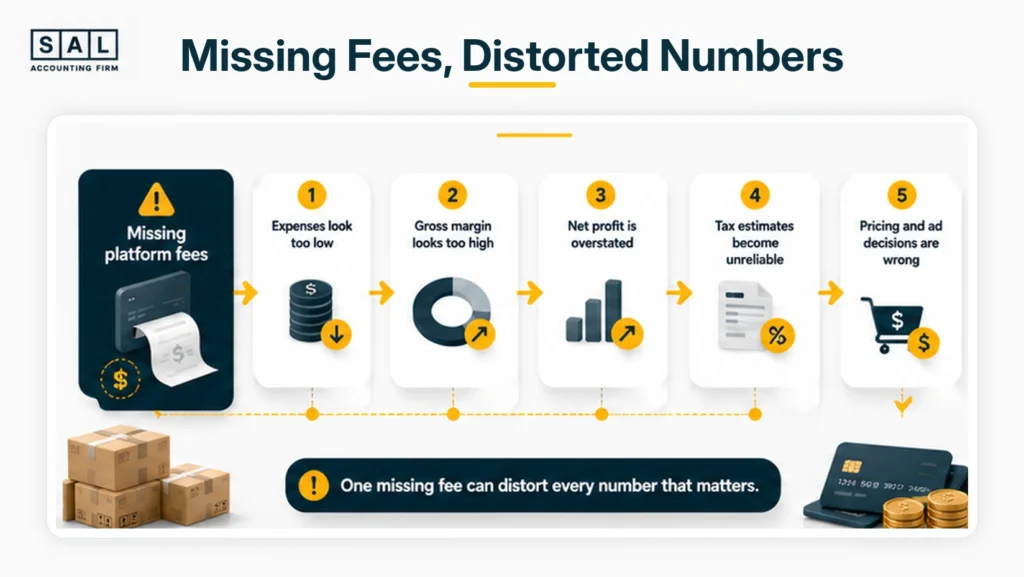
2. Platform and Payment Fees Disappear
Many ecommerce fees are deducted before the remaining money reaches your bank.
These may include:
- Shopify Payments charges
- Stripe and PayPal processing fees
- Amazon referral and FBA fees
- Storage charges
- Shipping-label costs
- Advertising deductions
- Currency-conversion fees
- Refund and dispute fees
A bank-feed-only process may never record those costs separately.
This is one reason hidden Shopify costs can quietly reduce margin while the profit report still looks strong. The same problem affects Amazon sellers when referral, fulfilment, storage, advertising, and refund costs remain inside the settlement.
Amazon’s Payments Reports Repository provides date-range reports covering income, expenses, taxes, and transfers. That breakdown is far more useful than recording only the final disbursement.
Once the platform activity is available, the next step is consistent ecommerce transaction categorization. Processing fees, advertising, shipping, refunds, and marketplace charges should not disappear into one general expense account.
Pro Tip: Track platform fees as a percentage of sales each month. A sudden drop may mean fees are missing, not that the platform became cheaper.
3. Refunds, Returns and Chargebacks Are Recorded Incorrectly
Refunds, returns, chargebacks, and marketplace reimbursements are related, but they are not the same.
A refund reduces the customer’s payment. A return may also put a product back into inventory. A chargeback can include the disputed amount and an additional fee. A marketplace reimbursement may relate to inventory that was lost or damaged months earlier.
When all of this activity is placed into one expense category, you lose visibility into:
- Actual net sales
- Product return rates
- Chargeback costs
- Inventory returned to stock
- Products with repeated customer issues
- Marketplace reimbursements
Your Shopify refund policy also affects how returns move through operations. The accounting should follow what actually happened, including whether the customer received money back and whether the product returned to sellable inventory.
Basically, a $900 refund and a $900 chargeback may reduce cash by the same amount, but they tell you two very different things about the business.
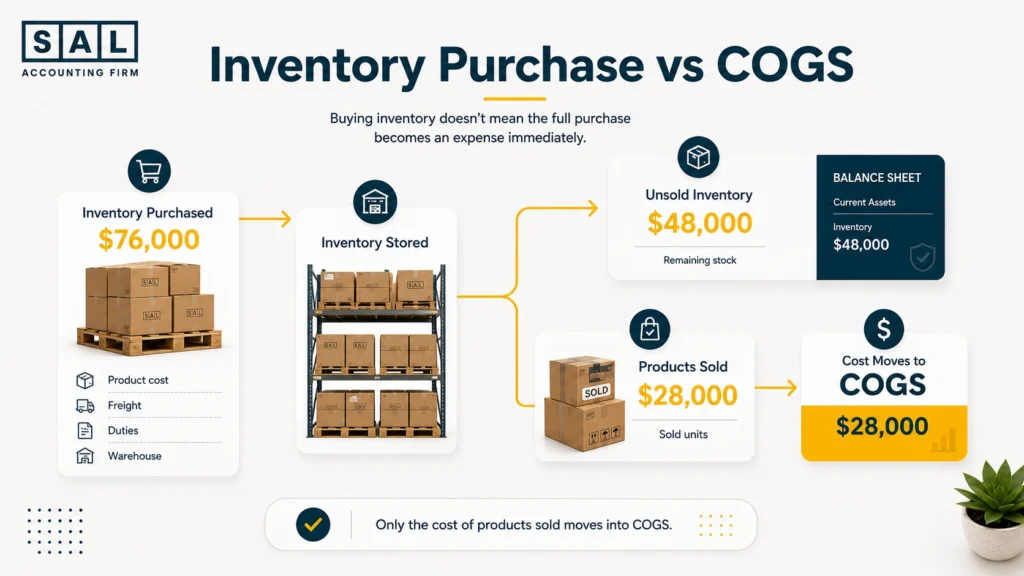
4. Inventory Purchases Are Treated as Immediate Expenses
Paying a supplier does not mean every product in the shipment has already been sold.
Suppose you purchase $76,000 of inventory in September. By month-end, $48,000 of those products remain unsold. Recording the full supplier payment as an expense makes September look far less profitable than it really was.
The basic relationship is:
Opening inventory + purchases and landed costs − closing inventory = COGS
The CRA explains that inventory is used to calculate both cost of goods sold and net income. That means an incorrect closing inventory balance can distort both the profit and loss statement and the balance sheet. CRA inventory rules also require an annual inventory count for businesses holding goods for sale.
Inventory accounting may need to include:
- Product costs
- Freight into the warehouse
- Customs duties
- Brokerage charges
- Packaging required to prepare goods for sale
- Products in transit
- Damaged or missing units
- Customer returns
- Amazon FBA stock
- Inventory across several warehouses
A consistent Shopify inventory accounting process keeps purchases, stock movements, and COGS from creating artificial changes in monthly profit.
Pro Tip: Compare the inventory value in the books with your warehouse, Shopify, or Amazon records every month. Waiting until year-end makes differences harder to explain.
- Read more: “How to Calculate COGS for Ecommerce Stores”
5. Ecommerce Integrations Duplicate or Omit Revenue
Automation can save time, but it can also repeat the same sale. A common duplicate happens like this:
- A Shopify integration records the customer order.
- Shopify sends the related payout.
- The bank feed imports the deposit.
- The deposit is categorized as sales again.
The business now shows two revenue entries for one group of orders. Duplicates can also happen when:
- Shopify and PayPal both import the same payment
- Two connectors cover the same channel
- Manual journal entries continue after automation begins
- Historical transactions are imported twice
- Transfers between bank accounts are categorized as income
The opposite problem is missing revenue. A payment method, marketplace, or sales channel may not be included in the connector at all.
A Shopify and QuickBooks integration needs more than a successful connection message. The imported activity must be reviewed against platform reports, payment gateways, and bank deposits.
Automation moves data. It does not prove that the data is complete or recorded only once.
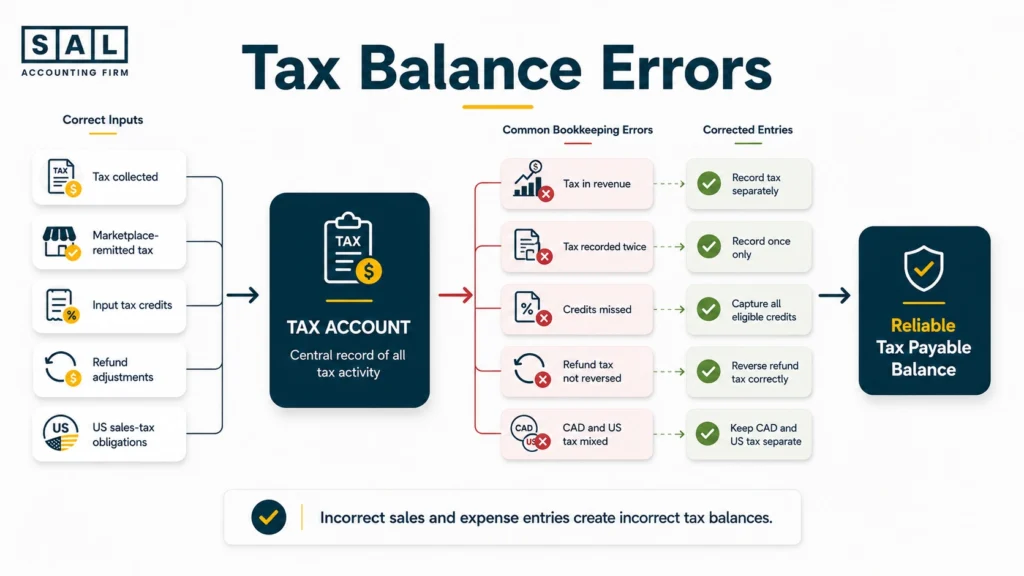
6. GST/HST and US Sales-Tax Balances Become Unreliable
GST/HST or US sales tax collected from customers is not ordinary business revenue.
A generic bookkeeping process may still:
- Include collected tax in sales
- Record marketplace-collected tax as payable again
- Miss input tax credits
- Mix Canadian and US tax accounts
- Ignore tax adjustments on refunds
- Leave paid returns sitting in payable accounts
- Use payout dates instead of the underlying sales period
The CRA requires records that support GST/HST collected, business purchases, and input tax credits. Those records must contain enough detail to calculate what is payable, refundable, or deductible. GST/HST record requirements generally include sales invoices, purchase invoices, and other supporting business records.
A proper GST/HST process for ecommerce stores should connect the tax accounts in your books with platform reports and filed returns.
US marketplace activity adds another layer. Marketplace facilitators often collect tax on facilitated sales, but a seller may still have registration or filing responsibilities because of direct sales, economic nexus, or physical presence. The marketplace seller rules differ by state.
Canadian brands with US customers should track their US sales-tax requirements separately rather than placing every US tax amount into one account.
7. Reported Profit No Longer Reflects Reality
All the earlier problems eventually reach your profit and loss statement. Profit may look too high when:
- Platform fees are missing
- Refunds are omitted
- Sales are duplicated
- Tax is included in revenue
- COGS is understated
Profit may look too low when:
- Inventory purchases are immediately expensed
- Bank transfers are treated as costs
- Revenue is limited to net payouts
- Expenses are duplicated
- Marketplace reimbursements are missed
The accounting software may calculate the report correctly based on the data inside it. The real problem is that the data itself is incomplete, duplicated, or placed in the wrong account.
Your ecommerce financial statements should explain sales, margin, inventory, tax, cash, and liabilities together. When those reports tell conflicting stories, one or more underlying balances need a closer look.
What Do Distorted Ecommerce Books Look Like?
The warning signs usually appear across more than one account or report.
| Bookkeeping Problem | What the Books Show | What Actually Happened | Report Affected | Decision at Risk |
|---|---|---|---|---|
| Payout recorded as revenue | Low sales and few fees | Net cash replaced gross activity | Profit and loss | Growth planning |
| Fees are missing | Stronger profit | Costs were deducted before payout | Profit and loss | Product pricing |
| Inventory is expensed | Large monthly loss | Unsold stock still has value | P&L and balance sheet | Inventory orders |
| Revenue is duplicated | Unusually high sales | Integration and bank both posted it | Profit and loss | Advertising spend |
| Tax is recorded twice | High tax payable | Marketplace already collected part of it | Balance sheet | Cash planning |
| Clearing account grows | Unexplained balance | Payouts or entries are incomplete | Balance sheet | Month-end close |
Other signs include:
- Revenue closely matches bank deposits
- Shopify, Amazon, and QuickBooks show different totals
- Platform fees look unusually low
- Inventory purchases create extreme profit swings
- Gross margin changes without a clear business reason
- GST/HST balances do not match filed returns
- Profit looks strong while cash continues to fall
One difference does not automatically mean the books are broken. Payment timing, currencies, refunds, and separate gateways can create valid differences.
The concern starts when nobody can clearly explain them.
Pro Tip: Ask your bookkeeper to explain one month’s gross margin change in plain English. The answer should connect to pricing, product mix, discounts, refunds, fees, or landed cost, not “that is what QuickBooks calculated.”
Check the fee gap first: Compare your plan and transaction costs with SAL’s Shopify Fee Calculator.
Case Study: How Marcus in Erin Mills Fixes Distorted Amazon COGS2
Marcus runs an Amazon and Shopify home-goods brand from Erin Mills in Mississauga. He imports products in large shipments and stores inventory through Amazon FBA and a Canadian warehouse. His books are maintained monthly, but profit collapses whenever he pays a large supplier invoice and rises sharply when purchases slow down.
The Problem
Supplier payments are recorded as immediate expenses, regardless of how much inventory has been sold. Amazon deposits are also recorded as sales without separating referral fees, FBA charges, refunds, reserves, advertising costs, and reimbursements.
What We Do
We separate inventory purchases from COGS, add the appropriate landed costs, and build a monthly inventory roll-forward. Amazon settlements are reconciled so sales, refunds, fees, reserves, reimbursements, and deposits appear separately.
Result
Marcus’s monthly profit now reflects the products sold during the period rather than the timing of supplier payments. He can compare Amazon and Shopify margins using the same accounting method and place new inventory orders with a clearer view of cash and profitability.
A reliable process follows the same principles covered in Amazon FBA bookkeeping: settlements, inventory, fees, refunds, and bank deposits need separate treatment.
For sellers whose settlement reports no longer match the books, SAL’s Amazon bookkeeping services focus on the activity behind each payout.
- Read more: “Signs Your Ecommerce Brand Needs a Better Bookkeeper”
Can Distorted Ecommerce Books Be Fixed Without Starting Over?
Usually, yes. A focused review should first identify the size and location of the problem. Rebuilding every transaction before that review can waste time and increase the cleanup bill.
The first review should answer:
- Which periods and accounts are affected?
- Is revenue missing, duplicated, or recorded net?
- Which payouts remain unreconciled?
- Are platform fees and refunds complete?
- Does inventory agree with supporting records?
- Are COGS entries consistent?
- Do GST/HST balances match filed returns?
- Does the problem affect only the past, or does it repeat every month?
From there, the work can normally be divided into two parts.
Historical cleanup corrects the affected periods, reconciliations, and opening balances.
Ongoing ecommerce bookkeeping replaces the process that caused the problem so the same errors do not return next month.
The CRA requires ecommerce businesses to retain information about internet-based transactions, even when platforms or third-party providers process the activity. Ecommerce transaction records may include system-generated sales data, payment information, and supporting electronic records.
You do not need to know every accounting entry before requesting a review. You do need access to the records that explain what happened.
Get the Financial Growth Roadmap
Final Thoughts: Do Your Books Explain What Happened Between the Sale and the Bank?
Finished books are not always reliable books.
The real test is whether your numbers explain the full path from customer order to bank deposit. Sales should connect to Shopify or Amazon. Fees and refunds should explain the payout difference. Inventory should connect to COGS. Tax balances should connect to filed returns.
At the end of the day, you should not have to guess whether your store is profitable. Book a consultation to find out what is missing, duplicated, or recorded in the wrong place before it affects another major decision.