
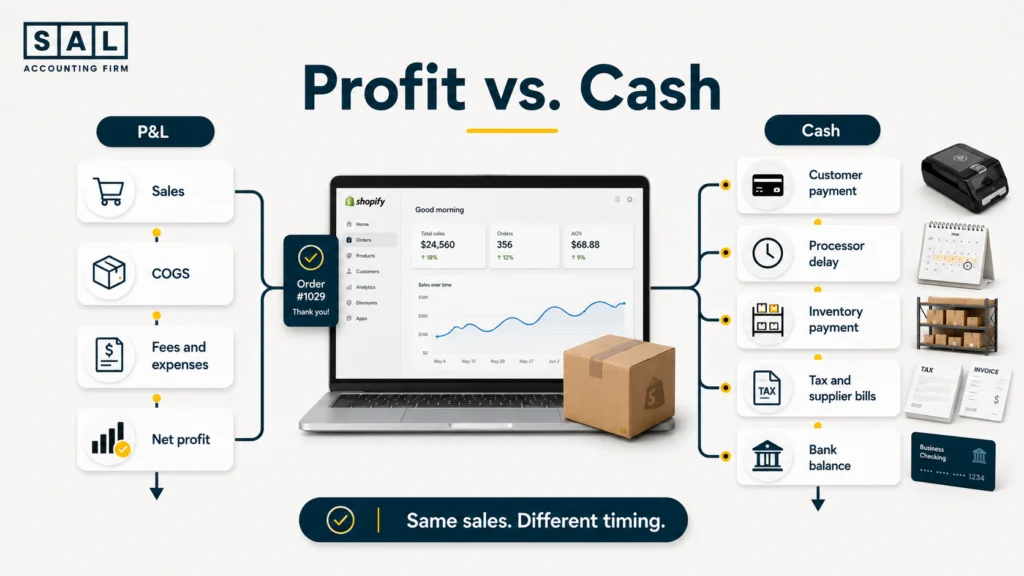
Your ecommerce P&L and bank balance are not supposed to match. Profit records what your store earned during a period, while cash shows what actually reached or left your accounts. At SAL Accounting, we trace the difference through inventory, payouts, taxes, debt, and owner withdrawals rather than treating it as missing money.
Keep reading, because the cash gap hiding behind a profitable month often reveals itself only when your next major payment is due.
Start with the operating result itself. SAL’s Ecommerce EBITDA Calculator shows what remains after COGS and operating expenses, before interest, tax, depreciation, and amortization change the final result.
Quick Takeaways
- Profit shows what your ecommerce store earned during a period.
- Cash flow shows the money that actually entered and left the business.
- Inventory, payout timing, supplier bills, taxes, debt, and owner withdrawals create most profit-cash gaps.
- A profitable ecommerce business can still run out of usable cash.
- Review bank balances, payouts, and upcoming payments every week.
- Complete a full profit-to-cash comparison every month.
- Never base a large restock or owner withdrawal on the P&L alone.
Bring sales, payouts, inventory, and bank activity into one reliable monthly close through SAL’s ecommerce bookkeeping in Toronto.
What Is the Difference Between Ecommerce Profit and Cash Flow?
Ecommerce profit is the amount left after the revenue and expenses belonging to a period are recorded.
Ecommerce cash flow is the money that actually moves into and out of your bank accounts, payment processors, credit cards, and other cash accounts.
Your P&L answers:
Did the store earn more than it spent during this period?
Your bank balance answers:
How much cash is available right now?
Those questions are related, but they are not the same. A cash-flow statement separates cash movements into operating, investing, and financing activities. That means it includes movements that may not appear as ordinary sales or expenses on the P&L. IAS 7 uses this structure to explain how cash changed during a period.
Here is the simplest way to separate the main reports:
| Report or number | What it tells you | What it includes | What it does not explain |
|---|---|---|---|
| P&L | Whether the store earned profit | Sales, COGS, fees, expenses | When cash moved |
| Bank balance | Cash available now | Deposits and withdrawals | Whether records are complete |
| Balance sheet | What you own and owe | Inventory, tax, loans, bills | Monthly performance |
| Cash-flow statement | Why cash changed | Operating, investing, financing | Product-level profit |
Basically, profit shows whether your store’s activity worked. Cash shows whether the money is available when a bill arrives.
A store might report $28,000 of monthly profit while having only $9,000 of usable cash. That does not automatically mean the P&L is wrong. Some of the value may be sitting in inventory, pending payouts, supplier deposits, or another balance-sheet account.
Your ecommerce financial statements should show those movements across the P&L, balance sheet, and cash-flow statement instead of leaving you to guess from the bank balance.
- Also read: “Cash vs. Accrual Accounting for Ecommerce”
What Are the Warning Signs of an Ecommerce Cash-Flow Gap?
The gap normally becomes noticeable before the owner gives it a name.
You may already be feeling it when:
- Sales are rising, but the bank balance keeps falling.
- The P&L shows profit, but supplier payments feel stressful.
- One large restock leaves no money for advertising.
- Shopify or Amazon reports more sales than the deposits received.
- GST/HST deadlines arrive after the tax money has been spent.
- Credit cards are covering costs during profitable months.
- You cannot tell how much cash is safe to withdraw.
- A proven product cannot be reordered because money is tied up elsewhere.
These signs do not always mean your store is losing money. They often point to a timing or tracking problem.
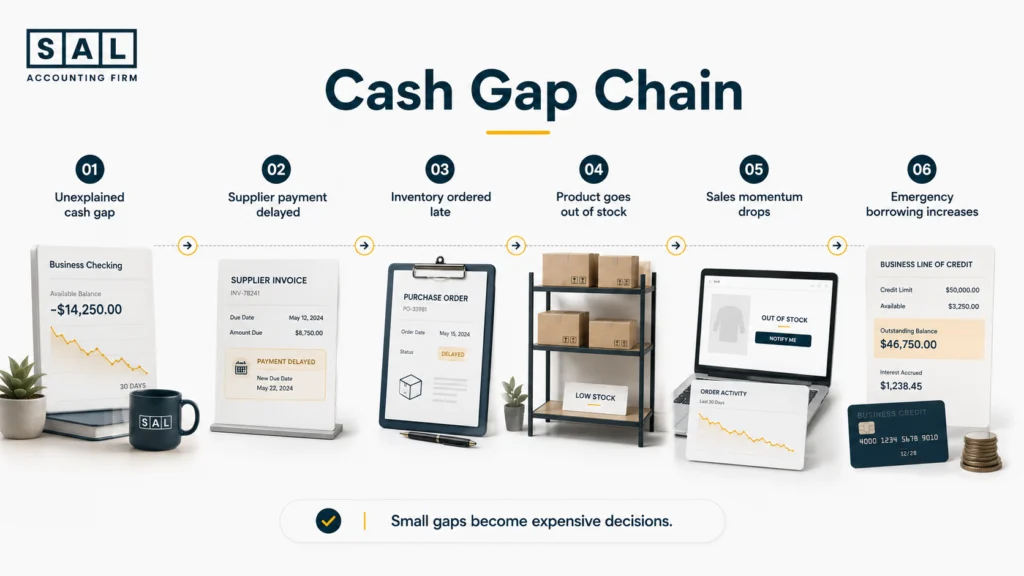
Several Shopify cash-flow warning signs appear well before a store reaches a serious shortage. The biggest warning is not a temporary drop in cash. It is being unable to explain why the drop happened.
Pro Tip: A falling bank balance is not automatically bad. You may have purchased profitable inventory or reduced expensive debt. The problem starts when you cannot explain the movement on one clear page.
Why Does Ecommerce Profit Not Match the Bank Balance?
Most profit-cash differences come from a small group of recurring movements.
| Cause | Effect on profit | Effect on cash | Where to check |
|---|---|---|---|
| Pending sales | Revenue may be recorded | Cash has not arrived | Payout report |
| Inventory purchases | Cost appears as units sell | Payment may leave now | Inventory records |
| Payout timing | Little immediate effect | Deposit moves between months | Clearing account |
| Supplier terms | Cost and payment dates differ | Cash leaves earlier or later | Accounts payable |
| GST/HST payable | Usually not an expense | Cash is later remitted | Tax account |
| Loan principal | Does not reduce profit | Cash leaves the bank | Loan statement |
| Owner withdrawals | Do not reduce operating profit | Cash leaves the business | Equity records |
1. Sales Can Be Recorded Before Cash Arrives
Under accrual accounting, a sale may appear on this month’s P&L even when the payout reaches your bank next month.
Suppose your store records $26,400 of orders during the final three days of June. Those sales belong to June, but the processor deposit reaches your bank in July. June receives the revenue. July receives the cash.
The Shopify order financial lifecycle separates the order date, payment capture, processor activity, payout date, and bank deposit so each stage lands in the right place.
2. Inventory Uses Cash Before It Becomes COGS
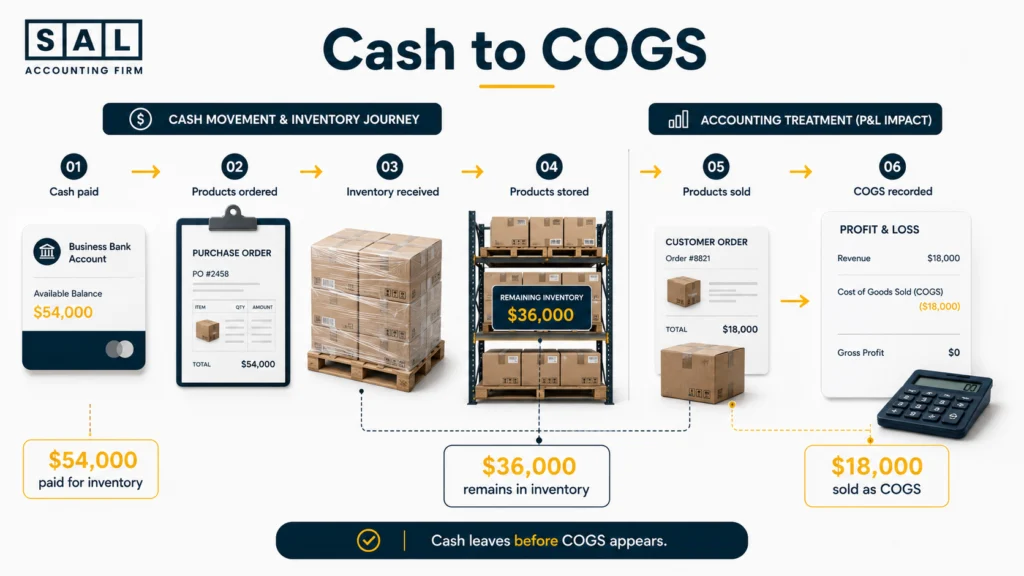
Inventory is often the largest cause of a growing ecommerce store’s profit-cash gap. Suppose you pay $54,000 for a new production run in September. By the end of the month, only one-third of those units have sold.
The full $54,000 may have left your bank.
However, the full purchase does not normally become a September expense. Most of it remains on the balance sheet as inventory until the related products sell. IAS 2 covers how inventory costs are measured and later recognized as an expense.
This is how a profitable store becomes cash-poor. The money has not disappeared. It has turned into products sitting with a supplier, warehouse, fulfilment centre, or returns provider.
Your inventory balance should also reflect the real cost of preparing each item for sale. Inventory landed-cost accounting brings product cost, freight, duty, brokerage, insurance, and direct inbound costs into the same calculation.
The amount reaching your P&L should then match the units actually sold through accurate ecommerce COGS calculations.
Pro Tip: Track both units and landed cost. The unit count shows where your products are. Landed cost shows how much cash is tied up inside them.
3. Shopify and Amazon Payout Timing Shifts Cash Between Months
Platform sales do not always become bank cash on the same day.
For Canadian Shopify Payments accounts, the minimum settlement time is currently three days. Banks may then need another 24 to 72 hours to process the deposit. Weekends, public holidays, payout schedules, and pending reviews can shift the final bank date further. Shopify’s Canadian payout rules explain the timing.
A payout may combine:
- Several days of customer payments
- Processing fees
- Refunds
- Chargebacks
- Currency conversions
- Reserves or holds
- Other balance adjustments
That is why the net bank deposit should not be recorded as total revenue.
Shopify’s payout reconciliation report separates transactions, fees, refunds, chargebacks, adjustments, reserves, and payouts. Shopify also states that the report reflects funds received through Shopify Payments rather than accounting revenue.
Recording only the deposit hides gross sales and makes fees, refunds, tax, and unsettled funds harder to find.
Estimate what Shopify may deduct before the payout reaches your bank with SAL’s Shopify Fee Calculator.
- Read more: “Shopify Payment Reconciliation Guide”
Case Study: How a Queen West Shopify Brand Tracks Its Missing Cash1
A growing skincare brand near Queen Street West in Toronto reports steady monthly profit. Sales are rising, repeat orders look strong, and the founder is preparing a larger production run. Still, supplier deposits keep landing on a personal line of credit. The founder initially assumes Shopify is holding too much money, but the monthly records reveal several cash movements happening at once.
The Problem
The business prepays for inventory, carries slow-moving seasonal products, and records net Shopify deposits as sales. The founder also withdraws money based on monthly profit, while a large part of each equipment-loan payment represents principal rather than an expense.
What We Do
We reconcile Shopify orders to discounts, refunds, fees, processor activity, payouts, and bank deposits. Inventory purchases are separated from COGS, loan principal is separated from interest, and the next 13 weeks of supplier, advertising, payroll, and tax payments are mapped.
The Result
The review shows that cash is mainly tied up in seasonal inventory, unsettled payouts, and debt reduction. The founder reduces the next production run, sets a safer withdrawal limit, and keeps the advertising budget separate from the headline bank balance.
Bring the same order-to-bank discipline into your monthly reporting with SAL’s Shopify accounting services.
4. Supplier Payment Terms Change When Cash Leaves
Supplier terms can shift cash between months. Inventory may arrive in April but remain unpaid until May, making April’s bank balance look stronger than it really is.
Your accounts payable report shows the bills already committed. A $70,000 balance is not fully available when $43,000 of supplier invoices are due next week.
5. GST/HST Collected Is Not Available Business Cash
GST/HST collected from Canadian customers may increase the bank balance, but it does not become ordinary sales revenue.
The CRA states that businesses hold collected GST/HST in trust and must remit the required amount after eligible input tax credits. It also says these deemed-trust amounts cannot be used as business cash flow. CRA’s deemed-trust rules explain the treatment.
Your bank can therefore look healthier than the amount you are genuinely free to spend.
Accurate GST/HST records for ecommerce stores should separate:
- Tax collected from customers
- Tax paid on eligible business costs
- Input tax credits
- Tax already remitted
- The remaining amount payable or refundable
Pro Tip: Move an estimated tax amount into a separate account each week. The final filing number may change, but the money will still be available when the payment is due.
Loan Principal Reduces Cash Without Reducing Profit
The full amount of a loan repayment leaves the bank, but only part of the payment normally affects the P&L.
Suppose your monthly loan payment is $6,400:
- $950 is interest and appears as an expense.
- $5,450 is principal and reduces the loan balance.
- The bank falls by the full $6,400.
Your P&L falls by $950. Your cash falls by $6,400. That creates a $5,450 difference.
Funding may support inventory or advertising growth, but its repayment schedule still needs to fit your cash cycle. The differences between Shopify Capital and other ecommerce funding options become important when supplier payments and payouts are already tight.
Owner Withdrawals Reduce Cash Without Affecting Operating Profit
An owner withdrawal can reduce the bank balance without lowering operating profit. The correct treatment depends on the business structure and whether the payment is:
- Salary
- A dividend
- A shareholder transaction
- An owner draw
- Repayment of money previously contributed
The practical rule is simpler:
Do not treat net profit as the amount available to withdraw.
Before moving cash out, account for:
- GST/HST and income tax
- Supplier bills
- Payroll
- Inventory commitments
- Loan repayments
- Refunds and chargebacks
- Minimum operating cash
Many ecommerce profit calculation mistakes start with treating the final P&L number as money that is immediately free to spend.
Ecommerce Profit vs. Cash Flow Example: Where Did the Money Go?
Consider a Canadian ecommerce store with $34,000 in monthly net profit. The owner expects the bank balance to increase by roughly the same amount. Instead, it falls from $68,000 to $50,000. Here is the profit-to-cash bridge:
- Start with monthly net profit: +$34,000
- Inventory increased: -$25,000
- Pending processor payouts increased: -$8,000
- Older supplier invoices were paid: -$7,000
- GST/HST was remitted: -$5,000
- Loan principal was repaid: -$4,000
- The owner withdrew cash: -$3,000
The final movement is:
$34,000 – $25,000 – $8,000 – $7,000 – $5,000 – $4,000 – $3,000 = -$18,000
The store earned $34,000, but its bank balance fell by $18,000. The money moved into inventory, pending payouts, supplier payments, tax, debt reduction, and the owner’s account. Nothing is automatically missing. The question is whether every movement was understood and planned.

Why Does Ecommerce Cash Flow Get Tighter as Sales Grow?
Growth normally uses cash before it produces more cash. As order volume rises, you may need to pay for:
- Larger inventory runs
- Higher supplier deposits
- More advertising
- Additional employees
- Warehouse space
- Faster fulfilment
- Returns and chargebacks
- Tax in more jurisdictions
Imagine doubling monthly sales from $120,000 to $240,000.
You may need to order twice as much stock and increase advertising weeks before the additional sales reach your bank. The P&L can improve while available cash becomes tighter.
Revenue alone does not show whether growth is funding itself. Your ecommerce contribution margin shows what remains after the costs that increase with each order.
At the same time, hidden ecommerce expenses may absorb cash that is easy to miss inside platform dashboards.
A structured Canadian Shopify profit framework keeps pricing, fees, advertising, inventory, and tax inside the same growth decision.
Pro Tip: Before increasing ad spend or placing a larger purchase order, estimate how much cash the growth will absorb and how many weeks it will take to return through customer payouts.
Case Study : How a Meadowvale Amazon Seller Separates Tax Cash From Growth Cash2
An Amazon home-goods seller operating from Meadowvale in Mississauga finishes the holiday period with strong sales and a profitable P&L. By February, the store is struggling to pay a freight invoice and place its next inventory order. The December bank balance looked healthy, but the money is no longer available.
The Problem
The holiday cash includes GST/HST collected from customers and funds needed for inventory already ordered overseas. Amazon fees, returns, advertising charges, freight, and loan repayments are spread across several reports.
What We Do
Gross Amazon sales are separated from marketplace fees and net settlements. Tax payable, inventory commitments, returns, advertising, freight, and debt principal are then added to a monthly profit-to-cash bridge.
The settlement and inventory process follows the same practical principles covered in Amazon FBA accounting best practices.
The Result
The business remains profitable, but far less cash is available than the original bank balance suggested. Separate tax and inventory reserves create a realistic reorder budget and reduce the need for emergency borrowing between peak periods.
Amazon sellers managing settlements across the GTA can keep fees, COGS, refunds, and deposits properly separated through SAL’s bookkeeping for Amazon sellers.
What Happens When You Ignore the Profit-Cash Gap?
An unexplained profit-cash gap leads to decisions based on money that is not really available.
You may:
- Withdraw too much cash
- Spend money reserved for GST/HST
- Miss supplier payment dates
- Restock a proven product too late
- Cut profitable advertising
- Depend on expensive short-term credit
- Borrow without identifying the real issue
- Assume higher sales will repair the shortage
The biggest cost is not one difficult month. It is losing confidence in your numbers.
When the P&L says one thing and the bank seems to say another, every decision starts feeling like a guess.
The usual effects of poor ecommerce bookkeeping include missing fees, unmatched deposits, unreliable inventory balances, and tax amounts that no longer agree with platform records.
A consistent ecommerce bookkeeping checklist keeps those records from drifting apart during the month.
How Do You Compare Ecommerce Profit and Cash Flow Each Month?
A useful tracking process does not need to be complicated. It needs to be consistent. This schedule keeps the most important reviews manageable:
| What to review | How often | Main source | What to look for |
|---|---|---|---|
| Bank and credit cards | Weekly | Banking records | Unusual movement |
| Platform payouts | Weekly | Shopify or Amazon | Pending cash |
| Bills and taxes | Weekly | Payables and tax records | Payments due soon |
| P&L and balance sheet | Monthly | Accounting software | Profit and balances |
| Profit-to-cash bridge | Monthly | Combined records | Reason cash changed |
| Cash forecast | Weekly update | Forecast | Future shortage |
1. Complete the Monthly P&L
Confirm that the period includes:
- Gross sales
- Refunds and discounts
- Platform and processing fees
- COGS
- Advertising
- Shipping and fulfilment
- Apps
- Payroll
- Operating expenses
A P&L with missing transactions cannot explain cash properly.
2. Reconcile Sales to Payouts and Deposits
Match platform activity to:
- Gross sales
- Refunds
- Fees
- Chargebacks
- Tax
- Processor balances
- Bank deposits
The dates will not always match. The totals still need to trace from the platform to the processor and then to the bank.
3. Update Inventory and COGS
Keep inventory purchases separate from the cost of products sold.
Review:
- Opening inventory
- New purchases
- Units sold
- Closing inventory
- Landed cost per unit
4. List What the Business Still Owes
Include amounts that have not left the bank yet:
- Supplier invoices
- Credit card balances
- Payroll
- GST/HST
- Loans
- Customer refunds
- Inventory deposits
5. Build the Profit-to-Cash Bridge
Start with net profit, then add or subtract changes in:
- Inventory
- Pending payouts
- Customer receivables
- Supplier balances
- Tax balances
- Loan principal
- Equipment purchases
- Owner transactions
Strong ecommerce management reporting places this bridge beside the P&L instead of forcing the founder to compare several disconnected reports.
The Shopify month-end close process also keeps payouts, expenses, inventory, tax, and bank records on the same cut-off date.
- Also read: “Cash Flow Forecast for Small Business”
Pro Tip: Use the same month-end date for the bank, P&L, payout reports, inventory records, and tax balances. Different cut-off dates create differences that look like errors but are really timing mismatches.
How Can You Find Where Ecommerce Cash Is Going?
When cash falls, do not ask only, “What did we spend?” Ask what type of movement occurred.
Operating Cash
This is money connected to ordinary trading:
- Customer receipts
- Platform fees
- Advertising
- Shipping
- Payroll
- Apps
- Rent
Working-Capital Cash
This is money tied to the timing between buying, selling, and collecting:
- Inventory
- Pending payouts
- Supplier bills
- Customer refunds
- Tax balances
Financing Cash
This includes:
- New borrowing
- Loan principal repayments
- Owner investment
- Dividends
- Owner withdrawals
Investing Cash
This includes longer-term purchases such as:
- Warehouse equipment
- Computers
- Vehicles
- Major software systems
- Leasehold improvements
A poor operating result, a temporary inventory build, and a large loan repayment can all reduce the bank balance. They require completely different responses.
That is why categorizing ecommerce transactions correctly is more useful than attaching a general expense label to every withdrawal.