
A CRA audit usually doesn’t start with a dramatic tax problem. It starts with a simple question: “Can you show us where this number came from?” For an ecommerce seller, that can mean tracing Shopify or Amazon sales through refunds, fees, inventory, GST/HST, bank deposits, and finally the tax return.
SAL Accounting helps ecommerce brands keep that trail clean. Here’s what to know before the CRA comes asking.
See how prepared your records actually are with SAL’s Tax Document Checklist for Ecommerce Stores.
Quick Takeaways
- There is no published Shopify sales number or ecommerce revenue threshold that automatically triggers a CRA audit.
- The CRA uses risk assessment and information from different sources to choose files for audit.
- Shopify, Amazon, Stripe, and PayPal reports need to connect to your accounting—not replace it.
- Inventory and COGS are much harder to support when counts, landed costs, and adjustments are poorly documented.
- Most required business records need to be kept for six years, although some exceptions apply.
- If the CRA proposes changes, you normally have an opportunity to respond before the audit is finalized.
Before the CRA starts asking questions, make sure your sales, payouts, inventory, and tax records actually connect with our ecommerce accounting support.
What Can Trigger a CRA Audit for Ecommerce Sellers?
There is no public CRA rule saying $1 million in Shopify sales, a certain refund rate, or one unusual transaction automatically puts your business into an audit.
Instead, the CRA’s audit selection process uses risk-assessment systems to identify returns with a higher risk of non-compliance. An officer then reviews information from different sources before deciding whether an audit is actually needed.
That does not give ecommerce sellers a simple list of “audit triggers.” But books that are difficult to verify, personal and business activity that is heavily mixed, or reported income that does not make sense beside the available records can create more questions.
Why Does Ecommerce Reconciliation Matter in a CRA Audit?
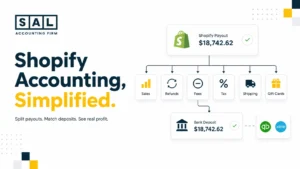
Because a sale and a payout are not the same thing. A customer may pay $100, but before that money reaches your bank you could have:
$100 sale
→ refund or discount
→ processing fee
→ GST/HST
→ chargeback or adjustment
→ net payout
If the accounting starts with the payout instead of properly recording what happened before it, explaining the original revenue gets much harder.
A proper ecommerce reconciliation process connects sales to payouts, accounting, and eventually the bank. Shopify sellers can go further with SAL’s Shopify payment reconciliation guide.
The CRA also makes ecommerce businesses responsible for their internet transaction records even when platforms, apps, or other third parties process part of the transaction. That matters because a third party may not retain those records for as long as your business needs them.

What Actually Happens During a CRA Audit?
A CRA audit is normally a process, not an immediate reassessment.
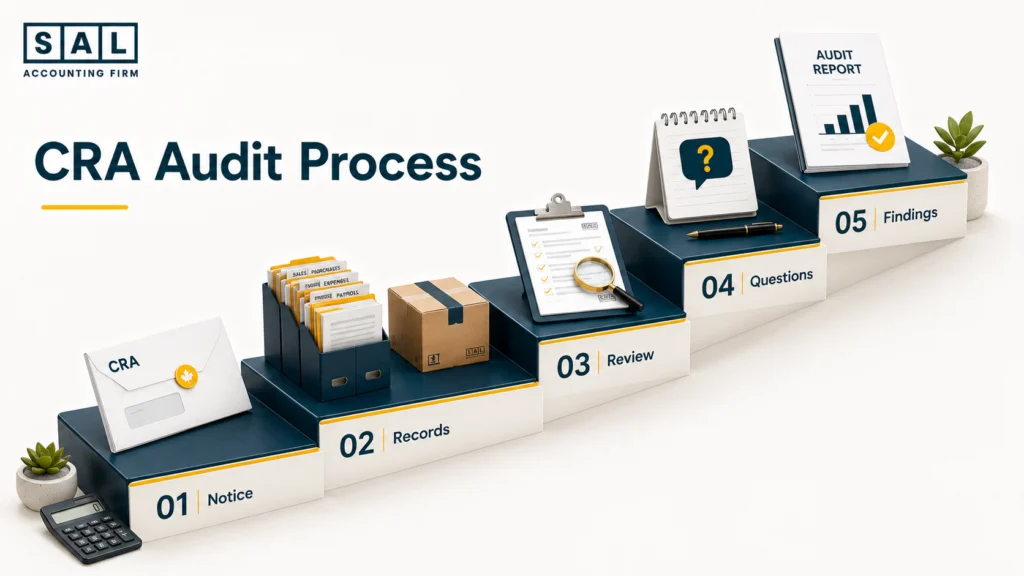
An auditor generally contacts the business, confirms the audit in writing, requests information, reviews the records, asks follow-up questions where needed, and then communicates the findings. The CRA notes that timelines vary and can become longer when records are difficult to obtain or additional specialist review is required.
What Does the CRA Ask for During a Business Audit?
The exact request depends on what is being reviewed, but the CRA may examine records such as:
- Ledgers and journals
- Invoices and receipts
- Contracts
- Bank statements
- Electronic accounting records
- Personal financial records where relevant
- Records involving related people or businesses
For an ecommerce seller, that could mean Shopify reports, Amazon settlements, processor reports, supplier invoices, inventory schedules, GST/HST support, bank activity, and the accounting entries behind the tax return.
The important point is that these documents need to connect. The CRA’s definition of business records includes both the accounting records and the documents supporting the underlying transactions.
How Far Back Can the CRA Audit an Ecommerce Business?
The normal income-tax reassessment period is generally three years for individuals and Canadian-controlled private corporations, and four years for corporations that are not CCPCs.
Those are normal periods, not absolute limits. Certain circumstances can allow the CRA to reassess older years, including cases involving misrepresentation attributable to neglect, carelessness, wilful default, or fraud.
And this is separate from record retention. A document may need to stay in your files longer than the normal reassessment period.
What Do Ecommerce Sellers Get Wrong Before Their First Audit?
Most first-audit problems are not one giant accounting failure. They are small gaps that become very noticeable once someone starts tracing the numbers backwards. Three areas stand out.
Are Shopify and Amazon Reports Enough for a CRA Audit?
They are useful records. They are not the complete accounting story. You should be able to follow:
Platform → processor → books → bank → tax return
That trail needs to explain material refunds, fees, taxes, chargebacks, payout timing, and other adjustments.
A Shopify sales export might be perfectly accurate while the revenue recorded in QuickBooks is still wrong. The report tells you what Shopify saw; your accounting needs to explain what the whole business reported.
Case Study: A Toronto Shopify Seller Has the Reports—but the Numbers Still Don’t Tie1
A Toronto Shopify seller receives an audit request involving revenue and GST/HST. The founder has years of Shopify reports and bank statements, so the request initially seems straightforward.
The Problem
Shopify sales do not equal accounting revenue, and accounting revenue does not equal bank deposits. Refunds, taxes, fees, payout timing, and a second processor explain most of the difference—but nobody has reconciled the full trail.
What We Do
We connect:
Shopify orders → refunds and fees → payment activity → accounting → bank deposits
Each material difference gets supporting documentation instead of an explanation from memory.
Result
The seller can provide one clear reconciliation rather than several unrelated platform exports.
Why Is Mixing Personal and Business Spending a Problem?
One personal purchase on a company card is not the same as completely unusable books.
The issue is repeated mixing that makes it difficult to tell which transactions belong to the business. The CRA can review personal financial information where it is relevant to a business audit, so muddying that separation can create unnecessary work. A cleaner trail is simple:
Business purchase → business account
Personal purchase → personal account
Owner contribution or withdrawal → clearly recorded owner transaction
Why Are Inventory and COGS a Problem During Ecommerce Audits?
Buying $80,000 of inventory does not necessarily mean the full $80,000 becomes an expense the day you pay the supplier. If some of those products remain unsold at year-end, your accounting needs to separate what is still inventory from what has moved into COGS. That usually means being able to support:
Opening inventory + purchases + applicable inventory costs − ending inventory = COGS
The problem is that ecommerce inventory rarely involves only supplier cost. Freight, duties, damaged products, write-offs, marketplace inventory, and year-end counts can all change the number.
SAL’s landed cost accounting guide covers the costs that can build into inventory, while inventory capitalization addresses when those costs move to expense.

Case Study: A Vaughan Seller Finds the Real Problem in Inventory2
A Vaughan ecommerce seller expects the CRA to focus on sales. Revenue is actually reasonably well reconciled. Then the questions move to inventory.
The Problem
Supplier invoices exist, but freight allocations, damaged products, marketplace inventory, year-end counts, and write-offs are sitting in different places. There is no clean inventory roll-forward.
What We Do
We rebuild:
Opening inventory → purchases and landed costs → adjustments → products sold → closing inventory
The calculation is then connected to invoices, inventory reports, counts, and accounting entries.
Result
The seller can support most of the COGS calculation and clearly isolate anything that genuinely needs correction instead of trying to defend one unexplained year-end number.
What Records Should Ecommerce Sellers Have Ready Before a CRA Audit?
You do not need a special binder labelled “CRA Audit.” You need records that support what you filed. For an ecommerce seller, that usually means:
- Sales reports from every channel
- Payout and settlement reports
- Bank and credit-card statements
- General ledger and trial balance
- Reconciliation schedules
- Supplier invoices
- Inventory counts and adjustments
- Freight and duty documents
- GST/HST returns and supporting invoices
- Payroll records, where applicable
- Owner-loan and shareholder-transaction records
The CRA’s record-keeping requirements cover both traditional documents and records created by computerized systems such as accounting platforms, point-of-sale tools, internet systems, and electronic inventory systems.
A regular ecommerce bookkeeping checklist makes those records much easier to produce than rebuilding them once an audit deadline already exists.

How Long Do Ecommerce Businesses Need to Keep CRA Records?
Most required business records need to be retained for six years from the end of the last tax year they relate to. There are exceptions, including certain long-term records and late-filed returns. The CRA sets these out in its record retention rules.
Electronic records matter too. If your accounting is maintained electronically, the underlying electronic information needs to remain available and usable. CRA guidance specifically treats internet-based transaction data as part of the audit trail where it is relevant for tax purposes.
Pro tip: Do not assume Shopify, Amazon, Stripe, or one of your apps will still hold everything you need six years from now. Keep your own records.
How Should Ecommerce Sellers Handle a CRA Audit?
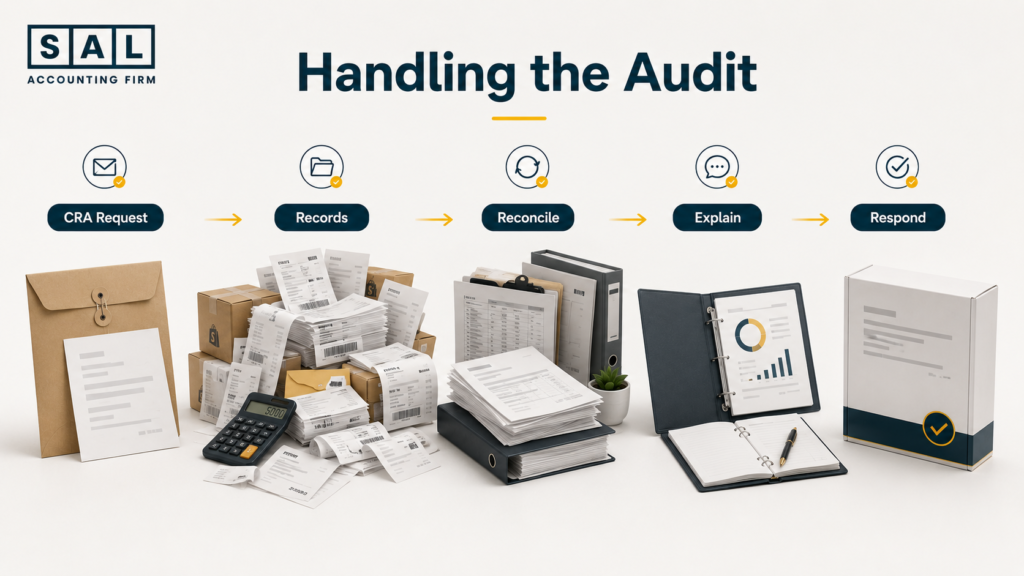
The best audit response is usually pretty uneventful. Understand what was requested. Pull the right records. Make sure the numbers connect. Give a clear answer. Sending every report you can find is not necessarily better than answering the actual request.
What Should You Say—and Not Say—to a CRA Auditor?
Once you have confirmed the auditor’s identity, the CRA recommends answering questions to the best of your ability and providing the required books and records.
A few practical rules help:
- Answer the question being asked.
- Verify something instead of guessing.
- Ask for clarification when a request is unclear.
- Keep copies of what you submit.
- Do not alter or manufacture records after the fact.
- If something is missing, explain that.
If a number needs an hour of research, there is nothing wrong with checking it before answering.
When Does CRA Audit Representation Make Sense?
Not every audit needs professional representation. It becomes much more useful when the audit involves complicated inventory, GST/HST, several sales channels, historical bookkeeping problems, owner transactions, or proposed adjustments.
You can authorize a representative such as an accountant or bookkeeper to deal with the CRA for your business tax matters. The goal is not to give the CRA a better story. It is to create a cleaner process:
CRA request → supporting records → accounting explanation → response
What Adjustments Can Come Up in an Ecommerce Audit?
There is no official CRA list of “the most common ecommerce audit adjustments.” But areas worth checking carefully include:
- Revenue that does not reconcile
- Unsupported business expenses
- Personal expenses claimed through the business
- Inventory and COGS
- GST/HST input tax credits
- Payroll discrepancies
- Misclassified owner transactions
GST/HST can be particularly documentation-heavy. If you claim an ITC, the CRA’s GST/HST record requirements require you to retain purchase invoices or receipts, and those documents need specific information to support the claim.
SAL’s ecommerce GST/HST guide goes further into the ecommerce side of those records.
What Happens If the CRA Finds a Problem?
A proposed adjustment is not automatically the end of the audit.
Once the review is complete, the auditor provides written findings. If changes are proposed, the CRA normally gives you 30 days to respond, including the opportunity to disagree or provide additional supporting documents. CRA audit findings explain the possible outcomes at this stage.
An audit can end with no changes, more tax owing, or even less tax owing and a refund. If a reassessment is issued and you still disagree, you also have formal objection and appeal rights.
First CRA Audit Checklist for Ecommerce Sellers
The best time to complete this checklist is when nobody from the CRA is waiting for it:
| Document / Record | Why the CRA May Want It | Where Sellers Usually Fall Short |
|---|---|---|
| Tax returns | Compare filed amounts with supporting records | Return does not tie cleanly to books |
| General ledger | Review how transactions were recorded | Large adjustments lack support |
| Bank statements | Verify deposits and payments | Deposits cannot be tied to sales activity |
| Shopify/Amazon reports | Support ecommerce revenue | Sales confused with payouts |
| Settlement reports | Explain deposits | Fees, refunds, and taxes ignored |
| Supplier invoices | Support purchases | Only proof of payment retained |
| Inventory records | Support inventory and COGS | Counts and write-offs undocumented |
| Freight/duty records | Support inventory cost | Landed costs treated inconsistently |
| GST/HST records | Support returns and ITCs | Required documents missing |
| Payroll records | Support wages and remittances | Payroll does not reconcile |
| Owner/loan records | Explain cash movements | Draws and contributions misclassified |
What Should You Fix After Your First CRA Audit?
Do not just save the final letter and go back to the same process.
If most of the auditor’s questions came from one area—reconciliation, inventory, missing invoices, GST/HST, or bookkeeping—that is the process to fix first.
Regularly preparing your ecommerce business for tax season covers much of the same groundwork that makes another review easier.
Pro tip: If proving one number required three spreadsheets, two old inboxes, and an hour of detective work, that process needs attention.
Ready If the CRA Comes Knocking?
Audit readiness is really about being able to explain your numbers without rebuilding the story from scratch. The cleaner the trail from sales to payouts, inventory, GST/HST, and the tax return, the easier it is to respond when questions come up.
Use SAL’s Financial Growth Roadmap for Canadian Ecommerce Brands to see where your financial systems, reporting, and controls may need to get stronger as the business grows.