

Transferring ecommerce accounting records means setting a firm handover date, moving secure access, exporting the reports behind sales and payouts, documenting unfinished work, and approving reliable opening balances. For online sellers, SAL Accounting treats the handover as a transfer of the full sales-to-bank trail, not just a QuickBooks or Xero file.
Read this before access changes hands: one missed balance can follow every report, tax return, and decision that comes next.
Build the handover file before the first email goes out. Open the Ecommerce Tax Document Checklist →
Quick Answer: How Do You Transfer Accounting Records to a New Accountant?
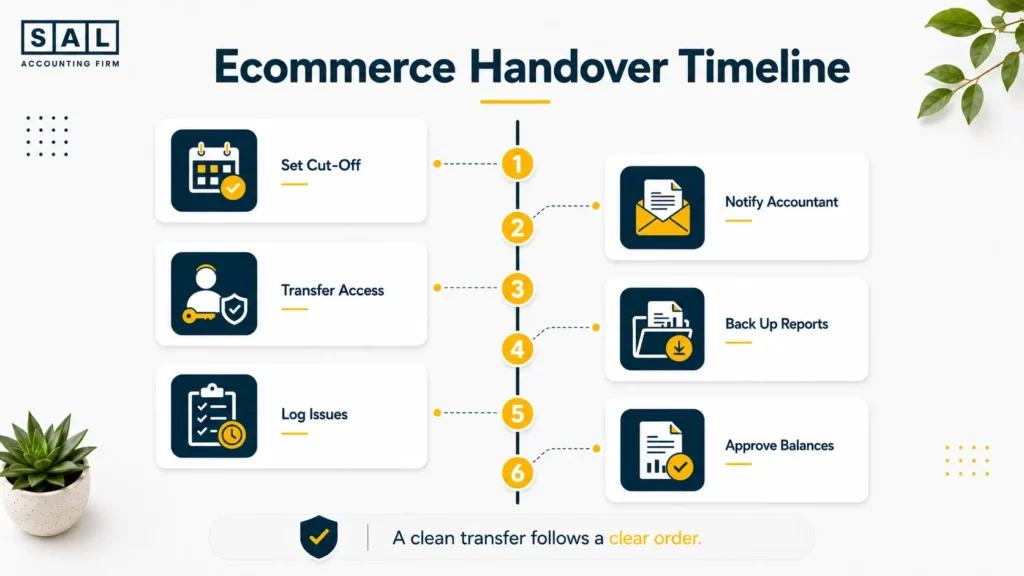
Transfer your ecommerce accounting records in six steps:
- Set a clear handover date.
- Inform the outgoing accountant.
- Give the new accountant secure access.
- Back up the essential reports.
- Document unresolved issues.
- Verify and approve the opening balances.
Do not cancel software, remove historical access, or change ecommerce integrations until the new accountant confirms that the transfer is complete.
Build your handover around the way your store actually works with SAL’s ecommerce bookkeeping services
- Also read: “When to Switch Accountants: 7 Ecommerce Red Flags”
What Records Does Your New Ecommerce Accountant Need?
Your new accountant needs enough information to follow a transaction from the original customer order to the amount that eventually reaches your bank. A profit-and-loss statement alone won’t show that trail.
Accounting and Financial Records
Transfer the records that support your final accounting balances:
- Core books: General ledger, trial balance, chart of accounts, and adjusting entries
- Final reports: Balance sheet, profit-and-loss statement, and cash-flow statement
- Supporting balances: Bank reconciliations, receivables, payables, loans, fixed assets, and shareholder accounts
Your final ecommerce financial statements should tie back to the general ledger and trial balance. Otherwise, the new accountant may receive reports that look complete but do not match the books.
Ecommerce and Payment Records
Provide the reports that explain how store activity becomes cash:
- Sales channels: Shopify, Amazon, and other marketplace reports
- Payment processors: Stripe, PayPal, settlement statements, and month-end balances
- Adjustments: Discounts, refunds, fees, chargebacks, reserves, and gift cards
Shopify’s official payout reconciliation report breaks down transactions, fees, and payouts for a selected period. Shopify also states that payout activity reflects funds received rather than accounting revenue. Amazon’s settlement reports provide a detailed breakdown of activity during each settlement period.
For marketplace-heavy stores, clean Amazon FBA bookkeeping starts with settlement activity, not only the deposits appearing in the bank.
Inventory and Tax Records
Transfer the records behind inventory, cost of goods sold, and tax balances:
- Inventory: SKU quantities, unit costs, valuation reports, freight, duties, and supplier invoices
- Tax: GST/HST, provincial tax, U.S. sales-tax, and corporate tax returns
- Payroll and notices: Payroll reports, remittances, CRA letters, IRS correspondence, and state notices
Inventory records should show both quantity and cost. Having the right number of units with the wrong unit cost still produces the wrong inventory balance.
The CRA’s GST/HST record requirements also require businesses to keep records supporting the tax collected, input tax credits claimed, and amounts reported.
Table: Records, Purpose and Common Problems
This table shows the main records to transfer and the warning signs your new accountant should look for.
| Record Area | What to Transfer | Why It’s Needed | Common Red Flag |
| Core accounting | Ledger, trial balance, final reports | Establishes closing balances | Reports are outdated or in draft |
| Banks and cards | Statements and reconciliations | Confirms cash and debt | Last reconciliation date is unknown |
| Sales and payments | Platform, processor and payout reports | Explains the sales-to-bank trail | Payouts were recorded as revenue |
| Inventory | Quantities, unit costs and COGS | Supports stock and gross profit | Platform and ledger do not match |
| Tax and payroll | Returns, payments and notices | Confirms liabilities and deadlines | Books differ from filed returns |
| Loans and owners | Loan and shareholder schedules | Supports balance-sheet amounts | Large balances are unexplained |
How to Transfer Your Accounting Records Step by Step
Step 1: Choose a Clear Handover Date
Choose the exact date when the outgoing accountant’s responsibility ends and the new accountant’s responsibility begins.
For example:
- The outgoing accountant completes the books through June 30.
- The new accountant takes over on July 1.
- The outgoing accountant prepares the June GST/HST return.
- The new accountant handles July payroll and bookkeeping.
Also assign any tax notices, corporate filings, supplier reports, or year-end work that falls close to the cut-off.
Pro tip: Use a month-end date where possible. It lines up more cleanly with statements, payouts, inventory reports, tax periods, and reconciliations.
Step 2: Inform the Outgoing Accountant
Send the request in writing. Keep it calm and direct.
Email template:
We have appointed a new accountant effective [date]. Please complete the agreed work through [date], provide the requested records, and identify any returns, reconciliations, notices, or adjustments that remain unfinished.
I authorize you to communicate directly with [new accountant’s name and contact information] regarding the transfer.
CPA Ontario’s confidentiality guidance says confidential client information should only be disclosed with proper authority, preferably written consent. Ask which records are client information and which documents are internal working papers rather than assuming every internal file will transfer.
Review the outgoing accountant’s engagement letter as well. It may contain notice requirements, unpaid-fee terms, or a separate charge for additional transition work.
Step 3: Give the New Accountant Secure Access
Create named user accounts instead of sharing the owner’s login. Your new accountant may need access to:
- Accounting software and ecommerce platforms
- Banks, credit cards, and payment processors
- Payroll software and tax portals
- Document storage and accounting integrations
QuickBooks provides dedicated accountant-user access. Shopify lets store owners assign specific roles and permissions. For Canadian tax matters, use the CRA’s formal representative authorization.
Strong ecommerce accounting data security starts with individual accounts, limited permissions, and a clear record of who can reach each system.
Pro tip: Keep an access tracker showing the system, account owner, current users, permission level, and date access was added or removed.
The business should retain control of:
- Primary administrator access
- Recovery email and phone number
- Subscription billing
- Multi-factor authentication
- Bank payment authority
Your accountant needs appropriate access. They do not need to own the system.
Step 4: Back Up the Essential Reports
Save dated copies of the reports supporting your closing balances. Use:
- PDF files to preserve what the report looked like on the handover date
- CSV or spreadsheet exports so transactions can be filtered and reconciled
- Native backups or exports where the software provides them
The CRA generally requires business records to be retained for six years from the end of the last tax year they relate to. Businesses also remain responsible for protecting and producing their records when a third party stores them. The CRA requires electronic systems to preserve enough detail for income and tax amounts to be verified.
Step 5: Transfer Unresolved Issues
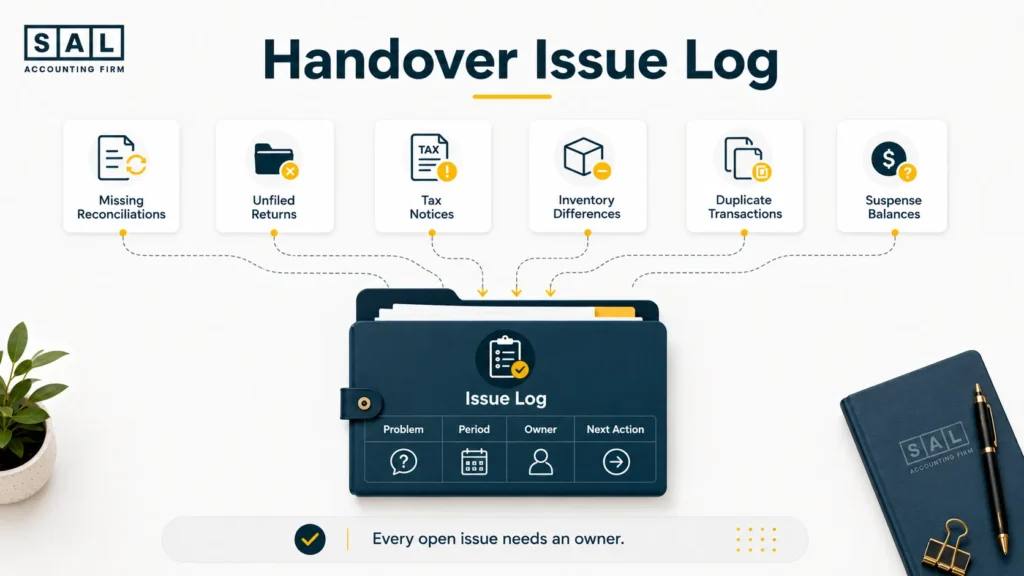
Create one clear issue log. Do not bury unfinished work inside old email threads. Include:
- Missing bank or credit-card reconciliations
- Unfiled tax returns
- CRA, IRS, or state notices
- Inventory differences
- Suspense or clearing-account balances
- Duplicated Shopify or Amazon transactions
- Outstanding cleanup work
For each item, record:
What is wrong → which period it affects → who owns it → what happens next
For example:
Issue: Stripe clearing balance does not match the processor report
Period: January to March
Owner: New accountant
Next action: Reconcile pending payouts and foreign-currency differences before opening-balance approval
Step 6: Verify the Opening Balances
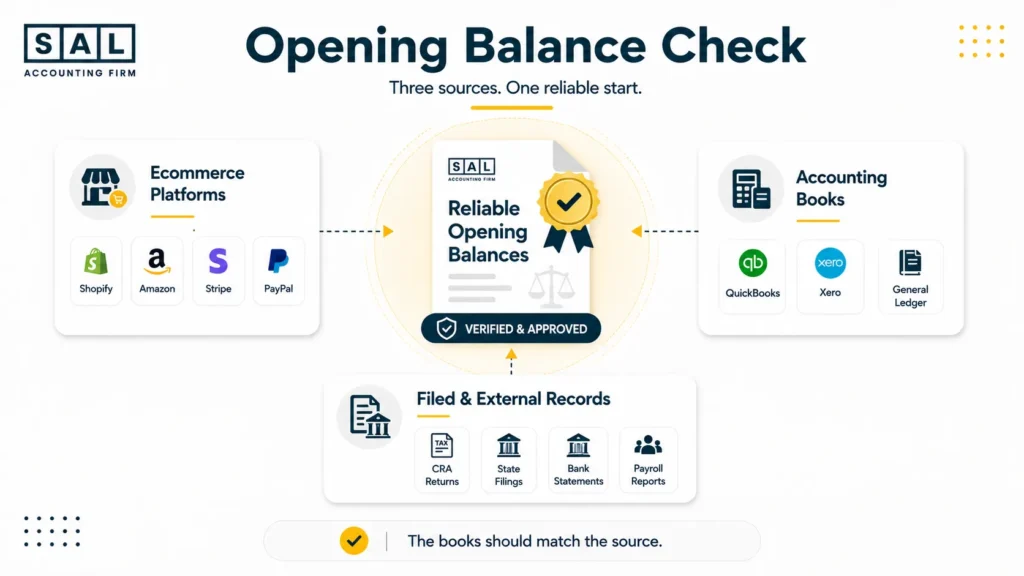
The new accountant should not accept the opening balances simply because they appear in QuickBooks or Xero. Verify:
- Banks and credit cards against statements and reconciliations
- Shopify, Amazon, Stripe, and PayPal against payout reports
- Inventory against quantities and unit costs
- GST/HST, payroll, and sales tax against filed returns
- Loans against lender statements
- Shareholder balances against actual owner transactions
Before sign-off, confirm that the chart of accounts follows a consistent method for categorizing ecommerce sales, fees, taxes, and COGS.
The outgoing closing trial balance should match the new opening trial balance after any approved corrections.
Pro tip: Once the balances are approved, lock the earlier period where the software allows it. That stops old transactions from being changed without anyone noticing.
Case Study: How Maya in Liberty Village, Toronto Transfers Her Shopify Books Cleanly1
Maya runs a Shopify home-goods business from Liberty Village, Toronto. Her bookkeeping is mostly current, but the reports do not clearly separate sales, refunds, gift cards, processing fees, and bank deposits. She wants to change accountants without rebuilding years of otherwise usable records.
The Problem
Several Shopify payouts have been recorded directly as revenue. The QuickBooks subscription is also connected to an email controlled by the outgoing firm.
What We Do
We set a month-end handover date, return primary software control to the business, export the final reports, reconcile Shopify activity to the bank, and verify each material opening balance.
The Result
Maya starts with business-controlled access and reports that clearly separate revenue, refunds, fees, gift-card activity, tax, and cash received. Because the books are mostly reliable, she moves into ongoing bookkeeping without a full historical rebuild.
Keep the Shopify sales-to-bank trail clean. Shopify accounting services in Toronto →
What Should the New Accountant Check After the Transfer?
Receiving the files is only the first part of the handover. The new accountant should test whether the important balances are complete, supported, and tied to the ecommerce activity behind them.
Sales, Refunds, Fees and Payouts
The accountant should reconcile:
- Gross sales
- Discounts and refunds
- Sales tax collected
- Platform and processing fees
- Chargebacks and reserves
- Pending payouts
- Bank deposits
A proper Shopify payment reconciliation moves from gross sales to net sales, then from processor activity to the final bank deposit.
Every dollar should have a clear path from the order to the bank.
Inventory and Cost of Goods Sold
Compare the inventory in the accounting software with Shopify, Amazon FBA, warehouse, and inventory-in-transit reports. Check both sides:
- Quantity: How many units does the business hold?
- Cost: What does each unit cost after freight, duties, and other landed costs?
For stores carrying stock, Shopify inventory accounting should match the accounting ledger at the handover date.
For example, 1,500 units valued at an outdated cost of $9 produce a $13,500 balance. If the real landed cost is $12, the inventory should be $18,000. That $4,500 difference also affects cost of goods sold and gross profit.
Also read: “How to Calculate COGS for Ecommerce Stores”
GST/HST, Payroll and US Sales-Tax Balances
Each tax balance should follow this basic calculation:
**Last filed balance
- activity since that return
− payments, refunds, or credits
= current ledger balance**
For Canadian filings, GST/HST compliance for ecommerce stores depends on keeping sales, tax collected, input tax credits, filings, and payments in the same trail.
Canadian sellers with U.S. customers should also review U.S. sales-tax requirements before accepting state balances as complete.
Do not clear a difference with one unexplained journal entry. Find out whether it came from a payment, amendment, missing transaction, penalty, or unrecorded filing.
Check the Canadian tax balance before it moves. Estimate your GST/HST position →
Bank and Credit-Card Reconciliations
Confirm the last completed reconciliation for every bank and credit-card account. Look for:
- Old uncleared transactions
- Duplicate bank-feed entries
- Missing statements
- Transfers recorded as income or expenses
- Closed accounts that were never fully reconciled
A consistent ecommerce reconciliation process should explain every difference between the statement and the ledger.
A bank balance can look correct even when the transactions behind it are wrong.
Loans, Clearing Accounts and Shareholder Balances
Loan balances should tie to lender statements, with principal and interest recorded separately.
A separate ecommerce payment reconciliation should explain processor clearing balances through pending payouts, reserves, disputes, currency differences, and timing.
Shareholder balances should clearly separate:
- Owner contributions
- Business expenses paid personally
- Reimbursements
- Dividends
- Draws
- Personal expenses paid by the business
A clearing or shareholder account should not become permanent storage for transactions no one can explain.
Ecommerce Example: Shopify Sales vs Bank Deposits
The following monthly example shows why Shopify sales and bank deposits should not be treated as the same number.
| Shopify Activity | Amount | Record As | Cash Effect |
| Gross product sales | $62,000 | Sales revenue | Adds to processor balance |
| Discounts and refunds | ($8,000) | Reduction of revenue | Reduces customer payments |
| Net sales | $54,000 | Net revenue | Actual sales amount |
| Tax collected | $4,920 | Tax liability | Adds cash collected |
| Fees and chargebacks | ($3,000) | Expenses and disputes | Reduces payout |
| Funds still pending | ($4,500) | Clearing asset | Not deposited yet |
| Bank deposits | $51,420 | Cash received | Amount reaching the bank |
Here’s the calculation
$54,000 net sales
- $4,920 tax
− $3,000 fees and chargebacks
− $4,500 pending funds
= $51,420 deposited
The store made $54,000 in net sales, even though only $51,420 reached the bank.
Recording the $51,420 deposit as revenue understates sales by $2,580. It also hides the tax liability, fees, disputes, and money still held by the processor.
The Shopify order financial lifecycle explains why one month can include current sales, earlier refunds, processing deductions, and payouts that cross the month-end date.
Test the fee total against your books. Run the Shopify Fee Calculator →
What Can Go Wrong During the Transfer?
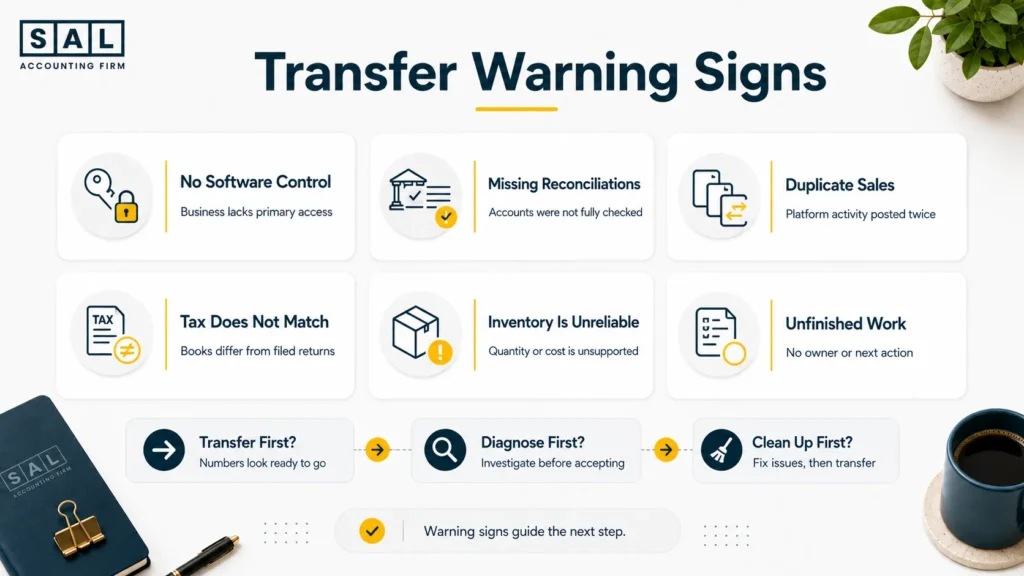
The Business Does Not Control the Accounting-Software Account
The outgoing accountant may control the primary login, subscription, billing details, or recovery email.
Fix this before access is removed. The business should own the account and give each accountant the permissions required to do the work.
Historical Reconciliations Are Missing
The bank balance may look reasonable even though several months were never reconciled.
The new accountant may need to rebuild those periods before approving the opening cash balance. That is cleanup work, not a basic record transfer.
Shopify or Amazon Transactions Are Duplicated
This often happens when an ecommerce integration records a settlement and someone also records the matching bank deposit as revenue.
Now the same activity has been counted twice.
Broken or overlapping Shopify and QuickBooks integrations are especially risky when historical transactions are re-imported during the handover.
Document what each integration posts before disconnecting or reconfiguring it.
Tax Balances Do Not Match Filed Returns
The accounting software may show one GST/HST or sales-tax balance while the filed return shows another.
Work through the difference one filing period at a time. It may relate to payments, amendments, missing entries, penalties, marketplace tax, or a return recorded twice.
These problems often surface later as inaccurate ecommerce financial statements, even when the profit-and-loss statement initially looks reasonable.
Inventory Does Not Transfer Correctly
A software migration may move inventory quantities without bringing over the correct costs.
Inventory held by Amazon FBA, a third-party warehouse, a supplier, or in transit may also be missed. Compare old and new SKU-level reports before approving the transfer.
Unfinished Work Is Not Documented
A tax return may have been drafted but not filed. A reconciliation may have been started but never finished.
The handover should identify whether each task is:
- Not started
- In progress
- Ready for review
- Filed or finalized
- Waiting for information
Can You Switch Accountants If Your Books Are Messy?
Yes. Your books do not need to be perfect before you change accountants. Messy records simply mean the handover needs an extra review and cleanup stage.
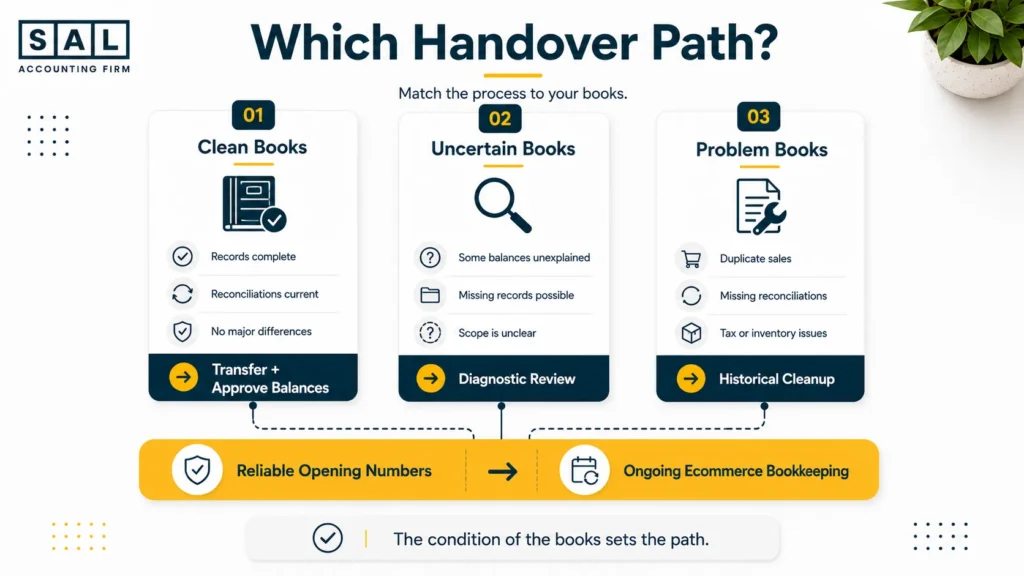
The ecommerce accounting handover path
Record Transfer
↓
Diagnostic Review
↓
Historical Cleanup — when required
↓
Opening-Balance Approval
↓
Ongoing Ecommerce Bookkeeping
Choose the path based on the condition of the books:
- Books are current: Transfer the records and approve the opening balances.
- You are unsure what is wrong: Start with a diagnostic review.
- Known problems exist: Complete a defined cleanup or migration project first.
This is common. It usually means the store’s platforms, processors, inventory, and tax requirements grew faster than the original bookkeeping process.
The point is to identify the problem before ongoing bookkeeping begins—not to make you feel bad for having one.
Case Study: How Daniel in Port Credit, Mississauga Cleans Up His Amazon Books Before Switching2
Daniel runs an Amazon FBA and Shopify accessories business from Port Credit, Mississauga. He knows the records are behind, but he does not know whether he needs a basic transfer or a larger cleanup project.
The Problem
Amazon deposits have been recorded as sales, several settlement periods are duplicated, inventory does not match the warehouse reports, and a U.S. sales-tax notice remains unresolved.
What We Do
We begin with a diagnostic review. We separate the transfer from the historical cleanup, reconcile Amazon settlements, remove duplicated entries, review inventory costs, and place the sales-tax notice in a dated responsibility tracker.
The cleanup follows practical Amazon FBA accounting best practices rather than forcing the bank deposits to match through one large adjustment.
The Result
Daniel receives reliable opening balances and a clear list showing what was corrected, what remains open, and who owns each next step. Ongoing bookkeeping begins after the historical issues are understood.
Turn Amazon settlements into books you can follow. Amazon seller bookkeeping services →
How Much Does an Ecommerce Accounting Transfer Cost?
There is no honest one-price answer. The cost depends on how much information must be transferred, reviewed, corrected, or rebuilt. The main cost factors are:
- Historical data: One current period is different from several unreconciled years.
- Sales channels: Each store and marketplace needs its own review.
- Inventory: FBA, warehouses, bundles, returns, and landed costs add work.
- Tax registrations: Every CRA account, province, state, or entity must be checked.
- Missing reconciliations: Historical bank and processor activity may need rebuilding.
- Software migration: Data must be exported, mapped, imported, and tested.
Ask for the proposal to separate:
- Record transfer
- Diagnostic review
- Historical cleanup
- Software migration
- Tax work
- Ongoing bookkeeping
That makes it clear whether you are paying to move the records, correct them, or both.
- Read more: “How Much Does Accounting Cost for an Online Store?”
Required Cleanup Work
Cleanup may include:
- Rebuilding missing bank and processor reconciliations
- Correcting duplicated Shopify or Amazon transactions
- Clearing suspense and processor balances
- Fixing inventory and cost of goods sold
- Matching tax balances to filed returns
- Correcting loan and shareholder accounts
- Completing overdue filings
A diagnostic review should identify this work before the new accountant accepts the opening numbers.
Ecommerce Accounting Handover Checklist
Before the Transfer
- Set the handover date.
- Assign upcoming tax, payroll, and reporting deadlines.
- Confirm that the business controls its software accounts.
- Authorize both accountants to communicate.
- List known errors, notices, and unfinished work.
During the Transfer
- Give the new accountant secure user access.
- Transfer the essential reports and tax records.
- Save dated PDF and spreadsheet backups.
- Document missing information and unresolved issues.
- Keep historical systems active until they are reviewed.
After the Transfer
- Verify banks, processors, inventory, taxes, loans, and owner balances.
- Compare the closing and opening trial balances.
- Test the ecommerce integrations.
- Approve and lock the opening period.
- Remove unnecessary old access.
Before appointing the next firm, the right questions to ask an ecommerce accountant should cover platform reconciliations, inventory, tax, system ownership, communication, and opening-balance approval.
Final Thoughts: A Clean Handover Starts with Reliable Opening Numbers
A clean handover is not about moving the largest possible folder of documents.
It is about giving the new accountant enough information to explain the opening numbers.
Sales should tie to payouts. Inventory should tie to quantities and costs. Tax balances should tie to filed returns. Bank accounts should tie to reconciliations. Unfinished work should have a clear owner and deadline.
Your books do not need to be perfect before you switch. They do need a reliable starting point.
Ready to make the switch without carrying old problems forward? Book a handover conversation