You built your Wix store. Products are listed, the design looks good. But once real orders start coming in, the basics run out fast. You need tools for marketing, reviews, inventory, and abandoned carts. Canada has roughly 48,624 live Wix stores right now. The Wix App Market has over 500 options.
This guide from SAL Accounting picks the best Wix apps for e-commerce by category so you can build the right stack without wasting money on tools that do not help much.
If you also need help tracking sales, managing taxes, or keeping clean books as your store grows, our ecommerce accounting services cover that side of things.
Quick Takeaways
- Wix Stores and Wix Payments are a good place to start. Get these before anything else.
- Upsell.com turns your thank-you page into a second sale to raise average order value.
- Omnisend covers email, SMS, and push notifications from one dashboard.
- Fera Product Reviews adds social proof to your product pages.
- For dropshipping: AutoDS for full automation, Printful for print-on-demand.
- QuickBooks Connector syncs orders, payments, and taxes to QuickBooks automatically.
- Do not stack more than 8 to 10 apps or your site slows down.
What Are the Best Wix Apps for an Online Store?
As we said, there are so many options on the Wix App Market, but the best Wix apps for e-commerce cover six areas: sales and conversion (Wix Stores, Upsell.com), marketing (Omnisend, Poptin), SEO (Wix SEO Setup Checklist, Rabbit SEO Traffic Booster), customer trust (Fera), inventory and accounting (QuickBooks Connector), and dropshipping (AutoDS, Printful). Start with what your store needs most right now, then add from there.
Apps install with one click from the Wix App Market and connect directly to your editor and dashboard. Most offer a free plan or trial so you can test before paying.
How to Choose Wix Apps for Selling: A Simple Framework
Before installing anything, get clear on what you actually need. Most store owners add apps based on what looks useful rather than what their store needs at this stage.
When you choose Wix apps for selling, think by stage:
- New store: Wix Stores, Wix Payments, one review app, one email app. Start there.
- Growing store ($5K–$20K/month): Add Upsell.com (formerly ReConvert), Abandoned Cart Recovery, Rabbit SEO Traffic Booster, and QuickBooks Connector.
- Dropshipping store: AutoDS or Printful from day one, plus your core store and marketing tools.
Here’s how the top Wix integrations for online stores compare across categories:
| App | Category | Free Plan | Paid From | Best For |
| QuickBooks Connector | Accounting | Free to install | $19/mo (QBO) | Syncing sales and tax data automatically |
| Wix Native Inventory Tools | Accounting | Free | Free | Basic stock tracking |
| AutoDS | Dropshipping | 14-day trial | ~€21/mo | Fully automated dropshipping |
| Printful | Dropshipping | Yes (pay per order) | $24.99/mo | Print-on-demand products |
| Wix Stores | Sales | With paid plan | $29/mo (Core) | Every store — your store foundation |
| Upsell.com (formerly ReConvert) | Sales | 14-day trial | $4.99/mo | Raising average order value |
| Abandoned Cart Recovery | Sales | Business plan | $36/mo | Recovering lost sales automatically |
| Omnisend | Marketing | Yes (500 emails) | $16/mo | Email, SMS, and push automation |
| Poptin | Marketing | Yes (1,000 visitors/mo) | ~€21/mo | Lead capture and pop-ups |
| Wix SEO Setup Checklist | SEO | Free | Free | SEO basics and Google setup |
| Rabbit SEO Traffic Booster | SEO | Yes (3 keywords) | ~€26/mo | Search rankings and backlink building |
| Fera Product Reviews | Trust | 14-day trial | ~€8/mo | Building social proof |
| Wix Reviews | Trust | Free | Free | Basic reviews to start |
Install apps one at a time and give each a few weeks before adding the next.
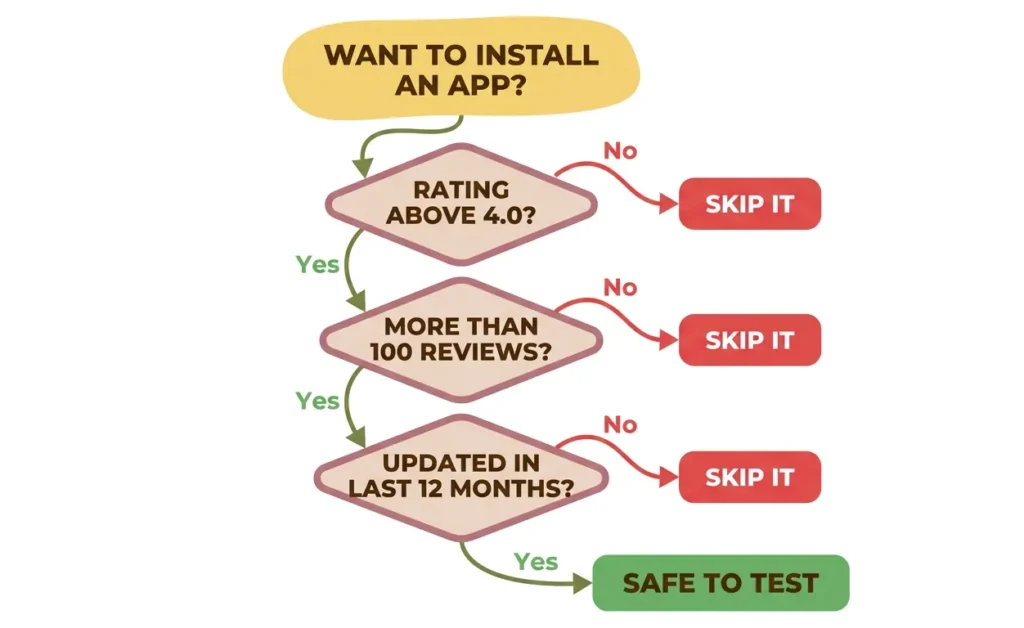
Pro Tip: Check the app’s rating and “last updated” date before installing. An app that hasn’t been updated in over a year can cause compatibility issues.
- Also read: “Best Ecommerce Accounting Software in 2026“
Best Wix Apps for Inventory and Accounting
Most Wix app guides skip this section, but manual financial tracking catches up with you fast. These inventory management apps for Wix keep your numbers clean.
1. QuickBooks Connector
QuickBooks Connector sends your Wix orders, payments, refunds, and tax data directly to QuickBooks Online, automatically.
No spreadsheet exports, no copying numbers by hand. For stores selling in Canada and the US, having records organized by region makes GST/HST and US sales tax reporting much simpler.
Also our cross-border tax accountants can make sure your records are set up correctly for both sides.
- Free to install; requires QuickBooks Online from $19/month
- Worth adding once you’re consistently doing $3K+/month
Note: the connector is not compatible with Safari, use Chrome or Firefox.
2. Wix Native Inventory Tools
Stock levels, low-stock alerts, and per-product tracking are all included with Wix Stores at no extra cost. Wix Native Inventory tools work well for simple catalogs.
The gap: there’s no Cost of Goods Sold (COGS) tracking, so you can see revenue but not true profit. QuickBooks Connector fills that gap.
Best Wix Apps for Dropshipping
Wix supports dropshipping natively through its App Market. These two apps cover the main approaches.
1. AutoDS
AutoDS connects to 25+ suppliers including AliExpress, Walmart, and CJ Dropshipping.
It has built-in product research, automatically updates prices and stock, and handles fulfillment for you. It even includes print-on-demand.
- 14-day free trial; paid plans from ~€21//month billed yearly
Note: Price is in EUR and varies by exchange rate.
If you also sell on Amazon, our Amazon accounting services cover that platform too.
2. Printful
Printful lets you sell custom products (t-shirts, mugs, phone cases, and 200+ other items) without stocking anything. When a customer orders, Printful makes it and ships it directly to them. It is used by brands like MTV and Coca-Cola.
- Free plan available; Growth plan at $24.99/month (free once you hit $12K/year in sales)
Best Wix Apps for Sales and Conversion
These are the apps that directly affect whether a visitor buys or leaves.
1. Wix Stores
This is the core of your store. Wix Store gives you product pages, a shopping cart, secure checkout, order management, inventory tracking, and shipping rules, all in one place. You need the Core plan ($29/month) or above to accept payments.
It also supports multichannel selling on eBay, Amazon, and Google Shopping, all managed from one dashboard.
If you sell on Shopify as well, our Shopify accounting services handle that side too.
2. Upsell.com (formerly ReConvert)
Upsell.com changes your thank-you page (the screen customers see right after buying) into a place where you can show product recommendations, reorder buttons, and discount offers. It’s a simple way to get more value from customers who already decided to buy.
- 14-day free trial; paid from $4.99/month (usage-based, scales with revenue or order volume)
3. Wix Abandoned Cart Recovery
Around 70% of online shopping carts get abandoned before checkout. Wix Abandoned Cart Recovery tool sends an automatic email to those customers.
It’s included on the Business plan ($36/month) and takes almost no setup, just turn it on.
- Also read: “Top Accounting Software Options for Shopify Sellers“
Best Wix Apps for Marketing and Email
Once your store is set up, these tools help you reach customers and bring them back.
1. Omnisend
Omnisend lets you set up automated marketing flows (welcome emails, abandoned cart follow-ups, win-back messages) across email, SMS, and push notifications from one place.
Good for any store that wants to stay in touch with customers without doing it manually.
- Free plan: up to 500 emails/month; paid from $16/month
Note: SMS features require additional setup and a US toll-free number verification. Email automation works out of the box.
2. Poptin
Poptin creates exit-intent pop-ups, spin-to-win wheels, countdown timers, announcement bars, and lead capture forms.
It integrates with 70+ platforms including Mailchimp, Klaviyo, and HubSpot, and connects directly to your Wix contacts panel.
- Free plan available (up to 1,000 visitors/month); paid plans from ~€21/month billed yearly (price in EUR, varies by exchange rate)
Best Wix Apps for SEO
Wix has built-in SEO tools, but they only go so far. These tools and apps help you go further.
1. Wix SEO Setup Checklist
A step-by-step checklist inside your Wix dashboard that walks you through SEO basics: page titles, meta descriptions, and connecting Google Search Console. A solid starting point, but it doesn’t cover keyword research or competitor analysis.
2. Rabbit SEO Traffic Booster
Rabbit SEO scans your site for keyword opportunities, builds backlinks, and sends daily ranking updates. It is designed for store owners who want better Google rankings without needing SEO expertise.
- Free plan (3 keywords); paid from about €26/month (billed yearly).
Pro Tip: Connect your store to Google Search Console before adding any SEO app. It is free and shows you accurate performance data no third-party tool can match.
Best Wix Apps for Customer Trust and Reviews
Shoppers don’t trust stores they’ve never heard of. Reviews close that gap faster than almost anything else.
1. Fera Product Reviews
Fera collects reviews after purchase automatically and shows them on your product pages with star ratings, photos, and videos. Seeing real customers with the product tends to convert better than text reviews alone.
- 14-day free trial; paid plans from ~€8/month billed yearly (price in EUR, varies by exchange rate)
Note: if you cancel your plan, reviews may be removed. Export them regularly as a backup.
2. Wix Reviews
Basic star ratings and written feedback, built into Wix at no cost. Works fine when you’re starting out. When you want automation and more display options, Fera is the next step.
Pro Tip: Most review apps offer a 14-day trial. Install one, get your first 10–15 reviews, and compare your conversion rate before and after. That tells you whether the paid plan is worth it for your store.
- Also Read: “Best Bookkeeping Tools for Small Business Owners“
How to Keep Your Wix Store Fast With Multiple Apps
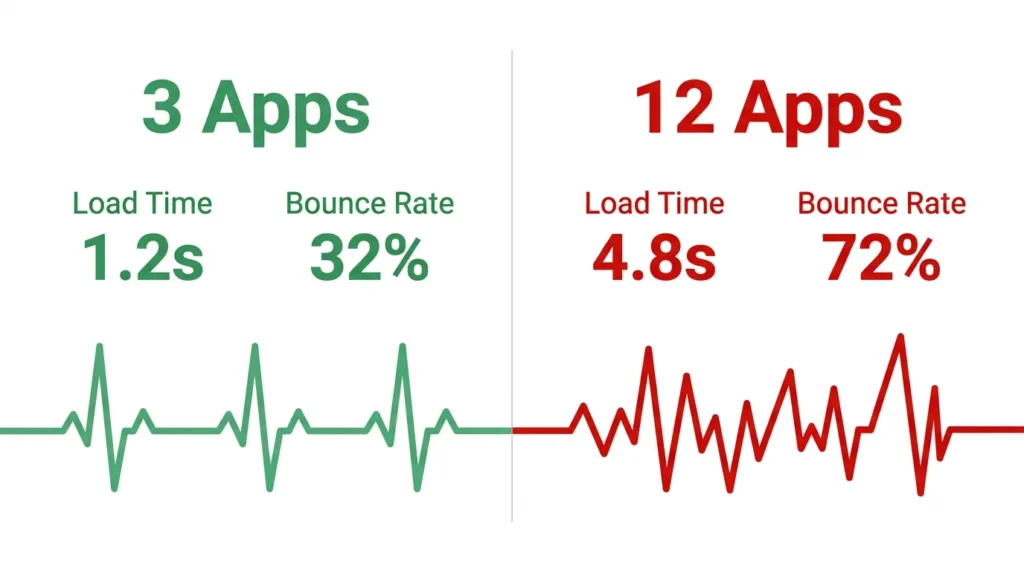
Every app you add runs code on your site. Too many and your pages slow down, and a slower site means fewer sales. Google research found that as page load time goes from one second to three seconds, the chance of a visitor leaving increases by 32%.
A few simple rules: start with three to five apps, avoid two tools that do the same job, uninstall apps you’re not using (disabling them isn’t the same as removing them), and check your speed with Google PageSpeed Insights after each new install.
Final Thoughts
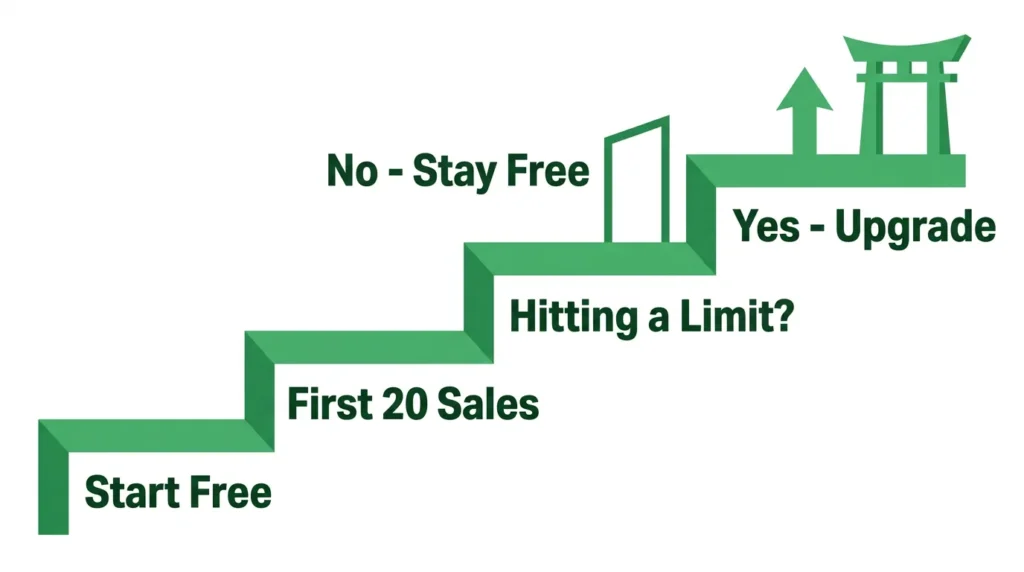
The Wix App Market for business owners offers hundreds of options across every category, but the right ones depend on your store size and goals. Add one app at a time, confirm it’s doing something useful, then move to the next.
- If you’re just launching: Wix Stores, Wix Payments, Abandoned Cart Recovery, and one review app is a complete starting point.
- If you’re growing consistently: add Omnisend, Upsell.com (formerly ReConvert), Rabbit SEO Traffic Booster, and QuickBooks Connector.
- If you’re dropshipping: AutoDS or Printful from day one.
If your store is growing and you want your retail accounting and tax tracking set up correctly alongside it, our team can help. Book a free consultation with our ecommerce accountants.