Our goal is to help people just like you pick the right Shopify plan so you can launch your first online store with confidence and without spending too much in 2026. But here’s the surprising part: only about 1 in 10 new Shopify stores are still active after 90 days. That high dropout rate usually happens because people choose the wrong plan, pay for features they don’t need, or miss out on the basic tools that actually help beginners succeed.
In this guide at SAL Accounting, we’ll break down every plan, show you the real costs and hidden traps, and explain exactly why the Basic plan is the smartest, lowest-risk choice for almost every new seller.
Quick Takeaways
- The best Shopify plan for beginners in 2026 is the Basic plan ($39/month or $29/yearly).
- New users get a 3-day free trial plus just $1/month for the first 3 months on Basic.
- Basic includes a full customizable store, abandoned cart recovery, 24/7 support, unlimited products, and low 2% transaction fees (if not using Shopify Payments).
- Most beginners stay on Basic until monthly sales consistently reach $5,000–$10,000, then upgrade to Grow or Advanced for lower fees and more staff accounts.
- Starter ($5/month) works only for social selling without a website—most new sellers quickly outgrow it and choose Basic instead.
What Is Shopify Pricing for New Sellers in 2026? (Plans, Costs & Beginner Deals)
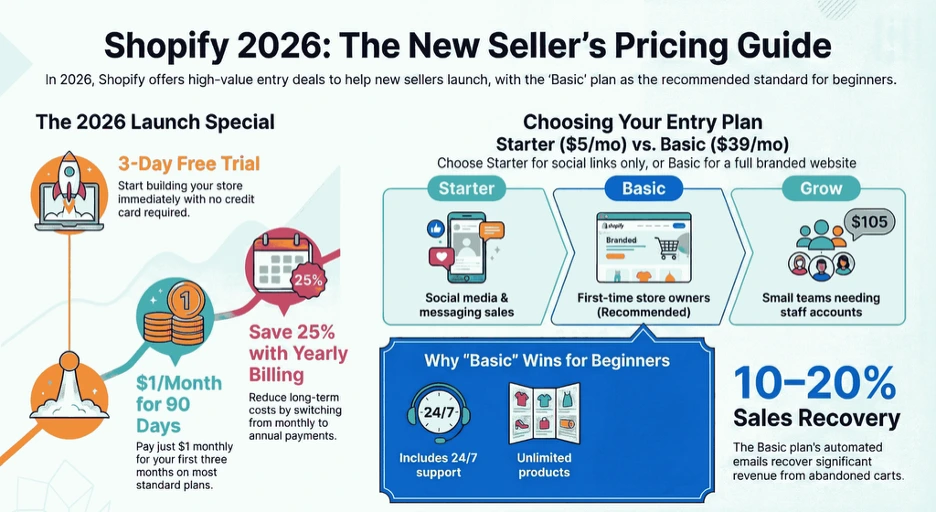
In March 2026, Shopify gives new users a great deal: sign up for a 3-day free trial (no credit card needed), then pay just $1 per month for the first 3 months on Basic, Grow, or Advanced plans (Shopify free trial). This lets you build, test, and even start selling your store at almost no cost. Consult our eCommerce accountant to make the best decision. Here are the main plans:
- Starter: $5/month. Best if you sell only through social media (Instagram, TikTok), links, or messages. No full website included. Simple tools for quick sales.
- Basic: $39/month (or $29/month if billed yearly). The top choice for most beginners. You get a full online store, unlimited products, abandoned cart recovery, 24/7 support, custom domain support, and basic reports. Perfect for launching and selling right away.
- Grow: $105/month (or $79/month yearly). Good for small teams. Adds 5 staff accounts, better shipping discounts, customer segmentation, and more marketing tools. Upgrade here when you grow.
- Advanced: $399/month (or $299/month yearly). For bigger stores. Includes advanced reports, 15 staff accounts, international features, and lower fees, too much for most new sellers.
- Shopify Plus: Starts at $2,300/month (custom, usually on a 3-year term). Enterprise-level for large brands. Not for beginners.
All plans come with secure hosting, free SSL, fraud protection, and access to thousands of apps. Yearly billing saves up to 25% on Basic, Grow, and Advanced. Use the best Shopify integrations for e-commerce for more benefits.
Which Shopify Plan Is Best for Beginners? (Why Basic Wins?)
Right now, the best Shopify plan for beginners is Basic. It gives you what you really need to start selling without spending money on stuff you won’t use yet. Most people who are just starting pick Basic and do great with it. They can sell internationally on Shopify. Here’s why Basic works so well for new sellers:
- You get a full online store that you can customize. Choose a free theme like Dawn, add your logo, change colors, and build pages, all without any coding.
- Abandoned cart recovery is already included. Shopify automatically emails people who leave items in their cart. This simple feature can bring back 10–20% of sales you would have lost.
- Support is available 24/7. You can chat or email the team any time, even late at night when you’re stuck. Check out the best Shopify dropshipping apps in 2026, too.
- You can add unlimited products, and you get unlimited bandwidth. List as many items as you want. Your store handles more visitors without extra charges or surprises.
- Transaction fees stay reasonable. You only pay an extra 2% if you don’t use Shopify Payments. That means you keep more of your early sales.
Right now, new users pay only $1 per month for the first 3 months after the 3-day free trial. That’s almost free time to build your store and test sales.
When Starter ($5/month) might be enough
If you sell only on social media, Instagram, TikTok, links, or messages, and you don’t want a full website yet, Starter is cheap and easy. But it doesn’t have abandoned cart emails, good reports, or your own branded shop. Most beginners outgrow it fast.
- Read More: ”Shopify Tax Exemption Explained: What It Is and How to Set It Up for Your Store in 2026”
Why you should skip Grow, Advanced, or Plus at the beginning
Grow costs $105/month and gives more staff accounts and better tools for teams. Advanced is $399/month and adds advanced reports and lower fees for big stores. Shopify Plus starts at $2,300/month and is made for huge companies. These plans charge a lot for features most new sellers don’t need in their first year. Have a look at the Shopify payment reconciliation guide for more.
Case Study: Toronto Print-on-Demand Creator Builds $3,200 Side Hustle on Basic Plan1
A Toronto entrepreneur in the Annex neighborhood runs a Shopify store that sells custom print-on-demand T-shirts inspired by local culture. Her store currently brings in $3,200 in the first four months. About 60% of her sales come from Canada and the US.
Problem
She loses time and potential sales from abandoned carts and manual order follow-ups. Limited staff access makes it hard to collaborate with a part-time helper. Basic reports are enough at first, but she worries about outgrowing them too soon.
What We Do
We recommend she start on the Basic plan during the $1/month promo. She uses the free Dawn theme, enables abandoned cart recovery emails right away, and adds one helper via the 2 staff accounts. We guide her to focus on high-quality photos and simple Instagram traffic instead of paid apps early on.
The Result
In four months, she recovers ~$450 in lost sales from abandoned cart emails alone. Collaboration with her helper runs smoothly without needing more staff accounts. Total first-year costs stay under $400, leaving more profit to reinvest in designs. She stays on Basic with no need to upgrade yet, proving it’s the perfect low-risk start for beginners.
How Do Shopify Plans Compare for Beginners (Key Differences Side-by-Side)
Now that you know why Basic usually fits beginners best, let’s put all the plans side by side. This quick comparison shows the real differences in features, costs, and limits. It helps you see exactly what you get (and what you don’t need yet). Here’s a simple table with the key points:
| Feature | Starter ($5/mo) | Basic ($39/mo or $29/yr) | Grow ($105/mo or $79/yr) | Advanced ($399/mo or $299/yr) | Plus ($2,300+/mo) |
| Full online store & website | No | Yes | Yes | Yes | Yes |
| Staff accounts | 0 | 2 | 5 | 15 | Unlimited |
| Abandoned cart recovery | No | Yes | Yes | Yes | Yes |
| 24/7 support | Yes | Yes | Yes | Yes | Priority + dedicated |
| Unlimited products & bandwidth | Yes (limited) | Yes | Yes | Yes | Yes |
| Transaction fee (3rd-party) | 5% | 2% | 1% | 0.6% | 0.2–0.4% |
| Professional reports | Basic | Basic | Standard | Advanced | Custom |
| Shipping discounts | Limited | Up to 77% | Up to 77–88% | Up to 88% | Custom |
| Best for beginners? | Social only | Yes – most new sellers | Scaling later | No | No |
Full online store & website
Starter does not include a full website. You can only sell through links, social media posts, or direct messages. You may need a plan for starting dropshipping on Shopify. Basic and every higher plan give you a complete branded online store. You can connect your own domain, create multiple pages, and fully customize the design to match your brand.
Staff accounts
Staff accounts let you add team members to help run your store. You don’t need to worry about e-commerce Accounting in 2026 anymore. Here’s how they differ across plans:
- Starter: 0 staff accounts. You handle everything by yourself.
- Basic: 2 staff accounts. Enough for you plus one helper, friend, or virtual assistant.
- Grow: 5 staff accounts. Good for small growing teams.
- Advanced: Up to 15 staff accounts. Supports larger operations.
- Plus: Unlimited staff accounts. Ideal for big businesses with many team members.
Abandoned cart recovery
Starter does not include abandoned cart recovery at all. Basic automatically includes this helpful feature. Shopify sends reminder emails to customers who add items to their cart but leave without buying. Grow, Advanced, and Plus all keep abandoned cart recovery included as standard.
24/7 support
Starter comes with basic 24/7 support through chat and email. Basic, Grow, and Advanced provide the same full 24/7 support (eCommerce support). You can reach the team any time of day or night. Plus takes it further with priority support and a dedicated account manager for faster, personalized help. You can also use Shopify tax exemptions easily.
Unlimited products & bandwidth
Starter technically supports unlimited products, but it comes with some restrictions on traffic and advanced features. Basic removes those limits and gives you truly unlimited products and bandwidth. Grow, Advanced, and Plus also provide unlimited products and bandwidth. Your store can handle growing traffic and large catalogs without any extra charges or slowdowns.
Transaction fee (3rd-party)
Transaction fees are extra charges when you use a payment processor other than Shopify Payments. Shopify’s payment reconciliation and matching the transactions, payments, and fees cost you more. Here’s the breakdown by plan:
- Starter: 5% extra fee. High and eats into profits quickly.
- Basic: 2%. Much better for keeping more money from early sales.
- Grow: 1%. Further reduction as your volume increases.
- Advanced: 0.6%. Even better savings on higher sales.
- Plus: 0.2–0.4%. Lowest rates, cost-effective for very high-volume stores.
Professional reports
Starter and Basic both provide only basic reports with simple sales and customer data. Grow upgrades to standard reports that give you more detailed insights into performance. Shopify advanced includes advanced reports with deeper analytics and customization options. Plus offers fully custom reporting tailored to large or complex businesses. Get expert bookkeeping services for the best Shopify reports.
Shipping discounts
Starter has very limited or no shipping discounts available. Basic unlocks up to 77% off standard shipping rates through Shopify’s partners. Grow improves those discounts to a range of 77–88%. Advanced reaches up to 88% off shipping rates. Plus provides custom shipping rates and the best possible discounts based on your volume.
- Read More: “Shopify Integration with QuickBooks: How to Sync, Automate & Reconcile Your Store’s Accounting“
How to Choose the Right Shopify Plan for Your New Store
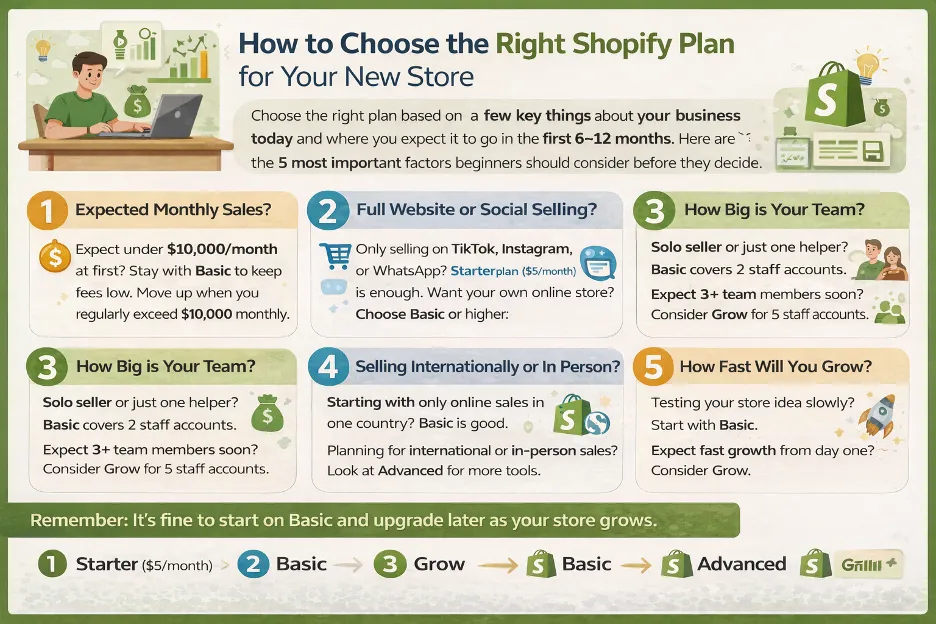
Choose the right plan based on a few key things about your business today and where you expect it to go in the first 6–12 months. Remember, accounting software options for Shopify sellers help your business a lot. Here are the 5 most important factors beginners should consider before they decide.
1. Your expected monthly sales in the first year
Expect less than $5,000–$10,000 per month at the start? This range is realistic for most new stores. Many earn under $1,000–$5,000 monthly in year one. Stay with Basic. Here’s why Basic makes sense at low volume:
- The 2% transaction fee (when you skip Shopify Payments) does not hurt much when sales are small.
- You avoid paying $100+ per month for features you do not need yet.
- You keep monthly costs low so you can focus on products, traffic, and first customers.
When sales regularly exceed $10,000 per month, lower fees on Grow (1%) or Advanced (0.6%) save you more than the higher subscription costs. Consider e-commerce taxes in Canada for full compliance.
2. Do you need a full website or just social selling?
Sell only through Instagram, TikTok, Facebook, WhatsApp, or link-in-bio tools? Do you not plan to build your own branded website soon? Starter ($5/month) works fine. Want your own professional online store, with custom pages, a domain like yourname.com, product collections, and a real shopping experience? Choose Shopify Basic or higher.
Pro tip: Avoid jumping to Grow or Advanced early just because it “sounds better.” Wait until you actually need the extra staff accounts or lower fees. Automate your Shopify account to avoid mistakes.
3. How big is your team (or will it be soon)?
Solo seller or just you plus one helper/partner? Basic’s 2 staff accounts cover you fully. Already have or will soon add 3–5 people who manage the store (inventory, customer service, marketing)? Grow’s 5 staff accounts make more sense. Larger teams should consider Advanced. Most beginners stay solo or with very small teams, so Basic handles this easily.
Pro tip: Launch on Basic during the $1/month promo. Test real sales and traffic first before you commit to a higher plan.
4. Do you sell internationally or in person, too?
Basic works well for most single-country online stores. Beginners usually start with domestic and online-only, so Basic is enough in the beginning. You must consider Shopify GST & HST as a Canadian seller. Consider these situations:
- Plan to sell to multiple countries right away and need advanced multi-currency, duty/tax automation, or international shipping tools? Advanced becomes more useful.
- Also, do in-person sales (pop-ups, markets, retail)? All plans support Shopify POS, but higher plans give better hardware discounts and reporting.
Pro tip: Ask: “Do I need this feature today?” If not, stay on Basic. Beginners rarely use advanced international or team tools in year one.
5. How fast do you expect to grow?
Test the idea, learn as you go, and be okay with an upgrade later? Start with Basic. Upgrading happens instantly, prorated, and Shopify credits the unused time. Confident you hit $20k+ per month quickly and want lower fees plus more tools from day one? Growing could be worth it.
Quick rule of thumb for beginners:
- Only social selling, no website — Starter
- Want your own store, solo/small team, under $10k/month — Basic (90% of beginners)
- Already have a team or expect fast scaling — Grow
- High-volume international or complex needs — Advanced (rare for new stores)
- Enterprise level — Plus (not for beginners)
Case Study: Mississauga Eco Accessories Seller Reaches $4,800/Month on Basic Plan2
A Mississauga entrepreneur in Erin Mills runs a Shopify store that sells eco-friendly phone accessories. His store currently brings in $4,800 per month after three months. About 70% of his sales come from Canada, with some US traffic.
Problem
Low expected sales make higher plans feel wasteful. Manual shipping setup and transaction fees eat into thin margins. No team means he handles everything alone, but he wants room for occasional help without extra cost.
What We Do
We guide him to launch on the Basic plan with the $1/month promo. He sets up Shopify Payments to avoid the 2% extra fee, uses unlimited products for his growing catalog, and adds one helper via the 2 staff accounts when needed. We suggest free tools for photos and organic Facebook Marketplace posts to drive local Mississauga traffic.
The Result
Abandoned cart recovery boosts sales by 12–15% automatically. Transaction fees stay at zero extra with Shopify Payments. He handles solo operations with the 2 staff accounts and keeps costs under $500 for the first year. Profit margins improve, and he reinvests in better product photos instead of upgrading early. Basic gives him steady growth without unnecessary expenses.
When Should You Upgrade from Your Shopify Beginner Plan?
You start on Basic and grow. At some point, you may need more. Pay attention to sales taxes for Shopify sellers in the US and Canada, too. Here are the clear signals to upgrade (and when to stay):
- Monthly sales consistently hit $5,000–$10,000 or more. The 2% transaction fee on Basic adds up ($100–$200/month extra). Grow (1%) or Advanced (0.6%) saves more than the higher subscription.
- You run out of staff accounts. Basic gives only 2. If you add helpers and hit the limit, move to Grow (5) or Advanced (15).
- You need better reports. Basic has simple data. For detailed customer segments, performance insights, or Shopify custom dashboards, switch to Grow (standard) or Advanced (advanced).
- You sell internationally at high volume. Basic handles basics. For advanced multi-currency, duty/tax automation, or complex global shipping, Advanced is better.
- Shipping discounts and lower fees matter a lot. Grow/Advanced gives up to 88% off shipping and reduced transaction fees. Upgrade when these savings beat the extra monthly cost.
| Signal / Trigger | Stay on Basic? | Upgrade to Grow ($105/mo) or Advanced ($399/mo)? | Monthly Savings / Benefit After Upgrade (approx.) |
| Monthly sales | Under $5,000–$10,000 consistently | Consistently $5,000–$10,000+ (2% fee = $100–$200 extra) | $50–$150+ (lower 1% or 0.6% transaction fees) |
| Staff accounts needed | 0–2 people (you + one helper max) | 3+ team members (inventory, CS, marketing) | No extra cost for 5–15 accounts |
| Reporting & analytics | Simple sales & customer overviews are enough | Need customer segments, detailed insights, custom dashboards | Better data → faster decisions & growth |
| International selling volume | Mostly domestic or low international volume | High-volume global sales + need advanced multi-currency, duty/tax automation, complex shipping | Lower international fees + automation |
| Shipping discounts & transaction fees | Shipping discounts and 2% fee are acceptable | Savings from up to 88% shipping discounts + 1%/0.6% fees outweigh the higher subscription cost | $50–$300+ depending on volume |
When NOT to upgrade
Stay on Basic if your monthly sales are still under $5,000. The overall cost stays lower than higher plans. You also do not need to upgrade if you still have space in the 2 staff accounts and the basic reports meet your needs. If you are in the first 3 to 6 months or still testing the business, keep risk low and stick with Basic until you have solid data showing real growth.
Pro tip: Check your plan every 3–6 months. Look at sales, fees paid, and team needs. Upgrade only when numbers show you save or gain more than the extra cost. Contact our Shopify tax accountant at SAL Accounting for expert help with plan upgrades.
Final Thoughts
The best Shopify plan for beginners in 2026 is still Basic. It gives you a full store you can customize, abandoned cart recovery, 24/7 support, unlimited products, and low fees. The $1/month promo for the first three months makes it super cheap to start. Most new sellers do really well with Basic and only upgrade when sales hit $5,000–$10,000 per month consistently, or they need more staff. Pick Basic, launch quickly, and focus on real growth.
If you are ready to go, head to shopify.com, start your free trial, choose Basic, and grab the $1/month deal. SAL Accounting can help with payouts, taxes, and CRA stuff. Contact us and book a consultation today.
FAQs About Shopify Plans for Beginners
Basic. It gives a full store, abandoned cart recovery, 24/7 support, unlimited products, and low fees ($39/month or $29/yearly). Most beginners start here.
3-day free trial, then $1/month for the first 3 months on Basic. After that: $39/month ($29/yearly). Add ~$15/year domain and $0–$20/month apps. First-year total: $400–$800.
Yes. Starter plan ($5/month) lets you sell via social links or messages—no website needed. Basic adds a simple drag-and-drop store with free themes. No coding required.
Abandoned cart recovery, 24/7 support, Shopify Payments (no extra 2% fee), unlimited products, and a free theme. Skip advanced reports or paid apps at first.
Very easy. Go to Settings > Plan. Switching is instant and prorated. Shopify credits or charges only the difference. No data or store changes.
Yes. 3-day free trial (no card needed). New users then pay $1/month for the first 3 months on Basic, Grow, or Advanced.
No. Free themes like Dawn work great, no coding needed. Start with built-in tools. Add paid themes or apps later when you need them. Most beginners launch with free options.