

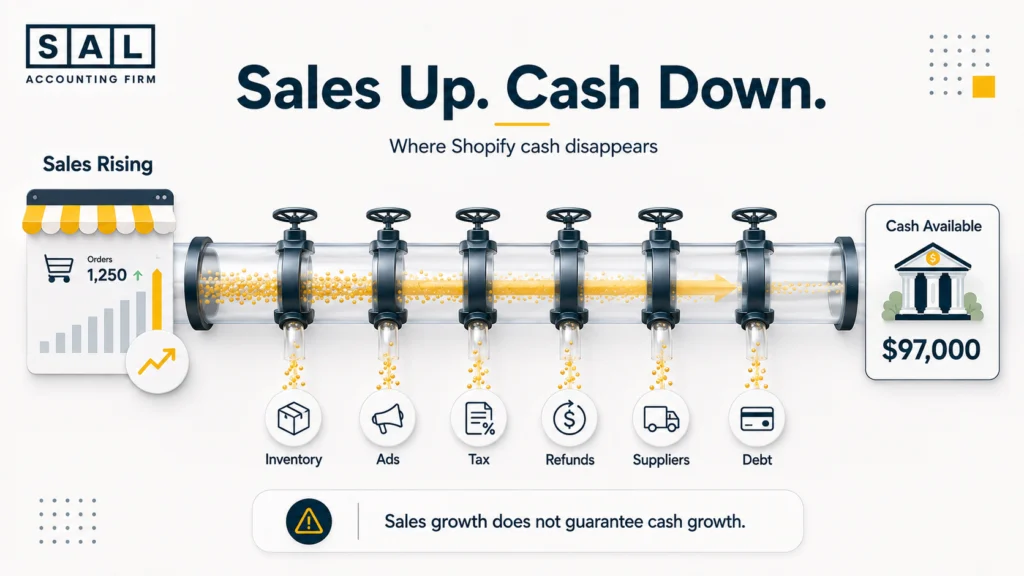
Your Shopify dashboard says growth. Your bank account says something else. That gap can build quietly while inventory, payout delays, refunds, taxes, supplier bills, and debt pull cash in different directions.
The ecommerce specialists at SAL Accounting trace the full sales-to-cash trail, not just the headline revenue. Read this before your next major order or tax payment, the warning sign you miss now could be the one that limits next month’s growth.
Find out what Shopify may be keeping before each payout reaches you: Run the Shopify Fee Calculator.
Quick Takeaways
- Rising Shopify sales can weaken cash flow when inventory, advertising, fulfilment, and tax obligations grow first.
- Slow-moving inventory is cash sitting in products instead of covering upcoming expenses.
- Shopify sales, payouts, and bank deposits represent different stages of the payment process.
- Refunds and chargebacks may pull cash out after the original sales money has already been spent.
- GST/HST collected from customers shouldn’t be treated as spendable revenue.
- Supplier terms and debt repayments can put profitable stores under cash pressure.
- The fastest way to find the issue is to compare profit, cash movement, inventory, payouts, tax, and upcoming obligations together.
Sales, payouts, inventory, and tax need one consistent accounting trail before your cash flow can be trusted. Review Shopify accounting services in Toronto.
Shopify Cash Flow Warning Signs at a Glance
Start by matching what you’re experiencing with the number most likely to explain it.
| Warning sign | What you notice | What it usually means | Check first |
|---|---|---|---|
| Sales rise while cash falls | Revenue grows, but the bank balance drops | Growth is absorbing cash elsewhere | Operating cash flow |
| Inventory keeps increasing | More products sit unsold | Cash is tied up in stock | Inventory turnover |
| Payouts arrive late or lower | Deposits don’t match expectations | Fees, timing, refunds, or holds | Payout reconciliation |
| Refunds pull cash back out | Bank debits or payout reductions follow earlier sales | Previous revenue is being reversed | Refund activity |
| Tax creates a shortfall | Filing deadlines arrive without enough cash | Collected tax was spent | Tax payable |
| Suppliers need faster payment | Bills arrive before products sell | Payment terms don’t fit the sales cycle | Supplier forecast |
| Debt leaves little usable cash | Sales increase, but available cash stays tight | Repayments are taking cash first | Debt cash outflow |
1. Shopify Sales Are Rising, but Cash Is Falling
Sales growth doesn’t automatically produce immediate cash growth. Imagine your monthly Shopify sales climb from $135,000 to $188,000. During the same month, you:
- Place a $74,000 inventory order.
- Spend $36,000 on paid advertising.
- Pay a GST/HST balance from the previous quarter.
- Issue refunds from last month’s promotion.
- Make a loan repayment.
- Wait for several days of sales to enter the bank.
Your store may still be profitable. The issue is that the profit and the cash don’t arrive at the same time.
When sales look healthy but the bank balance remains tight, the explanation often sits behind why an online store isn’t making money: fees, product costs, advertising, returns, tax, and timing are consuming more than the sales dashboard shows.
Compare Profit With Cash Movement
Review these figures over the same three- to six-month period:
- Net sales.
- Gross profit.
- Net income.
- Operating cash flow.
- Inventory balance.
- GST/HST payable.
- Supplier commitments.
- Loan repayments.
- Owner withdrawals.
- Ending bank balance.
A reliable ecommerce profit calculation separates revenue from COGS, refunds, fees, fulfilment, advertising, and tax. Your cash flow review then explains when each amount entered or left the business.
The choice between cash and accrual accounting for ecommerce changes when activity appears in your reports, but neither method replaces a forward-looking cash forecast.
Pro Tip: Create a monthly profit-to-cash bridge. Begin with net income, then list the cash effects of inventory, tax, debt principal, owner activity, and payout timing. That bridge usually reveals why profit and the bank balance moved in different directions.
Test whether the store is producing operating profit before blaming payout timing: Calculate your ecommerce EBITDA.
Also read: “Cash Flow Statement for Shopify Stores: Tools, Tips and How to Stay Cash-Healthy”
2. Shopify Inventory Is Consuming Too Much Cash
Inventory becomes a cash flow warning sign when you purchase products faster than customers buy them.
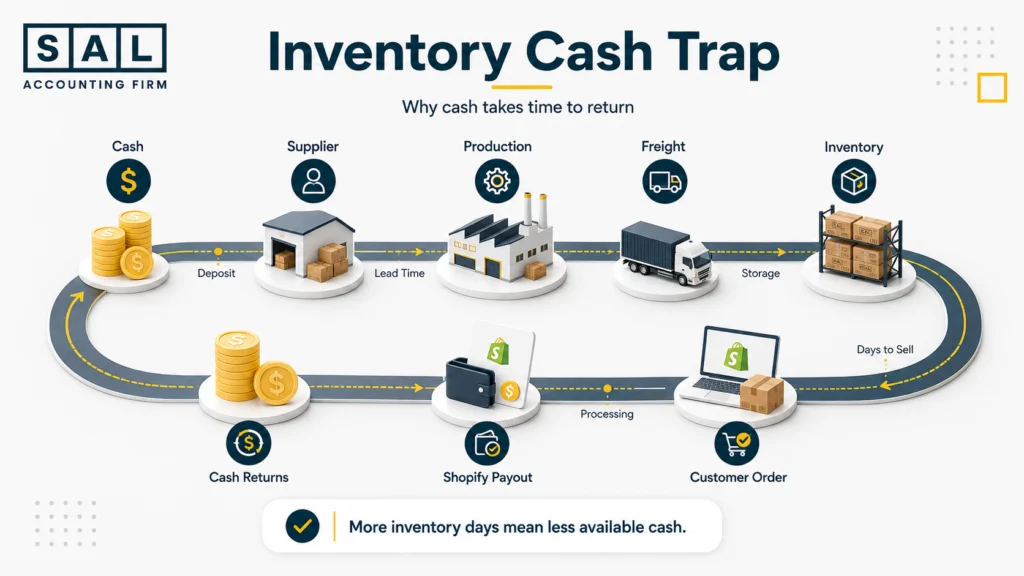
You may pay the supplier deposit first, followed by the production balance, freight, customs costs, insurance, and warehouse receiving fees. The cash begins returning only after the product sells and its payout clears.
Basically, the cycle looks like this:
Cash → supplier → inventory → customer order → payout → cash
The longer money stays inside that cycle, the less is available for advertising, payroll, tax, and the next purchase order.
Shopify’s official inventory reports include inventory quantities, product sales, sell-through rates, and days of inventory remaining. Those reports are useful operationally, but they still need to be matched with product costs, supplier commitments, and accounting records.
Shopify Inventory Turnover
Inventory turnover shows how many times your average inventory is sold during a period.
Inventory turnover = COGS ÷ Average inventory
Suppose annual COGS is $720,000 and average inventory is $240,000:
$720,000 ÷ $240,000 = 3 inventory turns per year
The store sells and replaces the equivalent of its average inventory roughly three times during the year. A falling turnover ratio may mean:
- Purchase orders are too large.
- Certain SKUs are moving slowly.
- Demand forecasts are too optimistic.
- Seasonal stock arrived too early.
- Older products aren’t being cleared.
- Product costs increased without a matching sales increase.
A high ratio isn’t automatically better. It may mean the store is running too lean and risking stockouts.
The useful question isn’t, “Is our turnover good?” It’s, “Why is turnover changing, and which SKUs are causing it?”
Product-level ecommerce SKU profitability analysis adds another layer by showing whether the products absorbing the most inventory cash are actually producing strong margins.
Shopify Days Inventory Outstanding
Days inventory outstanding estimates how long average inventory remains in stock before becoming COGS.
Inventory days = Average inventory ÷ COGS × Number of days
Using the figures above:
$240,000 ÷ $720,000 × 365 = approximately 122 days
That means the average inventory investment remains tied up for about four months.
Now ask the more practical question:
Can the store cover four months of advertising, payroll, tax, fulfilment, and supplier commitments while waiting for that inventory to sell?
If the answer is no, purchasing may be moving faster than working capital can support.
Accurate inventory days also depend on accurate COGS. A clean process for calculating ecommerce COGS should include the cost of units sold rather than treating every supplier payment as an immediate expense.
Shopify Cash Conversion Cycle
The cash conversion cycle measures the time between paying suppliers and recovering that money from customer sales.
A simplified version is:
Inventory days + receivable days − payable days
Shopify customers normally pay at checkout, so traditional receivable days may be low. But the wider ecommerce cycle may still include:
- Supplier deposits.
- Production lead times.
- International freight.
- Customs clearance.
- Warehouse receiving.
- Inventory days.
- Shopify payout timing.
- Refund activity.
- Chargebacks.
- Supplier balances due before the stock sells.
The point is simple: customer payment at checkout doesn’t mean your original inventory cash has already returned.
Inventory Turnover and Inventory Days KPIs
Use a small group of connected KPIs instead of relying on one inventory total.
| KPI | What it tells you | Warning pattern | What to do |
|---|---|---|---|
| Inventory turnover | How often stock sells | Falls over several periods | Review slow SKUs |
| Inventory days | How long cash stays in stock | Rises faster than lead time | Reduce reorder size |
| Sell-through rate | How much available stock sells | Remains low after launch | Review demand and pricing |
| Cash conversion cycle | Time from supplier payment to recovered cash | Becomes longer each quarter | Adjust terms and timing |
| Open PO coverage | Cash committed to future stock | Exceeds forecasted free cash | Delay or resize orders |
Shopify calculates product sell-through by dividing units sold by the combined total of units sold and ending inventory for the selected period. Recent data can also have a short processing delay.
A proper Shopify inventory accounting process keeps inventory as an asset until the related products sell. That prevents a large purchase order from distorting one month’s profit while still keeping the cash impact visible.
Pro Tip: Add confirmed purchase orders to your cash forecast on the dates deposits and balances are due—not only when the stock reaches the warehouse.
Case Study: How a Liberty Village Shopify Brand Frees Cash From Slow-Moving Inventory1
A skincare brand in Liberty Village, Toronto, is growing steadily and placing larger supplier orders to avoid stockouts. Sales look healthy, but the owner regularly moves personal money into the business before payroll and advertising payments are due. Demand isn’t weak across the whole store. A small group of seasonal bundles and slower products is absorbing a large share of every purchase order.
The Problem
Purchasing decisions are based on total store growth. Bestselling products move quickly, but several slower SKUs have more than six months of stock on hand. Because inventory is reviewed as one total, the owner can’t identify which products are holding the cash.
What We Do
We review inventory value, landed COGS, turnover, sell-through rate, supplier lead times, and open purchase orders by SKU. Products are then separated into core stock, seasonal stock, and slower items that need smaller reorders or a clearance plan.
The Result
The next purchase order is reduced without creating shortages for the strongest products. More cash remains available for payroll, advertising, and tax, while the owner gains a clearer view of which SKUs generate cash and which ones delay it.
3. Shopify Payout Delays Are Creating Cash Pressure
A Shopify sale doesn’t move directly from checkout to your bank account.
The payment may pass through:
- Authorization.
- Capture.
- Payment processing.
- Shopify Payments balance activity.
- Fees, refunds, holds, or adjustments.
- Payout batching.
- Bank processing.
- Accounting reconciliation.
That timing gap becomes a cash flow problem when bills are scheduled around the order date instead of the expected bank deposit date.
The full Shopify order financial lifecycle explains why the customer payment, Shopify sale, payout, and bank deposit can all appear on different dates.
Shopify Payout Lifecycle
Shopify displays previous and scheduled payouts, along with captured funds that haven’t yet been added to a scheduled payout. Settlement time varies according to factors such as the store’s country, payment method, and risk level. After funds are sent, the bank may need another one to three days to display the deposit.
A practical payout review should connect:
Shopify sales → payment activity → payout → bank deposit
Don’t begin with the bank deposit and record the whole amount as sales. The deposit may already have several deductions inside it.
Shopify Payout Bookkeeping and Statuses
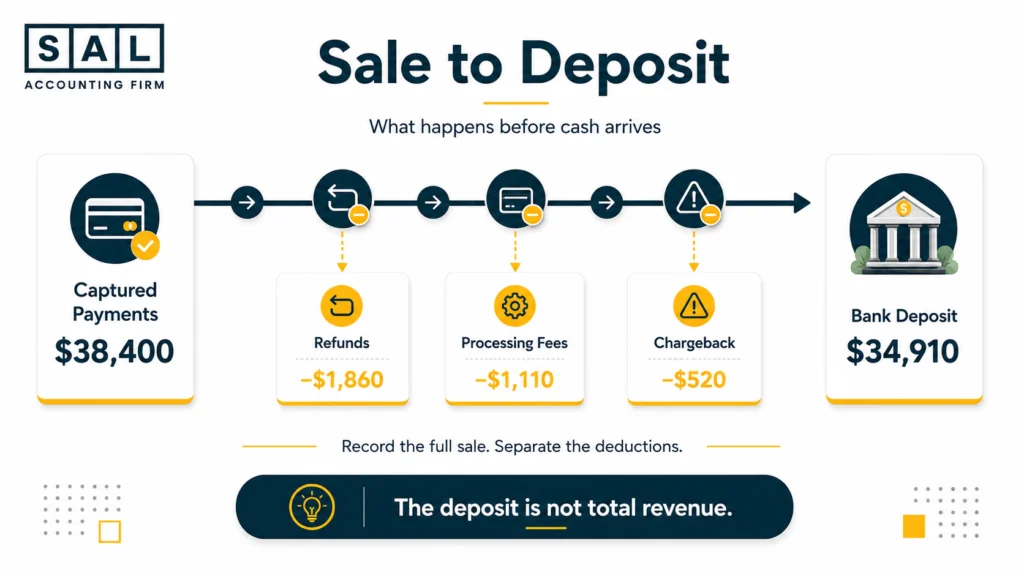
Imagine a product launch generates $38,400 in captured customer payments.
Before the related money reaches the bank, the payout activity includes:
- $1,860 in refunds.
- $1,110 in payment-processing fees.
- A $520 chargeback.
- No other adjustments.
The bank receives $34,910.
Recording $34,910 as sales would hide the original revenue, refunds, fees, and chargeback. It would also make future profit and cash flow analysis harder to trust.
A clean process for categorizing Shopify transactions records each part in the right account rather than letting everything disappear inside the net deposit.
Reconciling Shopify Payouts
Shopify’s official payout reconciliation report breaks down Shopify Payments balance activity, including transactions, fees, holds, reserves, adjustments, and payouts.
It’s designed to show how funds moved through Shopify Payments and how those amounts relate to bank deposits. Shopify also makes clear that the report isn’t an accounting revenue statement, because sales and payout activity may use different dates and totals.
A monthly reconciliation should match:
- Gross sales.
- Discounts.
- Shipping income.
- Tax collected.
- Refunds.
- Processing fees.
- Chargebacks.
- Currency adjustments.
- Payouts.
- Bank deposits.
- Ending processor balance.
The broader ecommerce reconciliation process should also cover PayPal, Stripe, Klarna, and any other payment method that deposits separately.
Pro Tip: Reconcile each payment processor independently. Combining Shopify Payments, PayPal, and other gateways into one clearing account makes missing deposits much harder to trace.
Also read: “Shopify Payment Reconciliation Guide: How to Match Transactions, Payouts and Fees”
Shopify Payout Data for Financial Reporting
Payout data is essential for tracing cash, but it isn’t a complete financial reporting system.
Use:
- Shopify sales reports for order activity.
- Payment reports for captured transactions.
- Payout reports for processor movement.
- Bank statements for cash received.
- Inventory records for stock and COGS.
- Accounting records for liabilities, expenses, debt, and tax.
- A cash flow statement for the overall movement of money.
Several hidden Shopify costs may not be obvious from the sales dashboard, including apps, currency conversion, shipping subsidies, 3PL charges, and payment fees.
4. Shopify Refunds Are Weakening Cash Flow
Refunds often create cash pressure because the sale and refund affect different periods.
A customer buys in June. You use the June cash for advertising or inventory. The customer returns the product in July, so cash has to leave the business after the original sale has already been counted and possibly spent.
For Canada-based Shopify Payments accounts, Shopify states that the amount needed to cover a refund can be debited from the connected bank account outside the regular payout schedule. In other regions, a negative balance may instead be offset against subsequent payouts.
The problem becomes larger when:
- Return volume rises after a major promotion.
- Refunds are concentrated around one SKU.
- Returned products can’t be resold.
- Return shipping and 3PL inspection fees apply.
- The customer is refunded before stock reaches the warehouse.
- No cash reserve exists for expected returns.
A clear Shopify refund policy may reduce customer confusion, but the finance side still needs a reserve based on actual return patterns.
A Refund Can Cost More Than the Refund Amount
The full cash effect may include:
- The customer refund.
- Original payment fees.
- Outbound shipping.
- Return shipping.
- Warehouse receiving.
- Inspection or repackaging.
- Damaged inventory.
- Discounting needed to resell the item.
- Customer support time.
Track refunds by product, reason, campaign, acquisition channel, and original sale month. That shows whether returns are random or tied to sizing, product quality, descriptions, fulfilment, or a specific promotion.
Shopify Chargebacks Add Another Cash Shock
When a chargeback is opened, the disputed amount and a chargeback fee may be taken immediately. The seller can submit evidence, but the issuing bank or credit card company decides the outcome. The collection method can depend on the store’s location and whether enough money is available in the Shopify Payments balance.
What to Do Next
- Hold a refund and chargeback reserve.
- Track returns by original sale period.
- Review refund rates by SKU.
- Separate resellable returns from damaged stock.
- Include return shipping and 3PL fees.
- Forecast likely refund debits and payout reductions.
- Avoid spending an entire promotional sales spike immediately.
Pro Tip: Build the reserve from your store’s recent refund behaviour. A generic percentage may be far too high for one product category and far too low for another.
5. Shopify Tax Obligations Are Creating Cash Shortfalls
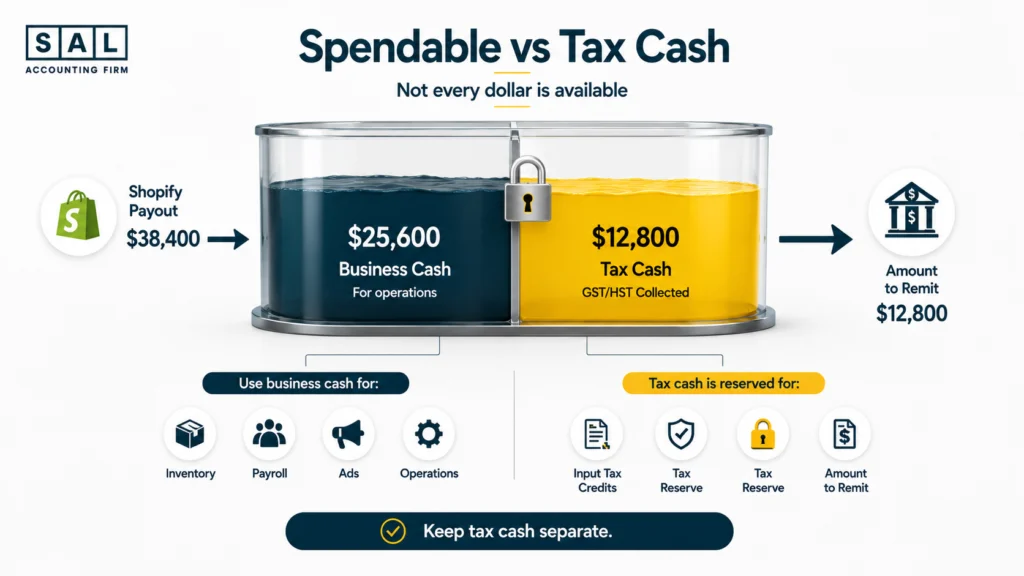
GST/HST creates a cash flow problem when tax collected from customers is treated as money available for normal operations.
The tax may sit in the same bank account as sales cash. That doesn’t make it revenue.
A common pattern looks like this:
- Shopify deposits include collected tax.
- The bank balance appears stronger.
- The store uses the cash for inventory or advertising.
- The filing deadline arrives.
- The tax liability remains, but the cash is gone.
The obligation didn’t appear suddenly. The business spent the reserve before paying it.
Keep Sales Tax Separate From Revenue
Your accounting records should separate:
- Product revenue.
- Shipping income.
- Discounts.
- Refunds.
- GST/HST collected.
- Provincial sales taxes.
- Input tax credits.
- Tax payments.
- Tax still payable.
Shopify tax reports provide platform data, but Shopify sales tax reporting still needs to be reconciled with refunds, tax adjustments, other sales channels, and the general ledger before filing.
For Canadian orders, the GST/HST rate can depend on where the supply is considered to take place. For physical goods that a seller ships or delivers, the delivery destination is generally central to determining the province of supply and the applicable rate.
Build Tax Into the Cash Forecast
The forecast should include:
- Expected GST/HST collected.
- Available input tax credits.
- Prior-period adjustments.
- Filing frequency.
- Filing deadline.
- Payment deadline.
- Provincial tax obligations.
- U.S. sales tax obligations, where applicable.
The CRA states that monthly and quarterly GST/HST returns are generally due one month after the reporting period ends. Most annual filers generally have three months after fiscal year-end, although some sole proprietors and listed financial institutions follow different deadlines.
The wider GST/HST compliance process for ecommerce stores should also account for sales across provinces, input tax credits, refunds, and platform activity.
Pro Tip: Move your estimated tax reserve weekly or after each major payout. Waiting until quarter-end makes it easier to mistake the tax cash for working capital.
Read more: “Shopify GST and HST Explained for Canadian Sellers”
Case Study: How a Port Credit Shopify Seller Prevents a GST/HST Cash Shortfall2
A home-accessories seller in Port Credit, Mississauga, has a strong holiday quarter. Shopify deposits are much higher than usual, so the owner places a larger spring inventory order and increases advertising. A few weeks later, the GST/HST return is being prepared, and there is no longer enough unrestricted cash to comfortably cover the expected payment.
The Problem
GST/HST collected from customers is mixed with normal operating cash. The owner knows tax will eventually be due, but the balance hasn’t been reconciled or included in the weekly cash forecast.
What We Do
We separate sales, shipping income, tax collected, refunds, fees, and deposits. We then reconcile the tax payable balance, review available input tax credits, add the expected payment to the forecast, and establish a regular tax reserve process.
The Result
The owner can monitor the estimated obligation throughout the reporting period instead of discovering it near the deadline. Inventory and advertising decisions are now based on cash available after tax, not the full bank balance.
6. Shopify Supplier Payments Are Accelerating
Supplier payments drain cash when vendors need to be paid before the related products generate customer payouts.
This often happens when a growing store moves from:
- Small orders to large production runs.
- Domestic purchasing to overseas manufacturing.
- Payment after delivery to deposits before production.
- Short lead times to multi-month lead times.
- One vendor to factories, freight providers, brokers, and 3PLs.
The products may eventually be profitable. The store still needs enough working capital to finance the gap.
Follow the Full Supplier Timeline
Map every cash event connected to the inventory order:
- Purchase-order deposit.
- Production payment.
- Remaining supplier balance.
- Freight and insurance.
- Customs duty and brokerage.
- Import tax.
- Warehouse receiving.
- Storage.
- Product sale.
- Shopify payout.
Supplier cash may leave months before the related cost appears as COGS.
That’s why a strong profit and loss statement doesn’t automatically mean a supplier bill is affordable today.
The full landed cost of ecommerce inventory includes more than the factory invoice. Freight, duty, brokerage, insurance, and receiving costs can materially change how much cash each unit requires.
What to Do About Supplier Pressure
- Add every deposit and balance date to a rolling forecast.
- Separate committed purchase orders from possible orders.
- Review reorder quantities by SKU.
- Compare payment terms with expected sell-through.
- Negotiate staged payments where practical.
- Include freight, duty, brokerage, and receiving.
- Avoid funding inventory with GST/HST reserves.
- Delay weak-SKU reorders before cutting core products.
Pro Tip: Forecast supplier cash by due date, not expected delivery date. A product arriving in November may require deposits in July and September.
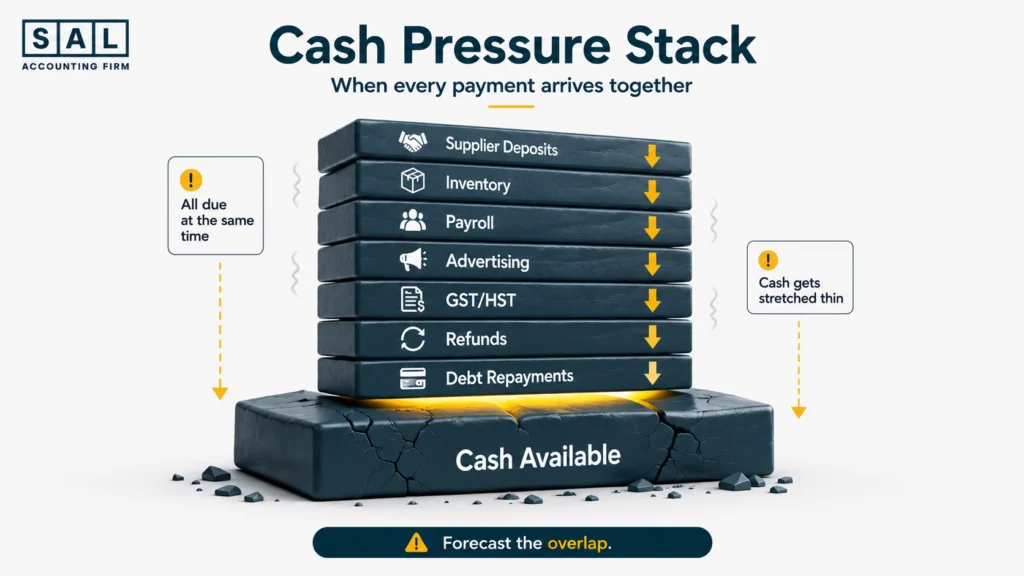
7. Shopify Debt Repayments Are Constraining Cash
Financing may solve an inventory or advertising gap today while creating a new monthly cash obligation tomorrow.
The pressure increases when repayments overlap with:
- Supplier deposits.
- Payroll.
- GST/HST deadlines.
- Seasonal advertising.
- Large refund periods.
- Inventory replenishment.
- A slower sales month.
The issue isn’t automatically the loan. The issue is taking on a repayment schedule without modelling the other cash commitments around it.
The repayment structure, expected cost, and alternatives deserve review before accepting Shopify Capital or another funding option.
Warning Signs in Shopify Financing
Watch for:
- Strong sales but little unrestricted cash.
- New borrowing used to cover earlier repayments.
- Tax payments delayed to protect the bank balance.
- Supplier balances repeatedly pushed back.
- Repayments missing from the cash forecast.
- Financing used for products with weak margins.
- High-sales periods creating both larger repayments and larger inventory needs.
Stress-Test the Repayment
Run three scenarios:
- Expected sales: Revenue and margins follow the current plan.
- Lower sales: Revenue declines while fixed commitments remain.
- Higher sales: Revenue rises, but inventory, fees, tax, refunds, and repayments also increase.
That third scenario gets overlooked. More sales can create a larger working-capital need before they create more available cash.
A Realistic Shopify Cash Flow Example, Walked Through
Imagine a Shopify store begins the month with $92,000 in the bank. During the month:
- Shopify and other processors deposit $186,000.
- Inventory and supplier payments use $112,000.
- Advertising, payroll, shipping, and overhead use $54,000.
- A prior GST/HST balance uses $19,000.
- Loan principal repayments use $13,000.
The ending bank balance is $80,000.
Cash has fallen by $12,000 even though the store had a strong sales month.
The money isn’t necessarily missing:
- Part moved into unsold inventory.
- Part paid tax from an earlier reporting period.
- Debt principal used cash without appearing as an ordinary operating expense.
- Some current sales may still be waiting inside payment processors.
- Profit and cash were affected in different periods.
A rolling 13-week cash flow forecast makes those timing gaps visible before the bank balance becomes the warning.
Which Shopify Cash Flow Problem Is Hitting You?
Use your last three months of reports to complete this check.
| What is happening? | Check first | Likely pressure point | Immediate action |
|---|---|---|---|
| Sales rise while cash falls | Cash flow statement | Growth is consuming cash | Build a profit-to-cash bridge |
| Inventory grows faster than COGS | SKU and inventory reports | Overbuying or slow stock | Review reorder quantities |
| Deposits don’t match Shopify | Payout and bank reports | Reconciliation gap | Match each processor separately |
| Refunds hit after strong sales | Refunds and bank activity | Earlier cash is reversing | Build a reserve |
| Tax deadlines create stress | Tax payable ledger | Tax cash was spent | Separate tax funds |
| Supplier bills arrive too early | PO payment calendar | Terms don’t fit sell-through | Renegotiate timing |
| Debt leaves little usable cash | Loan and forecast data | Repayments are too restrictive | Stress-test financing |
Several “yes” answers usually point to a connected reporting problem rather than one isolated transaction.
Inventory pressure may lead to debt. Repayments then make it harder to hold tax cash. A promotion can create more sales, a larger reorder, and a wave of refunds at the same time.
That’s why fixing only the bank balance rarely fixes the underlying issue.
A consistent ecommerce bookkeeping checklist keeps payouts, fees, refunds, inventory, COGS, and tax from building into one large cleanup.
Several warning signs appearing together usually call for a full sales-to-cash review. Review ecommerce bookkeeping services in Toronto.