Our goal is to make your decision easy. We compare Shopify and WooCommerce head-to-head so you can pick the best one for your store. But here’s the surprising part: global e-commerce sales will hit around $6.88 trillion in 2026. That means over 21% of all retail sales happen online. Pick the wrong platform, and you can quietly lose thousands of dollars on extra fees, slow growth, or constant fixes.
In this Shopify vs WooCommerce comparison, we at SAL Accounting break down the real differences in pricing, features, ease of use, customization, and scaling. You’ll see exactly which platform helps your business win in 2026, and which one to avoid.
Quick Takeaways
- Shopify vs WooCommerce: Shopify wins for beginners with easy setup and built-in tools; WooCommerce offers more control and lower costs if you handle WordPress.
- Pricing 2026: Shopify is often cheaper for medium/large stores with predictable fees; WooCommerce usually costs less only for very small stores under $10k/year.
- Features: Shopify has stronger ready-to-use tools (payments, POS, AI); WooCommerce shines with unlimited plugins for customization.
- Ease of use: Most beginners pick Shopify for fast launch, 24/7 support, and no tech headaches; WooCommerce fits if you already know WordPress.
- Migration 2026: Switching is easy with tools like Cart2Cart—test small batches and add 301 redirects to keep your SEO safe.
Shopify & WooCommerce Comparison: What Are the Main Differences?
Shopify and WooCommerce power millions of online stores in 2026. Together, they run a huge chunk of the global e-commerce world, with millions of businesses relying on them every day to sell products online. No matter which one you pick, professional e-commerce accounting services make tracking sales, taxes, and profits much easier.
Shopify
Shopify is a complete hosted platform. You pay a monthly fee and they take care of hosting, security, updates, and most of the technical side for you. It’s like renting a ready-to-go shop that just works from the start. Here are the benefits:
- Powers ~2.8 million live stores worldwide (StoreLeads, March 2026)
- Holds roughly 26–28% market share overall, ~29–30% in the US
- Best for higher-value stores and brands that want to grow quickly
- Comes with built-in tools like payments, shipping, and AI features out of the box
You can also check the best Shopify integrations for e-commerce to get better results.
WooCommerce
WooCommerce is a free plugin for WordPress. You install it on your own website and get full control, but you manage hosting, security, and updates yourself. It’s like owning and building your shop exactly the way you want. Below are the features:
- Powers ~4.2 million live stores globally (StoreLeads, March 2026)
- Holds 20–33% market share (often leads in total store count)
- Ideal for businesses that need deep customization
- Offers unlimited flexibility through thousands of free and paid plugins
The Main Difference: Shopify gives you speed and simplicity with almost no maintenance. WooCommerce gives you total freedom. As long as you’re comfortable handling the extra setup.
Pro Tip: Try Shopify’s free trial first — it lets you build a real store for $1/month for 3 months so you know if it feels right.
Shopify vs WooCommerce Pricing 2026: Which Is Cheaper for Your Store?
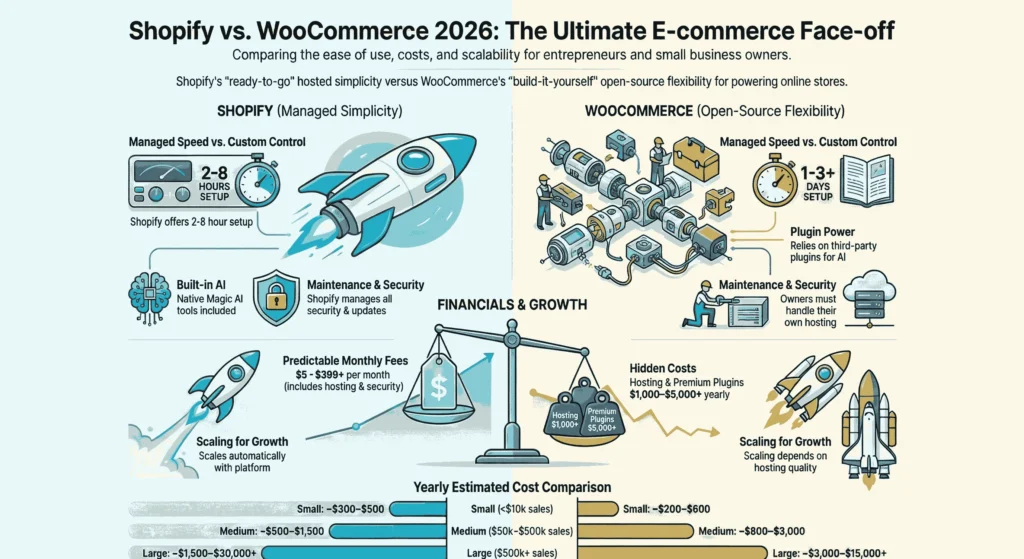
Pricing is one of the first things people check when they compare Shopify and WooCommerce. Shopify gives you clear monthly plans with most things included. WooCommerce looks free at the start, but costs build up with hosting, plugins, and other extras.
Shopify Pricing (2026 plans)
Shopify charges a simple monthly fee. There are various Shopify plans for beginners, too. They bundle hosting, security, and many tools in the price. The pricing for Shopify is like this:
- Starter plan: $5/month – works great for selling on social media or tiny stores (limited checkout options)
- Basic plan: $39/month (or about $29/month if you pay yearly) – most new stores pick this one
- Shopify plan: $105/month – you get better reports and lower sales fees.
- Advanced plan: $399/month – great for advanced shipping rules and detailed reports
- Shopify Plus: starts around $2,300/month – built for big brands only
If you skip Shopify Payments and use another payment gateway, you pay extra transaction fees (0.5% to 2% per sale, depending on your plan). Most people use Shopify Payments, so they avoid those extra fees.
WooCommerce Pricing (2026 reality)
WooCommerce itself costs nothing. You pay for the rest yourself. Woocommerce pricing is as follows:
- Hosting: $5–$50/month for basic sites → $100–$500+ per month for bigger stores that need good speed
- Domain name: around $10–$20 per year
- Themes: free options exist, but nice premium themes run $50–$300 (one-time cost)
- Plugins: lots are free, but important ones (like bookings, subscriptions, advanced SEO, or payments) cost $50–$300 per year each
- Security and backups: usually $5–$50/month extra
- Developer help: custom work often costs $50–$150 per hour
A small WooCommerce store might total $200–$600 per year. A medium or growing store can easily reach $1,000–$5,000+ per year once you add everything.
Pro Tip: Add up your real 3-year costs before choosing — many people forget plugin fees on WooCommerce or extra transaction fees on Shopify.
Here is a quick cost comparison table:
| Store size / yearly sales | Shopify (yearly cost) | WooCommerce (yearly cost) | Better choice for cost |
| Very small (< $10k/year) | ~$300–$500 | ~$200–$600 | WooCommerce |
| Medium ($50k–$500k/year) | ~$500–$1,500 | ~$800–$3,000 | Shopify |
| Large ($500k+/year) | ~$1,500–$30,000+ | $3,000–$15,000+ | Shopify |
Quick Comparison: Shopify costs more at the beginning, but usually ends up cheaper and easier to predict as your store grows.
WooCommerce saves money for very small stores or if you love customizing and don’t mind managing everything yourself.
Shopify vs WooCommerce Features: Which Platform Has Better Tools?
Features decide how easy or powerful your daily store work feels. Shopify builds most tools right in so you start quickly. WooCommerce starts simple. You add what you need with plugins. This gives you more freedom but needs more time. Here are the main differences. I explain each one clearly:
Payments & Checkout
Shopify: Shopify includes Shopify Payments. Setup is easy. You avoid extra fees on most plans. It works with over 100 other payment gateways. Checkout is fast, safe, and you can change it a little with code.
WooCommerce: WooCommerce has no built-in payment system. You add Stripe, PayPal, or others with plugins. Checkout can be changed a lot. You use code or extensions to make it perfect for your needs.
Shipping & Fulfillment
Shopify: Shopify shows real-time rates from carriers like USPS, UPS, and FedEx. You create labels automatically. Dropshipping apps on Shopify work right away. Higher plans give better shipping rules.
WooCommerce: Core WooCommerce has basic zones and flat rates. You add plugins for advanced rules, multiple carriers, or local pickup. This works well for custom shipping.
Marketing & SEO Tools
Shopify: Shopify includes email campaigns, abandoned cart emails, discount codes, and gift cards. It has basic SEO tools. Shopify Magic AI writes descriptions and edits images (it improved a lot in 2026).
WooCommerce: Core WooCommerce gives basic marketing. You add email (like Mailchimp), upsells, abandoned cart recovery, or strong SEO (like Yoast) with plugins. You control more, but you set up more.
Inventory & Order Management
Shopify: Shopify lets you add unlimited products. You track stock in many locations. It sends low-stock alerts. You edit many items at once. It handles big catalogs easily. Shopify inventory accounting is more straightforward.
WooCommerce: WooCommerce supports unlimited products and basic stock in the core. For advanced things like variants, bundles, or multiple warehouses, you usually add plugins.
Analytics & Reporting
Shopify: Shopify gives a clear dashboard on every plan. Basic reports are free. Higher plans add detailed reports. You see sales and traffic easily.
WooCommerce: WooCommerce uses the basic WordPress dashboard. You add Google Analytics or better reports with plugins. You can customize it a lot, but it takes extra steps.
Point of Sale (POS) for In-Person Sales
Shopify: Shopify has its own POS app and hardware. It works even offline. It syncs with your online store automatically.
WooCommerce: WooCommerce has no built-in POS. You use plugins like Square. The connection is not as smooth.
- Read More: “How to Start DropShipping on Shopify in 2026”
Customization & Design
Shopify: Shopify uses themes and apps for design. You edit with Liquid code, but changes are limited. The 2026 updates focus on speed and standard looks.
WooCommerce: WooCommerce gives full code access through WordPress. You use thousands of plugins and themes. You can build almost anything.
AI & Modern Tools (2026 Updates)
Shopify: Shopify Magic AI creates text, edits images, and helps more in 2026. The Winter ’26 Edition added agentic storefronts and Sidekick AI assistant. These tools are ready to use.
WooCommerce: WooCommerce has no built-in AI. You add AI (chatbots, recommendations) with plugins or APIs. You have freedom, but Shopify leads in built-in AI for 2026.
Pro Tip: Use Shopify Magic AI right away to write product descriptions fast — it saves hours and makes listings look better.
Here’s a quick side-by-side look at the main features in 2026:
| Feature Category | Shopify | WooCommerce | Winner for most |
| Payments & Checkout | Native, easy, 100+ gateways | Plugins, very flexible | Shopify |
| Shipping & Fulfillment | Real-time rates, auto labels | Basic + plugins | Shopify |
| Marketing & SEO | Built-in + AI | Strong via plugins | Tie |
| Inventory & Orders | Unlimited, multi-location, alerts | Basic + plugins | Shopify |
| Analytics & Reporting | Clear dashboard, advanced on top | Basic + plugins | Shopify |
| POS (In-Person) | Native app/hardware, offline sync | Third-party only | Shopify |
| Customization & Design | Themes/apps, limited code | Full code, unlimited plugins | WooCommerce |
| AI & Modern Tools (2026) | Native Magic, agentic, Sidekick | Plugins/APIs only | Shopify |
Case Study: Mississauga Port Credit T-Shirt Seller Launches Store in One Weekend with Shopify1
A first-time seller in Mississauga’s Port Credit area wants to get an online custom T-shirt store live quickly. He has no tech experience at all.
Problem
He tries WooCommerce first. He installs WordPress, adds plugins for payments and shipping, and tries to set up hosting. Everything feels confusing. After more than two weeks of work, the store is still not live. He feels overwhelmed by all the troubleshooting.
What We Did
We recommend Shopify’s free trial. We walk him through the guided setup wizard step by step. We help him pick a free theme, add his first 20 products, connect Shopify Payments, and set up Canadian tax rules correctly using our simple Shopify tax setup guide.
The Result
The store goes live in just 8 hours over a single weekend. In the first month, he makes $2,500 in sales while still teaching full-time. He has zero ongoing tech maintenance tasks. Support is always available through 24/7 chat. Tax handling stays effortless from day one.
Shopify vs WooCommerce: Which Is Easier to Use and Set Up?
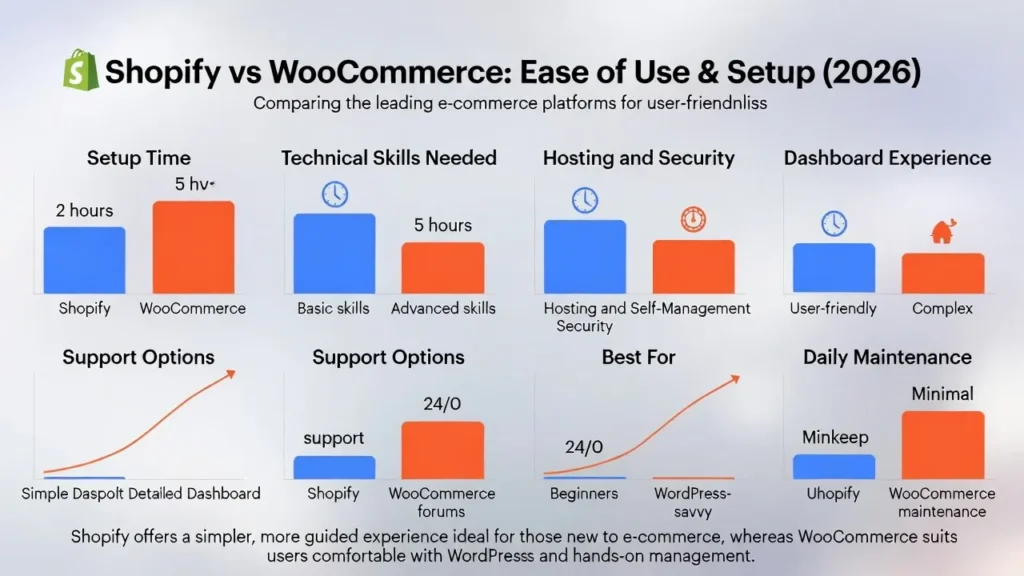
Ease of use matters a lot when you’re starting or running a store. Shopify keeps everything simple and guided. WooCommerce gives more power but needs more work from you. Here are the main differences in one short bullet each:
- Setup time for beginners: Shopify: 2–8 hours. WooCommerce: 1–3+ days.
- Tech skills needed: Shopify: Very low, almost none for the best Shopify accounting automation tools. WooCommerce: Medium to high.
- Hosting & security: Shopify: Fully managed by them. WooCommerce: You handle it or pay extra.
- Dashboard experience: Shopify: Clean and made only for stores. WooCommerce: WordPress-based, feels busier.
- Support options: Shopify: 24/7 chat help (Shopify help center). WooCommerce: Community forums and paid support.
- Best for: Shopify: Beginners and fast launches. WooCommerce: People who know WordPress or want full control.
- Daily maintenance: Shopify: Almost zero. WooCommerce: Regular updates and checks needed.
Quick comparison: Shopify is much easier for most people in 2026. You launch fast and avoid tech headaches. WooCommerce is good if you already know WordPress or need big changes later.
Which Is Better for growth, security, and support, Shopify or WooCommerce?
Your store might get bigger over time. You want a platform that grows with you, stays safe, and helps when you need it. Both can handle growth, but they do it in different ways in 2026.
Scalability
Shopify: Shopify grows automatically. It handles big traffic spikes, busy sales days, or thousands of products without slowing down. You may decide to sell internationally on Shopify. You just upgraded your plan. No need to worry about servers. Shopify Plus works for very large brands with extra power.
WooCommerce: WooCommerce grows based on your hosting. Good hosting (like WP Engine or Kinsta) handles more traffic well. You manage server power yourself. Very big catalogs (50,000+ products) need strong hosting and caching plugins.
Winner for most stores: Shopify – less work as you grow.
Security
Shopify: Shopify takes care of security for you. It follows PCI rules, gives free SSL, checks for fraud, and blocks attacks. Updates happen automatically. You stay safe as long as you use strong passwords. Check out the e-commerce automation tools that help you with this.
WooCommerce: Security depends on you and your hosting. WordPress and plugins can have weak spots if you skip updates. Good plugins (Wordfence, Sucuri) and managed hosting keep it secure – but you must stay on top of everything.
Winner for most people: Shopify – security feels easier and safer.
Pro Tip: Turn on two-factor authentication on Shopify day one — it stops most account hacks quickly and easily.
Customer Support
Shopify: Shopify gives 24/7 live chat, phone, and email on paid plans. Real people answer fast. They also have a big help center, forums, and expert partners.
WooCommerce: WooCommerce has no official 24/7 support. You use community forums, docs, or pay for help from hosting or developers. Some premium plugins give support, but it’s not instant like Shopify.
Winner: Shopify – much faster and easier help.
| Aspect | Shopify | WooCommerce | Winner for Most Stores |
| Scalability | Automatic, handles spikes easily | Depends on hosting & optimization | Shopify |
| Large catalogs | Smooth up to millions of SKUs | Possible with strong hosting | Tie |
| Security | Fully managed, PCI compliant | You manage updates & plugins | Shopify |
| Support | 24/7 chat/phone/email | Community + paid options | Shopify |
| Best for growth | Fast-growing brands, less tech work | Custom setups with tech team | Shopify |
Quick comparison: Shopify works better for most stores that want to grow without constant tech management. It scales easily, keeps things secure, and gives quick support.
WooCommerce is good if you have a developer or strong hosting and want full control over growth.
How to Switch from Shopify to WooCommerce (or Vice Versa) in 2026
Sometimes one platform starts feeling wrong after a while. Or, sellers may decide to integrate one with another, like the Shopify and Amazon integration. You might want lower costs, more control, or less tech work. Switching is doable. You can move from Shopify to WooCommerce or the other way around. It just needs careful steps, so you don’t lose products, customers, SEO rankings, or sales.
Why People Switch
Many store owners start on one platform and later decide to move to the other as their business changes. Here are the most common reasons:
- Shopify → WooCommerce: To cut monthly subscription fees, get unlimited customization with full code access, or fully own and control your site without platform restrictions.
- WooCommerce → Shopify: To make management easier, use built-in tools instead of plugins, scale automatically without hosting worries, and stop dealing with constant updates, security, or performance tweaks.
Most switches take 1–4 weeks for small or medium stores. Large or complex ones can take 1–3 months.
Pro Tip: Always test migrating 10–20 products first — this shows problems early and saves big headaches later.
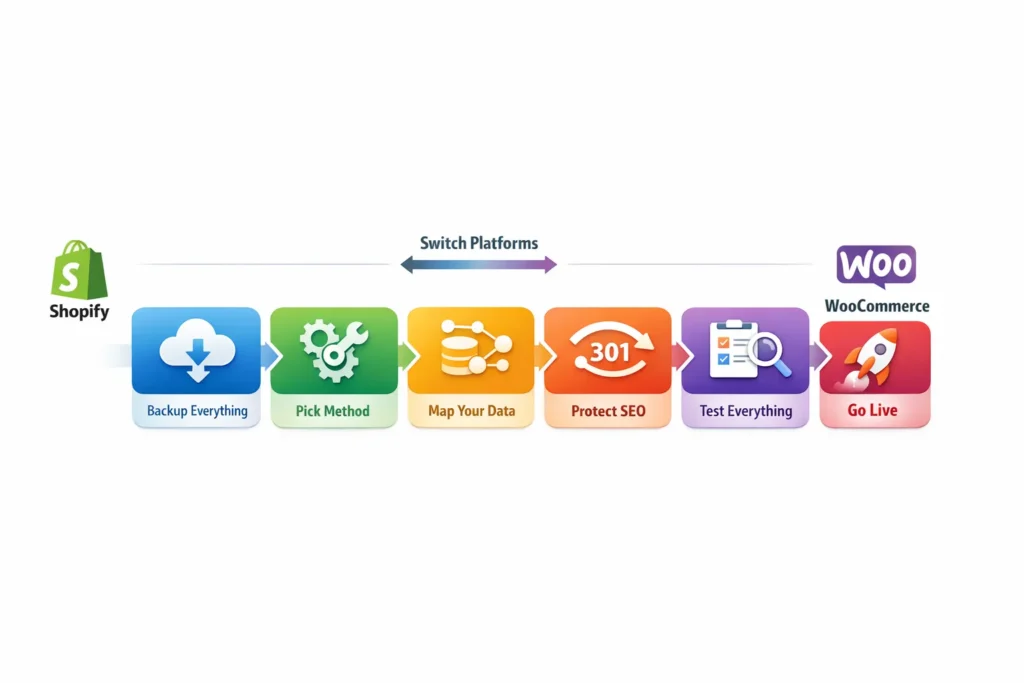
Step-by-Step Migration Guide
Here’s a simple step-by-step guide that works for both directions (Shopify to WooCommerce or WooCommerce to Shopify). Follow these steps to keep your data safe and your sales running.
1. Backup everything first
Export products, images, customers, orders, and blog posts from your current platform. Do this before anything else, so you have a full copy if something goes wrong.
2. Pick your method
Choose the way that fits your store size and comfort level:
- Automated tools (easiest): Use Cart2Cart, LitExtension, or Matrixify. They move products, customers, orders, and reviews, and set up redirects automatically. Cost: $69–$600+, depending on store size.
- Plugins/apps: Shopify to WooCommerce → “Migrate Shopify to WooCommerce” plugin or WP All Import. WooCommerce to Shopify → Matrixify app.
- Manual (cheaper but slower): Export CSV files from one platform and import them to the other. Only good for very small stores.
3. Map your data
Match fields like product names, prices, variants, images, and categories between the old and new platforms. Always test the import on a staging/test site first to catch any issues.
4. Protect your SEO
Set up 301 redirects for every old URL to its new version. Keep the same meta titles, descriptions, and URL slugs where possible so Google doesn’t lose your rankings.
5. Test everything
Check that products display correctly, checkout works, the payment process works, images load, and the mobile view looks good. Also test abandoned cart emails, apps, and any custom features.
6. Go live
Update your domain DNS to point to the new platform. Turn off the old store. Monitor for errors closely in the first 24–48 hours and fix anything that pops up right away.
Book a consultation with our Shopify accounting expert. We’ll review your store and give you a clear plan.
Case Study: Toronto Yorkville Jewelry Boutique Saves $1,200/Year on Platform Fees2
A handmade jewelry boutique in Toronto’s Yorkville neighbourhood deals with high monthly costs on Shopify Basic, plus extra app and transaction fees.
Problem
The store makes about $45k in sales each year. Yearly expenses hit around $1,000 from the subscription, different apps/plugins, and transaction fees. These costs cut into their slim margins and leave less money for new inventory or marketing.
What We Do
We guide the owner to switch to WooCommerce on reliable shared hosting. We keep only a few essential plugins. We remove the transaction fees completely. We set up Xero integration so GST/HST tracking runs automatically without any manual work.
The Result
Yearly costs drop to about $450 — that gives a $550 saving in the first year alone. The owner now spends much less time thinking about platform bills. She focuses more on creating new jewelry designs. She enjoys clean, automated tax records that make month-end closing much faster.
Final Thoughts
Shopify and WooCommerce are both solid choices in 2026. It really comes down to what fits your business right now. Shopify makes things quick and simple so you can focus on selling. WooCommerce gives you full control if you’re ready to handle the setup. Pick the one that matches your skills, budget, and goals.
Still deciding? Send us an email at tax@salaccounting.ca and tell us about your store. We’ll reply quickly with a personalized recommendation if you contact us. Looking forward to hearing from you.