Most Amazon FBA sellers quietly lose thousands every year in reimbursements they never claim, from missing inventory, damaged shipments, or hidden fee mistakes that Amazon doesn’t always flag. This post is your quick way to plug those leaks and grow smarter with the best financial reporting software for Amazon FBA.
In 2026, Amazon raised FBA fulfillment fees by an average of $0.08 per unit (effective January 15), pushing many net margins below 15%. We at SAL Accounting will show you the best tools for Amazon FBA that fit your stage, delivering clear numbers, seamless QuickBooks/Xero connections, and the insights to protect and grow your profits this year. Let’s find your perfect tool.
Quick Takeaways
- The best Amazon FBA financial reporting tools are Sellerboard (beginners), A2X and Link My Books (scaling), Nova Analytics and Finaloop (advanced)
- Amazon’s 2026 fee hike ($0.08/unit) squeezes margins below 15% — reporting tools protect profits with clear ASIN-level visibility.
- Top tools sync Seller Central data, categorize fees, flag reimbursements, and export clean tax reports for QuickBooks or Xero.
- Beginners: Sellerboard ($15–50/mo). Scaling: A2X or Link My Books. Advanced: Nova Analytics or Finaloop.
- These tools pay for themselves fast — recovered cash, saved time, fewer tax errors, and better decisions.
Why Do Amazon FBA Sellers Need Dedicated Financial Reporting Tools?
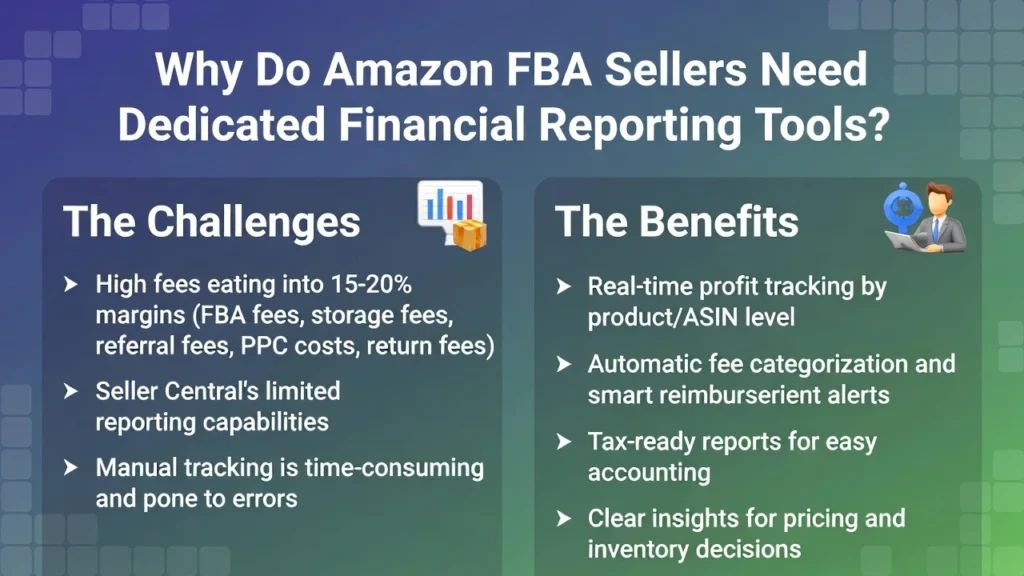
Amazon FBA sellers face high fees (fulfillment, storage, referrals, PPC, returns) that quickly cut into 15-20% margins. Seller Central gives basic sales and payout data, but dedicated tools go much further. Our e-commerce accounting expert can explain more about them. Here are the main benefits you get:
- Real-time profit tracking by product (ASIN level) so you see exactly what’s making or losing money
- Automatic categorization of every fee type. No more guessing where costs come from
- Smart alerts for reimbursements Amazon owes you (lost inventory, damaged items, wrong charges)
- Clean, tax-ready reports that make CRA/IRS filing faster and more accurate
- Clear insights to spot leaks, cut waste, and make better pricing or inventory decisions
These tools catch your money automatically, save hours of manual work, reduce errors, and give you the full picture. The Amazon FBA bookkeeping guide helps you as well.
What Key Features Should You Look for in Amazon FBA Financial Software?
When you pick a tool for Amazon FBA, focus on the features that fix your real daily problems. Here are the main ones you need:
Automatic Sync from Seller Central
The tool links straight to your Seller Central account. It pulls in sales, orders, refunds, payouts, fees, and inventory changes every day (or even in real time). You don’t have to download files or upload anything by hand. Your numbers stay fresh and accurate with the top 2026 accounting software.
Real-Time Profit Tracking by Product
You get a dashboard that shows true profit for each ASIN or variation. It subtracts all costs, fulfillment fees, storage, PPC, returns, everything. This shows you which products actually make money and which ones lose it quietly. Many tools only show total sales; the good ones break it down by item.
- Example: You notice a hot seller has negative profit because of high storage fees. You can discount it or pull it fast.
Fee & Reimbursement Breakdowns
The software sorts every fee type on its own and spots reimbursements Amazon owes you. This feature handles the complicated Amazon fee structure and hidden money you might miss. It automatically does these things:
- Breaks down every fee category clearly (referral, fulfillment, storage, long-term, disposal, etc.)
- Flags reimbursements for lost inventory
- Flags reimbursements for damaged inventory
- Flags reimbursements for wrongly charged fees or errors
- Tracks these opportunities so you don’t have to hunt for them manually.
Pro tip: Choose a tool with reimbursement alerts and an easy export button for submitting claims quickly. Use the best bookkeeping tools for e-commerce that work well in Canada.
Tax-Ready Reports & Exports
It builds clean profit & loss statements, cash flow forecasts and summaries, expense reports, and transaction exports. You can send them straight to your accountant or import them into tax software. Look for easy customization and one-click exports to CSV, PDF, or Excel.
Strong Integrations
The tool connects directly to QuickBooks Online, Xero, or A2X. Your data flows into your main accounting system without double work or copying. This keeps everything in sync and avoids headaches later. Go for native connections over third-party hacks.
Pro tip: If you already use QuickBooks, pick a tool that’s an official QuickBooks partner for the easiest setup.
Multi-Marketplace & Multi-Currency Support
If you sell in more than one country (US, Canada, UK, EU, etc.), the tool handles different currencies, local fees, and VAT/GST rules properly. It converts amounts to your home currency and tracks cross-border sales correctly. This saves you from conversion mistakes that mess up your real profits.
- Read More: “Shopify Integration and Automation with QuickBooks”
Here are the must-have features:
| Feature | What It Does | Why It Matters | Quick Check in Trial |
| Automatic Sync from Seller Central | Pulls sales, fees, refunds, payouts daily | Numbers stay current, no manual uploads | See recent payout update next day |
| Real-Time Profit Tracking by Product | Shows profit per ASIN after all costs | Finds winners and losers fast | Check one product’s true margin |
| Fee & Reimbursement Breakdowns | Sorts fees, flags Amazon reimbursements | Finds hidden money automatically | Look for claim alerts |
| Tax-Ready Reports & Exports | Makes P&L, cash flow, expense exports | Easy GST/HST or U.S. tax filing | Export sample report in one click |
| Strong Integrations | Links to QuickBooks, Xero, A2X | Data flows without double-entry | Check official partner status |
| Multi-Marketplace & Multi-Currency | Handles US/Canada/UK/EU, local fees, VAT | Correct cross-border profits | Add second marketplace and test currency |
Top Amazon FBA Financial Reporting Tools in 2026
Here are real tools that help with financial reporting, profit tracking, fee breakdowns, and reimbursements. We sorted them by stage so you can find one that fits your business:
1. Sellerboard
Sellerboard is a popular profit tracker made for Amazon FBA sellers. It shows daily profits, sales, refunds, fees, and basic reimbursements on a simple dashboard. This helps beginners understand their true margins fast and spot basic issues early.
- Pricing: Sellerboard starts around $15–50/month (basic plans from $19/mo in recent data).
- Pros: Very easy to use, clear daily profit view, good fee tracking (including storage and refunds), low price, nice free trial (often 2 months).
- Cons: Not many advanced options if you grow fast, and limited custom reports.
- Why it fits: Low cost, quick setup, simple numbers every day.
2. Fetcher
Fetcher is a straightforward Amazon FBA analytics tool for beginners. It tracks basic profits, gives simple alerts, and updates daily with sales minus fees and refunds. Fetcher focuses on essentials like overall margins. See the Amazon guide on taxes in Canada and the US for more.
- Pricing: Around $20–40/month (intro plans from $19/mo for low orders).
- Pros: Cheap, easy sync, good for small multi-channel basics, quick to see what’s working.
- Cons: Less deep Amazon features than some tools, limited reports.
- Why it fits: Little to learn, perfect for new sellers.
3. A2X
A2X is a strong accounting automation tool for Amazon sellers. It sorts fees automatically and sends clean data summaries to QuickBooks or Xero. It handles reimbursements and multi-currency well, making reconciliation easy as your sales increase.
- Pricing: Starts at $19–$29/month, goes up with more orders (basic from $29/mo).
- Pros: Saves a lot of time on bookkeeping, provides accurate data, great support, and is easy to reconcile.
- Cons: Setup takes time at first, price rises with volume, and summaries are not super detailed.
- Why it fits: Good breakdowns, strong links to accounting, and it grows with you.
4. Link My Books
Link My Books syncs Amazon data smoothly and makes tax reports, plus profit by product. It works nicely with Xero or QuickBooks and handles international sales, providing better margin analytics and alerts.
- Pricing: Around $20–$100+/month (starts low, scales with sales).
- Pros: Lower price than many, supports different currencies and taxes, and has useful margin alerts.
- Cons: Setup needs some effort, fewer custom options than bigger tools.
- Why it fits: Solid details, multi-country support, helps spot weak products.
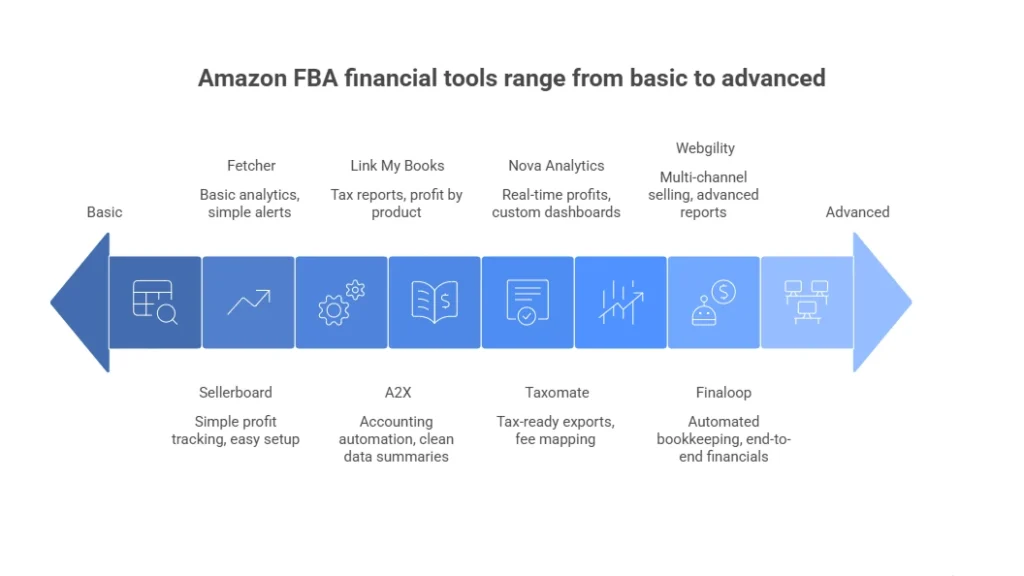
5. Taxomate
Taxomate creates tax-ready exports, maps fees, and tracks reimbursements. It’s good for sellers with cross-border sales and focuses on clean data for QuickBooks, Wave, or Xero. You can also use QuickBooks to integrate with your Shopify account.
- Pricing: Taxomate starts around $14–$80/month (starts low, affordable plans).
- Pros: Cheap, great Xero link, easy tax summaries, good reconciliation.
- Cons: Weaker QuickBooks support, fewer advanced features than others.
- Why it fits: Automates reports and claims as you grow.
6. Nova Analytics
Nova Analytics gives real-time profits per product with high accuracy. It has custom dashboards and smart insights, updating frequently (often hourly) for detailed visibility across many ASINs.
- Pricing: Often $50–$200+/month (depends on volume).
- Pros: Very fresh data, accurate profits, custom views, great for big catalogs.
- Cons: Higher cost for large sellers, too much for small ones.
- Why it fits: Deep and fast visibility for serious businesses.
7. Finaloop
Finaloop does full automated bookkeeping with an Amazon focus. It includes reports, integrations, and team access for end-to-end financials without manual work. If looking for more professional results, check the Amazon and Shopify integration guide.
- Pricing: Starts around $99+/month (often based on sales/revenue).
- Pros: Finaloop handles everything, real-time financials, replaces a bookkeeper, good for big ecommerce.
- Cons: More expensive than self-setup tools.
- Why it fits: All-in-one that saves time on a large scale.
8. Webgility (with QuickBooks/Xero)
Webgility works for multi-channel selling, advanced reports, inventory, and profits. It links deeply with QuickBooks or Xero for complex setups.
- Pricing: $50–$300+/month.
- Pros: Handles many channels, strong sync, good for complex setups.
- Cons: Can be pricey and complex if you only sell on Amazon.
- Why it fits: Scales big, custom features, solid accounting links.
- Read More: “E-commerce Withholding Tax Guide on Amazon”
Here is a quick comparison table (prices approximate—check sites):
| Tool | Best Stage | Starting Price | Standout Feature | Key Integrations |
| Sellerboard | Beginner | $15–50/mo | Daily profit dashboard | Seller Central |
| A2X | Scaling | $19/mo | Fee mapping & reimbursements | QuickBooks, Xero |
| Link My Books | Scaling | $20/mo | Tax reports & multi-currency | QuickBooks, Xero |
| Nova Analytics | Advanced | $50+/mo | Real-time ASIN profits | Various |
| Finaloop | Advanced | $99+/mo | Full automated bookkeeping | Amazon-focused |
How to Choose the Best Tool for Your Amazon FBA Stage?
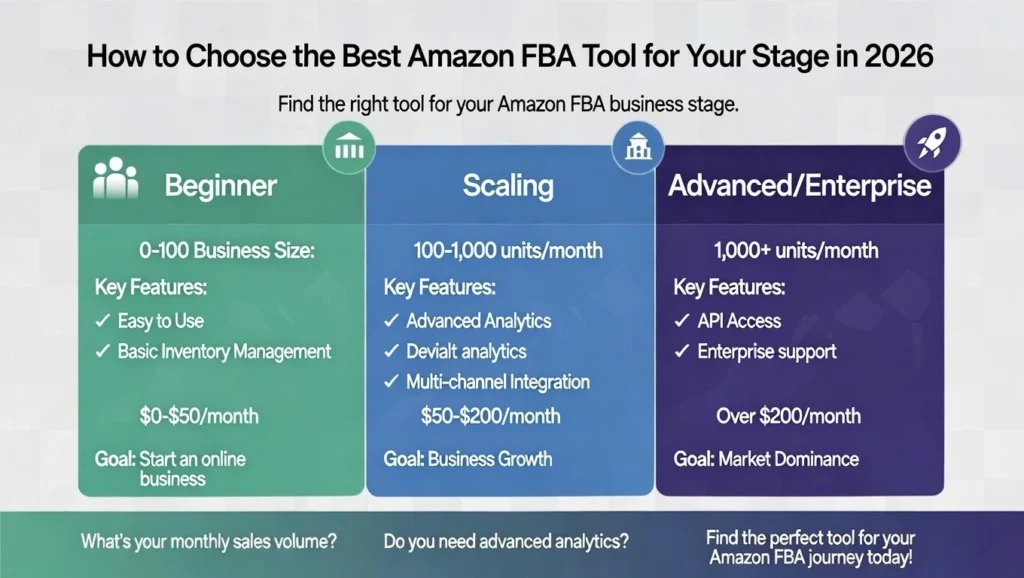
The best tool depends on where your Amazon FBA business is right now. You don’t need big, expensive features if you’re new. You also don’t want to pay for stuff you won’t use. Here’s a clear way to pick the right one:
Beginner stage
(New seller, low sales, 1–50 products): Choose simple and cheap tools. You want easy setup, basic profit views, and automatic data pull from Seller Central. Skip anything hard or costly.
Look for: $15–50 per month, quick start, daily profit numbers, basic alerts for money Amazon owes you.
Goal: See clear numbers fast without learning too much. Making e-commerce accounting easy in 2026.
Scaling stage
(Growing sales, 50–500+ products, selling in more countries): You need stronger tools. Pick ones with good analytics, support for different currencies, detailed fee tracking, and easy links to QuickBooks or Xero.
Look for: Profit by product, automatic reimbursements, tax reports, and alerts for weak products.
Goal: Find winners and losers fast and handle more sales easily.
Advanced/enterprise stage
(High sales, many stores, selling worldwide): Go for powerful tools with custom reports, smart insights, full automation, and support for other sales channels too.
Look for: Advanced dashboards, team sharing, future forecasts, and big integrations.
Goal: Run a big business smoothly and make fast, smart choices. You must minimize your tax liabilities as a small business.
Quick questions to help you decide
How many products do you sell? (Few = beginner tools, lots = scaling or advanced)
Do you sell in more than one country? (You need multi-currency support)
Do you use QuickBooks or Xero already? (Strong links are important)
What’s your monthly budget? ($20–$50 = beginner, $50–$200+ = scaling/advanced)
How much time do you want to spend setting it up? (Little time = pick simple tools)
Try free trials of 2–3 tools that match your stage. Check if the data sync works, look at a recent payout report, and see if the screen feels easy to use.
Case Study: Mississauga Seller Near Square One Scales Profitably with Link My Books1
A Mississauga Amazon FBA seller near Square One grows from 40 to 400+ products. They add U.S. sales. They use basic Seller Central reports.
Problem: Basic reports miss low-margin items and reimbursements. The seller loses $2,900 CAD on lost inventory, storage fees, and other errors. Manual tracking leads to inconsistent GST/HST categorization. This inconsistency risks CRA audit flags.
What We Do: We set up A2X integrated with QuickBooks. The tool syncs Amazon Seller Central. It flags $2,900 in missed claims. It generates accurate reports. We submit the reimbursement claims. We amend tax returns for correct deductions.
The Result: The seller recovers the full $2,900 in 60 days. Tax preparation time drops from 12 hours to 3 hours per quarter. Margins improve 2–4% long-term with automated monthly checks.
Which Amazon FBA Accounting Tools Integrate Best with QuickBooks or Xero?
Most Amazon FBA sellers use QuickBooks or Xero as their main accounting software. The right tool sends all Amazon data straight into them automatically, no manual work, no errors. Here are the best ones for integration:
- A2X: The most trusted connector; clean, accurate daily sync for both QuickBooks and Xero.
- Link My Books: Super affordable and reliable, especially strong with multi-currency and tax summaries.
- Webgility: Deepest integration for high-volume or multi-channel sellers.
- Taxomate: Best low-cost option if you use Xero (weaker on QuickBooks).
- Finaloop: Full bookkeeping service that can still feed data into QuickBooks/Xero if needed.
Pro Tip: Start with A2X if you want the safest, most popular choice. Try the free trial and connect one payout. You’ll see the difference immediately.
How Amazon FBA Reporting Tools Improve Tax Compliance
Financial reporting tools take your Amazon FBA data and make it simple and useful for taxes and better business choices. Here we explain how they help you with tax compliance:
Easier Tax Compliance
These tools make tax time simple and safe by creating ready-to-use reports and organizing your data correctly. Filing sales tax made simple for e-commerce stores. Here’s how they help:
- Generate clean profit & loss statements, expense lists, and transaction exports automatically.
- Categorize everything properly (fees, refunds, reimbursements, sales tax/VAT) so nothing gets mixed up or missed.
- Let you export files in CSV, PDF, or Excel with one click.
- Send reports straight to your accountant or import them into tax software.
- Make filing GST/HST in Canada or U.S. sales tax easier, more accurate, and less stressful with fewer errors.
Automatic Reimbursement Recovery
The software checks your account for lost, damaged, or wrong-charged inventory. It alerts you when Amazon owes you money and gives easy forms to submit claims. Sellers often get back $500 to $5,000 or more each year that they would have lost. This adds to your real profit and helps lower your taxable income the right way.
Clear Business Insights
You see true profit per product (by ASIN) after all costs. Dashboards and alerts show you:
- Which products make money and which lose it
- Rising storage or PPC costs
- Slow-moving inventory before big fees start
- Low-margin items you can fix, discount, or drop
This helps you reorder good items, cut bad ones, and set better prices to grow faster.
Time Savings and Less Stress
You no longer spend hours in spreadsheets or Seller Central. Dashboards and reports show up instantly. You get your time back to work on sourcing products, ads, or growing the business instead of fighting numbers. Our Amazon FBA accounting services for sellers help you gain more of these tools.
Case Study: Toronto Seller Near CN Tower Recovers $4,100 in FBA Reimbursements2
A Toronto Amazon FBA seller near the CN Tower tracks payouts manually in spreadsheets for two years.
Problem: The seller misses reimbursements for lost inventory and storage fee errors. The total reaches $4,100 CAD. Manual tracking causes inconsistent GST/HST categorization. This inconsistency risks CRA audit flags.
What We Do: We set up A2X integrated with QuickBooks. The tool syncs Amazon Seller Central. It flags $4,100 in missed claims. It generates clean reports. We submit the reimbursement claims. We amend tax returns for proper deductions.
The Result: The seller recovers the full $4,100 in 90 days. Tax preparation time drops from 15 hours to 2 hours per quarter. Margins improve 2–3% long-term with monthly automated checks.
Final Thoughts
The best financial reporting software for Amazon FBA gives you real clarity: true profits per product, automatic reimbursement recovery, easy tax reports, and time saved every week. Pick a tool that fits your stage. Simple for beginners, strong for growing, powerful for big sellers.
If you want help choosing the right one, setting it up, or managing your full Amazon FBA accounting and taxes, contact us at SAL Accounting. We specialize in Amazon sellers and make everything simple, accurate, and profitable for you. Reach out today for a quick chat.
FAQs: Amazon FBA Financial Reporting Software
It depends on your business. Beginners like Sellerboard (easy and cheap). Growing sellers pick A2X or Link My Books (good connections). Big sellers choose Nova Analytics or Finaloop (fast and advanced). Try free trials to see what works for you.
A2X takes your Amazon payouts every day. It sorts fees, refunds, and reimbursements. It sends clean reports to QuickBooks or Xero so your books are easy to read and correct.
Yes. A2X, Link My Books, Webgility, and Finaloop connect directly to QuickBooks. They send sales, fees, refunds, and reimbursements automatically.
Look for automatic sync with Seller Central, profit per product, fee breakdowns, alerts for money Amazon owes, tax reports, QuickBooks/Xero connection, and support for different currencies if you sell in other countries.
Yes. It finds money Amazon owes you (often $500–$5,000 a year). It saves hours of work and shows which products make money. The cost pays back fast.
Pick a tool like A2X, Link My Books, or Sellerboard. Connect your Seller Central account during setup. Sales, fees, and payouts come in automatically every day.
Yes. A2X, Link My Books, Nova Analytics, and Webgility work with the US, Canada, UK, EU, etc. They handle different currencies, local fees, and taxes correctly.
No good free tools exist. Free options miss the money Amazon owes and real profits. Paid tools start at $15/month and save you more than they cost.