
Our aim with e-commerce payment reconciliation is to match your online sales, refunds, and fees from Shopify, Amazon, Etsy, or eBay with the real money in your bank account so your books stay accurate. But most importantly, bad reconciliation quietly steals your profits through small mistakes and forgotten fees. Recent reports show it can leak 2-3% of your total sales. That means thousands of dollars lost every month for growing stores.
In this guide, SAL Accounting will walk you through the full payment reconciliation process, show you the common pitfalls, and share proven strategies to stop these costly gaps for good.
Quick Takeaways
- E-commerce payment reconciliation is the process of matching your online sales, refunds, and fees with the actual money in your bank account.
- Bad reconciliation can quietly cost you 2-3% of your total sales through hidden fees and mismatches.
- Reconcile weekly, always use order ID as your main matching key, and track every fee carefully.
- Automation tools can reduce your reconciliation time from 15+ hours to just 1-2 hours per month.
- Consistent payment reconciliation gives you clear cash flow, prevents costly errors, and helps your business grow with confidence.
What Is Payment Reconciliation in E-commerce?
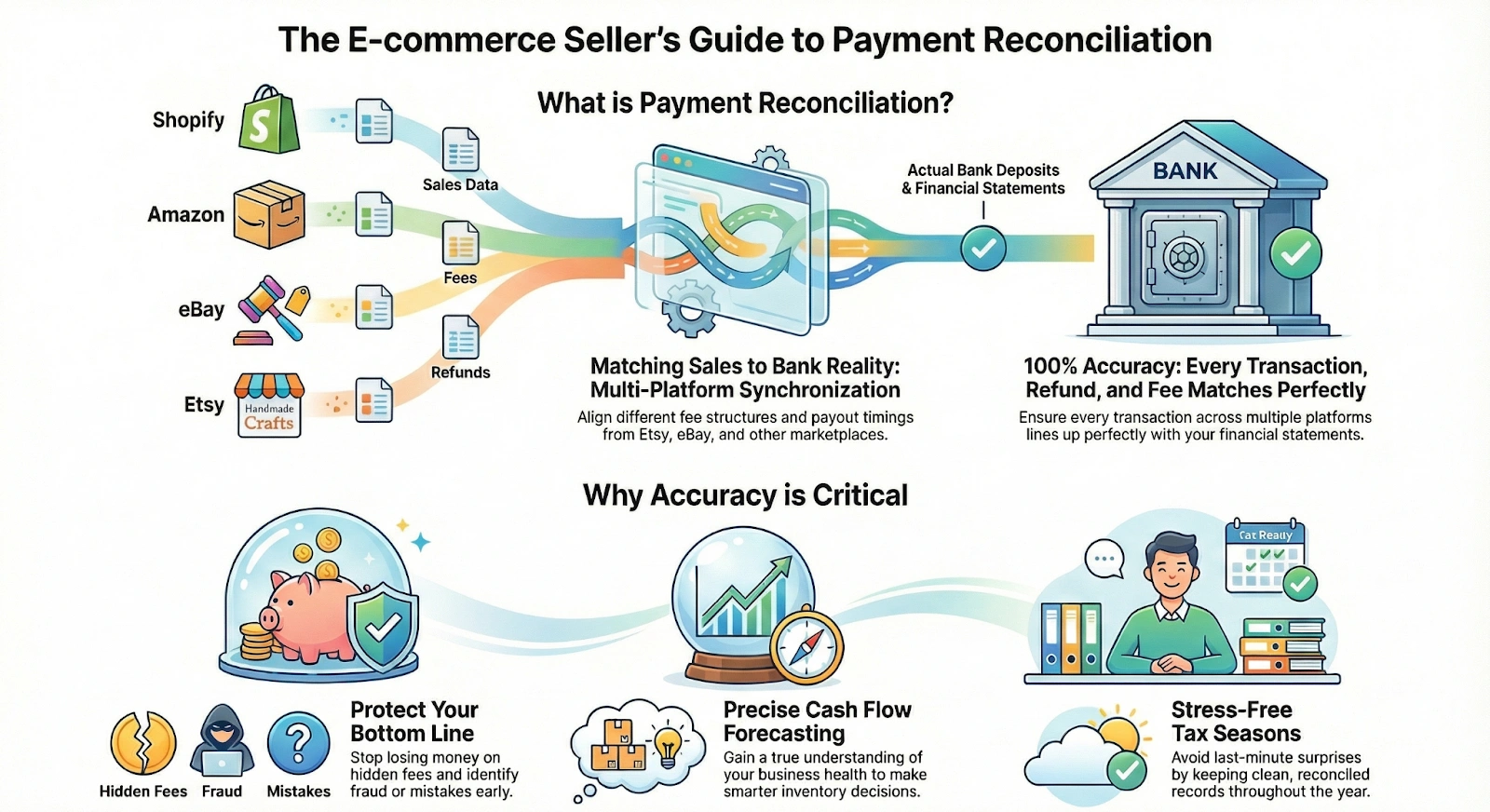
Payment reconciliation in e-commerce is the process of matching your online sales, refunds, and fees from Shopify, Amazon, Etsy, or eBay with the actual money that lands in your bank account and payment gateway reports (Shopify’s guide). You pull data from your stores and compare it with your bank statements and gateway reports. The goal is simple. You make sure every transaction lines up perfectly.
Let us handle your eCommerce accounting and bookkeeping so you can focus on growing your business.
Why Is Accurate Reconciliation Critical for Online Businesses?
Accurate reconciliation matters a lot for your online business. It does more than just match numbers. It helps you understand and manage your business better. Here is why it is important:
- You see and forecast your true cash flow
- You catch mistakes and fraud early
- You avoid surprises during tax season
- You make smarter decisions about inventory and marketing
- You stop losing money on hidden fees and chargebacks
Pro Tip: If you sell on more than one platform, reconcile on a regular basis. Each marketplace handles fees, payouts, and timing in its own way. Regular reconciliation keeps your records clean and accurate.
How to Do Payment Reconciliation for Your Online Store: Step-by-Step Process
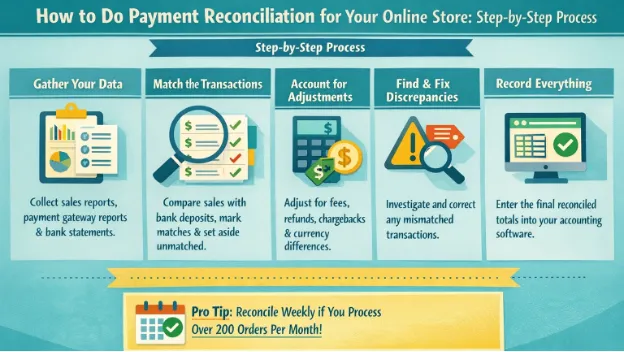
The payment reconciliation process is simple. Follow these steps to match your sales with your bank deposits correctly:
Gather Your Data
Before you start, collect all your documents in one place. This saves time and avoids confusion. The documents include:
- Sales reports from Shopify, Amazon, Etsy, or eBay to track e-commerce taxes and accounting.
- Payment gateway reports from Stripe, PayPal, or other processors
- Latest bank statements
Having everything together makes the job much easier.
Match the Transactions
This is the most important part. Compare every sale from your store with the money that actually came into your bank. For this:
- Use order ID, date, and amount to match them
- Mark the ones that match perfectly
- Set aside any that do not match for later
Account for Adjustments
Not every sale matches the exact amount in your bank. You need to adjust for these common items:
- Payment processing fees (Amazon pay fees)
- Customer refunds and returns (check the refund policies on platforms like Shopify)
- Chargebacks and disputes
- Currency conversion fees
Subtract these carefully so your records stay correct.
Find and Fix Discrepancies
Check any transactions that still do not match in addition to expenses for your e-commerce store. Take time to find out why there is a difference. It could be a delayed payout from Amazon, a refund that has not been deducted yet, a chargeback, or a simple typing error. Once you find the reason, fix it right away in your spreadsheet or accounting system.
Record Everything
Enter the final matched and adjusted amounts into your e-commerce accounting software like Xero or QuickBooks. Make proper journal entries for sales, fees, refunds, and corrections. This step keeps your books accurate for tax time and for checking how your business is doing.
Pro Tip: If you process more than 200 orders per month, reconcile every week instead of waiting until the end of the month. It saves you a lot of time and stress.
What Are Common Issues in Reconciling Online Payments?
Reconciling online payments sounds simple, but many e-commerce owners face these common problems:
Multiple Sales Channels
You sell on Shopify, Amazon, Etsy, and eBay at the same time. Each platform pays on different days and takes different fees. Integrations like Shopify and Amazon may create confusion. This makes it hard to match everything together.
Fix: Create one master spreadsheet or use a multi-channel tool that pulls data from all platforms into one place.
Timing Differences
Marketplaces often delay payouts. You make a sale today, but the money may take days or weeks to reach your bank account. E-commerce cross-border shipping is also an issue for some sellers. These gaps create confusing mismatches.
Fix: Reconcile on a weekly basis instead of monthly. This helps you track delayed payouts more easily.
Refunds, Chargebacks, and Returns
Customers return items or dispute charges. The refund shows in your gateway report, but the money leaves your bank at a different time. You need extra effort to track them correctly.
Fix: Always match refunds and chargebacks using the original order ID and mark them clearly in your records.
Hidden Fees and Adjustments
Platforms and processors deduct fees for processing, shipping, advertising, and currency conversion. These small deductions in addition to e-commerce tax deductions make your deposit amount different from your total sales.
Fix: Build a simple fee checklist for each platform and subtract these fees every time you reconcile.
High Volume of Transactions
When your store grows and you get hundreds of orders per month, manual checking becomes overwhelming. You easily miss small differences or spend many hours on reconciliation.
Fix: Use e-commerce automation tools or accounting software that can handle high volumes and match transactions automatically.
Pro Tip: Set aside a fixed time each week for reconciliation. Doing it regularly stops these challenges from becoming a big mess.
Here’s a clear summary of the most common challenges and how to fix them:
| Challenge | What Happens | Why It’s a Problem | Simple Fix |
| Multiple Sales Channels | You sell on Shopify, Amazon, Etsy, and eBay at the same time | Different payout days and fees | Use one master spreadsheet or a multi-channel tool |
| Timing Differences | Marketplaces delay payouts | Creates confusing mismatches | Reconcile weekly instead of monthly |
| Refunds, Chargebacks & Returns | Refund timing doesn’t match bank deduction | Requires extra tracking | Always match using the original order ID |
| Hidden Fees and Adjustments | Many small fees are deducted | Reduces your real profit | Create a fee checklist for each platform |
| High Volume of Transactions | Too many orders for manual work | Easy to miss differences | Use automation tools or accounting software |
Case Study: Toronto Store Owner Recovers Thousands Through Better Reconciliation1
Sarah Chen runs a growing jewelry business from her studio in Kensington Market, Toronto. She sells on both Shopify and Amazon and handles around 750 orders per month.
Problem:
She loses money because of delayed Amazon payouts, mismatched fees, and untracked chargebacks. Over six months, these small reconciliation mistakes cost her nearly $4,800.
What She Does:
Sarah reconciles every week instead of once a month. She uses order ID as her main matching key and creates a simple fee checklist for both platforms.
The Result:
Within three months, she cuts her reconciliation time from 16 hours to just 3 hours per month. She recovers over $3,100 in previously missed discrepancies. Now she has clear visibility of her cash flow.
Best Practices for E-commerce Payment Reconciliation Success
You can make reconciling much easier and more accurate if you follow these best practices:
Reconcile Regularly
Don’t wait until the end of the month to do everything at once. Reconcile every week if you have many orders. When you do it often, problems stay small and easy to fix. You catch mistakes early and avoid the stressful month-end close for platforms like Shopify.
Keep Good Records
Save all your reports in one folder with clear names and dates. Good organization saves you hours and reduces mistakes.
Pro Tip: Use consistent naming like “Shopify_Sales_March_2026.csv”. When all your files follow the same pattern, you can find any old report in just a few seconds.
Use One Main Matching Key
Matching transactions correctly is one of the most important parts. The best way is to always use the order ID as your main matching key. It connects your store sale directly to the bank deposit without guesswork. Use the order ID every time. Follow these steps:
- Find the order ID in your store sales report
- Find the same ID in your bank or gateway report
- Mark it as matched when both sides line up
Pro Tip: Make order ID your number one matching key. Never match only by amount. This simple rule prevents almost all matching mistakes and saves you time. Check the best bank accounts for your online store.
Track Your Fees Carefully
Fees can quietly eat into your profits, so you need to track every single one during reconciliation. Many sellers miss deductions because they look small or come from different places. You must account for all of them to see your real profit. Account for all deductions. Common deductions include:
- Payment processing fees
- Customer refunds and returns
- Chargebacks and disputes (Chargebacks on Shopify)
- Currency conversion fees
Review Patterns Every Month
After you finish reconciling, take a few minutes to step back and look at the bigger picture. Many problems repeat month after month. When you spot these patterns, you can fix the root cause instead of fixing the same issue again and again. Review the month and look for patterns. Common patterns include:
- Delayed payouts from certain platforms
- Repeated chargeback reasons
- Frequent timing mismatches between sales and deposits
Pro Tip: Spend just 10 minutes at the end of each month writing down your top 3 problems. Over a few months, you will see clear patterns and make permanent changes that save you time and reduce stress.
Separate Duties When Possible
If you have a small team, let one person handle the reconciliation and let another person review the work. This reduces errors and adds an extra check.
Pro Tip: Even if you work alone, save your reconciliation file and review it the next day with fresh eyes.
Here is a helpful overview of the best practices you can follow to improve your reconciliation process:
| Best Practice | How to Do It | Frequency | Main Benefit | Result You Can Expect |
| Reconcile Regularly | Set a fixed day each week | Weekly | Problems stay small | Less stress at month end |
| Use One Main Matching Key | Always use Order ID | Every time | Fewer matching errors | Faster reconciliation |
| Keep Good Records | Clear file names in one folder | Ongoing | Saves searching time | Easy to find old reports |
| Track Fees Carefully | Use a fee checklist | Every session | Prevents profit loss | Accurate profit numbers |
| Review Patterns | Write top 3 problems monthly | Monthly | Fixes root causes | Fewer repeated issues |
How Can Automation Improve the Payment Reconciliation Process?
You do not need to spend hours fixing payments by hand every month. Automation for platforms such as Shopify makes everything faster, more correct, and much easier. Here are some good tools that help you match your online payments with less work:
- MyWorks or A2X They make journal entries by themselves in QuickBooks or Xero. They use your Shopify and Amazon data.
- Synder or Link My Books These tools are great if you sell on many platforms. They take data from Shopify, Amazon, Etsy, eBay, and Stripe. You can make your own rules.
- HubiFi or Ledge These tools work well for big stores with many orders. They use AI to match payments right away and get very good results.
- Stripe + Xero/QuickBooks This is a simple choice if you mostly use Stripe. It connects straight to Xero or QuickBooks and shows clear reports with basic matching.
- Other Tools Some sellers use Float or ReconArt when they want more advanced features.
Recommendation: Start with MyWorks or Synder if you have a small or medium store. Move to HubiFi when your business gets bigger.
Platform-Specific Tips for E-commerce Stores Payment Reconciliation
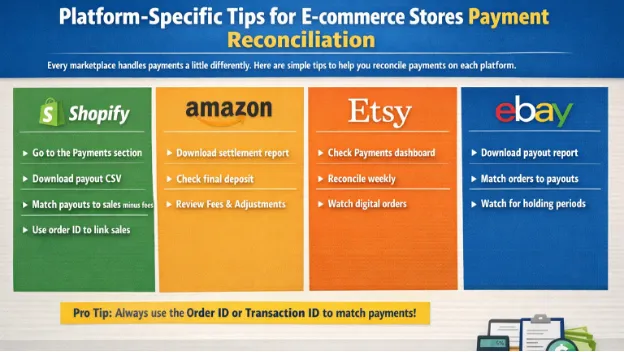
Every marketplace handles payments a little differently. Here are simple tips to help you reconcile payments on each platform.
Shopify
Shopify payment reconciliation is pretty easy. Its dashboard is clean and simple. Follow these steps:
- Go to the Payments section in your Shopify dashboard to see all your payouts.
- Download the payout CSV file every time money lands in your bank account.
- Match the total payout amount with your total sales minus fees and refunds.
- Use the transaction ID or order ID to link each sale quickly.
Amazon
Amazon settlement reports can be a bit more complicated. You need to understand them to avoid confusion. Financial Software for Amazon can help. Here is how to handle them:
- Amazon sends settlement reports every two weeks.
- Download the latest report from your Seller Central account.
- Compare the final settlement amount with the actual money in your bank deposit.
- Pay special attention to the “Amazon Fees” and “Adjustment” sections because these often cause discrepancies.
Etsy
Etsy has a simple payout system through Etsy Payments. Payouts usually arrive fast. Use this approach:
- Check the Payments dashboard for a clear list of sales, fees, and deposits.
- Reconcile Etsy payments weekly because payouts happen quickly.
- Watch for digital download orders because they often have different fee structures.
- Match each deposit with your sales and fee records.
eBay
eBay uses Managed Payments, which adds a few extra steps. See the sales taxes for eBay sellers in Canada to learn more. Follow these steps:
- Sales money first goes into your eBay account before it moves to your bank.
- Download the payout report from the Seller Hub.
- Match each payout with your individual sales orders.
- Check carefully for holding periods that can delay the deposit.
Pro Tip: Always use the order ID or transaction ID from the platform when matching payments. This small habit makes reconciliation faster and more reliable across all your stores.
Consult our bookkeeping and accounting team for cleaner records, better accuracy, and peace of mind.
Case Study: Mississauga Home Decor Seller Scales Across Three Platforms2
Mike Patel runs a home decor shop in Mississauga. He sells on Shopify, Etsy, and eBay. His monthly orders grow from 350 to 1,300.
Problem:
He feels overwhelmed by different payout schedules and fee structures. Reconciliation takes him 14 hours every month and causes frequent shortfalls in his bank account.
What He Does:
Mike learns the payout system for each platform. He downloads Shopify payout CSVs weekly, carefully reviews Amazon settlement reports, and reconciles Etsy every week. He creates a simple spreadsheet using order IDs and adds Synder to automate matching.
The Result:
His auto-match rate reaches 93% in the first month. He cuts reconciliation time from 14 hours to under 2 hours per month. He now reconciles every Monday morning and uses the extra time to grow his business.
Conclusion: Take Control of Your E-commerce Finances Today
E-commerce payment reconciliation gives you clear cash flow and stops hidden profit loss. You catch mistakes early and make better decisions for your business. Follow the simple steps. Fix common issues. Use the right tools. Reconciliation becomes quick and stress-free. Start with one best practice this week. Whether you sell on Shopify, Amazon, Etsy, or eBay, you will see real improvement.
Contact us today and let our team manage your eCommerce accounting and bookkeeping while you focus on growing your business.