
You run a Shopify store and hire help. Payroll becomes a complex process involving spreadsheets and strict deadlines. We want to show you the best payroll apps for Shopify. These Shopify payroll solutions automate pay for employees and contractors. They keep you compliant in 2025.
Here’s the surprise: 40% of small businesses, including Shopify stores, paid payroll fines last year. Those penalties cost thousands. Simple mistakes cause them, like wrong US state taxes or missed Canadian EI payments. They hurt your growth.
We at SAL Accounting will explain how the top e-commerce payroll software stops these problems. You’ll see comparisons and pro tips to protect your store. Keep reading to turn payroll stress into easy wins.
Quick Takeaways
- Gusto, Xero, and Wave lead as the best payroll apps for Shopify with seamless POS sync and auto tax filing.
- Shopify payroll automation cuts manual hours and prevents $1,000–$27,000 fines with one-click compliance.
- Choose apps by team size: Wave for <10 staff, Rippling for 25+, Xero for U.S./Canada cross-border.
- Must-have features: automatic W-2/T4 e-filing, multi-currency, mobile approvals under $50/month.
- Test two apps with Shopify POS data in 30-day trials to ensure 100% IRS/CRA accuracy in 2025.
Why You Need Payroll Automation for Your Shopify Store in 2025
You started your Shopify store alone. Now you hire employees or contractors. Paying them eats up hours every week. Manual payroll looks simple at first. But one small mistake can cost you big. Even worse, late or incorrect paychecks make good workers leave fast. That’s where Shopify payroll automation steps in. Here’s what it does:
- Pays employees and contractors with one click
- Automatically calculates and files federal, state, and provincial taxes
- Pulls hours directly from Shopify POS or your time-tracking app
- Generates and sends Form W-2s, T4s, 1099s, and ROEs without your input
- Updates itself when tax laws change, such as everything about Shopify income and sales taxes in the US and Canada.
Shopify sellers face complex payroll compliance. Our Shopify accounting services ensure accurate filings and full adherence to tax rules.
What Features Should You Look for in the Best Payroll Apps for Shopify?
You need specific tools to run payroll smoothly. Generally, automating your Shopify payments and accounting helps you a lot. The right app saves time and prevents fines. Below are the must-have features with clear explanations.
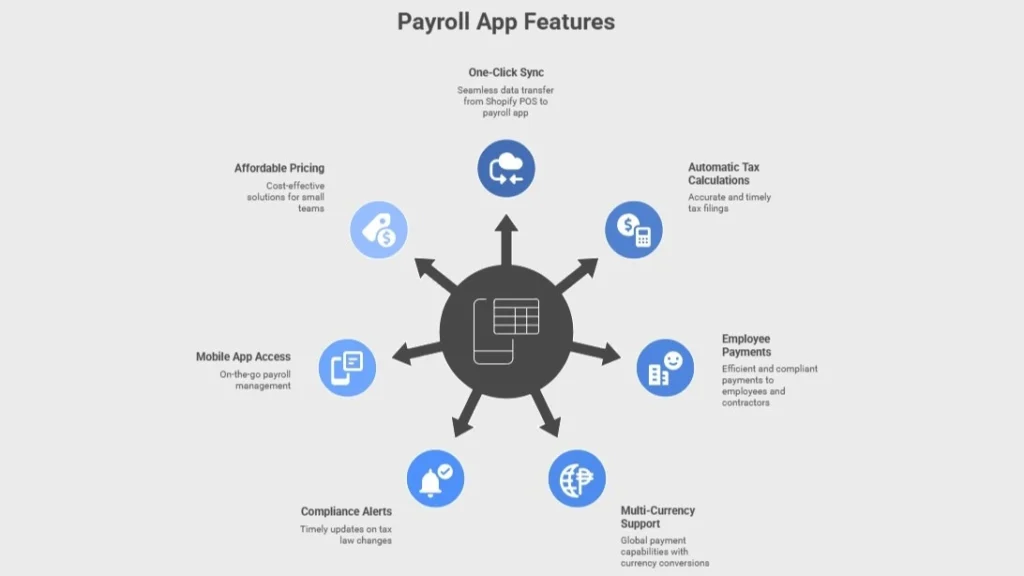
One-Click Shopify Sync
Your Shopify POS tracks employee hours. The payroll app pulls that data instantly. No manual entry. No mistakes from copying numbers. Sales commissions from online orders also flow in automatically.
Automatic Tax Calculations & Filings
The app knows every tax rule. It calculates federal, state, and provincial taxes in seconds. Then it files W-2s, T4s, 1099s, and ROEs (full ROEs calculation) directly with the IRS or CRA. You never miss a deadline.
Employee + Contractor Payments
Pay W-2 staff and 1099 freelancers in one batch. The app splits them correctly. Learn more about how to file Form 1099-K for e-commerce.
- Employees get direct deposit
- Contractors receive checks or ACH; everyone sees pay stubs online (What is an ACH).
Multi-Currency & Global Support
You sell in CAD but pay workers in USD. The app handles conversions. It tracks exchange rates daily. International contractors get paid in their local currency without extra fees.
Compliance Alerts
Tax laws change often. The app sends alerts for new rules, such as new rules about Shopify GST & HST for Canadian sellers in 2025.
- Overtime updates
- Minimum wage changes
- New filing requirements. You stay legal without constant research.
Mobile App Access
You run your store on the go. The payroll app works on your phone. Approve runs, view reports, or fix errors from anywhere (warehouse, trade show, or home).
Affordable Pricing for Small Teams
Good apps start under $50 per month. Most offer free trials. You pay only for active workers. No hidden fees for tax filings or direct deposit. You can use many of the best accounting software options for Shopify for free at first.
Pro Tip: Visit the Shopify App Store. Search “payroll.” Read reviews from stores with your team size. Install two apps. Run test payroll with fake data. Choose the one that feels fastest.
Top 5 Shopify Payroll Solutions: Full Comparison for 2025
You know the features you need. Now meet the apps that deliver them. We chose these five based on Shopify App Store ratings, real merchant reviews, and 2025 updates. Each app fits US or Canadian stores, or both.

1. Gusto: Best for Growing US Teams
Gusto shines for US Shopify stores with 5–100 employees. It connects to Shopify POS and time-tracking apps in one click. Hours and commissions flow in Gusto automatically. Try some of the best accounting practices for your Shopify store to gain more.
- Pricing: $40/month base + $6 per person
- Key Wins: Full HR suite, health insurance, 401(k) setup, workers’ comp integration
- Canada? US only (no CRA support)
- Rating: 4.8/5 on Shopify App Store
- Best For: Stores that want payroll + benefits in one place
Pro Tip: Use Gusto’s free migration service. They import your old payroll data in 48 hours and double-check every number.
2. QuickBooks Payroll: Best for Accounting Fans
You run QuickBooks Online for books. This payroll add-on lives inside it. Shopify sales sync to profit reports in real time. See how to integrate Shopify with QuickBooks.
- Pricing: $45/month + $5 per person
- Key Wins: Same-day direct deposit, built-in time-sheet sync, automatic profit tracking
- Canada? US only (no provincial tax support)
- Rating: 4.6/5
- Best For: Merchants who already use QuickBooks and want one dashboard
3. Xero: Best for Multi-Currency Stores
Here is another app: Xero manages CAD, USD, EUR, and 160+ currencies. You sell globally and pay contractors overseas without stress. Shopify integration with Xero brings many benefits for your store.
- Pricing: Starts at $13/month (payroll add-on separate)
- Key Wins: Live bank feeds, inventory sync, AI tax predictions, multi-country filings
- Canada & US: Full support for both
- Rating: 4.7/5
- Best For: Cross-border sellers who need currency flexibility
4. Rippling: Best for Fast-Scaling Teams
Rippling bundles payroll, HR, IT, and benefits into one platform. Onboard a new hire in 90 seconds flat. This is one of the top Shopify integrations in 2025.
- Pricing: Custom quote—starts around $8 per user
- Key Wins: Global payroll in 50+ countries, laptop provisioning, app access control
- Canada & US: Complete support for both
- Rating: 4.9/5
- Best For: Stores growing from 10 to 100+ employees fast
5. Wave Payroll: Best for Canadian Budgets
Wave gives free invoicing and accounting. Add payroll for low cost. CRA filings happen automatically with zero extra fees when using Wave for your Shopify store.
- Pricing: $20/month base + $6 per person (self-service)
- Key Wins: No charge for tax filings, Shopify tax exemption setup, free bank transfers, simple T4/ROE generation.
- Canada & US: Strong Canada focus, basic US state support
- Rating: 4.5/5
- Best For: Canadian stores with under 20 employees on a tight budget
| App | Starting Price | U.S. | Canada | Global Pay | HR Tools | Shopify Sync |
| Gusto | $40 + $6/person | Yes | No | No | Yes | Yes |
| QuickBooks | $45 + $5/person | Yes | No | No | No | Yes |
| Xero | $13 + payroll add-on | Yes | Yes | Yes | Basic | Yes |
| Rippling | ~$8/user | Yes | Yes | Yes | Yes | Yes |
| Wave | $20 + $6/person | Limited | Yes | No | No | Yes |
Pro Tip: Start with a 30-day trial. Import last month’s hours from Shopify POS. Run a full test payroll. Compare the tax totals to your accountant’s numbers before you commit. Streamline compliance through our e-commerce and retail accounting.
Case Study: We Turn “Bloom & Leaf” from Payroll Panic to 20-Minute Bliss1
Mississauga houseplant dropshipper – 7 staff, three contractors
Problem:
It’s 2 a.m. the night before payday. The owner hunches over Excel, re-adding hours for the fourth time. One EI line sits blank. The CRA letter arrives weeks later—$1,800 penalty. Staff whisper about late paychecks. Growth stalls.
What We Do:
We wire Xero straight into Shopify POS. Hours teleport in real time. T4s and T4As vanish into CRA’s inbox on autopilot. U.S. growers get crisp USD; Canadian pickers get CAD. The founder green-lights runs from trade-show floors with a thumb swipe.
Result:
Payroll shrinks to 20 minutes flat. Fines evaporate. Paydays land like clockwork. The owner reclaims 18 golden hours monthly to grow the jungle.
How Do Payroll Rules Differ Between Canada and the U.S. for Shopify Stores in 2025?
Payroll rules change sharply across the border. One error triggers costly fines. Here’s a clear breakdown every Shopify merchant needs. Core differences that affect your costs include:
Tax Authority & Forms:
U.S.: The IRS handles federal taxes while each state runs its own agency. Employees receive a W-2 form at year-end. Contractors get a 1099-NEC.
Canada: The CRA manages both federal and provincial taxes. Employees receive a T4 slip. Contractors get a T4A (T Tax Slips). Check out how to report a T4, T4A, and T4A-NR on your tax return.
Payroll Taxes:
U.S.: You withhold federal income tax, state/local taxes, and FICA. FICA covers Social Security (6.2% each side) and Medicare (1.45% each side).
Canada: You deduct federal and provincial income tax, CPP (Canada Pension Plan) (5.95% each side), and EI (1.66% employee, 2.32% employer). Learn more about e-commerce taxes in Canada.
Overtime & Holidays:
U.S.: Workers earn 1.5× pay after 40 hours per week. No federal paid holidays exist.
Canada: Overtime starts at 1.5× after 44 hours in most provinces (40 in Alberta/BC after 8/day). Employees get 9–11 paid statutory holidays per province.
Termination & Remittance:
U.S.: Most states follow “at-will” rules with minimal notice. Deposits occur monthly or semi-weekly based on payroll size.
Canada: Employees earn 1–8 weeks’ notice or pay in lieu (based on service years). Most small businesses remit monthly; larger ones follow accelerated schedules.
2025 Updates:
U.S.: The overtime salary threshold rises to $60,008 per year starting January 1, 2025. More staff qualify for overtime.
Canada: CPP2 and EI premiums increase. Employers and employees each pay an extra $300–$400 per worker annually.
| Rule | United States | Canada |
| Authority & Forms | IRS + states; W-2, 1099-NEC | CRA + provinces; T4, T4A |
| Taxes | Federal + state + FICA | Federal + provincial + CPP + EI |
| Overtime / Holidays | 1.5× after 40 hrs; 0 paid | 1.5× after 44 hrs; 9–11 paid |
| Termination / Deposits | Minimal; monthly/semi-weekly | 1–8 weeks; monthly (most) |
| 2025 Change | Threshold → $60,008 | CPP2 + EI ↑ $300–$400/employee |
Pro Tip: Never use a U.S.-only app for Canadian employees (or the reverse). The tax calculations fail and trigger penalties. Always check the app’s “Supported Regions” page before you install.
- Read More: “How to Start DropShipping on Shopify in 2025”
How Do You Choose the Right Payroll App for Your Shopify Store in 2025?
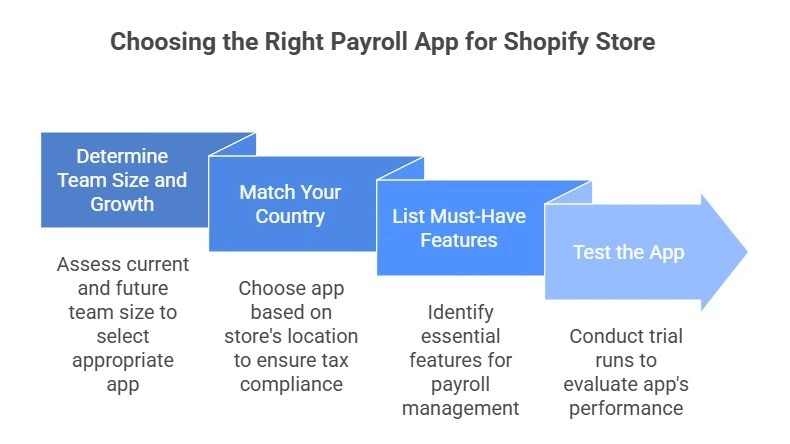
You now understand the top apps and the Canada vs. US rules. The next move is straightforward: select the app that fits your business exactly. Follow this clear 4-step guide.
Step 1: Know Your Team Size and Growth
Count your current employees and contractors. Then picture the next 12 months. Accounting for e-commerce platforms like Shopify will be much easier.
- 1 to 5 people: Choose Wave (Canada) or Gusto (US). These apps cost the least and take minutes to set up.
- 6 to 25 people: Pick Xero or QuickBooks Payroll. They handle more staff without sudden price increases.
- 25 or more people (or hiring fast) Select Rippling. It manages payroll, HR, and IT as your team grows quickly.
Step 2: Match Your Country
Your store’s location decides which app works best. You can find the best dropshipping app for your Shopify store based on your location. Here is how to choose the best payroll app for your country:
- US stores only: Use Gusto or QuickBooks Payroll. They calculate every state tax correctly.
- Canada stores only: Go with Wave for the lowest CRA fees or Xero for better reports.
- Stores in both the US and Canada: Choose Xero or Rippling. These are the only apps that process IRS and CRA taxes in one place without errors.
Step 3: List Your Must-Have Features
Write down what you need. Check each app against this list: Shopify POS hours import automatically, pay contractors with 1099 or T4A forms, approve payroll from a mobile app, tax filings included at no extra cost, and multi-currency support for global sales. Pick a top e-commerce accounting software according to these features.
Step 4: Test the App Before You Commit
Install two apps from the Shopify App Store. Import last month’s hours from Shopify POS. Run a test payroll with fake $100 amounts. Compare speed, tax totals, and pay stub design. Ask your accountant to review one test run.
Pro Tip: Schedule a 15-minute live demo with the app’s sales team. Say: “Show me a real Shopify sync and a Canadian T4.” The best apps prove it on screen. Save time and avoid fines with our bookkeeping services for e-commerce at Sal Accounting.
Case Study 2: We Hand “NorthWave Apparel” the Perfect App in 48 Hours Flat2
Toronto outdoor gear brand – 14 US employees, 2 Canadian contractors
Problem:
Monday morning chaos. The bookkeeper toggles between QuickBooks tabs—one for IRS, one for CRA. A contractor’s T4A sits in limbo. A US state tax rate updates overnight. The accountant flags a $900 mismatch. Tension rises.
What We Do (4-Step Guide):
We count heads (16 and climbing), so Wave is out. U.S.-Canada mix narrows the field to Xero and Rippling. Must-haves: 1099s, T4As, mobile sign-off, currency magic. We yank March hours from Shopify, fire $100 test payrolls in both, and watch the numbers dance.
Result:
Rippling wins. We onboard a new Canadian stitcher in 90 seconds. First live run hits 100% tax perfection. The brand pockets $1,200 yearly and breathes easy.
Final Thoughts
The best payroll apps for Shopify automate payments, eliminate errors, and keep you compliant in 2025. You avoid costly fines and wasted hours by choosing the right tool for your team size, location, and cross-border needs. This guide delivers clear comparisons, must-have features, and real-world steps to simplify payroll for U.S. and Canadian merchants.
If you need expert help with Shopify payroll, tax filings, or full e-commerce accounting, contact us at SAL Accounting to make compliance effortless and protect your growth.
FAQ About Best Payroll Apps for Shopify
Gusto (U.S. HR focus), QuickBooks Payroll (accounting sync), Xero (multi-currency), Rippling (global scaling), and Wave (Canadian budget option). All integrate with Shopify POS.
Count your team, check U.S./Canada needs, and list must-have features like tax filing. Install two apps, import POS hours, run test payrolls, and pick the fastest.
Yes. Both connect via Shopify App Store. Gusto syncs employees and hours; QuickBooks links sales to reports and enables same-day deposits.
One-click POS sync, automatic tax calculations and e-filing, employee/contractor payments, compliance alerts, mobile approvals, and plans under $50/month.
Yes. Wave offers low-cost CRA compliance with EI/CPP handling. Xero supports provincial taxes, T4s, and multi-currency for growing stores.
Choose apps with real-time tax updates and auto e-filing. Review mappings quarterly, keep digital records, and consult a CPA for 2025 rule changes.
Yes. Rippling pays in 50+ countries with local compliance. Xero handles 160+ currencies and generates 1099/T4A forms automatically.
They calculate withholdings, create W-2s/T4s/1099s, and e-file with IRS/CRA by deadlines. Syncs Shopify data to avoid errors and save 4–30 hours monthly.