We help business owners who sell on Shopify, WooCommerce, Etsy, or their own websites find the best bank accounts for e-commerce. The right account makes cash flow easier, cuts unnecessary fees, and supports real growth. Global e-commerce sales will pass $6.8 trillion in 2026. That’s more than 20% of all retail worldwide. Yet many online sellers still use their personal bank accounts. This small choice creates big financial headaches.
In this SAL Accounting post, we’ll break down exactly how the right dedicated business account fixes these problems and seriously improves your e-commerce business’s financial management.
Quick Takeaways
- Top three business bank accounts for e-commerce in Canada in 2026: Venn, Wise Business, Float.
- A dedicated business account separates personal and business money. It simplifies CRA taxes and cuts high fees on USD payouts.
- Fintechs like Venn and Wise beat traditional banks for e-commerce. They offer low fees, multi-currency support, and direct Shopify links.
- For cross-border sales, use accounts with real USD holding and FX under 0.5%. You save 2–3% compared to big banks.
- Many sellers use Venn or Wise for US/international payouts plus RBC or BMO for local CAD. This combo saves money and keeps things simple.
Why E-commerce Sellers Need Dedicated Online Business Bank Accounts
When you use your personal account for everything, it quickly becomes a mess. A dedicated business account keeps your finances separate. You stop mixing personal and business cash. This makes tax time much simpler. The CRA requires clear records, and your accountant will thank you for the clean books. Our e-commerce tax accountant can help you a lot. Here’s what you actually get:
- Direct connections to Shopify, QuickBooks, and Stripe. Payouts appear in real time
- Automatic expense tracking, no more manual downloads
- Higher interest on your balance (some pay 3–4% APY)
- Free or low-cost wires to suppliers
- Lower fees on international sales and multi-currency handling
- Personal accounts almost never offer these.
Cross-border sales make a dedicated account essential. Many sellers ship to the US and other countries, and personal accounts often charge high conversion fees on USD payouts and foreign transactions.
What Features Matter in the Business Bank Accounts for E-commerce?
Pick an account that fits your online store. Look for the things that actually save you time and money. Here are the key features to check:
- Low or no monthly fees: Lots of good accounts stay free or cheap if you use them regularly.
- Direct integrations: They link straight to Shopify, WooCommerce, Etsy, Stripe, QuickBooks, or Xero. Payouts and expenses update automatically. See the best Shopify integrations for e-commerce.
- Multi-currency support and low FX rates: You handle USD from US customers easily. No big conversion fees eat your profits. Check the best US banks for Canadians.
- Unlimited or high-limit electronic transactions: You get free Interac e-Transfers and incoming payments without limits holding you back.
- High interest on balances: Some pay up to 4% on CAD or USD money. Your cash earns a bit while it sits there.
- Strong security and tools: You get real-time alerts, virtual cards, easy expense sorting, and good fraud protection.
- Easy tax and CRA setup: Clear statements and simple payment options make tax time less stressful.
Fintech banks usually win on speed, low costs, and cross-border help. Traditional banks give you branches if you ever need to talk to someone in person.
Which Are the Best Business Bank Accounts for E-commerce in 2026?
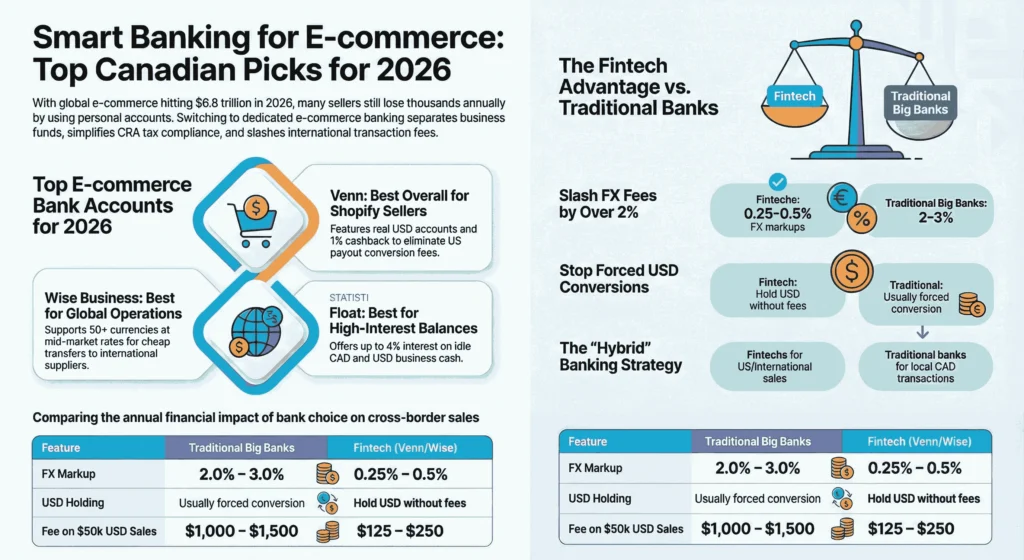
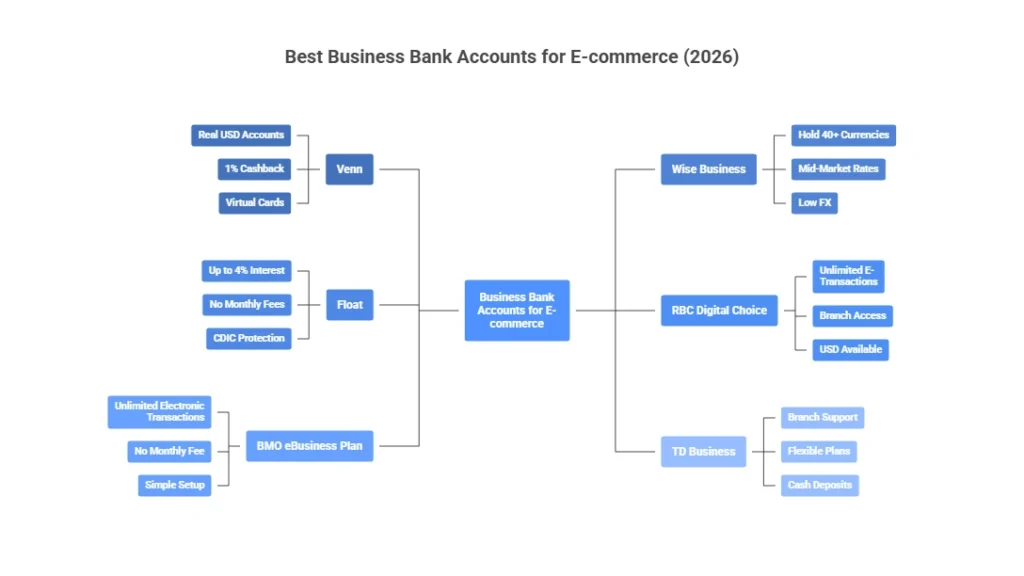
We compared the top options for Canadian e-commerce sellers. We looked at low fees, Shopify/Stripe links, cross-border USD support, and time-saving tools. These work well in 2026 for businesses with US and global sales. You may also need to track and calculate COGS for e-commerce stores. Here’s a quick comparison:
| Account | Best For | Monthly Fee | Key Perks | Multi-Currency / FX | Integrations | Notes |
| Venn | Shopify + cross-border | $0–$49 | Real USD accounts, 1% cashback, virtual cards | CAD/USD/GBP/EUR, low FX (~0.4%) | Shopify, Stripe, QuickBooks, Xero | No conversion on US payouts |
| Wise Business | International payments | $0 (setup ~$31) | Hold 40+ currencies, mid-market rates | 50+ currencies, very low FX | Stripe, Amazon, manual links | Best for global suppliers |
| Float | High-interest balances | $0 | Up to 4% on CAD/USD | CAD & USD in one account | Basic expense tools | Earn on idle cash |
| RBC Digital Choice | Online + branch backup | $6 | Unlimited e-transactions, Interac | USD available, standard FX | QuickBooks, Xero | Good mixed use |
| BMO eBusiness Plan | Unlimited free e-transactions | $0 | No fee, unlimited electronic | Limited multi-currency | Standard | Simple digital-only |
| TD Business | Flexible traditional support | $5–$95+ | Tiered plans, cash deposits | USD options, higher FX | QuickBooks, etc. | In-person help available |
Venn – Best Overall for Canadian E-commerce
Venn is designed for Canadian e-commerce businesses. It provides real local CAD and USD accounts, so Shopify or Stripe payouts from the US arrive without conversion fees and Canadian e-commerce taxes made simple. You save 1.5–3% on every US sale. Virtual cards, cashback, and direct accounting links make daily operations easier. Setup is quick and fully online.
Advantages:
- Real CAD/USD accounts with no conversion on US payouts
- 1% unlimited cashback on corporate cards
- 2% interest on all CAD and USD balances
- Low FX rates and seamless integrations with Shopify, Stripe, QuickBooks, Xero
Fees: Fees: $0 base plan (Essentials), up to $49/month for Plus or higher tiers; no hidden fees on core features.
Wise Business – Best for Cross-Border Savings
Wise handles international money efficiently. You hold and convert over 50 currencies at mid-market rates with no hidden markups. Payments arrive like a local in many countries, and supplier transfers stay cheap. It works perfectly as a companion to your main bank for global e-commerce needs.
Advantages:
- Hold and manage 50+ currencies at mid-market rates.
- No hidden markups on conversions
- Low-cost transfers to suppliers worldwide
- Local account details in many countries
- No monthly fees after one-time setup
Fees: One-time setup fee around $55 CAD; no monthly fees; low conversion fees starting from about 0.48%.
Float – Best for Earning Interest
Float lets your business cash earn interest. You get up to 4% on CAD and USD balances in one account. There are no monthly fees, and setup is fast. It fits stores that hold funds while growing and need simple expense tracking.
Advantages:
- Up to 4% interest on CAD/USD balances (tiered by spend)
- Zero monthly or transaction fees on key transfers
- Instant access like a chequing account
- CDIC protection for peace of mind
Fees: $0 monthly fees; no transaction fees on ACH/EFT; interest based on balance and card spend thresholds.
RBC Digital Choice – Best Traditional Option
RBC Digital Choice offers reliable online banking from a major bank. You enjoy unlimited electronic transactions and some free Interac e-Transfers. You also track the expenses for your e-commerce store easily. Branch access covers occasional cash needs, and it connects well to accounting software. USD accounts are available, though FX fees are higher.
Advantages:
- Unlimited electronic debit and credit transactions
- 10 free outgoing Interac e-Transfers per month
- Branch access for cash or in-person support
- Solid integrations with QuickBooks and Xero
Fees: $6 monthly; no minimum balance required.
BMO eBusiness Plan – Best for Unlimited Free Transactions
BMO eBusiness Plan keeps costs low for digital stores. You get unlimited electronic transactions with no monthly fee. It suits pure online sellers who focus on simplicity. Multi-currency is limited, so combine it with a fintech like Wise for cross-border payments. You can also consider e-commerce tax deductions with these accounts.
Advantages:
- Unlimited electronic transactions
- No monthly fee (for existing accounts)
- Simple setup for digital-only businesses
- 2 free Interac e-Transfers per month
Fees: $0 monthly fee (note: some plans may change to $5 starting March 2026 for new accounts; check current details).
TD Business – Reliable All-Rounder
TD Business provides flexible business chequing plans. You receive branch support, cash deposit options, and basic accounting integrations. It works well when you combine online sales with local or in-person needs. International fees are higher than fintech alternatives. See how to sell internationally on Shopify, too.
Advantages:
- Branch support and cash deposit capability
- Flexible plans for different transaction volumes
- Standard integrations with accounting software
- Good balance of online and traditional features
Fees: Start from $5–$7/month; higher tiers up to $95+ (waivable with balances); check TD for current 2026 rates.
How Online vs. Traditional Banking Compares for E-commerce Sellers
Online banking (fintechs like Venn, Wise, and Float) and traditional banking (big banks like RBC, BMO, and TD) both work great for e-commerce. The best one depends on how you sell, how much you do cross-border, the business structure for your online retail, and what you need every day. Here is what you should do:
- Pick fintech/online banking if you sell a lot to the US or Europe, want low fees on USD payouts, need smooth Shopify connections, or hate extra charges.
- Pick traditional banking if you like having a branch nearby, handle some cash sometimes, or feel better with a well-known Canadian bank.
- Many sellers use both: a fintech (like Venn or Wise) for cross-border and international work, plus a traditional bank (like RBC or BMO) for regular CAD transactions.
To make this clearer, here’s how traditional banks compare to fintech options for cross-border e-commerce sellers:
| Feature | Traditional Bank | Fintech (Venn / Wise / Float) | Why It Matters |
| FX Markup | 2–3% above exchange rate | ~0.25–0.5% | Lower markup = higher profit on every USD sale |
| Exchange Rate Type | Marked-up bank rate | Real mid-market rate (or very close) | Transparent pricing saves money |
| USD Holding | Often auto-converts to CAD | Hold USD without forced conversion | Avoid unnecessary FX fees |
| Number of Currencies | Limited (usually CAD/USD) | 40–50+ currencies (Wise) | Better for global suppliers and customers |
| Cost on $50,000 USD Sales | ~$1,000–$1,500 in FX fees | ~$125–$250 in FX fees | Big annual savings difference |
| CRA Reporting Clarity | Standard statements | Detailed currency breakdowns | Easier tax reporting and audit trail |
Case Study: Mississauga Pet Supplies Seller Turns Red Months into Steady Profits1
A Mississauga entrepreneur in Liberty Village runs a Shopify store that sells handmade jewelry and accessories. Her store currently brings in $420k a year. About 45% of her sales come from the US and Europe.
Problem
She loses 2.5–3% on every USD payout from Shopify because of bank conversion fees and markups. This quietly costs her $8,000–$10,000 every year. Manual tracking of foreign transactions makes CRA reporting messy. International chargebacks sometimes delay refunds.
What We Do
We switch her to a Venn business account so she can hold real local USD and enjoy low FX rates (0.25–0.45%). She keeps her RBC account for local CAD and Interac. We update her Shopify payout settings to use Venn’s USD details. We add Wise for occasional EUR payments to suppliers. We also set up automatic exports to Xero for clear currency tracking.
The Result
In six months she saves $9,200 in FX and conversion fees. Profit margins on US sales climb from 18% to 24%. Chargebacks drop because of better fraud alerts and virtual card controls. CRA filing becomes simple with detailed, exportable statements—no more last-minute scrambling.
What Should Canadian E-commerce Sellers Consider for Cross-Border Banking?
Cross-border sales are very common for Canadian e-commerce sellers. They have transfer pricing between Canada and the US as well. You often receive USD from US customers on Shopify, Etsy, or Amazon. The right business bank account makes a big difference in costs and ease. Here are the key things to consider:
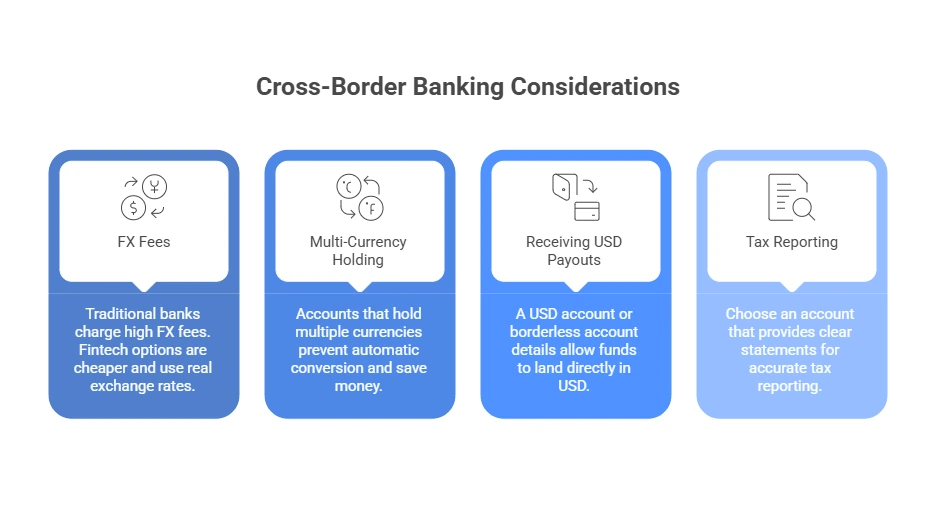
FX Fees and Conversion Costs
Traditional banks typically add a 2–3% markup when they convert USD to CAD. This fee applies every time you receive or move US dollars. Fintech options like Venn or Wise charge far less, usually 0.25–0.5%, and many use the real mid-market exchange rate with almost no hidden markup.
Example: For a store doing $50,000 in US sales per year, this difference can easily save $1,000–$1,500 annually.
Multi-Currency Holding
Look for accounts that let you hold CAD and USD (or more currencies) separately within the same account. This prevents automatic conversion when money arrives. Venn provides real local USD account details. Wise supports holding and managing 50+ currencies. Both avoid the forced CAD conversion that many traditional banks apply.
Pro Tip: Start with CAD/USD only if your sales are mostly in North America. Add EUR/GBP later if you expand to Europe. This keeps fees low and simplifies tracking.
Receiving USD Payouts Smoothly
Shopify, Stripe, Etsy, and similar platforms often pay sellers in USD. If your account only holds CAD, the bank converts it immediately and charges a fee. A proper USD account or borderless account details let the funds land directly in USD.
Pro Tip: Update your platform payout settings to use your USD account details right away. Test with a small payout first to confirm no unexpected fees hit.
Tax and CRA Reporting
The CRA requires accurate reporting of foreign income and any exchange-rate gains or losses. Choose an account that provides clear, downloadable statements showing transaction dates, amounts in original currency, and applied rates. See what happens if an e-commerce seller isn’t registered for GST/HST.
Pro Tip: Export statements monthly and note the exchange rate used for each conversion. Use accounting software (QuickBooks or Xero) to auto-import. This saves hours at tax time. Consult our cross-border tax expert for the best results.
Case Study: Toronto Fashion Accessories Seller Goes Global Without the Fees2
A Toronto entrepreneur in Liberty Village runs a Shopify store that sells handmade jewelry and accessories. Her store currently brings in $420k a year. About 45% of her sales come from the US and Europe.
Problem
She loses 2.5–3% on every USD payout from Shopify because of bank conversion fees and markups. This quietly costs her $8,000–$10,000 every year. Manual tracking of foreign transactions makes CRA reporting messy. International chargebacks sometimes delay refunds.
What We Do
We switch her to a Venn business account so she can hold real local USD and enjoy low FX rates (0.25–0.45%). She keeps her RBC account for local CAD and Interac. We update her Shopify payout settings to use Venn’s USD details. We add Wise for occasional EUR payments to suppliers. We also set up automatic exports to Xero for clear currency tracking.
The Result
In six months she saves $9,200 in FX and conversion fees. Profit margins on US sales climb from 18% to 24%. Chargebacks drop because of better fraud alerts and virtual card controls. CRA filing becomes simple with detailed, exportable statements—no more last-minute scrambling.
Final Thoughts
The best business bank account for your e-commerce store in 2026 stands as one of the smartest decisions you make. A dedicated account separates your finances, reduces unnecessary fees (especially on cross-border USD payouts), simplifies CRA compliance, and supplies tools that save time and money. The right setup transforms financial stress into smooth growth.
Contact us at SAL Accounting today for a free consultation. Let us help you choose the perfect account and set up everything smoothly.
E-commerce Business Bank Account FAQs
Inventory/COGS (30–50%), shipping (10–25%), marketing/ads (10–30%+), platform fees (2–5% + monthly), returns (15–24%), software/apps ($50–$500+/month), fraud (1–3%), customer service, storage, taxes (1–5%).
Separate business and personal accounts. Set clear categories. Scan receipts and link bank + platforms. Reconcile weekly/monthly. Review profit & loss reports monthly. Use accounting software for automation.
QuickBooks Online, Xero, FreshBooks, Expensify/Ramp, A2X, Finaloop. They connect to Shopify/Amazon for automatic sales, fees, and payout imports.
Yes. Most business costs (inventory, shipping, ads, fees, software) are deductible in Canada and the US. Keep receipts. Talk to a tax pro for sales tax rules and 2026 filing.
Reconcile weekly or monthly. Check profit & loss reports monthly. Watch big categories (ads, shipping) weekly. Do full reviews every three months.
Set budgets per category (e.g., ads ≤20% revenue). Use zero-based budgeting. Add free shipping thresholds. Track actual vs. budget monthly. Adjust every quarter.
Use a USD or multi-currency account. Avoid automatic conversion. Choose low FX rates and update your payout settings.