
You’re listing products on Etsy, fulfilling orders through Shopify, and trying to keep inventory straight in a spreadsheet. Then a customer buys the last unit on Etsy, but your Shopify store still shows it in stock. You end up with a cancellation, a refund, and another bad review.
This is exactly what happens when two stores run on separate systems. And it’s more common than most Canadian e-commerce owners admit. Retailers selling across three or more channels generate 143% more revenue than single-channel stores. The extra reach is real, but only if you can actually keep your numbers accurate.
This guide from SAL Accounting walks you through exactly how to set up a proper Shopify Etsy integration so products, orders, and inventory stay in sync. We focus on what actually matters to Canadian sellers who are growing and starting to sell (or plan to sell) into the US.
If you’re already selling on Shopify and thinking about adding Etsy (or the other way around), our Shopify accounting team helps sellers get clear on their real margins from day one.
Quick Takeaways
- Shopify and Etsy don’t connect natively. You need a third-party app for real Shopify Etsy integration.
- Shopify’s Marketplace Connect app no longer supports new Etsy connections. Most sellers now use CedCommerce, LitCommerce, or ShopUpz.
- Make Shopify your single source of truth for inventory so you never oversell.
- Etsy’s combined fees run roughly 10–15% per sale. Know your margins on each platform before you list.
- In Canada, sales from both platforms count together toward your $30,000 GST/HST threshold.
Why Link Shopify and Etsy? The Real Benefits for Growing Stores
Shopify and Etsy serve different customers, and that’s exactly why running both platforms works for many Canadian e-commerce businesses.
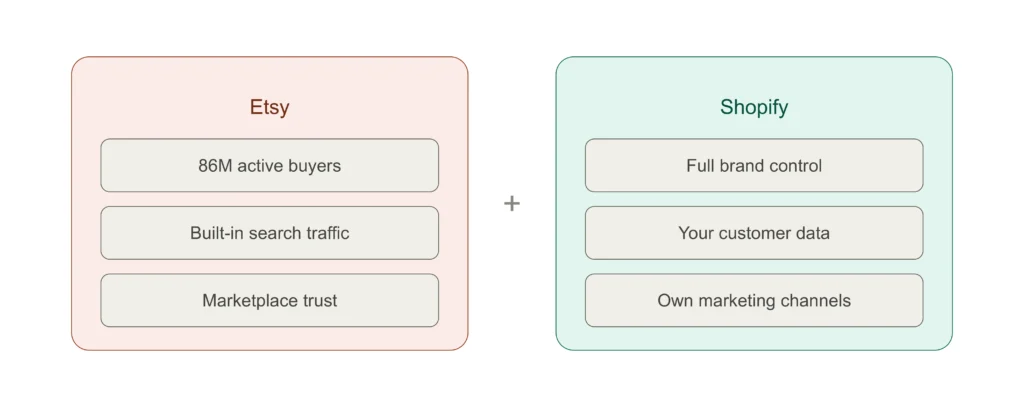
Etsy puts you in front of active buyers who are already searching for unique, handmade, or vintage items. Shopify gives you full control over your brand, checkout experience, and customer data, exactly what you need once you start scaling.
The two audiences overlap less than you’d think. Etsy shoppers love the marketplace feel. Shopify customers usually come from your own marketing, ads, or email list. Selling on both means you reach people you would miss with just one store.
The practical win is simple: with the right Shopify Etsy sync, you move from hard manual work to clean multichannel e-commerce management from one dashboard. In short, a solid cross-platform sales strategy saves hours every week and prevents overselling mistakes that kill reviews and margins.
How to Connect Shopify with Etsy in 2026 (Step by Step)
Yes, you can connect Shopify with Etsy, but not natively. Shopify’s Marketplace Connect app stopped accepting new Etsy connections in 2025. If you’re already using it, you can keep going for now. If you’re starting fresh, you’ll need a third-party app.
Many older guides still push Marketplace Connect. If you tried it and hit a wall, this is why. The good news is that today’s third-party apps often work better and give you more control. Here’s exactly how to set it up.
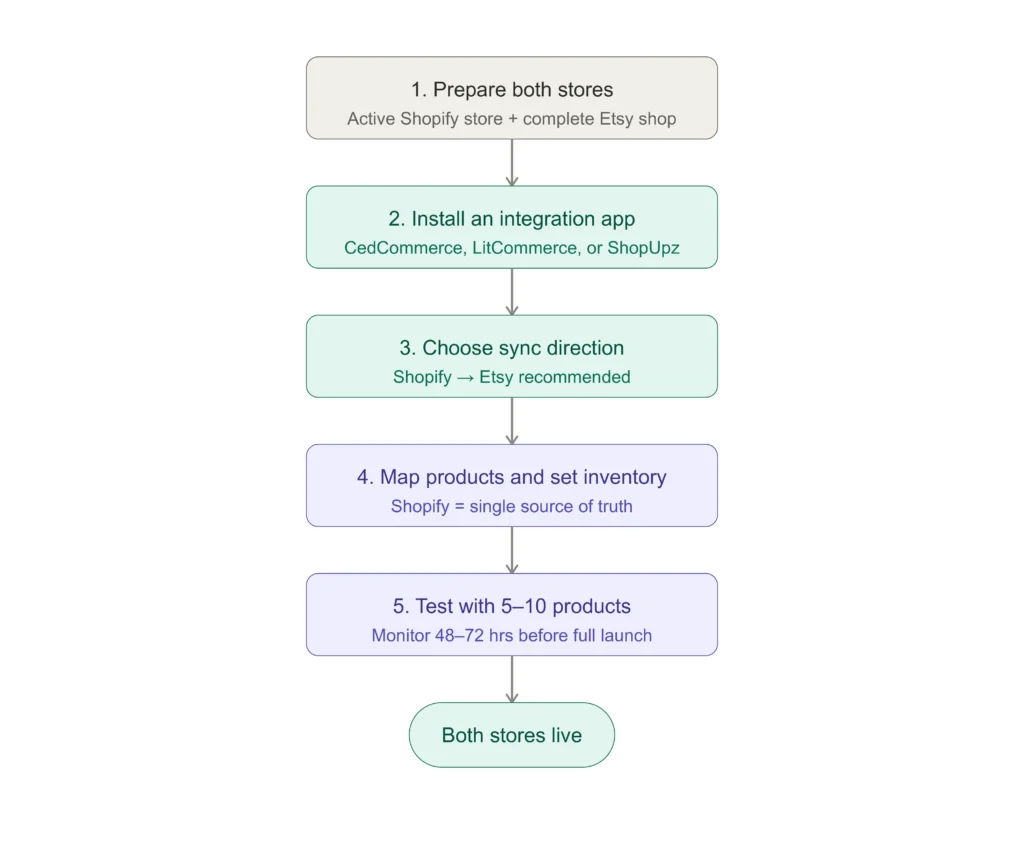
1. Make Sure Both Stores Are Ready
You need an active Shopify store and a fully set-up Etsy shop (shop name chosen, payment method added, shipping profiles done, and at least one listing live). Etsy blocks third-party apps on incomplete shops.
2. Pick and Install Your Integration App
Go to the Shopify App Store, search for an Etsy integration app, install it, and follow the prompts to connect your Etsy account securely.
3. Choose Your Sync Direction
Decide whether to push from Shopify to Etsy, pull from Etsy into Shopify, or run two-way sync. Most Canadian sellers who are scaling make Shopify the master catalog and push to Etsy.
4. Map Your Products and Set Inventory Rules
This step is all about Shopify Etsy product linking. Match your existing listings across both platforms so inventory stays connected. Most apps can import your existing Etsy products into Shopify automatically. Set one platform as the source of truth for stock levels, almost always Shopify.
5. Test Before Going Live
Sync a small batch of 5–10 products first. Place a test order, watch inventory updates on both sides, and confirm the order lands cleanly in Shopify. Monitor for 48–72 hours before you flip the switch for your full catalog.
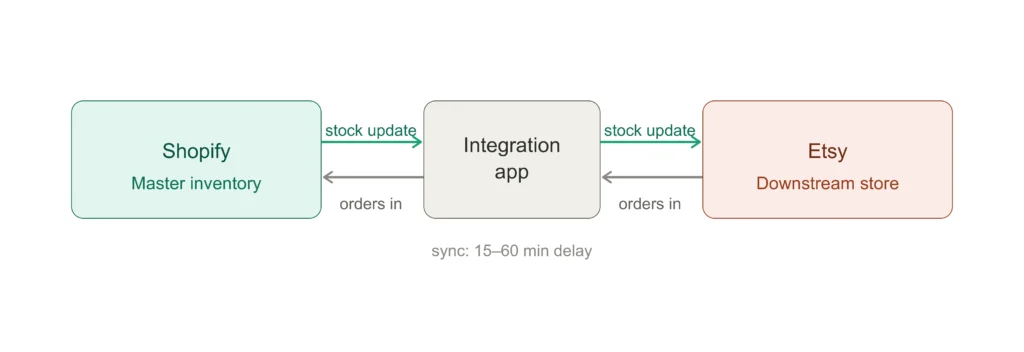
Pro Tip: Make Shopify your single source of truth for inventory. This is the key to smooth Shopify Etsy inventory integration. Update stock levels in Shopify and let the app push changes to Etsy. Managing from two places is exactly how overselling happens.
If you’re already on Shopify and thinking about adding Etsy, or the other way around, our ecommerce accountants can help you get confident in your numbers instead of second-guessing them.
Best Apps for Shopify Etsy Integration in 2026
Not all apps are equal. Here’s a quick comparison of the ones Canadian sellers actually use right now.
| App | Rating | Free Plan / Trial | Starts At | Best For |
| CedCommerce | 4.6 (1,177 reviews) | Free trial | ~$19/mo | Bulk syncing, established catalogs |
| DPL Etsy Integration | 4.8 (~500 reviews) | Free trial | ~$14.99/mo | Print-on-demand and order automation |
| LitCommerce | 4.7+ | Yes (10 products) | $19.99/mo | Multichannel sellers adding more platforms |
| ShopUpz | Newer app | Yes | Varies | Simple Marketplace Connect replacement |
If your goal is to integrate Etsy into Shopify admin so you can manage orders and products from one place, LitCommerce and ShopUpz are strong choices.
Pro Tip: Start with the free plan or trial. Push a small batch of products first and check that inventory, pricing, and order data all transfer correctly before you commit.
What to Watch Out For After You Link Shopify and Etsy
Getting the connection working is the easy part. Keeping everything running smoothly week after week takes a little ongoing attention. Here are the four issues our specialized Etsy accountants see most often with Canadian Shopify + Etsy sellers:
- Etsy’s strict listing policies: Not every product that sells on Shopify qualifies for Etsy. If you use production partners, you must disclose it. Syncing your full catalog without checking can get listings removed or your shop flagged.
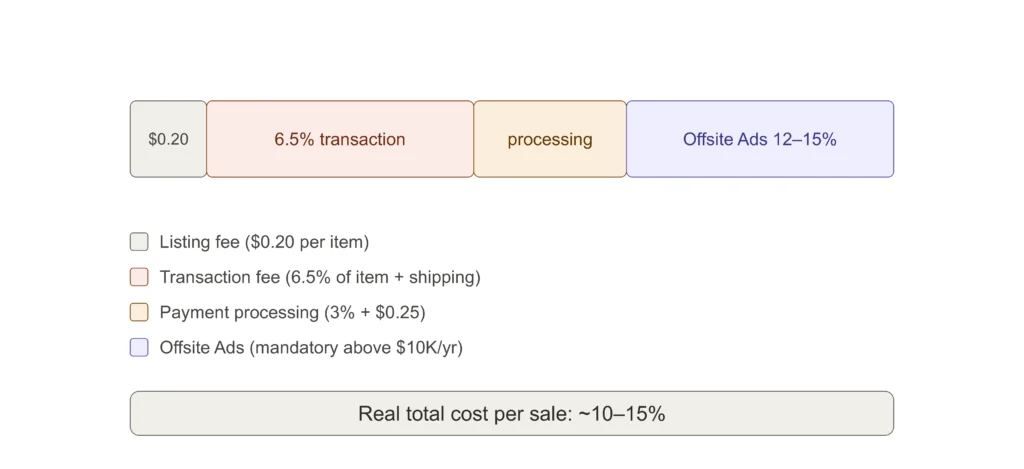
- Pricing must be different on each platform: Etsy’s fee stack (listing + 6.5% transaction + processing) plus mandatory Offsite Ads (12–15% above $10K/year) means your margins are thinner there. Most apps let you set platform-specific pricing so you stay profitable on both sides.
- Sync is not instant: Most apps update every 15–60 minutes. During busy weekends or flash sales that gap can cause overselling. Hold back a small buffer and set low-stock alerts on both platforms.
- SEO works completely differently: Etsy lives on tags, categories, and its own search algorithm. Shopify relies on your own marketing and Google. Never just copy-paste listings.
How Shopify Etsy Integration Affects Your Taxes and Books?
This is the part almost every integration guide skips, and it’s exactly where Canadian sellers who are growing and selling into the US start to feel uncertain about their numbers.
1. Combined Revenue and GST/HST in Canada
Your combined revenue from Shopify and Etsy counts as one total for tax. In Canada, once your total sales across both platforms exceed $30,000 over four quarters in a row, you must register for GST/HST. The CRA does not care that the money came from two different stores.
2. Avoiding Double GST/HST Charges on Etsy
Etsy has collected GST/HST on Canadian orders since July 2022. But if you already have your own GST/HST number, add it to your Etsy account. Otherwise buyers get charged twice: once by you and once by Etsy. We see this mistake create refund headaches and messy books all the time.
3. US Sales Tax When Selling on Both Platforms
Selling into the US adds another layer most sellers don’t expect. Sales from both platforms count together toward each state’s economic nexus thresholds (usually $100,000). Our cross-border tax team usually help sellers who suddenly face unexpected sales tax in states they weren’t planning for. It is a common problem we fix for ecommerce sellers.
4. Bookkeeping and Reconciliation Challenges
On the bookkeeping side, Shopify and Etsy pay out on completely different schedules with different fee reports. Without proper reconciliation your revenue numbers stop matching your bank deposits, and you end up spending hours every month trying to figure out the gaps.
As specialized ecommerce accountants, we tell every Canadian seller in this situation the same thing: track each channel separately. Record revenue, fees, refunds, and net payouts for Shopify and Etsy as two distinct income streams. It makes tax filing cleaner and finally gives you a clear picture of which platform is actually more profitable.
Pro Tip: Tools like A2X or Link My Books can pull everything into clean entries in QuickBooks or Xero. If you’re running both Shopify and Etsy, this single step saves hours every month.
- Also read: Etsy Seller Tax Guide for U.S. and Canada
Shopify vs Etsy: Quick Fee Comparison
Before you decide how to split your catalog, know what each platform actually costs per sale.
| Factor | Shopify (Basic) | Etsy |
| Monthly fee | €25/month billed yearly(€1/month for first 3 months on yearly plan) | $0 (optional $10/mo for Plus) |
| Transaction fee | 0% with Shopify Payments | 6.5% of item price + shipping + gift wrap |
| Payment processing | 2.9% + $0.30 | 3% + $0.25 (US), varies by country |
| Listing fee | None | $0.20 per item (renewed every 4 months) |
| Offsite Ads | None | 12% or 15% on attributed sales (12% once you exceed $10K lifetime sales) |
| Built-in audience | No, you drive traffic | Yes, 86 million active buyers |
Etsy charges a 6.5% transaction fee on the item price plus shipping and gift wrap. Add the $0.20 listing fee per item, payment processing, and Offsite Ads (12% or 15%), and most sellers see a real total cost of roughly 10–15% per sale.
Conclusion
A proper Shopify Etsy integration turns two separate stores into one connected system. You get Etsy’s built-in traffic and Shopify’s brand control without the daily manual work.
The technical setup takes an afternoon. The harder part is what comes next: keeping your fees straight, your taxes filed correctly, and your books clean when the two platforms pay out on different schedules with different reports.
That’s exactly where most growing Canadian sellers start to feel uncertain about their numbers, and it’s exactly what we help with every day. Want to make sure your multichannel setup gives you accurate numbers you can actually trust for decisions? Book a free consultation with our eCommerce accountants.