This guide shows every expense hitting your online store and gives you simple ways to track and control them. We want to make e-commerce financial management easy for you. You spot leaks fast, keep spending tight, and grow stress-free. Even decent e-commerce stores lose up to 5% of expected revenue yearly to “invisible leakage”
2026 carrier hikes push real shipping expenses 8–12% higher than advertised rates due to surcharges. We at SAL Accounting cover all major e-commerce business expenses, provide clear steps to track e-commerce expenses properly, and practical fixes to stop the leaks, so more money stays in your business.
Quick Takeaways
- Biggest e-commerce costs: COGS (30–50%), marketing (20–40%), shipping (10–25%).
- Tracking every expense consistently matters more than just increasing sales. Clear numbers protect margins and cash flow.
- Separate business and personal accounts immediately. Categorize expenses into Fixed, Variable, and COGS from day one.
- Review profit & loss reports monthly. Reconcile payouts weekly to catch leaks early.
- Use automation and accounting software to track fees, receipts, and taxes.
What Are Typical E-commerce Business Expenses in 2026?
Lots of online sellers chase big sales numbers. They often miss the small everyday expenses that add up fast. In 2026, shipping surcharges from UPS and FedEx keep going up. Platform fees stay about the same. Ad costs swing a lot. When you see your full expense picture clearly, you stop that “invisible leakage” we talked about. You gain real control over cash flow and profits.
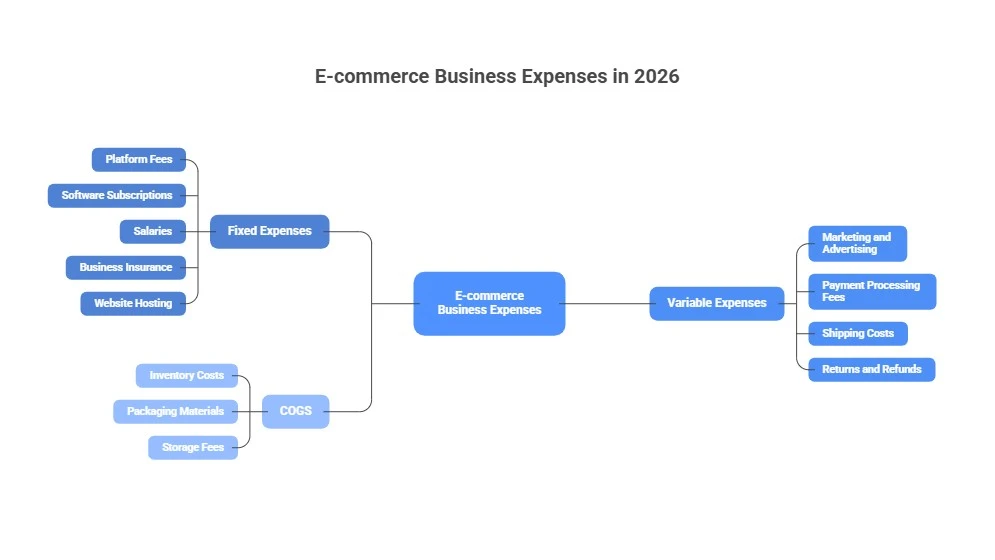
Most e-commerce expenses fall into three main groups: fixed, variable, and COGS (cost of goods sold). You can consult our e-commerce accountant & bookkeeper to take care of them. Below, we will go through each in detail:
Fixed Expenses
Fixed expenses do not change much from month to month. You pay the same amount even if you sell a few items or many items. These costs feel like regular bills that keep your business running. Here are the most common fixed expenses:
- Platform fees (Shopify plans cost between $29 and more than $2,000 per month)
- Monthly subscriptions for software and apps. You may pay a specific amount for Shopify integrations for e-commerce.
- Salaries for your team members (when you pay them a steady amount)
- Business insurance
- Basic website hosting and domain name fees
Fixed expenses usually make up 5 to 15 percent of your total revenue. They are easy to predict because the amount stays steady. You can save money by choosing yearly plans or by stopping tools you no longer need.
Variable Expenses
Variable expenses change depending on how many sales you make. When you sell more, these costs become higher. When you sell less, these costs become lower. You can use e-commerce tax deductions to reduce your expenses. Here are the main variable expenses:
- Marketing and advertising (this is often your highest variable cost)
- Payment processing fees (normally 2 to 3.5 percent of each sale, plus small extra fees)
- Shipping and order fulfillment costs
- Returns and refunds from customers
Variable expenses usually take up 20 to 40 percent of your revenue. You can improve your profit quickly by lowering these costs. Good ways include finding cheaper shipping options, running better ads, considering tax loopholes for your e-commerce store, and reducing returns.
COGS (Cost of Goods Sold)
COGS stands for Cost of Goods Sold. It includes only the direct costs of the products you sell to customers. You must learn how to track e-commerce COGC. This means the money you spend to get or create the items. Here are the typical COGS items in 2026:
- Buying or making your inventory
- Packaging materials (such as boxes, tape, labels, and bubble wrap)
- Storage or warehouse fees (if you keep your own stock)
COGS often makes up 30 to 50 percent of your revenue. This category gives you the biggest chance to increase your profit. You can make a real difference by finding better suppliers or by buying materials in larger amounts. Tracking COGS for your Shopify store is helpful.
Why Categorizing Matters for E-commerce Financial Management
When you sort expenses into clear groups, you see your true profit picture. This makes everything easier to understand and control. Here are the key benefits:
- Spot issues fast, like marketing taking over 30% of revenue (a red flag in 2026 with tougher ad competition).
- Prepare taxes easily. Many deductions come from organized receipts.
- Forecast cash flow for your small business better, especially with 2026 shipping hikes pushing real costs 8–12% above headline rates (FedEx/UPS base 5.9% increase, but surcharges make it higher).
- Make smarter decisions, like switching platforms or outsourcing fulfillment.
If you skip categorization, small leaks grow into big problems. Many sellers underestimate variable costs like returns (average 15–17%) and fraud losses.
Here is a quick comparison of the three main e-commerce expense types:
| Expense Type | Typical % of Revenue | Common Examples | Key Tip |
| Fixed | 5–15% | Platform fees, software subs, salaries, insurance, hosting | Choose yearly plans or cancel unused tools |
| Variable | 20–40% | Ads/marketing, payment fees, shipping, returns | Optimize per order (cheaper shipping, better ads, fewer returns) |
| COGS | 30–50% | Inventory buys, packaging, storage fees | Source better suppliers, buy bulk smartly |
What Are the Biggest Costs in Running an E-commerce Business?
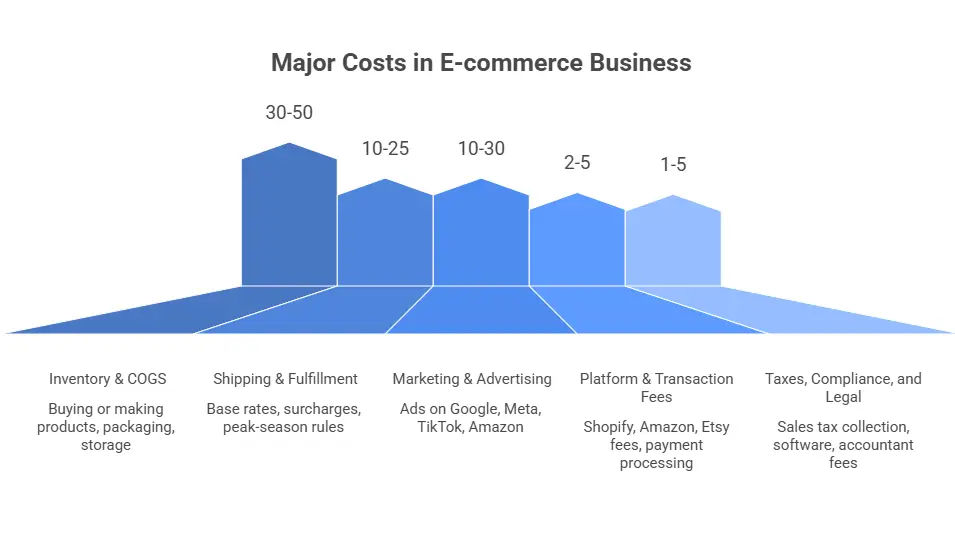
Now, here are the biggest e-commerce businesses’ costs for most online sellers. Top costs ranked by typical impact:
Inventory & COGS (Often 30–50% of Revenue)
This is usually your highest single cost. It includes buying or making products, packaging materials, and storage if you keep stock yourself. High product prices or too much stock tie up your cash fast. Material costs and supply chain problems still make prices higher for many sellers. Learn how to handle inventory accounting.
Pro tip: Find better suppliers. Buy in bulk when it makes sense. Use just-in-time ordering so extra stock does not sit around.
Shipping & Fulfillment (Often 10–25% of Revenue or $8–$15+ per Order)
Shipping has become one of the hardest expenses for online sellers. Here is why costs feel so high in 2026:
- Base rates from UPS, FedEx, and USPS increased by about 5.9% for 2026.
- Extra surcharges, size-based (dimensional weight) fees, and peak-season rules push real costs 8–20% higher than the headline increase.
- These hidden add-ons often surprise sellers and make budgeting difficult.
High shipping causes many shoppers to abandon carts. About 90% leave because of fees. Returns add extra shipping and handling costs, too.
Pro tip: Set a free shipping minimum. Use local carriers. Switch to third-party fulfillment to lower costs per order.
Marketing & Advertising (Often 10–30%+ of Revenue)
Ads on Google, Meta, TikTok, or Amazon become more expensive every year. This happens because of stronger competition and privacy changes. Many stores spend 20–40% just to get new customers. If your return on ad spend falls below 3–4 times, profits disappear quickly.
Pro tip: Build free traffic with SEO, email lists, and good content. Focus on products that give higher profit. Use retargeting to spend less on paid ads.
Platform & Transaction Fees (Often 2–5% of Revenue + Monthly Subscriptions)
This covers fees from Shopify, Amazon, or Etsy. It also includes payment processing like Stripe or PayPal at 2–3.5% plus small fixed fees per sale. Amazon added small extra fees per item in 2026 ($0.05–$0.30). These add up fast when you sell a lot. Shopify plans start at $39 per month and increase with add-ons.
Pro tip: Compare platforms every year. Use the platform’s own payment system to avoid extra fees. Or, choose the best financial software for your Amazon FBAbusiness, for instance. Ask for volume discounts when your sales grow.
Taxes, Compliance, and Legal (Often 1–5% of Revenue or $500–$5,000+ Yearly)
Taxes and compliance have become a bigger headache for online sellers. Here is why they feel so heavy:
- Sales tax collection rules keep changing across states and provinces (nexus thresholds are lower, and more places require registration). Sales tax nexus for e-commerce sellers is important.
- Tools like Avalara or TaxJar cost $100–$500+ per month for automatic calculations and filing.
- Accountant or legal fees add up for setup, audits, and electronic filing updates (CRA/IRS push more digital reporting).
These hidden costs surprise many sellers. They make budgeting harder and take time away from selling. Non-compliance can lead to penalties or back taxes.
Pro tip: Use sales tax software early. Track nexus carefully. Work with a good accountant to claim all deductions and stay compliant without overpaying. Gain information on U.S. sales tax requirements for Canadian sellers.
Other Notable Costs
These smaller ones can add 5–20% more to expenses as your store grows:
- Software, apps, and tools: $50–$500+ per month for premium features (email marketing, reviews, SEO, AI tools). Subscription creep from unused apps hurts fast.
- Fraud, chargebacks, and security: 1–3% of sales from disputes, payment fraud, and protection tools. Global e-commerce fraud losses are rising fast.
- Customer service and support: Payroll or outsourcing for handling inquiries, chats, and returns (especially with higher return rates).
- Inventory storage and warehousing: Fees if you manage your own stock (or shift to FBA costs).
Why Should E-commerce Businesses Track Expenses?
Tracking your expenses is one of the best things you can do for your online store. It helps you see the real picture and stop losing money quietly. With costs like shipping and ads rising fast, good tracking makes a big difference. Here are the main benefits:
- You know exactly where your money goes, no more guessing about marketing, shipping, or apps.
- You protect profit margins, catch small leaks like returns or subscriptions early to save 5–10% of revenue.
- You make smarter decisions, real numbers tell you when to cut ad spend, negotiate shipping, or drop unused tools.
- You prepare taxes easily and handle e-commerce accounting in 2026 better, organized records help claim all deductions and meet 2026 CRA/IRS electronic filing rules without stress.
- You improve cash flow and plan growth, clear in/out numbers let you invest in inventory, ads, or new products safely.
- Read More: “In-House vs Outsourced E-commerce Accounting”
Case Study: Toronto Shopify Seller Saves Thousands by Tracking Expenses1
A Toronto e-commerce owner near Queen West owns a Shopify store that sells custom candles and generates $280k in annual revenue.
Problem:
She focuses only on gross sales and Shopify revenue reports. She assumes detailed expense tracking is unnecessary until tax time and misses many small leaks that quietly reduce her profit.
What We Do:
We review her Shopify payouts, bank feeds, and ad platform reports. We set up proper expense categories in QuickBooks Online + A2X. We reconcile all 2025 transactions and create a monthly review checklist with automated alerts for unusual spikes in shipping or ad spend.
The Result:
The full expense picture becomes clear within one quarter. She identifies and fixes $9,400 in annual leaks (unused apps, overpaid shipping zones, low-ROAS ads). Her net profit margin rises from 11% to 18% without increasing sales. She now treats monthly expense reviews as routine and uses a simple dashboard to monitor costs in real time.
How to Track Expenses for Your Online Store Accurately?
It really doesn’t have to be complicated. Start small, build better habits over time, and the goal is simple: catch every single cost so nothing slips away.
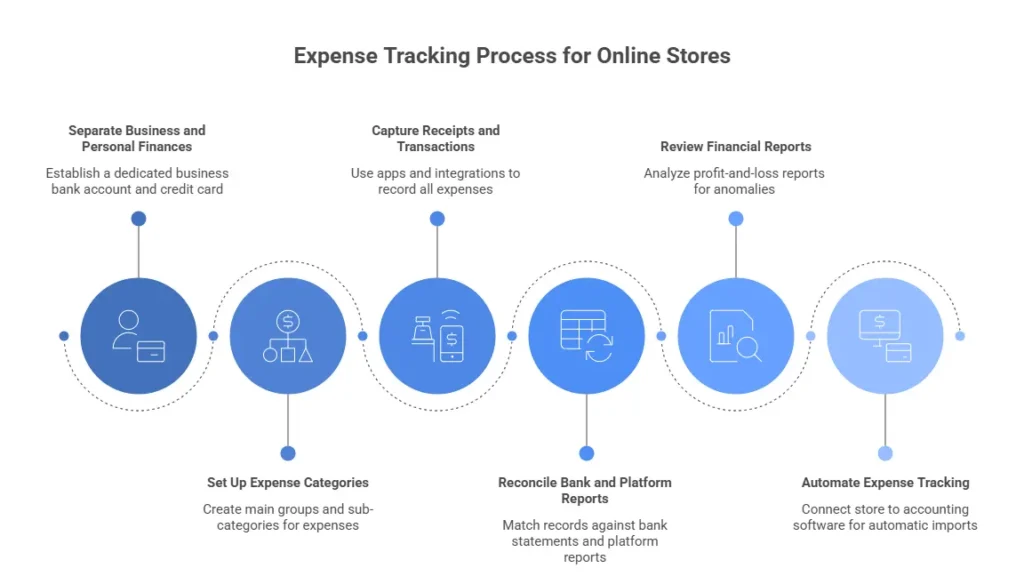
Separate Business Money from Personal Money
Get a dedicated business bank account and credit card. Use them only for store-related stuff. When personal and business money stay apart, everything becomes way easier to follow from day one. See how to open a US bank account as a Canadian.
Pro tip: Add a clear note in your accounting software or spreadsheet like “Business Only – No Personal Use” so you (and your bookkeeper) never mix transactions accidentally.
Set Up Clear Categories Right Away
Make main groups: fixed, variable, COGS. Then add useful sub-categories like shipping, ads, returns, and software subscriptions. Have a small business bookkeeping checklist ready. Most accounting tools let you create these in just a few minutes.
Pro tip: Use consistent names that match your platform reports (e.g., “Shopify Transaction Fees” instead of just “Fees”) to make reconciliation almost automatic.
Capture Every Receipt and Transaction
Use a phone app to scan paper receipts. Connect your bank, credit card, and sales platforms (Shopify, Amazon, PayPal, etc.). Once linked, payouts, fees, and sales flow in automatically.
Pro tip: Set up email forwarding rules so supplier invoices go straight to a dedicated folder or app inbox. This stops paper receipts from getting lost forever.
Reconcile Regularly
Match your bank statements and platform reports against your records every week or month. Spot any mismatch and fix it right away. That keeps your numbers trustworthy. Check out the Shopify payment reconciliation guide to learn more. Here are the two most important things to do:
- Reconcile soon after payouts hit your bank (usually every 3–7 days on Shopify or Amazon). Fresh errors are much easier to spot and correct.
- Use your software’s built-in reconciliation tool to mark cleared items. This prevents duplicates and flags problems quickly.
Review Reports Often
Pull up your profit-and-loss report once a month. Look for spikes in shipping, ads, returns, anything that looks off. Regular checks help you catch problems before they grow.
Automate Where Possible
Connect your store to accounting software so sales, fees, and payouts import themselves. Add receipt-scanning apps or simple bank rules to categorize expenses automatically. For example, automating your Shopify accounting is a great idea and helps you a lot.
Pro tip: Turn on “bank rules” in your software for recurring transactions (e.g., Shopify subscription = “Platform Fees – Fixed”). It learns once and saves you hours every month.
What Software Is Best to Track E-commerce Expenses?
The best tools for e-commerce expenses connect directly to your store, bank, and payment processors so sales, fees, payouts, and expenses import automatically. Choose the best eCommerce accounting software in 2026. Here are the top choices most sellers use:
- QuickBooks Online: Best for small to medium-sized stores. Connects to Shopify/Amazon, tracks inventory & COGS, scans receipts, tax-ready reports. Starts ~$30/month.
- Xero: Great clean interface and inventory tools. Multi-currency, bank rules, automatic Shopify/Amazon imports. $15–$80/month.
- FreshBooks: Ideal for solopreneurs or very small stores. Easy receipt scanning, simple reports, strong mobile app. ~$20–$60/month (basic COGS support).
- Expensify or Ramp: Perfect for real-time spend control (team or ad budgets). Company cards with approvals, auto receipt matching, integrates with QuickBooks/Xero. Often free with card or low per-user fees.
- A2X or Finaloop: Built for Shopify/Amazon sellers. Auto-reconciles payouts to sales/fees/refunds, clean entries to QuickBooks/Xero. $19–$200+/month by volume.
Pick one that matches your store size and start with a free trial. Connect your store first to see the time it saves.
Here is a quick comparison of the top e-commerce expense tracking tools:
| Software | Best For | Key Features | Pricing (approx.) | Best Integration |
| QuickBooks Online | Small to medium stores | Shopify/Amazon sync, inventory/COGS, receipt scan, tax reports | Starts ~$30/month | Shopify, Amazon |
| Xero | Clean interface, inventory focus | Multi-currency, bank rules, auto imports | $15–$80/month | Shopify, Amazon |
| FreshBooks | Solopreneurs / very small stores | Easy receipt scan, simple reports, mobile app | ~$20–$60/month | Basic Shopify/Etsy |
| Expensify / Ramp | Real-time spend control | Company cards, approvals, auto receipt match | Often free with card | QuickBooks/Xero |
| A2X / Finaloop | Shopify/Amazon sellers | Auto payout reconciliation, clean entries | $19–$200+/month (volume) | Shopify, Amazon, QuickBooks/Xero |
How to Reduce E-commerce Business Expenses?
You do not have to cut quality or slow growth to lower expenses. You just make smarter choices in the areas that hurt your margins most. Here are practical ways to cut the highest costs we talked about earlier:
Reduce Inventory & COGS Costs
Talk to suppliers and ask for better prices or volume discounts. Buy in bulk only for products that sell fast, so you avoid dead stock. Try dropshipping or print-on-demand for new items you want to test without risk. Check the dropshipping taxes in Canada to avoid extra cost.
Lower Shipping & Fulfillment Expenses
Set a free shipping minimum, like free over $75, to raise average order value. Use regional carriers or services like Pirate Ship for lower rates. Offer local pickup or cheap ground shipping to avoid expensive express options.
Cut Marketing & Advertising Spend
Marketing and ads often eat the biggest chunk of your budget, but you can lower costs without losing sales. Smart shifts to better channels, free organic traffic, and targeted ads make a real difference fast. Here are three simple ways to spend less while keeping revenue strong:
- Shift budget to high-ROAS channels and pause low performers weekly.
- Build an email list fast, send regular campaigns, and get free traffic after setup.
- Focus on retargeting and lookalikes instead of expensive cold ads.
Minimize Platform & Transaction Fees
Use the platform’s own payment processor, like Shopify Payments, to skip the extra 0.5–2% fees. Compare platforms every year. Some charge less when your sales grow. Ask for custom rates once your monthly volume hits certain levels. For example, you can try A2X for Shopify integration.
Decrease Returns & Refunds
Use better product photos, videos, size charts, and clear descriptions so customers know what to expect. Add a clear return policy and restocking fees for non-defective returns when rules allow. Offer exchanges instead of refunds to keep the money in your business.
Trim Other Notable Costs
Check software subscriptions every month and cancel apps you do not use. Add fraud detection tools early to stop chargeback losses. Outsource customer service only when order volume makes it worth the cost. Start with chatbots or FAQs.
If you look for more ways to cut down on your ecommerce expenses, contact our bookkeeping expert today.
Case Study: Mississauga Pet Supplies Seller Turns Red Months into Steady Profits2
A Mississauga entrepreneur runs a WooCommerce store that sells natural pet treats and accessories and generates $310k in annual revenue.
Problem:
She relied only on the WooCommerce dashboard and PayPal reports. She never tracked app subscriptions, ad fees, or shipping surcharges in detail. This caused missed charges and inefficient delivery zones, turning several months into losses despite steady sales.
What We Do:
We connected WooCommerce, Stripe, Google Ads, and bank statements to Wave (free accounting tool) with Zapier automation. We built custom categories for pet-specific costs. We ran a subscription audit and switched to Canada Post + ShipStation for better rate comparison.
The Result:
In five months she cut $10,900 in yearly waste (dropped unused plugins, paused low-ROAS Google ads, optimized packaging and regional zones). Monthly profit flipped from –$800 to +$3,200 average. She now uses Wave’s dashboard for weekly checks with automated alerts for categories over 12% of revenue.
- Read More: “WooCommerce Canada Tax Setup: GST/HST & QST Guide”
Final Thoughts
E-commerce brings rising costs and hidden leaks that quietly cut profits. Track every expense, categorize clearly, and review regularly. Start small, separate accounts, capture receipts, automate when ready, and margins improve. Consistent habits turn guesswork into confidence. You gain better cash flow, easier taxes, and room to grow.
f you need help with reconciliation, tax-ready books, or cost-cutting strategies, SAL Accounting is here for e-commerce sellers on Shopify, WooCommerce, Amazon, Etsy, and more. Contact us today.
FAQs: Expenses for E-commerce Businesses
Inventory/COGS (30–50%), shipping (10–25%), marketing/ads (10–30%+), platform fees (2–5% + monthly), returns (15–24%), software/apps ($50–$500+/month), fraud (1–3%), customer service, storage, taxes (1–5%).
Separate business and personal accounts. Set clear categories. Scan receipts and link bank + platforms. Reconcile weekly/monthly. Review profit & loss reports monthly. Use accounting software for automation.
QuickBooks Online, Xero, FreshBooks, Expensify/Ramp, A2X, Finaloop. They connect to Shopify/Amazon for automatic sales, fees, and payout imports.
Yes. Most business costs (inventory, shipping, ads, fees, software) are deductible in Canada and the US. Keep receipts. Talk to a tax pro for sales tax rules and 2026 filing.
Reconcile weekly or monthly. Check profit & loss reports monthly. Watch big categories (ads, shipping) weekly. Do full reviews every three months.
Set budgets per category (e.g., ads ≤20% revenue). Use zero-based budgeting. Add free shipping thresholds. Track actual vs. budget monthly. Adjust every quarter.
It finds hidden leaks (unused apps, bad ads, high returns). You fix them fast and save 5–10% of revenue. Better numbers help you cut waste and decide smart.
Shipping takes 10–25% of revenue and rises in 2026 (extra fees add 8–20%). High fees cause cart abandonment (up to 90%). Returns double the cost. Optimize rates and thresholds to save money and improve cash flow.