Starting a Shopify dropshipping store sounds simple: no warehouse, no upfront stock, and suppliers ship for you. But yes, you can start dropshipping on Shopify by choosing a niche, adding supplier products, setting up payments, and testing orders before launch. The global dropshipping market was valued at USD 365.67 billion in 2024, but the tricky part is knowing your real profit.
In this SAL Accounting post, we’ll cover setup, suppliers, automation, inventory, taxes, accounting, and bookkeeping.
Before pricing your products, use the Shopify Fee Calculator to see what you may actually keep after fees.
Quick Takeaways
- Shopify dropshipping lets you sell products without buying inventory upfront.
- Your supplier stores, packs, and ships the product after a customer orders.
- You still need to manage supplier stock, shipping times, refunds, and customer expectations.
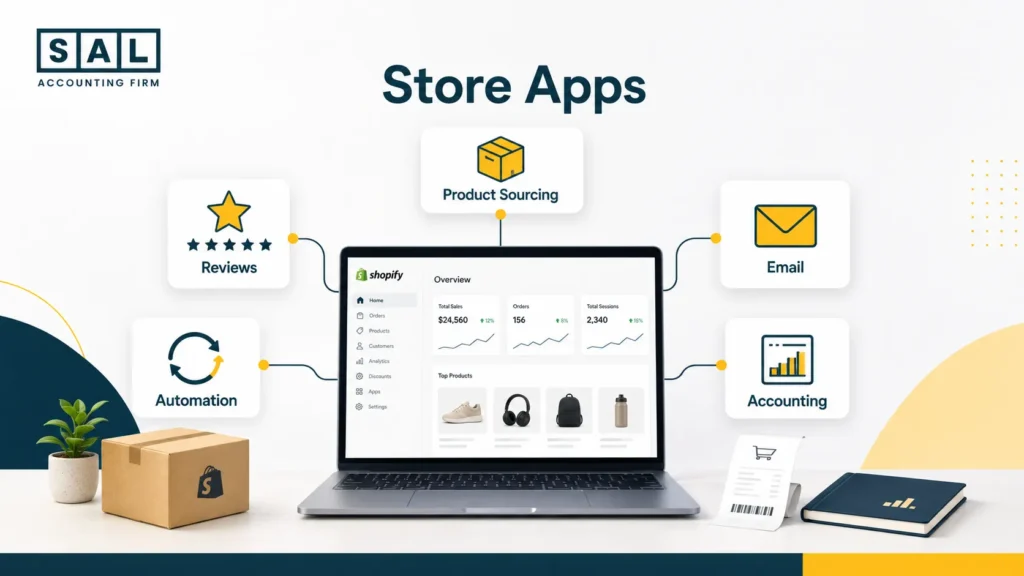
- Shopify apps can help with product imports, order automation, reviews, email, and accounting.
- Shopify sales are not the same as profit.
- Clean bookkeeping from the beginning makes it easier to see which products are actually working.
If Shopify is your main sales channel and the numbers are already starting to feel hard to trust, accounting support for Shopify stores can help you see what your store keeps after product costs, fees, refunds, and taxes.
What Is Shopify Dropshipping and How Does It Work?
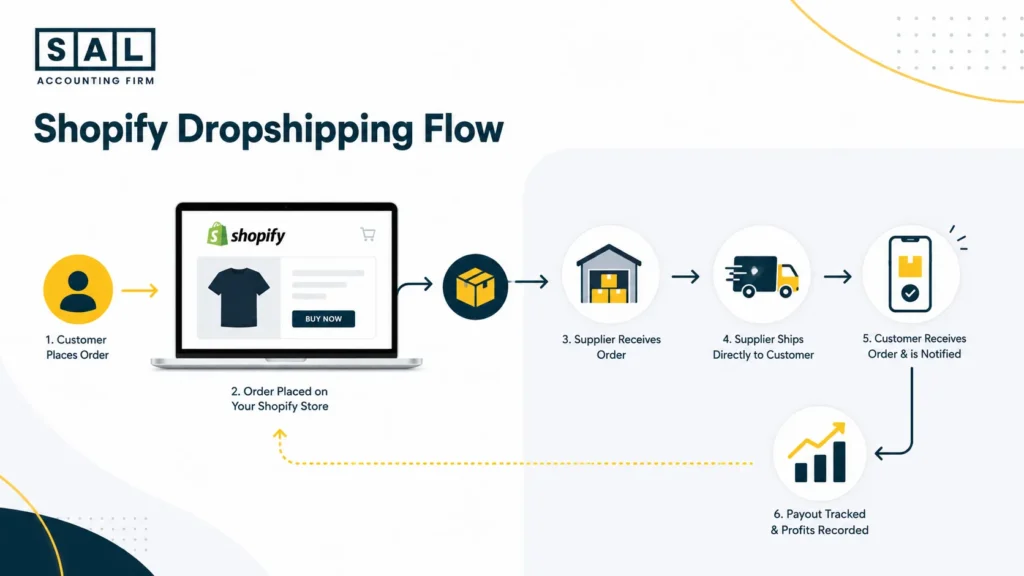
Shopify dropshipping is a way to sell products online without storing or shipping those products yourself. Here’s the simple version:
- A customer buys from your Shopify store.
- Your store sends the order to a supplier.
- The supplier ships the product to the customer.
- You keep the difference between the selling price and the real cost of the order.
Shopify explains that dropshipping lets sellers sell products without handling inventory or shipping, while suppliers fulfill orders directly to customers through the dropshipping model. That sounds simple, but you still run the business.
- You choose the products.
You set the prices.
You handle the customer experience.
You track the numbers.
Basically, dropshipping removes the warehouse, not the responsibility.
If you’re brand new to online selling, it helps to understand the basics of starting an ecommerce business before you add suppliers, apps, sales tax, and payouts into the mix.
How to Start Dropshipping on Shopify Step by Step
You do not need a perfect store on day one. You need a clean setup that lets you test products properly.
1. Choose a Clear Niche
Start with one clear audience. For example:
- Pet owners
- Home office workers
- New parents
- Fitness beginners
- Beauty buyers
- Small apartment renters
A niche keeps your store focused. It also makes your product pages, ads, emails, and SEO content easier to write. Instead of selling random trending products, choose a group of buyers and solve a specific problem for them.
2. Research Products Before You Add Them
A product should make sense after costs. Look for products that are:
- Easy to explain
- Easy to ship
- Not too fragile
- Not too heavy
- Not heavily regulated
- Backed by reliable supplier reviews
- Priced with enough room for profit
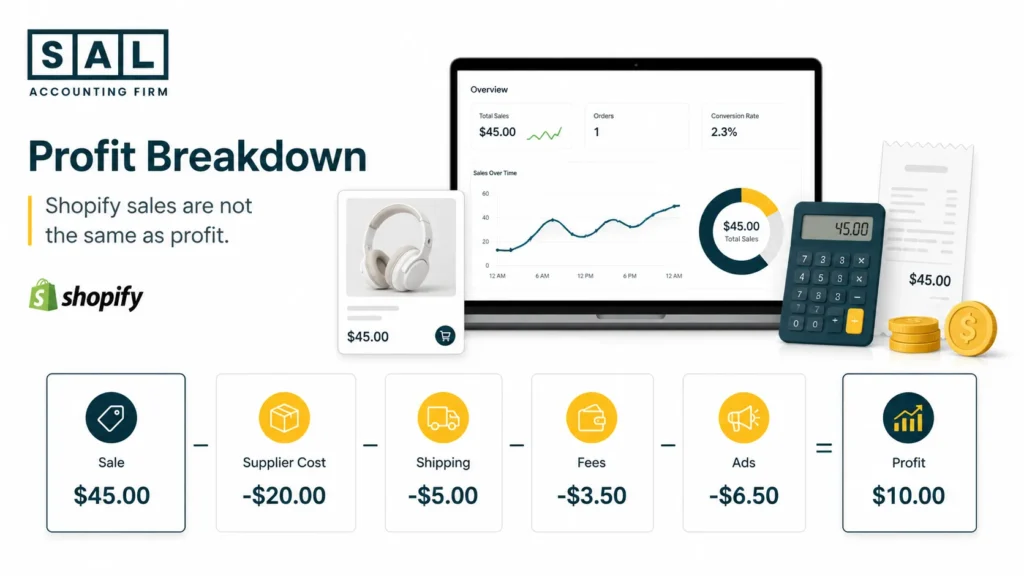
Pro Tip: Before you import a product, run the numbers as if you already made a sale. If the margin only works before ads, shipping, fees, and refunds, it probably is not a safe product to scale.
Here’s a simple Shopify dropshipping product margin example:
| Cost Item | Example Amount | What It Means | Beginner Check |
| Selling price | $45 | Customer pays this | Is price realistic? |
| Supplier cost | -$14 | Product cost | Compare suppliers |
| Shipping | -$6 | Delivery cost | Avoid thin margins |
| Platform/payment fees | -$2 | Shopify/payment cost | Estimate early |
| Ads | -$10 | Marketing cost | Track per sale |
| Estimated profit | $13 | Before tax/apps | Margin still works? |
A $45 sale looks good until you see what is left after costs. That is why product research should include the numbers, not just demand.
For Shopify sellers, this connects closely to cost of goods sold reporting, because supplier costs need to match what was actually sold.
- Also read: “How to Track COGS for Shopify Stores”
3. Create Your Shopify Store
Once you know your niche and first products, create your Shopify store. Shopify lists current plan details on its pricing page, so check that before you build your startup budget. You’ll usually need:
- Store name
- Domain
- Theme
- Homepage
- Product pages
- About page
- Contact page
- Shipping policy
- Refund policy
- Privacy policy
- Terms of service
Keep it simple. A clean store with clear product pages usually beats a busy store with too many distractions. If you’re still comparing plans, the choice often comes down to features, transaction costs, and expected sales volume. That is where a breakdown of Shopify pricing in Canada can help you avoid guessing.
4. Install a Dropshipping App
A dropshipping app connects your Shopify store to suppliers.
These apps can help you:
- Import products
- Sync supplier stock
- Send orders to suppliers
- Update tracking
- Manage product variants
- Change suppliers when needed
Common tools include DSers, Spocket, Zendrop, CJdropshipping, AutoDS, Printful, and Printify. DSers describes its Shopify app as a tool for one-click product listing, bulk ordering, automated order syncing, real-time tracking, and supplier optimization through its Shopify App Store listing.
You do not need every app at once. Start with the tools that solve real problems in your store. A bigger list of Shopify dropshipping apps can help when you are ready to compare options, but the first goal is to keep your setup easy to manage.
5. Connect Suppliers and Place a Test Order
Your supplier has a huge impact on your customer experience. Before you sell a product seriously, place a test order. Check:
- How long delivery takes
- Whether tracking works
- What the packaging looks like
- Whether the product matches the photos
- Whether quality feels acceptable
- Whether instructions are clear
- Whether the supplier communicates quickly
This step is easy to skip, but it can save you from refunds later. If your supplier sends poor-quality products to you, they will probably send poor-quality products to your customers too.
Pro Tip: Order the product yourself before selling it heavily. Photos, tracking, packaging, and delivery speed all look different when you experience the order like a real customer.
6. Set Up Payments, Shipping, and Taxes
Before launch, make sure customers can pay, shipping times are clear, and taxes are set up properly.
- Payments: Choose Shopify Payments, PayPal, or another supported provider. Keep in mind that payouts may include sales, fees, refunds, and adjustments.
- Shipping: Match your shipping policy to your supplier’s real delivery times. If delivery takes 8 to 12 business days, say that clearly.
- Taxes: Shopify can help calculate taxes, but Shopify says tax is still the merchant’s responsibility through Shopify tax tools.
- GST/HST: Canadian sellers should watch the CRA’s GST/HST small supplier guidance. This is also where Shopify GST/HST rules start to matter as sales grow.
7. Test the Full Customer Flow
Before launch, place one test order. Make sure:
- Checkout works
- Payment works
- Shipping appears correctly
- Taxes appear correctly
- The order reaches your supplier
- Tracking updates come back
- Confirmation emails send properly
This is not just a tech check. It is also a bookkeeping check. If the order, payout, tax, fee, and supplier cost do not flow clearly from the beginning, it gets harder to clean up later.
How to Choose Products and Suppliers for Shopify Dropshipping
The right product is not just something that looks popular. It needs to be sellable, shippable, and profitable. A good beginner product usually has:
- Clear demand
- Simple use case
- Good photos
- Low damage risk
- Reasonable shipping time
- Enough margin after costs
- Reliable supplier reviews
- Low refund risk
Supplier quality matters just as much. A poor supplier can create problems even when the product itself is good. Late shipping, wrong variants, missing tracking, and weak packaging all turn into customer service work for you.
When checking suppliers, look at:
- Processing time
- Warehouse location
- Tracking reliability
- Product reviews
- Return policy
- Support response time
- Backup supplier options
For Canadian sellers who plan to sell into the US, shipping can affect both the customer experience and the cost side of the business. Cross-border delivery, customs, and duties can matter, so it is worth understanding cross-border ecommerce shipping before you scale a product.
Best Shopify Dropshipping Apps for Beginners
Shopify apps can save time, but too many apps can also make the store harder to manage. Start with the basics.
| App Category | Example Tools | Main Use | Beginner Note |
| Product sourcing | DSers, Spocket, Zendrop | Import products | Start with one |
| Print-on-demand | Printful, Printify | Custom products | Good for branding |
| Reviews | Loox, Judge.me | Build trust | Add after launch |
| Email marketing | Klaviyo, Shopify Email | Recover carts | Keep flows simple |
| Accounting | QuickBooks, Xero, A2X | Track payouts | Set up early |
The best app stack depends on your store. A pet product store, print-on-demand store, and beauty dropshipping store may all need different tools.
This is why Shopify integrations should be chosen around the problem they solve, not because every other store uses them.
For accounting, A2X says its Shopify app syncs payout data into QuickBooks Online, Xero, Sage, or NetSuite and separates transaction types such as sales, fees, taxes, refunds, and gift cards through its Shopify App Store listing. That matters because a Shopify payout is rarely just one clean sales number.
If you are comparing accounting tools, a list of accounting software for Shopify sellers can help you think through what needs to connect before the numbers get too busy.
- Also read: “Best Shopify Dropshipping Apps” .
How Inventory Management and Automation Work in Shopify Dropshipping
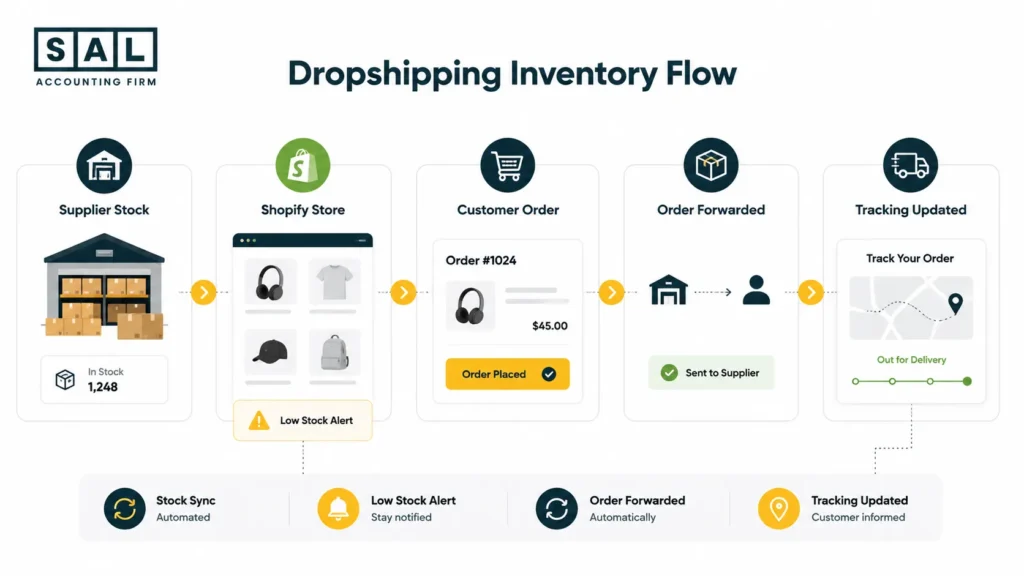
Dropshipping means you do not store products yourself. But it does not mean inventory stops mattering. If your supplier runs out of stock and your Shopify store still shows the product as available, customers can buy something you cannot ship. That creates:
- Canceled orders
- Refunds
- Support emails
- Delayed fulfillment
- Unhappy customers
- Messy sales reports
Automation helps, but it still needs checking. A good dropshipping setup should help with:
- Supplier stock syncing
- Product import
- Order forwarding
- Tracking updates
- Price updates
- Low-stock alerts
- Variant management
This is where ecommerce automation tools can save time, especially once orders move beyond manual tracking. But automation does not replace judgment.
If a product keeps going out of stock, shipping late, or creating refunds, it may not be worth keeping. For Shopify stores, this also connects to inventory accounting, because product costs, stock movement, refunds, and sales should not be floating around separately.
Case Study: How Daniel in Port Credit, Mississauga Fixed Supplier and Inventory Issues1
Daniel runs a Shopify dropshipping store from Port Credit in Mississauga, selling pet travel products to customers across Canada and the US. His store starts getting steady orders, but a few best-selling items keep going out of stock without warning. Customers are placing orders for products the supplier cannot ship, and Daniel has to send refund emails instead of tracking updates. The store is not failing, but the supplier setup is making it harder to trust what Shopify shows.
The Problem
Daniel is relying on one supplier and not checking stock changes often enough. Some products still look available on Shopify even when the supplier has delays or low inventory. That creates canceled orders, frustrated customers, and refund records that are hard to match later.
What We Do
We help Daniel build a simple weekly inventory check. Best-selling products are reviewed first, backup suppliers are added where possible, and unreliable products are flagged before they create more refund issues. We also make sure supplier costs and refunds are tracked clearly, so Daniel can see whether each product is still worth selling after delays, stock gaps, and customer refunds.
How to Track Shopify Dropshipping Profit, Accounting, and Bookkeeping
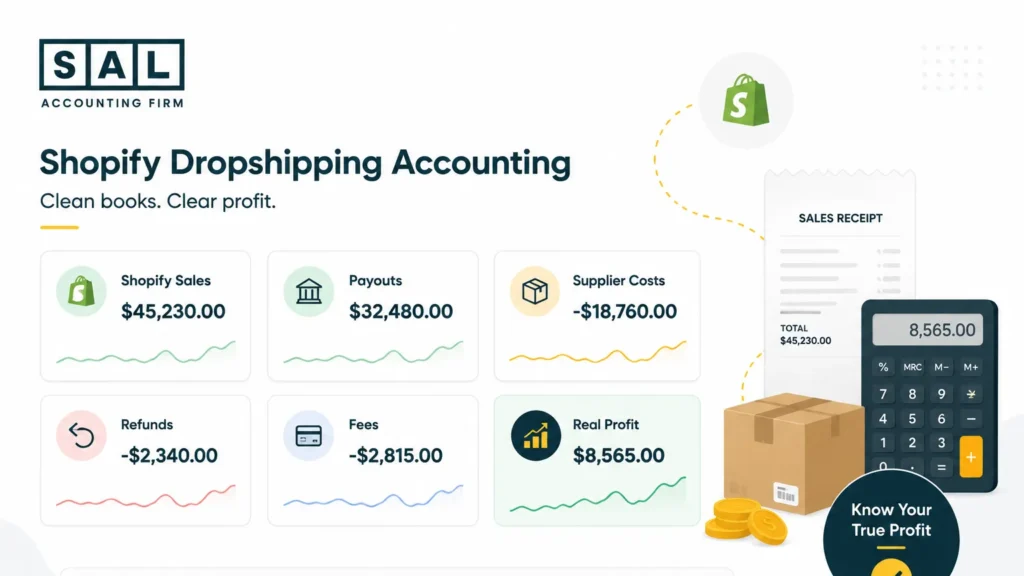
Your Shopify dashboard may show sales, but sales are not profit. Let’s say your store shows $10,000 in sales this month. Here’s what might be happening behind that number:
| Profit Line | Monthly Example | Why It Matters | What to Check |
| Shopify sales | $10,000 | Top-line sales | Not profit |
| Supplier costs | -$3,200 | Product cost | Match to orders |
| Shipping costs | -$1,100 | Fulfillment cost | Watch increases |
| Platform/payment fees | -$450 | Selling cost | Reconcile payouts |
| Refunds/chargebacks | -$600 | Lost revenue | Track by product |
| App subscriptions | -$250 | Monthly tools | Avoid app creep |
| Ads | -$2,400 | Customer acquisition | Check ROAS |
| Estimated profit | $2,000 | Before tax | Review monthly |
Now the picture looks different. The store is still making money, but it is not making $10,000. It is making closer to $2,000 before tax and other costs. Basically, you need to track the full path from sale to payout. That includes:
- Gross sales
- Discounts
- Refunds
- Payment fees
- Shopify fees
- Supplier costs
- Shipping costs
- Ad spend
- App subscriptions
- Tax collected
- Bank deposits
This is where Shopify payment reconciliation matters. The issue is not just what sold. It is what happened between the customer payment, Shopify payout, supplier charge, and bank deposit.
Many beginners also mix up sales, payouts, and profit. That is one of the most common ecommerce accounting mistakes because it makes the business look better or worse than it really is. Use this simple Shopify dropshipping bookkeeping checklist to keep the main numbers clean:
| Bookkeeping Area | What to Track | Tool/Source | Why It Matters |
| Shopify sales | Gross sales | Shopify reports | Shows activity |
| Payouts | Bank deposits | Shopify Payments | Matches cash |
| Supplier costs | Product/shipping | Supplier invoices | Shows margin |
| Fees | Platform/payment fees | Shopify/A2X | Avoids overstated profit |
| Refunds | Refunds/chargebacks | Shopify reports | Spots issues |
| Ads | Spend by channel | Meta/TikTok/Google | Checks profit |
| Apps | Subscriptions | App invoices | Controls costs |
| Taxes | Collected/payable | Shopify/accounting | Keeps records clean |
If you use QuickBooks, the way Shopify connects can affect how clean your numbers look. A proper Shopify QuickBooks integration can make payouts, fees, refunds, and taxes easier to review.
For Xero users, the same idea applies. A clean Shopify Xero integration helps stop Shopify activity from turning into one messy bank deposit.
Pro Tip: Review profit by product, not just total store sales. One product can bring in revenue but still lose money once ads, supplier costs, refunds, and app costs are included.
A2X can also be part of that setup. The main benefit of A2X for Shopify is that it helps break payouts into clearer summaries instead of forcing you to untangle every sale manually.
Case Study: How Maya in Liberty Village, Toronto Cleaned Up Her Shopify Dropshipping Numbers2
Maya runs a small Shopify dropshipping store from Liberty Village in Toronto, selling home office accessories to Canadian and US customers. At first, the store looks healthy because Shopify shows steady sales every week. But when she checks the bank account, the deposits never seem to match what Shopify shows. Between supplier costs, payment fees, refunds, ad spend, and app subscriptions, she cannot tell which products are actually making money.
The Problem
Maya is treating Shopify payouts as income. Fees, refunds, taxes collected, and supplier costs are getting mixed together. The store looks profitable on the surface, but she does not have a clear product-by-product view of what is actually left after costs.
What We Do
We separate Shopify sales from payouts, then break out supplier costs, shipping, refunds, payment fees, ad spend, and app costs. Instead of looking only at what hits the bank, we help Maya see the full picture: what sold, what it cost, what Shopify paid out, and what profit was left. Once that setup is clear, she can decide which products to keep, which ads to slow down, and which supplier costs need a closer look.
If your store has already moved past the testing stage, ecommerce bookkeeping can help you clean up the gap between platform sales, supplier payments, refunds, and bank deposits.
Shopify Dropshipping Taxes for Beginners
Taxes depend on where your business is located, where your customers are, what you sell, and whether you have crossed registration thresholds. So keep this section as a starting point, not personal tax advice. For Shopify dropshipping, think about three areas.
Income Tax
If your store earns profit, that profit may be taxable. That means you need clean records for:
- Sales
- Supplier costs
- Shipping costs
- Ads
- App subscriptions
- Payment fees
- Refunds
- Professional fees
- Other business expenses
Many of these may connect to ecommerce tax deductions, but the records need to be clean enough to support them.
Tax Checks for Canadian Shopify Dropshipping Sellers
If you sell from Canada, tax usually comes down to two main checks:
- GST/HST in Canada: As taxable sales grow, the CRA’s small supplier rules start to matter. You can also use the GST/HST Refund Calculator for ecommerce stores to get a clearer starting point before sales tax gets harder to track.
- US sales tax: If you sell to US customers, state rules may depend on nexus. The Sales Tax Institute’s economic nexus thresholds show how rules vary, and US sales tax requirements can still matter even without a US warehouse.
Dropshipping adds one more layer because suppliers, customers, and platforms may sit in different places. That is why dropshipping taxes in Canada are worth checking before the store grows.
- Also read: “GST/HST Return Filing in Canada”
Common Shopify Dropshipping Mistakes to Avoid
Most dropshipping mistakes are common and fixable. The goal is not to make you feel behind. It is to help you know what to check before the problem gets bigger. Here’s a simple way to think about the most common Shopify dropshipping mistakes:
| Mistake | What Happens | Why It Hurts | Better Move |
| No stock checks | Supplier runs out | Canceled orders | Review weekly |
| Weak margins | Costs eat profit | Scaling loses money | Price with costs |
| One supplier | No backup | More delays | Add alternatives |
| Sales = profit | Numbers look wrong | Bad decisions | Track full costs |
| Too many apps | Costs pile up | Lower profit | Install slowly |
| Late bookkeeping | Messy records | Tax stress | Review monthly |
Now, let’s break those down simply.
Mistake 1: Thinking “No Inventory” Means No Stock Tracking
You do not hold inventory, but your supplier does. If their stock is wrong, your store can still sell a product that cannot be shipped.
Mistake 2: Choosing Products Without Checking Margins
A product can sell and still lose money. Always check supplier cost, shipping, ads, fees, refunds, and app costs before scaling.
Mistake 3: Relying on One Supplier
One supplier can work at the beginning, but backup options matter.If the supplier runs out or changes shipping times, your customers still expect answers from you.
Mistake 4: Treating Shopify Sales as Profit
Shopify sales are only the starting number. Your actual profit depends on what is left after supplier costs, shipping, fees, refunds, ads, apps, and taxes.
Mistake 5: Ignoring Refunds and Chargebacks
Refunds are not just a customer service issue. They are also a product and bookkeeping signal. A high refund rate may point to poor product quality, unclear descriptions, slow shipping, or weak supplier performance.
Refunds should also match your policy clearly. If your policy is vague, a practical Shopify refund policy can reduce confusion for both you and your customers.
Mistake 6: Installing Too Many Apps Too Early
Apps can help, but each one adds cost and complexity. Before installing another app, ask:
- What problem does this solve?
- Will I use it weekly?
- Does it overlap with another app?
- Will it slow the store down?
- How will it show up in my books?
Mistake 7: Waiting Until Tax Time to Organize the Books
Tax season is much easier when your records are already clean. A simple ecommerce tax season checklist can help you keep supplier costs, Shopify payouts, refunds, and expenses organized before everything piles up.
For monthly routines, a Shopify month-end close checklist can also keep the store from becoming messy one payout at a time.
Final Thoughts on Starting Shopify Dropshipping
Shopify makes dropshipping easier to start, but the store still needs structure behind it. You need reliable suppliers, clear product margins, honest shipping expectations, clean automation, and bookkeeping that shows what your store actually keeps after costs.That is the difference between “we made sales” and “we understand the business.”
If you are setting up a Shopify dropshipping store and want a clearer sense of what needs to be tracked, fixed, or organized next,contact SAL Accounting.