
We help online sellers pick the best ecommerce accounting software. It automates reconciliations, makes compliance easy, and increases profits on platforms like Amazon, Shopify, and Etsy. Did you know 82% of small businesses fail due to cash flow problems? Online sellers often face hidden fees, delayed payouts, and inventory mistakes in spreadsheets.
In this 2026 guide from SAL Accounting, we look at these common issues and share easy ways to fix them. We review the top accounting software for ecommerce sellers. You discover their features, pricing, integrations, and how they keep your business safe.
Quick Takeaways
- Best overall for most ecommerce sellers: QuickBooks Online + A2X for seamless Amazon and Shopify automation.
- Top choice for international sellers: Xero excels at multi-currency and VAT/GST compliance.
- Best free/low-cost options: Wave (completely free) or Zoho Books (free under $50K revenue).
- Biggest time-saver: Automated payout reconciliation cuts manual bookkeeping by 70-80%.
- Essential for growth: Accurate inventory and fee tracking reveal true product profits fast.
What’s the Best eCommerce Accounting Software in 2026?
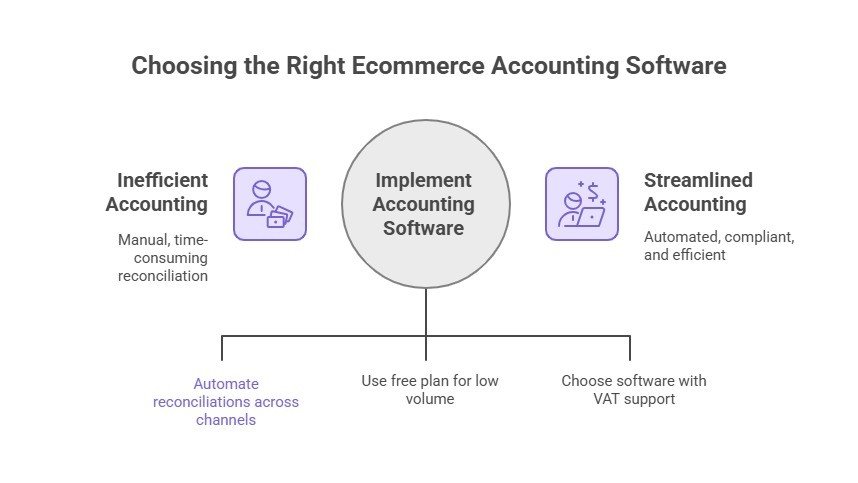
No single tool fits everyone. The top picks for online sellers today focus on automation, support for multiple sales channels, and solid tax handling, including VAT and sales tax.
- Multi-platform sellers: Pair QuickBooks Online with A2X or Link My Books (starts around $120/month combined). They automate reconciliations across Amazon, Shopify, Etsy, and others. This cuts manual work a lot.
- Budget-friendly option: Wave offers a free core plan. It suits lower-volume sellers (under $50K a year). You handle imports manually, and it skips built-in inventory tracking.
- International and VAT-focused: Xero stands out. It supports multi-currency and handles global compliance smoothly, perfect for cross-border sales.
Pick one based on your sales volume, channels, and growth stage. The right tool in addition to professional e-commerce accounting services protects your profits and makes compliance easier. Keep reading for detailed comparisons and recommendations.
Why Is Accounting Software for Online Sellers Necessary?
Online selling creates tricky money tracking. Regular tools fall short. Dedicated accounting software makes a real difference for ecommerce sellers. For example, accounting tools for Shopify sellers make a big difference in their success.
- You sell on Amazon, Shopify, Etsy, and more. Each platform uses different fees, refunds, and payouts. Many sellers waste hours on manual fixes. Automation cuts that time sharply.
- The US has over 13,000 tax jurisdictions with changing rates. Without automation, you face risks of errors and lost time.
- Poor tracking leads to lost or damaged stock. Retail averages show shrinkage around 1.6% of inventory value. This cuts into profits.
- Tools like Xero handle multi-currency conversions and global taxes with ease.
- Dedicated software creates custom categories for fees, shipping, and commissions. Generic tools miss these.
Imagine you run a $200K Shopify store. Spreadsheets overlook hidden fees and tax details. You lose time and invite errors. But, Shopify integrations for e-commerce will save your time and money. The right accounting software matches your selling style. It saves hours and stops costly mistakes.
Case Study: How a Toronto Amazon Seller Recovers $27,000 in Missing Fees
The Problem: A Toronto-based Amazon seller contacts us feeling frustrated. His business generates $1.2M in yearly sales (mostly to Canadian and US customers), yet his profits keep dropping despite growing volume.
What We Do: We see this often with Canadian sellers—hidden Amazon fees quietly eat margins. We connect his account to QuickBooks Online and A2X. The software quickly reveals Amazon has raised fees on 15 products without clear notice. Even bigger: it uncovers $27,000 in overcharges that never appear in Amazon’s standard reports.
The Result: We help him recover the full $27,000. More importantly, he gains clear visibility into true product profitability. He drops 7 underperforming items and doubles down on winners, boosting overall profits by 4.3%. “I finally understand what’s really happening in my business,” he says. At $139/month, the software pays for itself many times over.
➜ Read more: “E-Commerce Taxes in Canada Made Simple: Types, Tips & Strategies”
Top 10 Accounting Software for E-Commerce in 2026
We’ve reviewed popular accounting tools and picked seven solid options for online sellers. Each one fits different needs, like business size, budget, platforms, or international taxes. No single tool works for everyone. Your best pick depends on your setup. Here’s a clear breakdown to help you choose:
1. QuickBooks Online

QuickBooks Online dominates with over 85% of the small-business accounting market globally in 2025, with a strong U.S. lead—85.58% of its users are American, per 6sense. It’s a favorite for its powerful eCommerce tools and top-notch support, saving users an average of 5.4 hours a week over manual bookkeeping services.
Key Features
- Tracks sales, fees, and shipping from Amazon and Shopify separately.
- Makes Amazon FBA bookkeeping easy and sorts fees (storage, fulfillment, referral) automatically.
- Shows profit by sales channel.
- Updates inventory and costs in real time.
- Manages sales tax across thousands of zones.
- Creates inventory and tax reports.
Pricing
Pricing starts around $38/month (Simple Start). Plus, best for ecommerce inventory, runs about $115/month. Advanced hits $275/month for top analytics.
Best For
Small to medium online businesses earning $100K to $5M yearly. It’s perfect if you’re growing and need software that connects to multiple platforms while keeping taxes and finances clear.
🌟 Pro Tip: Try QuickBooks’ class tracking to split Amazon Handmade and FBA sales—it shows which channel’s really paying off.
➜ Read More: “Shopify Integration with QuickBooks: Automation & Reconciliation for Your Store”
2. Xero
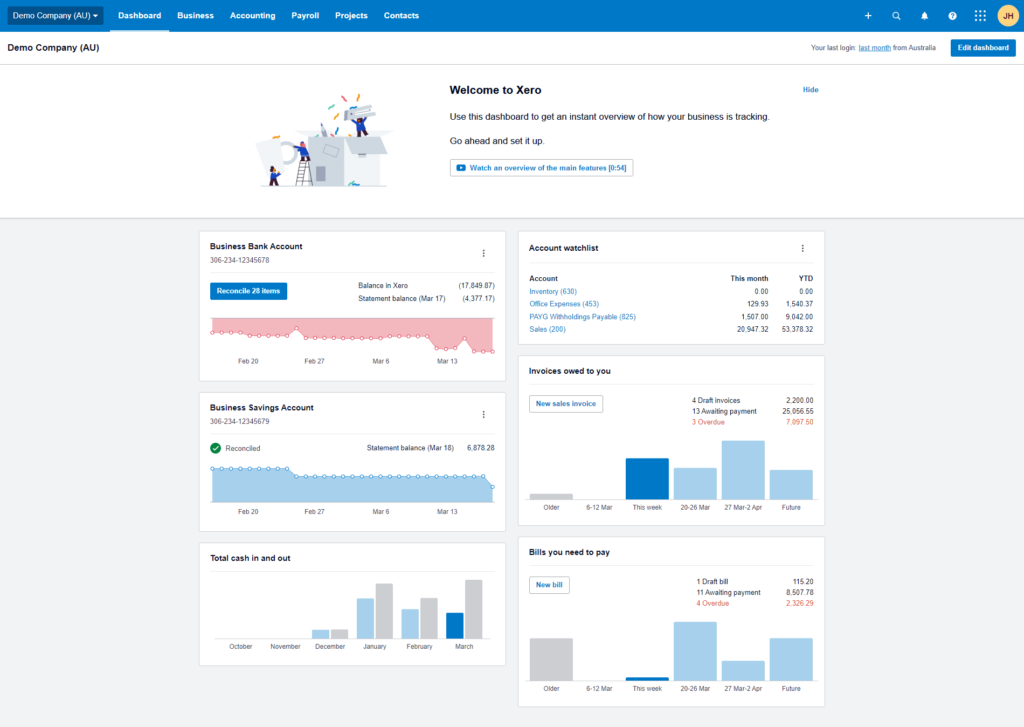
Xero’s got a fresh, easy-to-use design and rocks for sellers going global. It’s built to handle international accounting without the headache. Check out the guide on Shopify integration with Xero for more.
Key Features
- Records sales even with delayed marketplace payouts.
- Handles VAT/GST and tax codes worldwide.
- Converts currencies accurately.
- Offers eCommerce-ready account categories.
- Supports inventory valuation with audit trails.
- Builds sales channel reports.
Pricing
Basic plans begin at $20/month. The Growing tier covers most needs at roughly $47/month. Established adds multi-currency for around $80/month.
Best For
Any size business selling internationally. It’s a gem if you deal with multiple currencies or need VAT/GST sorted across countries, making it perfect for Shopify stores accounting with international customers.
Pro Tip: Use Xero’s tracking categories to see which products make the most cash across your sales channels—super handy no matter where they sell.
Case Study: How a Toronto Etsy Crafter Avoids a Tax Disaster
The Problem: Sarah’s Etsy jewelry shop in Toronto jumps from $45K to $380K in one year. She contacts us worried about sales tax. She has never tracked what she owes across multiple US states and Canadian provinces.
What We Do: We see this often with fast-growing Canadian sellers. We quickly set her up with Xero to track taxes by jurisdiction. Our team helps her get permits and set up payment plans. We create a simple system for her to handle all the different tax rules.
The Result: Sarah pays $12,300 in back taxes. We get most late fees waived, saving her over $31,000. Now she spends just 30 minutes a month on taxes. “What I thought might sink my business is now no big deal,” she says.
➜ Read more: “EIN for Canadian Companies: Why It’s Needed and How to Apply”
3. Zoho Books
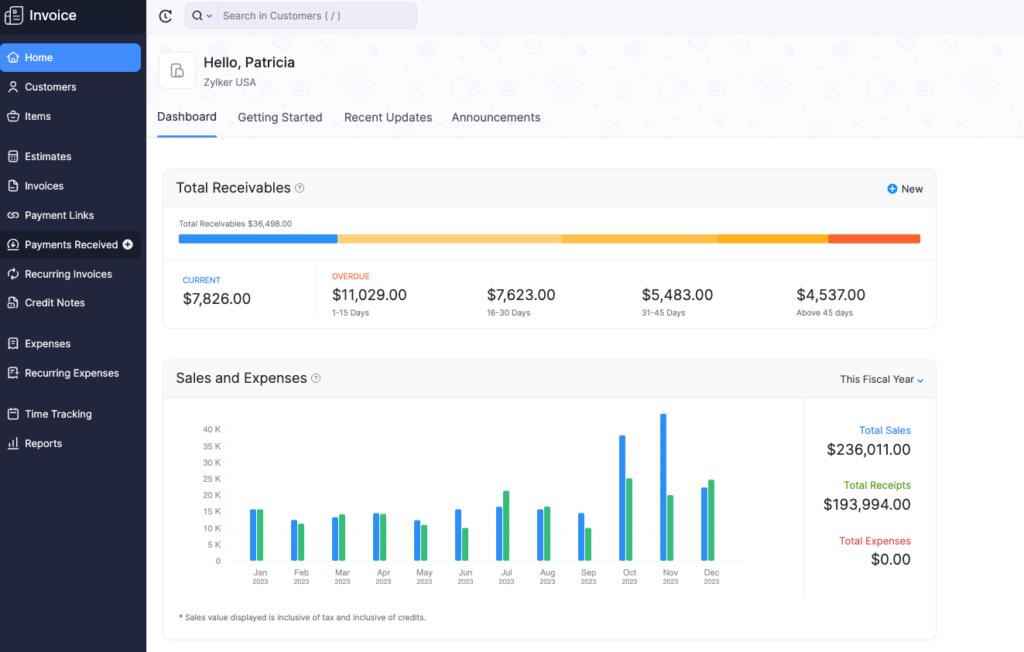
Zoho Books is a steal, especially if you’re already using Zoho tools. Bonus? It’s free if your business makes under $50K a year.
Key Features
- Classifies sales from different marketplaces with custom fields.
- Tracks inventory costs accurately.
- Adjusts for multiple currencies automatically.
- Updates inventory on your balance sheet.
- Reports sales tax by location.
- Tracks product launch costs.
Pricing
Free for under $50K revenue. Standard kicks off at $20/month. Professional, with better inventory, costs about $50/month.
Best For
Growing eCommerce businesses wanting value—especially Zoho fans looking for an affordable, solid option.
🌟 Pro Tip: Zoho’s custom reports can break down product profits, even with shifting shipping costs—great for dropshippers dealing with delivery ups and downs.
➜ Read More: “E-commerce Withholding Tax Guide on Amazon, Etsy, and Shopify”
4. Wave Accounting
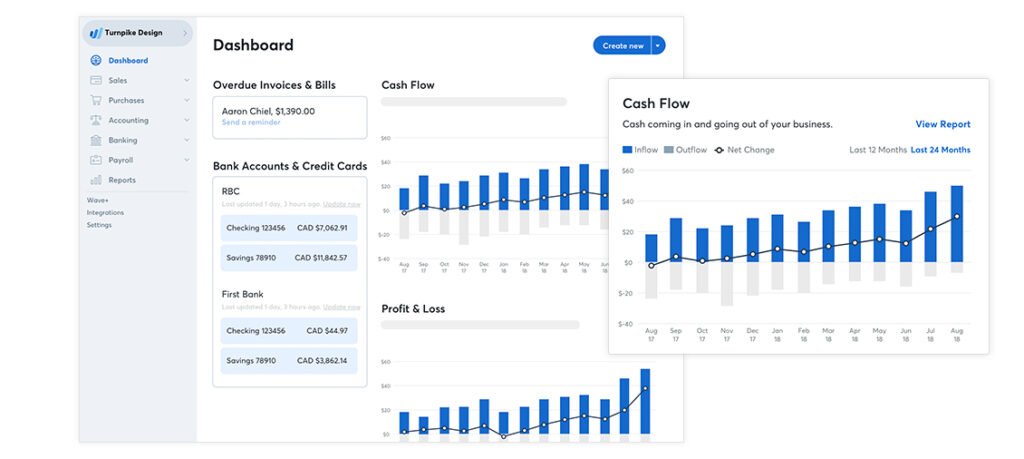
Wave is a total freebie that still gets the job done for small sellers. With over 4 million users worldwide, it’s a real deal for those watching their wallet.
Key Features
- Uses double-entry accounting for proper entries.
- Customizes categories for platform expenses.
- Sorts income and expenses by channel.
- Makes profit/loss and balance sheets.
- Imports sales via CSV files.
- Tracks basic sales tax.
Pricing
Core accounting and invoicing stay free. Pro add-on for extras like receipt scanning is around $19/month. Transaction fees apply for payments.
Best For
New eCommerce sellers under $50K yearly or single-platform users. It’s a smart starting point before you need fancier tools.
🌟 Pro Tip: Save your platform’s monthly statement as a CSV and set up a Wave template. It takes just 15 minutes a month to input.
➜ Read more: “A Guide to Withholding Taxes Under the U.S.-Canada Tax Treaty”
5. FreshBooks

FreshBooks keeps it simple with an easy interface. With 30 million users globally, it’s a hit for small sellers, especially those mixing products and services.
Key Features
- Pulls sales data from Shopify and WooCommerce.
- Calculates product costs for profit.
- Matches payment deposits to sales.
- Splits revenue and shipping in profit/loss reports.
- Tracks sales tax collection and payments.
- Includes time tracking for services.
Pricing
Lite starts at $19–20/month (limited clients). Plus offers unlimited clients for $33–38/month. Premium reaches about $60/month.
Best For
Small sellers under $200K yearly—perfect for solo entrepreneurs or those blending products with services.
🌟 Pro Tip: Use FreshBooks’ project tracking to tally up new product launch costs (think development, photos, marketing) for a clear ROI.
6. A2X

A2X is all about linking your eCommerce platforms to your accounting system. Over 12,000 businesses trust it to nail marketplace payout tracking, especially vital for Amazon sellers accounting.
Key Features
- Matches payout entries to the right sales period.
- Splits Amazon settlements (revenue, fees, refunds).
- Records unpaid sales accurately.
- Categorizes complex FBA fees.
- Handles multi-currency payouts.
- Syncs with QuickBooks or Xero.
Pricing
Plans start at $29/month for low volumes. Mid-volume sellers typically pay $49–79/month as orders grow.
Best For
Sellers on multiple channels like Amazon and Shopify who need spot-on settlement accounting. You can integrate Shopify with A2X and stay away from headaches.
🌟 Pro Tip: Use A2X’s historical import to fix past Amazon sales data—gold if you’re prepping for audits or investors.
➜ Read more: “How to File Your U.S. Tax Return While Living in Canada”
7. Sage 50cloud

Sage 50cloud brings heavy-duty inventory accounting for growing eCommerce businesses. It’s a champ for sellers with tricky stock or multiple setups.
Key Features
- Tracks landed costs (shipping, duties, imports).
- Manages serial/lot tracking for high-value items.
- Separates sales channels or warehouses.
- Records inventory moves accurately.
- Handles multi-company transactions.
- Delivers audit-ready financials.
Pricing
Pro begins around $50–60/month (annual billing). Premium adds forecasting for about $80+/month. Higher tiers scale up from there.
Best For
Mid-sized eCommerce businesses ($500K-$5M) with complex inventory, multiple entities, or strict accounting rules—especially those with physical products.
Pro Tip: Use Sage’s departmental accounting to make profit/loss statements per sales channel—clears up which platforms are worth your focus.
8. Link My Books
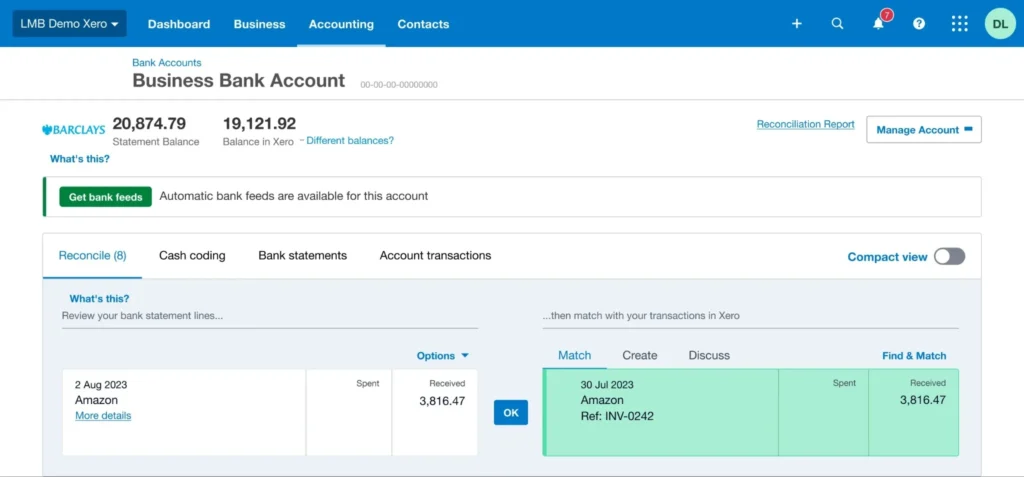
Link My Books makes payout reconciliation easy for sellers on many platforms. It sends clean data straight to your accounting tool.
Key Features
- Splits settlements from Amazon, Shopify, eBay, Etsy, and others.
- Handles VAT/GST and multi-currency payouts.
- Creates simple entries that match your bank deposits.
- Imports old data to fix past records.
- Shows basic reports for each sales channel.
- Lets your accountant view everything easily.
Pricing
Starts around $39/month for low order volumes. Popular plans for mid-size sellers run $79–99/month. Price grows with orders and channels.
Best For
Sellers on multiple platforms who want accurate automation. Great for Amazon, Shopify, or Etsy stores.
Pro Tip: Link all your marketplaces from the start. It groups data neatly so you quickly see which channels make the most profit.
➜ Read More: “Best Accounting Practices for Shopify Stores”
9. Synder
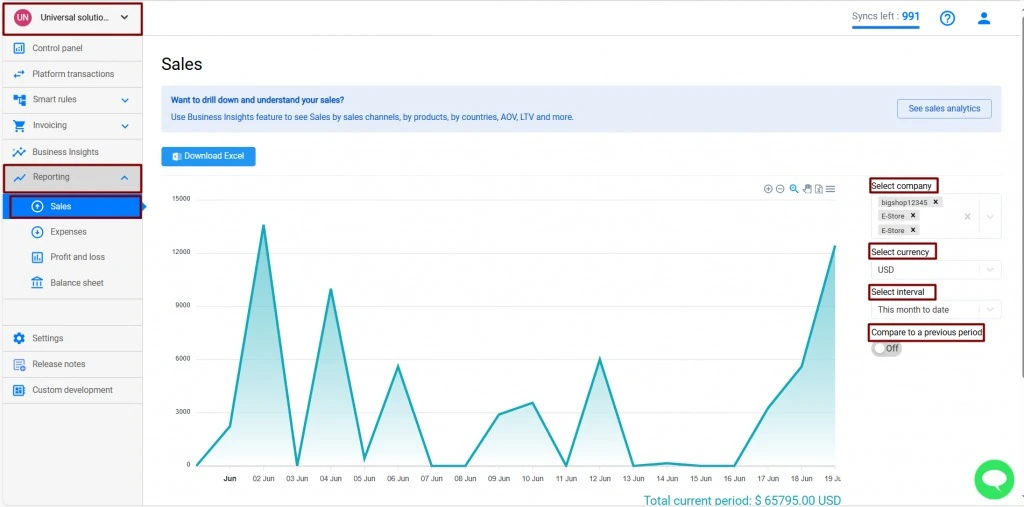
Synder pulls sales and payment data in real time from many platforms. It keeps your books accurate with little manual work.
Key Features
- Connects over 30 sources like Amazon, Shopify, Stripe, PayPal, and Square.
- Tracks fees, refunds, taxes, and cost of goods automatically.
- Updates inventory and product costs.
- Gives reports for each sales channel.
- Works with multiple currencies and spots duplicates.
- Lets you undo transactions if needed.
Pricing
Starts around $52/month for smaller sellers. Higher plans go up to $220/month based on transactions.
Best For
Growing sellers using many platforms and payment methods. Perfect if you want real-time sync with QuickBooks, Xero, or Sage. Automate your e-commerce account like Shopify to make everything efficient.
Pro Tip: Turn on detailed transaction mode. It helps you spot issues fast and build clear growth reports.
10. NetSuite
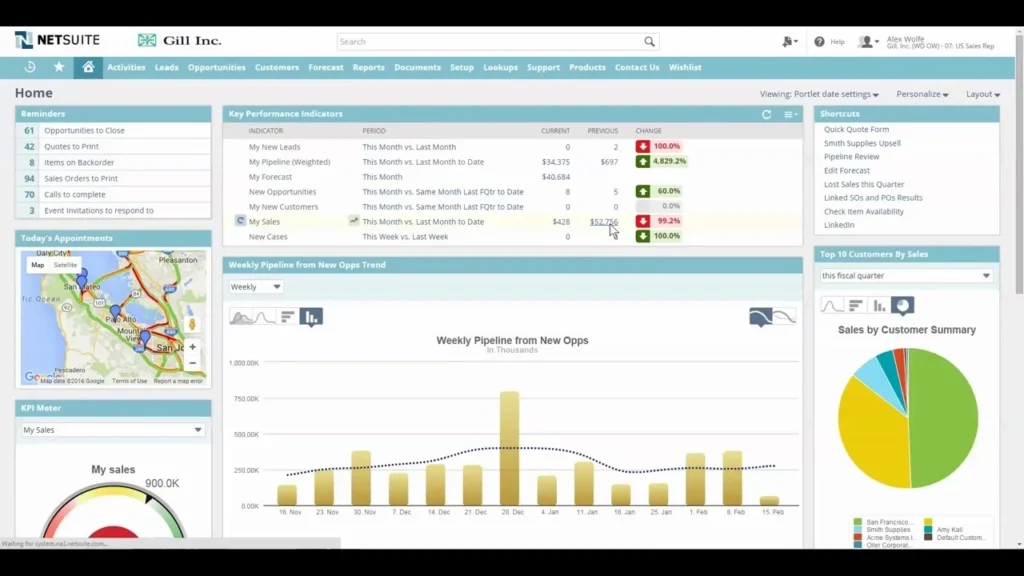
NetSuite is a complete cloud system that handles accounting, inventory, and orders all in one place. It works well for bigger businesses.
Key Features
- Manages orders, stock, and finances across channels.
- Supports multiple companies, currencies, and countries.
- Calculates full landed costs.
- Runs warehouse and fulfillment tasks.
- Offers custom dashboards and forecasts.
- Includes built-in CRM tools.
Pricing
Custom quotes only. Base often starts around $999/month plus $99 per user. Total cost usually $1,000–$10,000+ monthly.
Best For
Larger online stores ($5M+ revenue) that need one powerful system for everything.
Pro Tip: Add the ecommerce module early if you have your own website. It keeps stock and orders in sync without extra tools.Read More: “Best Shopify Dropshipping Apps to Automate, Scale, and Simplify Your Store”
Quick Comparison of Top Accounting Tools for Online Sellers
Here’s a simple side-by-side view to help you pick the right one for your business:
| Tool | Starting Price | Standout Features | Main Integrations | Inventory | Best For |
| QuickBooks Online | ~$38/month | Fee breakdowns, channel profits | Amazon, Shopify, A2X | Strong | Growing stores ($100K–$5M) |
| Xero | ~$20/month | VAT/GST, clean reports | A2X, platforms | Solid | Cross-border sellers |
| Zoho Books | Free (<$50K)/~$20/mo | Product profits, taxes | Shopify, Zoho | Lot tracking | Budget growth |
| Wave | Free | Simple bookkeeping | CSV | Basic | Startups (<$50K) |
| FreshBooks | ~$19–20/month | Easy invoicing | Shopify, Woo | Light | Solo/service sellers |
| A2X | ~$29/month | Payout reconciliation | QBO, Xero | Via tool | Multi-platform |
| Sage 50cloud | ~$50–60/month | Landed costs, stock detail | Third-party | Advanced | Complex inventory |
Note: Prices shown are entry-level—costs go up as your business grows. Feature availability varies by pricing tier.
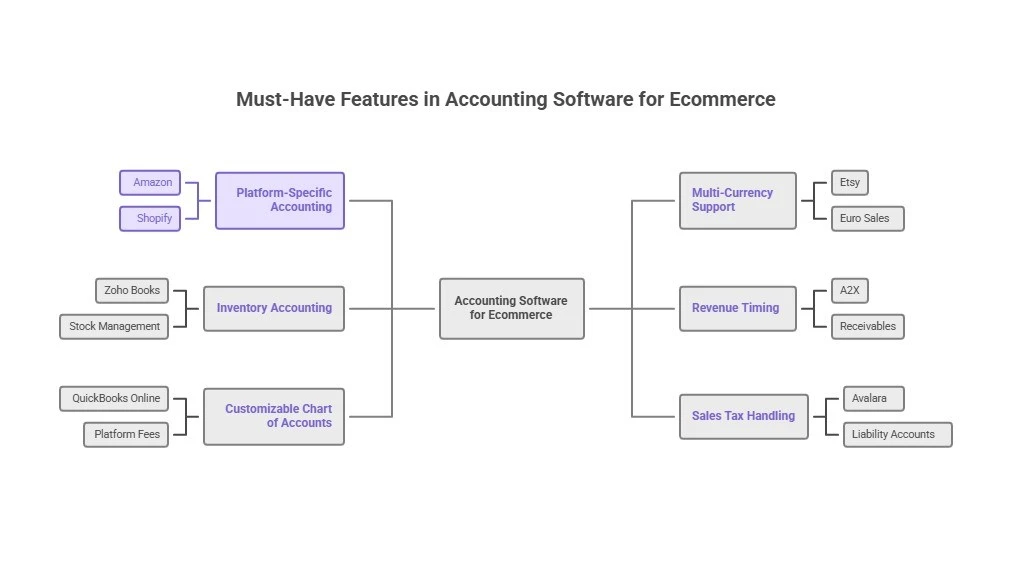
Must-Have Features in Accounting Software for Ecommerce
The right ecommerce accounting software delivers features that keep your books accurate and your decisions informed. Here’s what matters most:
Platform-Specific Accounting
You want software that nails sales from Amazon, Shopify, and other platforms, splitting out sales, fees, shipping, and taxes automatically. For those selling in multiple countries, you’ll need to consider tax implications of working remotely in Canada for a US company to avoid compliance issues
Example: A2X takes an Amazon payout and sorts it into sales, referral fees, FBA costs, and refunds—saving you hours of manual work.
Multi-Currency Support
If you sell internationally, your software must manage different currencies, tracking exchange rates and gains or losses.
Example: Xero logs your Euro Etsy sales, converts them to dollars at payout, and shows any profit or loss from the swap.
Inventory Accounting
Good software adjusts your inventory value on your balance sheet and tracks costs when you sell.
Example: Zoho Books adds stock to your assets when it arrives and cuts it when sold, keeping your finances real.
Revenue Timing
Marketplace payouts often come days or weeks after sales. Your software should log revenue when it’s earned, not paid, with receivables for pending payments.
Example: A2X records a $10,000 Amazon sale in June (even if paid July 2nd) and ties it up when the cash hits.
Customizable Chart of Accounts
Standard accounting categories don’t fit eCommerce. You need slots for platform fees, shipping, and channels tailored to eCommerce.
Example: QuickBooks Online lets you set up “Amazon FBA Fees,” “Shopify Charges,” and “Etsy Costs” for clear profit breakdowns.
Sales Tax Handling
With thousands of U.S. tax zones, it’s got to track taxes as liabilities (not income) and record payments. It is good to now that 44% of sellers get audited, so this matters.
Example: QuickBooks with Avalara sets up a liability account per state, logging taxes collected and paid to keep you safe.
➜ Read more: “6 E-Commerce Accounting Errors That Could Cost You Thousands“
How to Choose Your eCommerce Accounting Tool
Finding the right software comes down to five simple factors:
Business Size & Needs
Your annual sales determine which tools fit your budget:
- Under $50K: Wave or Zoho Books (free) cover the basics
- $50K-$500K: QuickBooks Plus ($90/mo) or Xero Standard ($42/mo)
- $500K-$5M: QuickBooks Advanced ($200/mo) + A2X ($49/mo)
- Over $5M: Sage 50cloud ($187/mo) for larger operations
Selling Platforms
Each marketplace needs specific accounting solutions:
- Amazon: A2X handles FBA fees and payout tracking
- Shopify: QuickBooks connects directly; add A2X for fees
- Etsy: FreshBooks or Xero track materials and costs
- Multi-Channel: Pair QuickBooks or Xero with A2X
Inventory Needs
Your product setup affects which software works best:
- Dropshippers: FreshBooks or Wave (no inventory needed)
- FBA Sellers: QuickBooks Plus tracks warehouse values
- High-SKU: Zoho Books or Sage manage lots and costs
- Manufacturing: Sage 50cloud tracks materials and production
Tax Complexity
Your tax obligations determine your software needs:
- Single-State: Any tool works (record tax as liability)
- Multi-State: QuickBooks with Avalara handles many states
- International: Xero manages VAT/GST across countries
Our Cross-border tax expert can ensure proper compliance; always the safest option.
Budget Reality
Good accounting is an investment, not an expense:
- Startup: Free tools like Wave cover basics
- Growth: Spend 1-2% of revenue on accounting tools
- Scaling: Clean books help secure better financing
🌟 Pro Tip: Choose software with solid basic accounting over fancy features.
Case Study: How a Toronto Shopify Dropshipper Scales with Confidence
The Problem: Mike runs a Toronto-based Shopify store selling fitness gear, hitting $75K monthly. He contacts us frustrated: “I see sales coming in, but I have no idea which products actually make money after ads, fees, and everything else.”
What We Do: We work with many dropshippers and know this issue well—ad costs often hide true profitability. We set him up with Zoho Books and track advertising spend by product. We create simple reports that show clear profit per item.
The Result: Mike drops 12 losing products and focuses on his 5 top performers. Sales rise only 15% in three months, but profits jump 78%. Better cash flow visibility also helps him negotiate supplier discounts, adding another 8% to margins. “That $30 a month for Zoho is easily the best money I spend,” he says now.
➜ Read more: “Best Bookkeeping Tools for Small Business Owners in Canada“
Conclusion: Set Up Your eCommerce Business for Success
The right eCommerce accounting software in 2025 builds a foundation to protect your business and drive growth—not just crunch numbers. With 82% of small businesses failing over cash flow and tax penalties averaging $18,000, solid accounting is a must-have, not a maybe.
Tools like QuickBooks, Xero, or Zoho Books turn bookkeeping into an edge. Need more? SAL Accounting delivers expert eCommerce bookkeeping to keep your books audit-ready and profits high.
Act now, contact us and secure your success!
FAQ: Your eCommerce Questions Answered
Depends on needs: QuickBooks Online + A2X/Link My Books for multi-channel sellers. Xero for international/VAT. Zoho Books for value and growth. Wave for free basics under $50K revenue.
A2X or Link My Books—they automate payouts, split fees/taxes/refunds precisely, and sync cleanly with QuickBooks or Xero.
Use connectors like A2X, Link My Books, or Synder. Add bank feeds, auto-rules, and recurring templates. This reduces manual work by 70-80%.
Yes—platform reports don’t provide proper entries, custom categories, or full statements required for taxes, decisions, and separating finances.
QuickBooks excels at inventory and U.S. sales tax. Xero leads in multi-currency and global compliance.
Wave offers free double-entry with flexible categories (great under $50K). Zoho Books has a free tier under $50K with ecommerce extras.
It sets up liability accounts per jurisdiction, calculates rates automatically, records collections as liabilities, and produces audit-ready reports.
Ranges from free (Wave/Zoho under $50K) to $20–115/month for core tools like Xero or QuickBooks. Add-ons like A2X start at $29/month. Total often $50–200/month for growing sellers.