We want to make getting your business tax ID super easy, whether it’s an EIN in the US or a Business Number in Canada, so you can grow without stress or paperwork headaches. You may not know that over 532,000 new business applications hit in January 2026 (up 7.2% from the month before), yet many skip a proper tax ID. That one mistake can block your bank account, delay payroll, or trigger IRS/CRA penalties.
Lots of people think their personal SSN is enough. It usually isn’t. We at SAL Accounting will walk you through what it is, why you probably need one, the differences between EIN and BN, and the quick steps to get it online. Keep reading.
Quick Takeaways
- A business TIN is your official tax ID — EIN in the U.S. and BN in Canada — and you usually cannot open a bank account or run payroll without it.
- Both numbers are free and issued instantly online if you qualify; avoid third-party sites that charge fees.
- Apply after your business is legally formed to prevent rejections or mismatched records.
- Save your confirmation letter immediately because it is your only official proof for banks, taxes, and payment platforms.
- If you operate in both the U.S. and Canada, you need two separate IDs since one number does not work across borders.
What Is a TIN for Business and Why Do You Need It?
A Tax Identification Number (TIN) is a unique number the government gives your business to track taxes and money stuff. In the US, people usually call it an Employer Identification Number (EIN), and the IRS hands it out. In Canada, it’s a Business Number (BN) from the CRA. It works the same way a Social Security Number works for you personally, but for your company. Here’s why you really need it:
- You need it to open a business bank account (banks almost always ask for it).
- You need it when you hire employees or contractors so you can handle payroll taxes correctly.
- You need it to file your business taxes, claim deductions, and sign up for sales taxes like GST/HST in Canada.
- Vendors, payment apps (Stripe, PayPal, etc.), and people who give out licenses usually want to see it.
- It helps you look professional and stay out of trouble with the tax rules.
If you’re just starting out, turning freelance work into a real business, or setting up shop in the US or Canada from another country, grab this number early. Without it, things like opening an account or paying people can get stuck for weeks. You can get expert help from our US-Canada cross-border tax accountant for this.
TIN for Business in the US vs Canada: What’s the Difference in 2026?
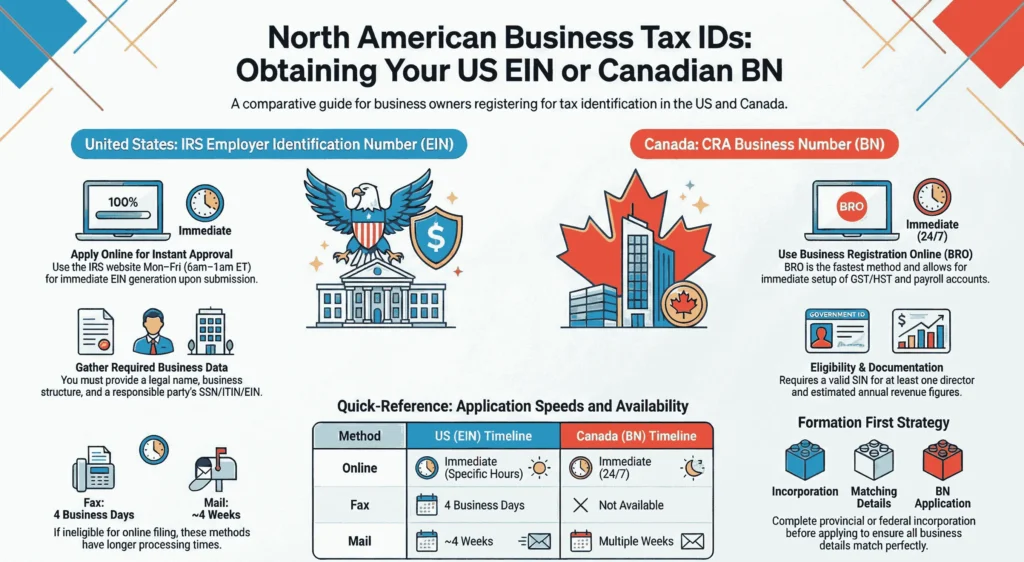
The table below compares the US Employer Identification Number (EIN) and the Canadian Business Number (BN) clearly and quickly. Both act as your business’s main tax ID, but they work differently depending on the country.
| Aspect | US – EIN | Canada – BN | Key Difference |
| Issued by | IRS | CRA | Different tax agencies |
| Format | 9 digits (XX-XXXXXXX) | 9 digits + program codes (e.g., RT0001) | BN includes suffixes |
| Main purpose | Tax ID, banking, payroll, hiring | Central ID for GST/HST, payroll, imports | BN bundles multiple accounts |
| Application time | Immediate online (if eligible) | Immediate online via BRO | Both fast |
| Free? | Yes | Yes | Both free |
| Online method | IRS online tool | BRO via My Business Account | Different portals |
| Sales tax / GST/HST | State-level only | RT account required > $30,000 revenue | Canada has federal GST/HST |
| Non-residents | Fax/mail/phone (not online) | Non-resident form or mail RC1 | Restricted online for non-residents |
Pro Tip: The EIN is the main business TIN in the US. The BN does a similar job in Canada but bundles extra accounts together. If you work in both countries, you need two separate numbers. There’s no one number that works for both.
How to Apply for a TIN for a Company in the US (EIN Application USA)
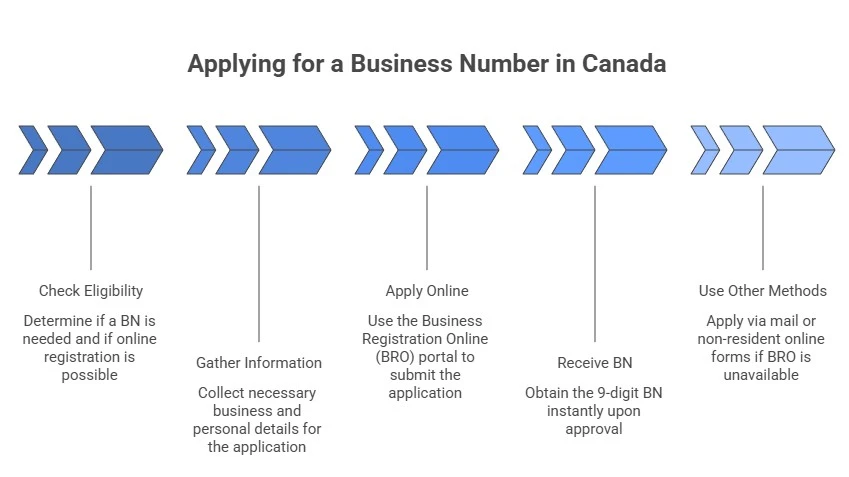
The EIN is your main business tax identification number in the US. The IRS gives it out for free. Most people get it online quickly if they qualify. Follow these steps below to get yours in just a few minutes:
1. Check If You Qualify for the Online Tool
Your principal place of business or legal residence must be in the US or its territories. The responsible party (the person who controls the business) needs a valid SSN, ITIN, or existing EIN. International applicants (no US principal place) can’t use it online. You must be the responsible party or have signed authorization if you’re a third-party designee. Check how to get an EIN for Canadian companies.
2. Gather Your Required Information
Collect everything before you begin so you can move through the form without stopping. Below are the things you need:
- Legal business name (use only letters, numbers, hyphens, ampersands with no special symbols).
- Business type (sole prop, LLC, corporation, partnership, etc.).
- Business address and start date.
- Responsible party’s name and SSN/ITIN/EIN.
- Expected number of employees.
- Reason for applying (like new business, banking, or hiring).
Pro Tip: Form your entity first (like file LLC papers with your state) to avoid problems. Choose the best structure between LLC, LLP, and S Corporation.
3. Apply Online (The Fastest Way)
Head to the official IRS website and look for the option to “Apply for an EIN online” under the small business or self-employed section. The online tool is available during these hours:
- Monday–Friday: 6:00 a.m. – 1:00 a.m. ET (next day)
- Saturday: 6:00 a.m. – 9:00 p.m. ET
- Sunday: 6:00 p.m. – 12:00 a.m. ET
Complete the form in one session; no saving allowed. It times out after 15 minutes of inactivity. Answer the questions step by step and submit. If approved, you get your EIN immediately on screen. It is one of the US sales tax requirements for Canadian sellers.
Pro Tip: Save or print the confirmation letter (CP 575) right away. It’s your official proof. A written copy mails in about 2 weeks.
4. Use Other Methods If Needed
If the online tool isn’t available to you (like if you’re outside the US or run into technical issues), the IRS still lets you apply through fax, mail, or phone. These methods take longer than online, but they work reliably. Here’s exactly what to do:
- Fax Form SS-4 to 855-641-6935 (US applicants; about 4 business days if you include a fax-back number).
- Mail Form SS-4 to: Internal Revenue Service, Attn: EIN Operation, Cincinnati, OH 45999 (about 4 weeks).
- International applicants: Call 267-941-1099 Monday–Friday, 6:00 a.m.–11:00 p.m. ET, or fax/mail Form SS-4.
Pro Tip: Only one EIN per responsible party per day. Stick to official IRS sites; the process is always free. Watch out for scam sites that charge fees.
- Read More: “Form T1134 Guide for Canadians Owning U.S. LLCs“
How to Apply for a TIN for a Company in Canada (Business Number Canada)
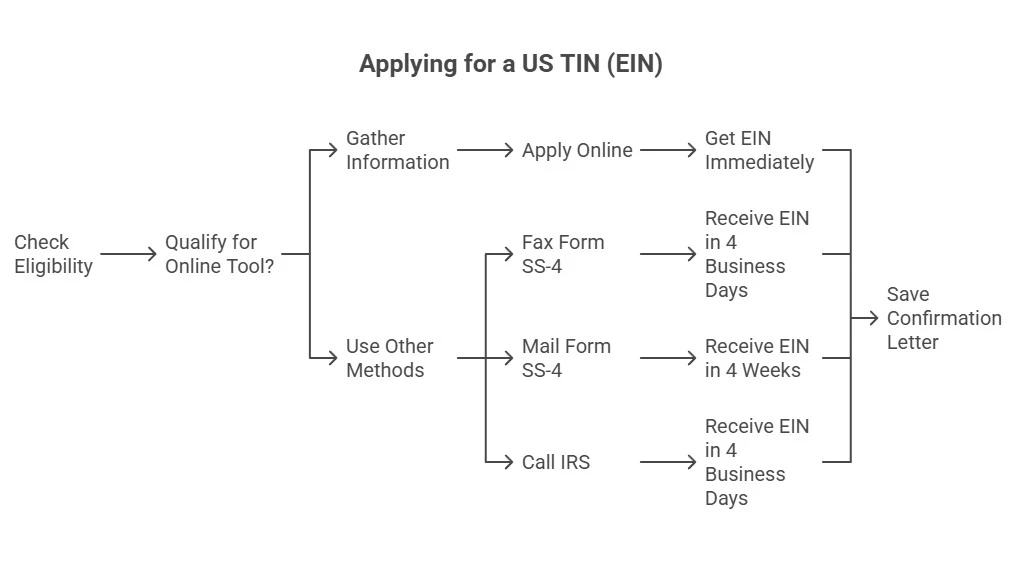
A TIN for a company in Canada is called a Business Number (BN). The Canada Revenue Agency (CRA) issues it for free. Most people get it online quickly through Business Registration Online (BRO). Phone registration ended on November 3, 2025. You must use it online now. Follow these steps below to get yours fast.
1. Check If You Need a BN and Qualify for Online Registration
You need a Business Number (BN) from the CRA in these common situations:
- You incorporate a business (Check corporate tax deadlines for Canadian businesses)
- You hire employees and handle payroll
- You collect GST/HST (required once revenue exceeds $30,000 per year)
- You import or export goods
- You use other CRA programs (like certain tax credits or excise taxes)
For online BRO registration, Canadian residents generally need a valid SIN (temporary SINs starting with 9 included). At least one director/owner typically needs a Canadian SIN. Non-residents or those without SIN access should use the CRA non-resident online form (if available) or mail paper forms. See how to claim tax treaty benefits as a non-resident.
Note: Sole proprietors with no employees and revenue under $30,000 can usually use their SIN. Many still get a BN for a more professional look and to separate personal/business finances.
2. Gather Your Required Information
Collect everything before you begin so you can move through the form without stopping:
- Legal business name and type (sole proprietorship, partnership, corporation, etc.).
- Business address (physical location, city, province, postal code).
- Details about owners, directors, or partners (names, SINs if applicable, roles).
- Start date or incorporation date.
- Estimated annual revenue. The way taxes work in Canada is important.
- Which CRA program accounts do you need (like RT for GST/HST, RP for payroll deductions, RM for import/export)
- Fiscal period and other basic tax info.
Finish forming your entity first (like incorporating provincially or federally), so the name and details match exactly. Double-check everything against your formation documents to prevent delays or rejection.
3. Apply Online with Business Registration Online (BRO)
Head to the official CRA website and search for Business Registration Online (BRO) in the business or tax services section. It’s the quickest way and adds program accounts like GST/HST. When you’re ready (good internet, quiet spot), follow these simple steps:
- Sign in or create a CRA My Business Account. Use a Sign-In Partner (like your bank) or a CRA user ID for secure access.
- From the Welcome page, select +Add account → Choose Business Account → Then select Business Registration Online.
- Review the disclaimer and agree to continue.
- Fill in the sections for a new BN and any needed programs (e.g., RT for GST/HST if your revenue is over $30,000).
- Answer each question carefully, review your info, and submit.
If everything checks out, the CRA approves it instantly. Your 9-digit BN appears right on screen. Save or print the confirmation page immediately as your official notice. CRA may email or mail full program details (like account suffixes) in about 2 weeks.
Pro Tip: Your session times out after 30 minutes of inactivity, so keep moving. The whole process is free and secure.
4. Use Other Methods If Needed
If the online BRO isn’t available to you (like certain non-residents or technical issues), the CRA still lets you apply through mail or specific non-resident online forms. These methods take longer than online, but they work reliably. Here’s exactly what to do:
- Mail Form RC1 (Request for a Business Number and Certain Program Accounts) to your regional tax centre (find the address on canada.ca). Processing takes weeks.
- Non-residents: Use the specific online non-resident registration form on the CRA site for BN and programs like GST/HST, or mail Form RC1 to the appropriate Non-Resident Tax Centre.
Pro Tip: You can only get one BN per business entity. The real CRA process is always free. Avoid any site that charges you.
Canadian TIN vs GST Number: What’s the Difference?
People often get confused between the Business Number (BN) and the GST number. Here’s the simple breakdown:
- Your Business Number (BN) is the main 9-digit ID the CRA gives your business. Think of it as your company’s main tax ID. You get one BN per business.
- The GST number (or GST/HST number) is not a separate number. It’s just your BN with an extra part added: usually RT0001 at the end.
The “RT” part means it’s the GST/HST program account attached to your BN. You only get this RT extension when you register for GST/HST (required over $30,000 revenue, or voluntary).
Example: If your BN is 123456789, your GST/HST number is 123456789RT0001.
How to Use Your Business Tax Identification Number (BN) for Compliance
You got your Business Number (BN). Now put it to work. It helps you stay legal, handle money smoothly, and look professional. Here are the main ways to use your BN every day:
- Tax filing and payments: Add your BN to every CRA return (like T2 for corporations or GST/HST filings). Use it when you pay taxes or send remittances too.
- Banking: Open a business bank account. Almost every Canadian bank asks for your BN to check that your business is real and to keep your personal money separate.
- Payroll and employees: Use your BN with the RP account when you hire people. It lets you deduct source taxes, make remittances, and send out T4 slips on time. See how to report a T4, T4A, and T4A-NR.
- GST/HST: Report and pay GST/HST with your BN’s RT account. You must do this once your revenue goes over $30,000 a year, or you can register early if you want.
- Import/export: Handle customs, duties, and border stuff with your BN’s RM account if you bring goods in or send them out.
Pro Tip: Put your BN on invoices, receipts, and contracts. Many clients and suppliers want to see it. If your business name, address, or structure changes, tell CRA right away. You usually don’t need a new BN; just update your account.
- Read More: “CRA T2 Tax Form: Easy Guide for Canadian Businesses“
Case Study: Toronto E-Commerce Store in Liberty Village Uses BN Correctly1
An online pet accessories store in Liberty Village, Toronto, sells custom collars and toys on Shopify. It operates as a sole proprietorship. It earns $45,000–$55,000 yearly from customers in Canada and the US.
Problem
After revenue passes $30,000, the owner registers GST/HST but does not add the BN to invoices or receipts. The owner uses a personal bank account. The owner delays the RP payroll setup when hiring a part-time packer. CRA sends notices for missing remittances. The first GST/HST return arrives late due to RT account confusion.
What We Do
We review the BN confirmation and CRA account. We help open a business bank account with the BN. We update Shopify invoice templates and receipts to include the BN. We set up the RP payroll account for the packer. We connect an accounting app to the RT account for automatic GST/HST reporting. We create a monthly checklist: add BN to orders, track revenue, remit payroll, and check CRA notices.
The Result
Invoices now look professional. Payments arrive faster. Payroll runs smoothly with T4 preparation. GST/HST filings occur on time with no penalties. The owner keeps a digital folder for BN documents, pre-filled templates, and calendar alerts. The store scales with full compliance and no stress.
| Use Case | How to Use BN | When Needed | Key Notes |
| Tax filing & payments | Add BN to CRA returns & payments | All CRA filings & remittances | Required on every return/payment |
| Banking | Provide BN for business bank account | Opening business account | Banks verify & separate finances |
| Payroll & employees | Use BN + RP for deductions & T4 slips | Hiring employees | Handles source deductions & T4s |
| GST/HST | Report/pay with BN + RT account | Revenue > $30,000/year or voluntary | Use RT for GST/HST returns |
| Import/export | Use BN + RM for customs & duties | Any import/export activity | Covers border & customs services |
What Are the Most Common Mistakes When Applying for a TIN?
People apply for a Tax Identification Number and expect a fast, free process. But small errors create delays, rejections, or extra work. Below, we explain mistakes that happen most often and tell you how to avoid them and finish in minutes.
Apply Before Your Business Exists Legally
Applicants request an EIN or BN before they complete legal formation, such as LLC filing with the state or incorporation papers. The IRS and CRA demand proof that the entity exists first. First, choose the business structure for your online retail or other types. Finish all formation steps. Verify that documents match exactly before you start.
Enter Wrong or Mismatched Details
Typos in the business name, incorrect address, mismatched responsible party name/SSN/ITIN/SIN, or inconsistent information cause immediate errors. Copy details directly from official documents. Check every field twice before submission.
Use Third-Party Paid Websites
Scam sites charge fees for a free government process. They submit applications with mistakes or collect personal data. Use only official sites: IRS.gov for EIN and canada.ca for BN/BRO. The real application costs nothing.
Fail to Save Confirmation Immediately
Online tools approve instantly, but users forget to save the screen, PDF, or printout. Proof becomes hard to find later. Download or print the confirmation letter at once (CP 575 for EIN, on-screen notice for BN). Keep a digital copy safe. Get in touch with our business incorporation expert at SAL Accounting to avoid any mistakes.
Case Study: Mississauga Freelancer in Erin Mills Fixes BN Mistake2
Freelance graphic designer in Erin Mills, Mississauga. Sole proprietorship. Earns $28,000–$32,000 yearly from Canada/US clients. You can always ask for free consultation from our tax accountants in Mississauga.
Problem
She starts BRO after $30,000 revenue. Uses home address instead of CRA mailing address. Enters a mismatched email. Submits without checking SIN. Form fails. No screenshot saved. Restarts two days later.
What We Do
Verify CRA account (SIN, email, address). Advise logging in to My Business Account first. Update contacts. Retry BRO. She uses a checklist: correct SIN, mailing address, revenue, RT for GST/HST. Completes in one session. Saves PDF + printout immediately.
The Result
CRA issues BN in minutes with RT0001 attached. Retroactive GST/HST registration—no penalties. She keeps a Google Drive folder for confirmation, calendar reminders, and a simple revenue spreadsheet. Filings are smooth. Business grows with full compliance, no stress.
Final Thought
You need a TIN to run your business legally and smoothly. Get an EIN in the US or a BN in Canada today. This step lets you file taxes, open a bank account, hire people, and avoid penalties from the IRS or CRA. Do not delay as mistakes block your growth. Prepare documents carefully. If you operate across borders, apply for both numbers.
Contact us at SAL Accounting for help with complex setups. Start strong. Focus on growth. Your business deserves a solid foundation.
FAQs: Get a TIN for Your Business
TIN is a unique tax ID for your business. US = EIN (IRS). Canada = BN (CRA). You need it for bank accounts, hiring, tax filing, sales tax (GST/HST), invoices, and compliance. Without it, banks and CRA block most operations.
Go to IRS.gov → “Apply for an EIN online” (free). Fill form in one session. Get EIN instantly if approved. Save CP 575 letter. Non-US residents fax/mail Form SS-4 or call 267-941-1099.
US EIN: Business name/type, address, start date, responsible party name/SSN/ITIN, employees, reason. Canada BN: Name/type, address, owners/directors (SIN), start date, revenue, programs (RT/RP/RM).
Use CRA Business Registration Online (BRO) on canada.ca. Sign in/create My Business Account → +Add account → BRO. Submit details. Get BN instantly. Non-residents use non-resident form or mail RC1.
TIN is the general term for tax IDs (SSN, ITIN, EIN, BN). EIN is the specific TIN the IRS gives US businesses. In Canada the TIN is called Business Number (BN).
US EIN: Instant online; 4 days fax; 4 weeks mail. Canada BN: Instant online (BRO); weeks by mail.
Yes. US EIN: Online at IRS.gov (US-based only). Canada BN: Online via CRA BRO. Both free.
US EIN: Check CP 575 letter, IRS online account, or call 800-829-4933. Canada BN: Check CRA letter, My Business Account, or call 1-800-959-5525. Keep copies safe.