You know how much you’re selling. But do you actually know how much each sale costs you?
If you’re running a Shopify store, selling on Amazon, or managing products across multiple channels, there’s a good chance your Cost of Goods Sold (COGS) isn’t as accurate as you think. And if COGS is off, so is everything else. Your margins, your pricing, and your tax numbers.
COGS is the total direct cost of producing or buying the products you sell, and it’s the single biggest expense for most e-commerce businesses. Get it right, and you can price with confidence, manage cash flow, and file clean tax returns. Get it wrong, and you might be losing money on every sale.
This guide from SAL Accounting walks you through how to track and calculate COGS for e-commerce stores, from the formula and inventory valuation methods to the tools that automate the whole process.
Quick Takeaways
- COGS is what it costs to produce or buy the products you sell.
- The formula: Beginning Inventory + Purchases – Ending Inventory = COGS.
- Pick a valuation method (FIFO, Weighted Average, or Specific Identification) and stay consistent.
- COGS is tax-deductible in both the U.S. and Canada.
- Automate tracking and reconcile at least every quarter.
What Is Cost of Goods Sold?
Cost of goods sold is exactly what it sounds like: the cost of the goods you sold. Everything you spent to get a product from your supplier to your warehouse, ready to be purchased. For e-commerce, that usually means purchase price, inbound shipping, duties or tariffs, and any production labor.
COGS doesn’t include things like marketing, office rent, software, or outbound shipping to customers. Those are operating expenses.
Why does this matter? Because your gross profit is Revenue minus COGS. According to NYU Stern School of Business, average gross margins in retail typically range from 30% to 35%. That number only means something if your COGS is accurate.
Why Does Tracking COGS Matter for E-commerce Businesses?
COGS is one of the most important e-commerce profitability metrics, and it affects almost every financial decision you make. Here is why it is important:
It sets the floor for your pricing. If you don’t know what a product actually costs you (including freight, duties, and landed costs), you can’t set a price that guarantees profit. For most online retailers, COGS falls between 20% and 50% of total revenue.
It determines your real profitability. Gross margin tells you whether your business model works. If it’s too thin, you won’t cover your operating expenses.
It affects your cash flow. If you’re sitting on $80,000 in unsold stock, that’s $80,000 you can’t spend on growth.
It impacts your tax bill. COGS is deductible in both the U.S. and Canada. The specific forms differ (Schedule C or Form 1125-A in the U.S., Form T2125 or T2 in Canada), but the rule is the same: get it wrong and you’re either overpaying taxes or risking penalties. Our corporate tax accountants can do it for you to prevent any mistakes.
What’s Included in COGS? (and What’s Not)
This is where a lot of e-commerce sellers get confused.
What counts as COGS:
- Purchase price of products for resale (or raw materials)
- Direct labor for manufacturing or assembly
- Inbound freight and shipping to your warehouse
- Customs duties, tariffs, and import taxes
- Product packaging that’s part of the product itself
What doesn’t count as COGS:
- Marketing and advertising
- Outbound shipping to customers
- Marketplace fees (Amazon referral fees, Shopify transaction fees)
- Warehouse rent, admin salaries, office rent, software
- For inventory specifics, check out: [How to Handle Inventory Accounting in Shopify: Step-by-Step Guide]
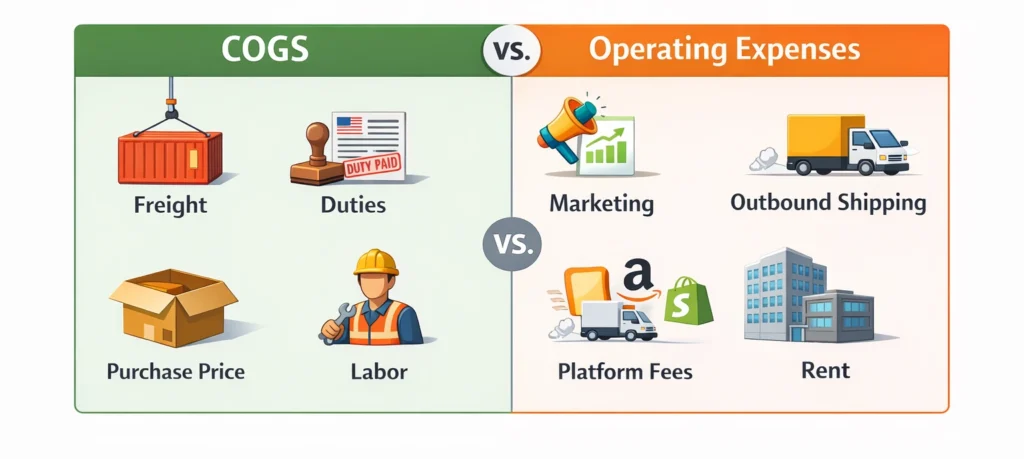
Pro Tip: Ask yourself – “Would this cost exist if I didn’t buy or make this product?” If yes, it’s COGS. If not, it’s an operating expense. And watch out for marketplace fees like Amazon FBA or Shopify charges. Those are operating expenses, not COGS.
Need help sorting out your Amazon fees and COGS? Check out our Amazon accounting services.
How to Calculate COGS for E-commerce? Step by Step
There are two versions of the formula depending on how detailed you want to get.
A. The Basic Formula
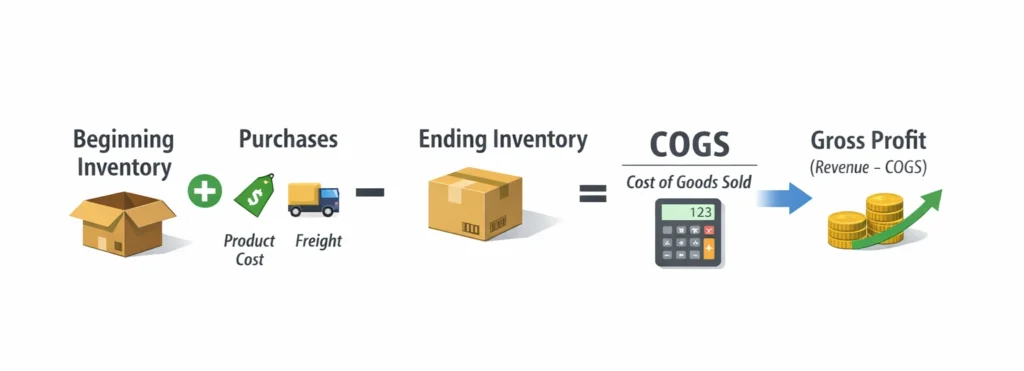
COGS = Beginning Inventory + Purchases – Ending Inventory
- Beginning Inventory: value of stock at the start of the period.
- Purchases: everything you bought or produced, including product cost, inbound freight, and duties.
- Ending Inventory: value of unsold stock at the end of the period.
Beginning inventory should match the ending inventory from your previous period.
B. The Extended Formula
For a more precise number:
COGS = Beginning Inventory + Purchases + Freight In – Ending Inventory – Purchase Discounts – Purchase Returns
Useful if you get volume discounts, return defective products, or want to track freight costs separately.
Pro Tip: Don’t expense inventory when you buy it. Expense it when you sell it. If you spend $50,000 on inventory in January and sell it over six months, recording all of it as COGS in January makes that month look terrible and the rest look unrealistically profitable. Use accrual accounting to match COGS to the period you earn the revenue.
Inventory Valuation Methods: Which One Should You Use?
The method you use to value inventory directly changes your COGS number. Choose one and stay consistent. Switching requires Form 3115 with the IRS or approval from the CRA.
1. FIFO (First In, First Out)
The oldest inventory gets sold first. It’s the most popular for e-commerce because it matches how most sellers actually move products. When costs are rising, FIFO gives you lower COGS and higher profit. Accepted in the U.S. and Canada.
2. Weighted Average Cost (WAC)
You take the total cost of all inventory and divide by total units. That average applies to every unit you sell. Great for large volumes of similar products. Accepted in the U.S. and Canada.
Pro Tip: If you sell in both the U.S. and Canada, FIFO or Weighted Average are your safest options.
3. LIFO (Last In, First Out)
The newest inventory gets sold first. During inflation, this means higher COGS and lower taxable income. LIFO is allowed in the U.S. but not in Canada since the CRA follows IFRS, which doesn’t permit it.
If you’re selling in Canada and US, our cross-border tax accountants can help you stay compliant on both sides.
P.S: There’s also Specific Identification, which tracks the exact cost of each item, but it’s only practical for high-value, unique products like custom furniture or handmade jewelry.
COGS Calculation Examples for Online Store Owners
Let’s see some online store COGS calculation examples.
Example 1: Shopify Reseller
You sell phone accessories on Shopify. Here’s one quarter:
- Beginning inventory: $20,000
- Purchases: $50,000 (including $3,000 freight and $1,500 customs duties)
- Ending inventory: $15,000
$20,000 + $50,000 – $15,000 = $55,000 COGS
Revenue was $120,000, so gross profit is $65,000 (54% margin).
But what if you forgot that $3,000 in freight? COGS drops to $52,000 and margin jumps to 57%. Looks good on paper, but it’s wrong. At tax time, you’ve understated costs and overstated income.
Example 2: Amazon FBA Seller
You sell kitchen gadgets on Amazon:
- Beginning inventory: $10,000
- Purchases: $30,000
- Ending inventory: $5,000
$10,000 + $30,000 – $5,000 = $35,000 COGS
One thing to watch: Amazon referral fees and FBA fulfillment fees are not COGS. They’re operating expenses. A lot of sellers mix these up, which increases COGS and hides the real gross margin.
For more on Amazon bookkeeping, read: [Amazon FBA Bookkeeping: A Detailed Guide for Sellers]
Example 3: How Your Valuation Method Changes the Number
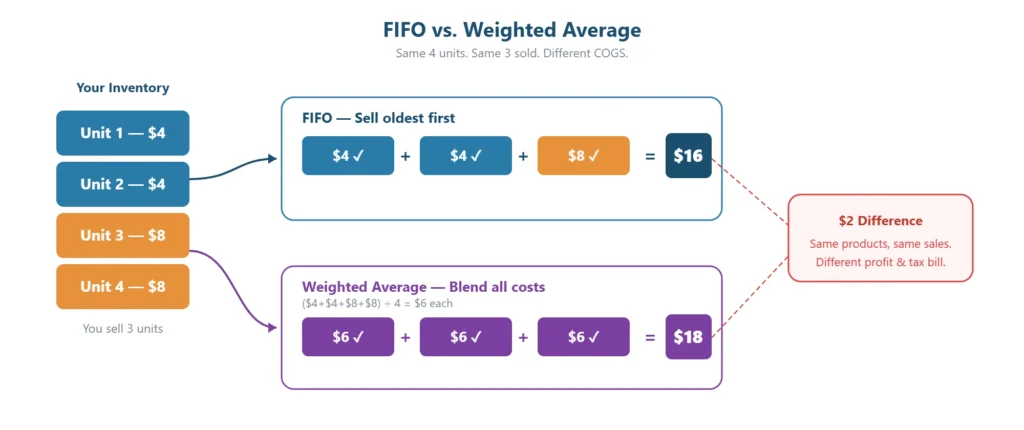
You make 4 units. 2 cost $4 each, 2 cost $8 each. You sell 3.
- FIFO: Sell the cheaper ones first. $4 + $4 + $8 = $16 COGS
- Weighted Average: Average all units. ($4 + $4 + $8 + $8) ÷ 4 = $6 per unit $6 × 3 = $18 COGS
How to Automate COGS Tracking with the Right Software?
A spreadsheet might work when you’re starting out. But once you’re past many SKUs or selling on more than one channel, you should automate COGC reporting for your own peace of mind.
Here’s a quick comparison of COGS tracking software for e-commerce:
| Tool | Best For | Key Features | Price |
| QuickBooks Online | U.S. sellers | Inventory tracking, COGS, sales tax | From ~$21/mo |
| Xero | Global, multi-currency | COGS tracking, advanced inventory add-ons | From ~$29/mo |
| A2X | Shopify + Amazon | Auto COGS sync, payout reconciliation | From $29/mo |
| Bookkeep | Multi-channel | Daily COGS summaries | From $49/mo |
| Link My Books | Shopify + Amazon | Automated COGS, data import | Custom pricing |
The key is connecting your e-commerce platform to your accounting software so your sales, fees, and COGS sync automatically.
Not sure which setup is right for your store? Our Shopify accountants can help you get connected.
How to Reconcile Your COGS?
Setting up the software is half the job. The other half is making sure the numbers are correct. Run this three-step check at least quarterly:
- Match order totals to payout reports. Compare what Shopify or Amazon says you sold against what they actually paid out.
- Match payouts to bank deposits. Use a clearing account for anything that hasn’t settled yet.
- Match your inventory balance to your books. If there’s a gap, your COGS is off.
Also watch for unlinked returns, restocked items that didn’t reverse the COGS entry, and unrecorded write-offs.
Pro Tip: Don’t record Shopify or Amazon deposits as revenue. Those are net of fees, refunds, and deductions. Book gross revenue and fees as separate line items. And if you import in a different currency than you sell in, make sure your software adjusts for exchange rate changes.
If you’re not still sure how to do it, talk to our experienced e-commerce tax accountants for free.
5 Tips to Reduce Your COGS and Improve Margins
Once your COGS is accurate, the next step is bringing it down. Even small savings per unit add up fast at volume.
- Negotiate pricing: Ask for bulk discounts or better terms. Even having a quote from another supplier helps.
- Cut shipping costs: Order in bulk less often instead of many small orders. Shop around for better rates.
- Drop slow movers: If it’s not selling, it’s just sitting there eating your cash.
- Automate tracking: Manual entries lead to mistakes. Let software handle it.
- Check SKU-level COGS: Your overall margin can look fine while some products are quietly losing money.
According to the MetLife & U.S. Chamber of Commerce Small Business Index (Q4 2025), 53% of retail businesses say inflation is their top challenge. Accurate COGS tracking is one of the best ways to protect your margins when costs are rising.
- Related: [E-commerce Tax Deductions Explained]
Conclusion
COGS isn’t just a line on your income statement. It’s the number that tells you whether your e-commerce business is actually making money.
Know what goes into your COGS, pick a valuation method and stick with it, automate your tracking early, and reconcile regularly. Whether you’re reporting to the IRS, the CRA, or both, accurate COGS means accurate tax filings, reliable margins, and better decisions.
If you’re selling cross-border or managing inventory across multiple channels and want help getting your financials in order, SAL Accounting specializes in exactly this. E-commerce accounting for Canadian sellers doing business in the U.S. who need expert help. Book a FREE consultation with our e-commerce tax accountants and start growing your store!
Frequently Asked Questions
COGS is the total direct cost of producing or buying the products you sell. It matters because it’s how you figure out your real profit, set the right prices, and file accurate tax returns in both the U.S. and Canada.
Beginning Inventory + Purchases – Ending Inventory = COGS. If you started a quarter with $20,000 in stock, bought $50,000, and had $15,000 left, your COGS is $55,000.
FIFO and Weighted Average Cost are the most common for e-commerce and both work in the U.S. and Canada. LIFO is only allowed in the U.S. Pick one and stick with it.
Yes, but it doesn’t pull data from those platforms on its own. You’ll need a connector like A2X, Bookkeep, or Link My Books to sync everything automatically.
COGS covers direct product costs like purchase price, freight, duties, and production labor. Operating expenses cover everything else: marketing, outbound shipping, rent, salaries, and platform fees.
Forgetting landed costs like duties and freight, recording inventory as an expense when you buy it instead of when you sell it, lumping marketplace fees into COGS, and skipping regular inventory counts.
Connect your sales channels (Shopify, Amazon, Etsy) to accounting software like QuickBooks or Xero using a tool like A2X or Bookkeep. Then reconcile your numbers at least every quarter.
Wholesale product cost, raw materials, inbound shipping, customs duties, and direct labor. Ads, outbound shipping, and platform fees are not COGS.
It’s not. COGS shows up on your income statement, where it’s subtracted from revenue to give you gross profit. Your inventory, which feeds into COGS, is the part that sits on the balance sheet.
Typically between 30% and 35% for retail according to NYU Stern data, but it varies by category. Beauty and digital products run higher. Electronics and commodities run lower.
It doesn’t do it automatically. You can enter a “Cost per item” for each product, but Shopify won’t generate a full COGS report. Most sellers connect to QuickBooks or Xero through a tool like A2X.
Your product cost, inbound shipping, duties, and direct production labor. Amazon referral fees, FBA fees, and storage fees are not COGS. Those are operating expenses.
Yes, at least quarterly. That means checking that your accounting software matches your actual inventory, your payout reports, and your bank deposits. Without it, errors like missed returns or unrecorded write-offs can quietly throw off your margins.
FIFO, LIFO, Weighted Average Cost, and Specific Identification. Most e-commerce sellers use FIFO or Weighted Average. LIFO isn’t allowed in Canada, and Specific Identification only makes sense for high-value, one-of-a-kind items.
Same formula: Beginning Inventory + Purchases – Ending Inventory = COGS. A spreadsheet works early on, but once you have more than a handful of SKUs or sell on multiple platforms, accounting software saves a lot of time.
It means roughly 80% of your revenue comes from 20% of your products. For COGS, this tells you where to focus. If your top sellers have inaccurate cost tracking, the impact on your overall profit numbers is big.
Not at all. SAL Accounting is based in Toronto, near the CN Tower and the PATH downtown, but we work with e-commerce sellers across Canada and the U.S. remotely. COGS tracking, reconciliation, and tax filing are all handled online.