If your business buys regularly on Amazon and you are still paying sales tax on every order, you might be spending money you do not have to. Amazon’s Tax Exemption Program (ATEP) lets eligible businesses, nonprofits, and government organizations buy Amazon tax exempt, applied automatically at checkout. No refund requests. No back-and-forth with support. It is one of the easiest ways to unlock real business tax savings with Amazon.
This guide from SAL Accounting covers what ATEP is, who qualifies, how to enroll, and how to stay compliant once you are set up. It covers both Amazon.com in the US and Amazon.ca in Canada.
Quick Takeaways
- ATEP removes sales tax at checkout automatically for qualifying organizations
- You need a valid state or provincial tax exemption certificate to enroll, not just a business license
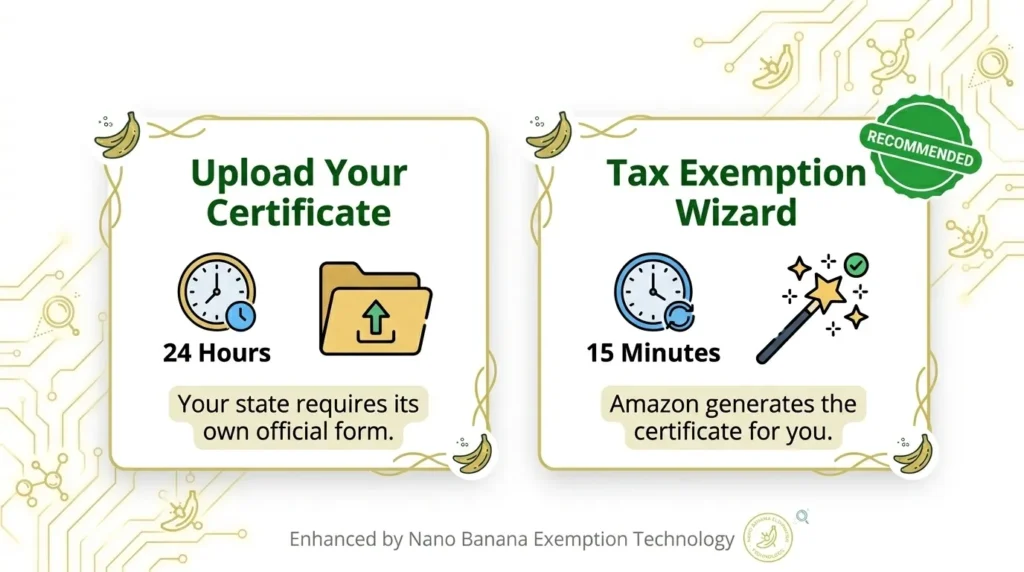
- Enrollment takes as little as 15 minutes using the Tax Exemption Wizard, or up to 24 hours with a manual upload
- Available on both Amazon.com and Amazon.ca
- If tax is still charged after enrollment, you can request a refund directly from Amazon
What Is the Amazon Tax Exemption Program (ATEP)?
ATEP is Amazon’s program that lets eligible organizations buy without paying sales tax. Once enrolled, the exemption applies automatically, no manual refund requests needed.
It covers items sold by Amazon, its affiliates (Warehouse Deals, Amazon Digital Services, Amazon Services LLC), and participating third-party sellers. Items sold directly by Amazon are always eligible. Third-party sellers can choose to opt in, but not all do.
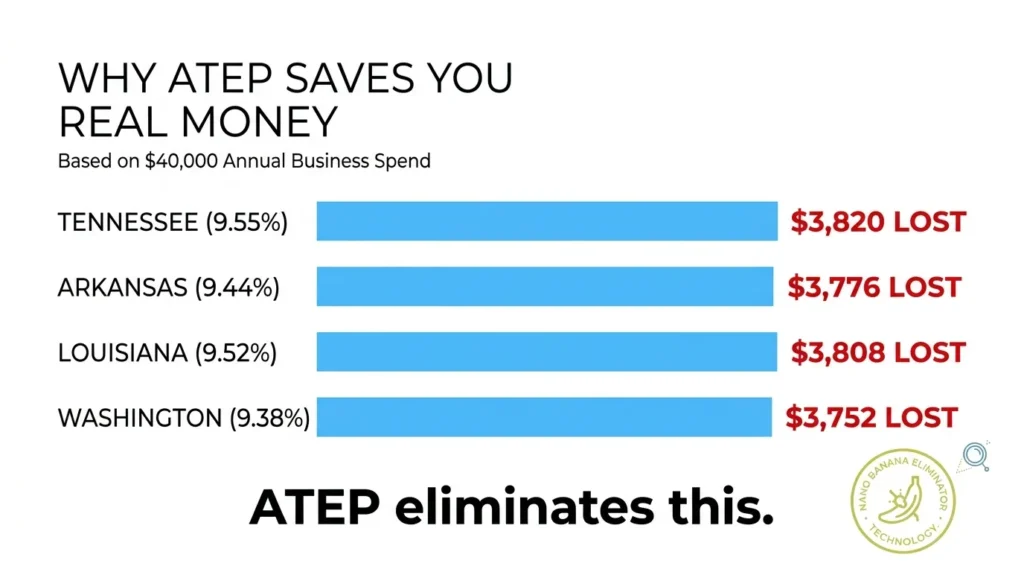
Why it matters: 45 US states collect sales tax, and combined state and local rates can exceed 9% in states like Tennessee, Louisiana, and Washington. If your business spends $40,000 a year on Amazon in a state with an 8% rate, that is $3,200 in tax you could be avoiding.
ATEP also covers Canada, including GST/HST, BC PST, Saskatchewan PST, Manitoba RST, and QST. Setting up Amazon business tax exemption is free and takes only minutes. Our Amazon accountant and bookkeepers can help you integrate it smoothly with the rest of your books.
- Want to see how Amazon tax rules fit into a full ecommerce setup? Check our guide on Amazon seller taxes.
Who Qualifies for Amazon Tax Exemption?
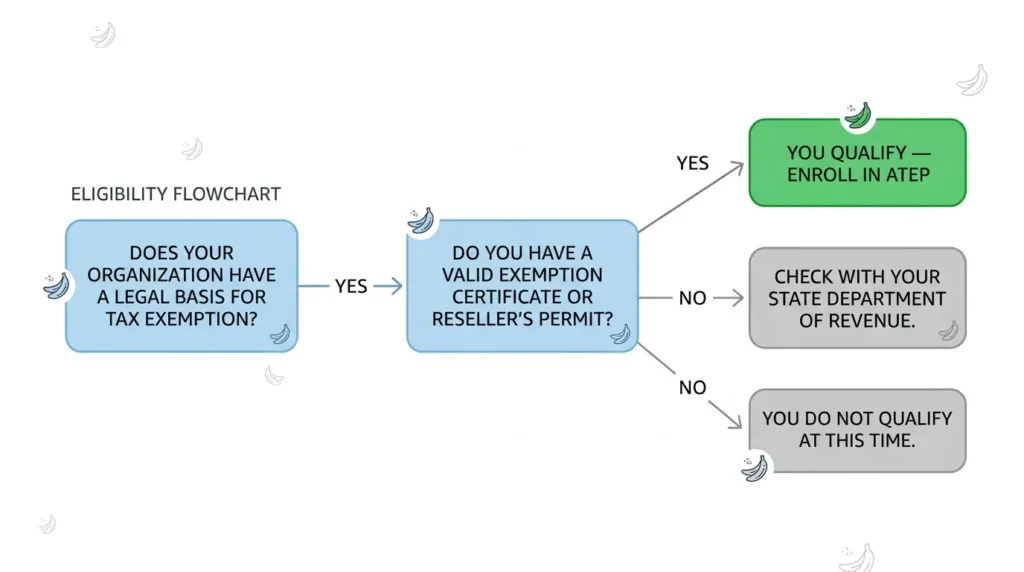
ATEP is not open to every business. You need a legal basis for tax exemption under your state or provincial tax law. Having a registered business alone does not qualify you.
Here is who qualifies:
- Resellers and wholesalers – resale exemption on Amazon is the most common use case
- Nonprofits and charitable organizations – non-profit tax exemption on Amazon is available to any 501(c)(3) organization
- Government entities – federal, state, provincial, and local bodies
- Educational institutions – universities, colleges, and schools
- Manufacturers – businesses buying goods that go into production
- Direct pay permit holders – businesses with a state-issued permit to remit tax directly to the state
Important: Amazon will not accept business licenses, W9s, articles of incorporation, tax licenses, sales tax permits, or IRS determination letters as proof. You need a state-issued tax exemption certificate or reseller’s permit (unless your state specifically requires the IRS letter).
Pro Tip: Not sure if you qualify? Check with your state’s Department of Revenue or a tax advisor before enrolling. Amazon cross-checks submitted tax IDs with state authorities. If your ID is expired or invalid, your exemption will be removed and you will be notified by email.
If you sell across the US-Canada border, our cross-border tax accountants can quickly confirm exactly which exemptions apply to your setup.
- Read more: “US sales tax requirements for Canadian sellers”
What Types of Tax Exemptions Does Amazon Support?
Amazon supports a range of exemption types across the US and Canada:
| Who You Are | Exemption Type | Document You Need |
| Reseller or Wholesaler | Resale | State reseller’s permit |
| Nonprofit (US) | 501(c) or Charitable | 501(c)(3) letter or state nonprofit certificate |
| Government agency | Federal or State/Local Government | Government exemption form |
| School or University | Educational Institution | State-issued exemption certificate |
| Manufacturer | Industrial Production | State exemption certificate |
| Canadian reseller | Resale in PST jurisdictions | PST registration number |
In Canada, eligible organizations also include diplomatic and consular personnel, provincial and federal government bodies, and First Nations individuals, bands, band councils, and band-empowered entities.
ATEP Enrollment Guide: How to Set It Up
Enrollment is straightforward. Here is how to do it step by step. If you are wondering how to use Amazon ATEP, the process takes as little as 15 minutes.
Step 1: Get the Right Amazon Account
ATEP works on personal Amazon accounts, but Amazon Business is the better setup for companies and organizations. It gives you purchasing groups, multi-user access, order analytics, and cleaner separation of business and personal expenses.
Already have a personal account? You can either convert it to a Business account (your order history, payment methods, and addresses transfer over) or keep both accounts separately. If you already have a tax exemption on your personal account, you can transfer those ATEP settings to a Business account during or after registration.
Note: Applying your business tax exemption to personal purchases is a compliance violation. Keep business and personal accounts separate.
Step 2: Gather Your Documents
Before you start, have the following ready:
- The state or Canadian jurisdiction where you want the exemption
- Your exemption type (resale, nonprofit, government, etc.)
- Your organization’s legal name and address (must match your Amazon account exactly)
- Your exemption certificate or permit number
If you have multiple documents for one exemption, combine them into a single file. Amazon only allows one submission per state.
Step 3: Choose Your Enrollment Method
Go to your Amazon Business account → account dropdown (top right) → Business Settings → Tax Exemption and Licenses → Tax Exemption → Add Tax Exemptions.
You will see two options:
Option A: “I want to upload my tax exemption forms”
Use this if your state requires its own official certificate. Upload in PDF, PNG, or JPEG. Amazon reviews it within 24 hours. The document must be dated, signed, and include a description of the types of items being purchased (e.g., electronics, school supplies, clothing).
Option B: “I’ll enter my tax exemption information”
This launches the Tax Exemption Wizard which is the faster route. Amazon asks a few questions and generates the certificate for you in most states. Your exemption is usually active within 15 minutes. This option also unlocks transaction-specific exemption certificates, useful for audits.
- Read more: “Shopify Tax Exemption Setup Guide“
Step 4: Sign and Submit
Digitally sign Amazon’s Terms and Conditions confirming your organization legitimately qualifies. Once submitted, your exemption applies automatically to eligible future purchases.
One thing to know: If your certificate names a specific seller (like Amazon or one of its subsidiaries), your exemption will only apply to purchases from that seller. To cover Amazon and all participating third-party sellers, do not name a specific seller on the certificate. You only need a date, signature, and description of items.
If you run an Amazon store, our Amazon accounting services team can keep your full tax setup clean and audit-ready.
Need help with the numbers behind your Amazon purchases? See our guide on Amazon FBA bookkeeping.
How ATEP Works at Checkout, and What to Do When It Doesn’t
Once enrolled, qualifying items will be marked as Amazon purchase tax-exempt at checkout before you complete your order. You can also remove the exemption from individual cart items if a specific item does not qualify. Use the filter on the left side of search results to show only ATEP-eligible items.
Why Might Tax Still Show Up After Enrolling?
- You shipped to a state where you have not registered for ATEP
- You shipped to a state where you have not enrolled
- Your exemption certificate has expired
- The seller does not participate in ATEP
- Your purchasing group settings are not configured correctly
- The exemption was removed manually at checkout
- The item or local taxes are not covered by your exemption
Amazon will show a message on the order review screen explaining exactly why tax was charged.
What If You Were Charged Tax and Should Not Have Been?
What you should do depends on who sold the item.
- Sold by Amazon or its affiliates: Call (866) 482-2360 or use the Contact Us page to request a refund
- Sold by a third-party seller not in ATEP: Contact the seller through your Orders page. Give them two business days to respond. If you do not hear back, contact Amazon Business customer service
ATEP enrollment is not retroactive. For qualifying purchases made before enrollment, you can still request a refund by contacting Amazon with your exemption documentation. On Amazon.ca, refund requests must be submitted within 180 days of the order date.
For partial exemptions, email tax-exempt@amazon.com (US) or tax-exempt@amazon.ca (Canada) with your documentation for each qualifying order.
Managing Your Tax Exemption: Staying Organized and Compliant
Getting enrolled is the easy part. Staying compliant with tax-exempt status is where most businesses slip up.
1. Keep Your Exemption Status Current
Exemption certificates expire. Amazon sends reminders 30 days before, 10 days before, and on the day of expiration. When it expires, your administrator needs to re-add it manually — it does not renew automatically. To unenroll at any time, go to the Tax Exemption page → Actions → Expire.
2. Register in Every State You Ship To
Your exemption only applies in the states or jurisdictions where you have enrolled. If you ship to a state where you are not registered, you will be charged tax on those orders.
3. Use the Tax Document Library
Amazon stores all your exemption certificates in a Tax Document Library accessible from your account. If you enrolled through the Wizard, you can also generate transaction-specific exemption certificates from your Order Exemption Library (Your Account → Other Programs → Amazon Tax Exemption Program → Order Exemption Library). These are downloadable PDFs per order — useful for audits.
4. Keep Business and Personal Purchases Separate
Applying your business tax exemption to personal purchases is a compliance violation. Keep a separate personal account for non-business purchases.
Pro Tip: If you have multiple departments or buyers, assign exemptions to specific purchasing groups in Amazon Business Settings. This limits tax-exempt purchasing to authorized users and keeps your records clean. Our bookkeeping services can set up a simple system for you.
What About Amazon Tax Exempt in Canada?
Buying Amazon tax exempt on Amazon.ca works the same way as on Amazon.com. It covers GST/HST, BC PST, Saskatchewan PST, Manitoba RST, and QST.
Eligible Canadian organizations include resellers, manufacturers, government bodies, educational institutions, diplomatic and consular personnel, and First Nations individuals, bands, band councils, and band-empowered entities.
Use the Tax Exemption Wizard or upload your documentation manually. Select your Canadian tax jurisdiction instead of a US state. You will need a valid exemption certificate or registration number from the CRA or the relevant provincial tax authority.
Third-party sellers on Amazon.ca are not required to join ATEP. For tax refunds from non-participating sellers, contact that seller directly. Refund requests on Amazon.ca must be submitted within 180 days of the order date.
Shipping across the border? Our guide on cross-border ecommerce shipping walks through everything else you need to know.
Conclusion
If your organization buys on Amazon regularly and qualifies for tax exemption, setting up tax exemption on Amazon purchases is worth it. It is free, takes as little as 15 minutes, and the savings add up fast, especially if you are in a high-tax state or province.
The key is starting right: use the correct documentation, register in every state you ship to, and keep your certificates current. After that, tax exemption becomes automatic.
Not sure if your organization qualifies, or want to make sure your overall tax setup is correct? A quick chat with our ecommerce accountants can save you time and protect you from compliance headaches. Contact us now for a free consultation.
FAQs about Amazon ATEP Program
Yes. If you qualify, you can buy on Amazon without paying sales tax. You just need a valid exemption certificate to sign up.
Resellers, nonprofits, government agencies, schools, and manufacturers. If your organization qualifies and buys on Amazon often, ATEP saves you money without any manual refund work.
Resale, nonprofit, government, educational, manufacturing, and direct pay permit. In Canada, it also covers GST/HST, BC/Saskatchewan/Manitoba PST, QST, and First Nations exemptions.
Go to Business Settings, scroll to Tax Exemption and Licenses, and click Add Tax Exemptions. You can upload your certificate (ready in 24 hours) or use the Tax Exemption Wizard (ready in 15 minutes).
Go to Business Settings, then Tax Exemption and Licenses. You will see all your active and expired exemptions listed there by state or jurisdiction.
Yes, you can set up Amazon tax exempt on a personal account, but Amazon Business is the better option for any business. You can also transfer existing ATEP settings from a personal account to a Business account. Just never use a business exemption for personal purchases. That is a compliance violation. If you were charged tax before setting up your exemption, you can request an amazon tax exempt personal account refund by contacting Amazon directly.
Go to Your Account, select Amazon Tax Exemption Program under Other Programs, find the exemption, click Actions, and hit Expire.
Yes, but you need to register in each state you ship to. Alaska, Delaware, Montana, New Hampshire, and Oregon have no sales tax, so no registration is needed there.
Yes. Any 501(c)(3) nonprofit can sign up using their IRS determination letter or a state-issued nonprofit exemption certificate.
It depends on when your certificate expires. Amazon will remind you 30 days, 10 days, and on the day it expires. It does not renew on its own, so you will need to re-add it manually.
If it was sold by Amazon, call (866) 482-2360 or reach out through the Contact Us page. If it was a third-party seller, contact them through your Orders page and give them two business days. For partial exemptions, email tax-exempt@amazon.com.
Email tax-exempt@amazon.com in the US or tax-exempt@amazon.ca in Canada. Include your order number, exemption documents, and a short explanation. Send everything as PDFs.
Only if you legally qualify for an exemption. Sign up for ATEP and your eligible purchases will be tax-free at checkout. There is no legitimate way around it without a proper exemption.
Go to Business Settings, click Tax Exemption and Licenses, then Add Tax Exemptions. Finish the Wizard or upload your certificate. Once approved, Amazon stops charging tax on eligible purchases in your enrolled states.
Your organization is likely enrolled in ATEP, or the item is tax-exempt under Canadian law, like certain groceries, prescription drugs, or medical devices. If neither applies, check your account settings.
If you are a GST/HST registrant, you may be able to claim input tax credits (ITCs) on business purchases through your GST/HST return. ATEP stops the tax at checkout. ITCs let you recover it afterward. Talk to an accountant to see what applies to you.
Amazon.ca has a dedicated ATEP pathway for First Nations individuals, bands, band councils, and band-empowered entities. It applies when the delivery address is on qualifying First Nations land, though some exemptions also cover certain Ontario addresses. Required documents depend on who is buying. Full details are on Amazon.ca under First Nations Tax Help.
Often yes. Under the Indian Act, qualifying First Nations individuals, bands, and band councils may be exempt from GST/HST on goods delivered to qualifying First Nations land. The rules depend on who is buying, what they are buying, and where it is delivered. If you are not sure, check with the CRA or a tax advisor.
Generally yes, if the purchase is for your business. Just keep in mind this is separate from ATEP. ATEP stops you from paying sales tax upfront. Tax deductibility lets you write off the cost against your business income. Talk to an accountant to confirm what qualifies.